
JS怎么将数字转为科学计数法字符串
深入讲解JavaScript中如何将数字转换为科学计数法字符串。包含Number.prototype.toExponential核心语法、fractionDigits有效位数控制、特殊值处理、BigInt扩展转换及人性化格式呈现。
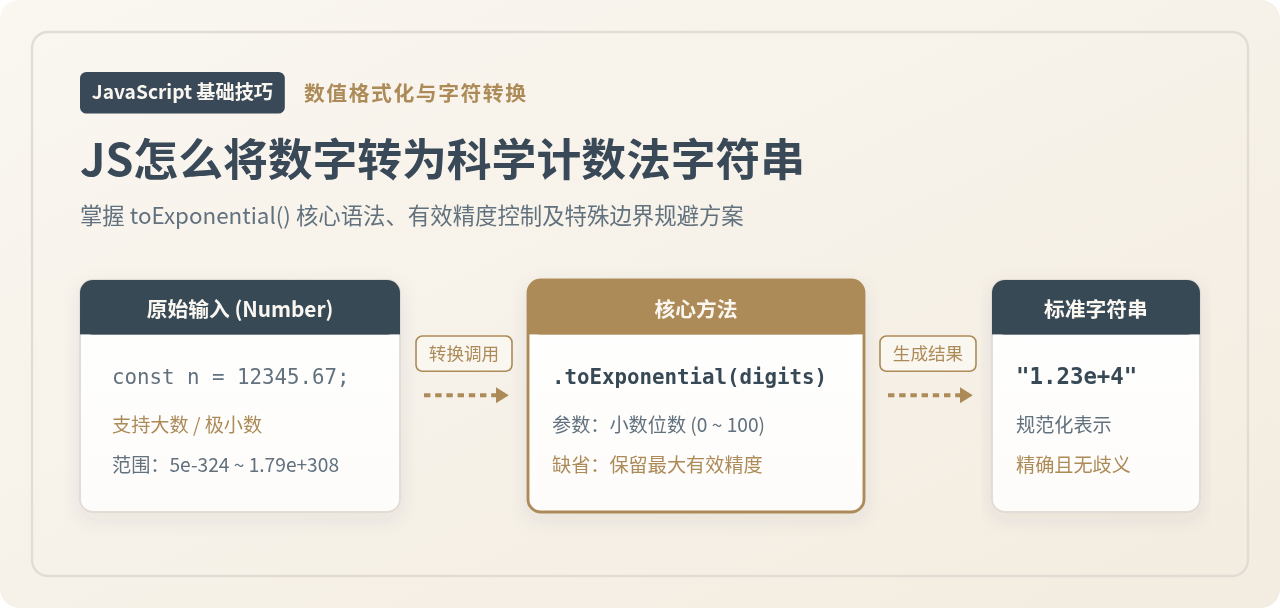
Number.prototype.toExponential([fractionDigits]) 方法。该方法能够按需指定小数位数,返回形如 "1.23e+4" 的规范化字符串。本文将围绕此核心方法,系统解析其语法规则、精度控制技巧、与原生 toString() 的边界差异、特殊数值表现,以及面向超大整数(BigInt)和人类视觉阅读的进阶转换方案。
一、核心解决方案:toExponential() 方法详解
JavaScript 的 Number 原型链上内置了 toExponential() 方法。它专门用于返回以指数表示法(即科学计数法)表示的数值字符串,其底数(尾数)部分由一位整数与若干位小数组成。
1. 基本语法
numObj.toExponential([fractionDigits])
该方法接收一个可选参数 fractionDigits,代表转换后小数点后保留的位数:
- 省略参数时:JavaScript 引擎将保留尽可能多的有效小数位数,以完整且无歧义地呈现该数字。
- 传入参数时:取值必须为
0到100之间的整数(含 0 和 100)。数字会按照该位数进行四舍五入修约,位数不足时自动在末尾补0。
2. 基础代码示例
以下示例展示了不同参数设置下的实际输出效果:
// 示例 1:缺省参数调用
const num1 = 123456.789;
const resDefault = num1.toExponential();
console.log(resDefault);
// 示例输出: "1.23456789e+5"

// 示例 2:指定保留 2 位小数(自动进行四舍五入)
const resTwoDigits = num1.toExponential(2);
console.log(resTwoDigits);
// 示例输出: "1.23e+5"

// 示例 3:指定保留 4 位小数(第 5 位小数四舍五入)
const resFourDigits = num1.toExponential(4);
console.log(resFourDigits);
// 示例输出: "1.2346e+5"

// 示例 4:位数不足时自动在小数末尾补 0
const num2 = 12;
console.log(num2.toExponential(4));
// 示例输出: "1.2000e+1"

// 示例 5:小数位数为 0 时,省略小数点
console.log(num1.toExponential(0));
// 示例输出: "1e+5"
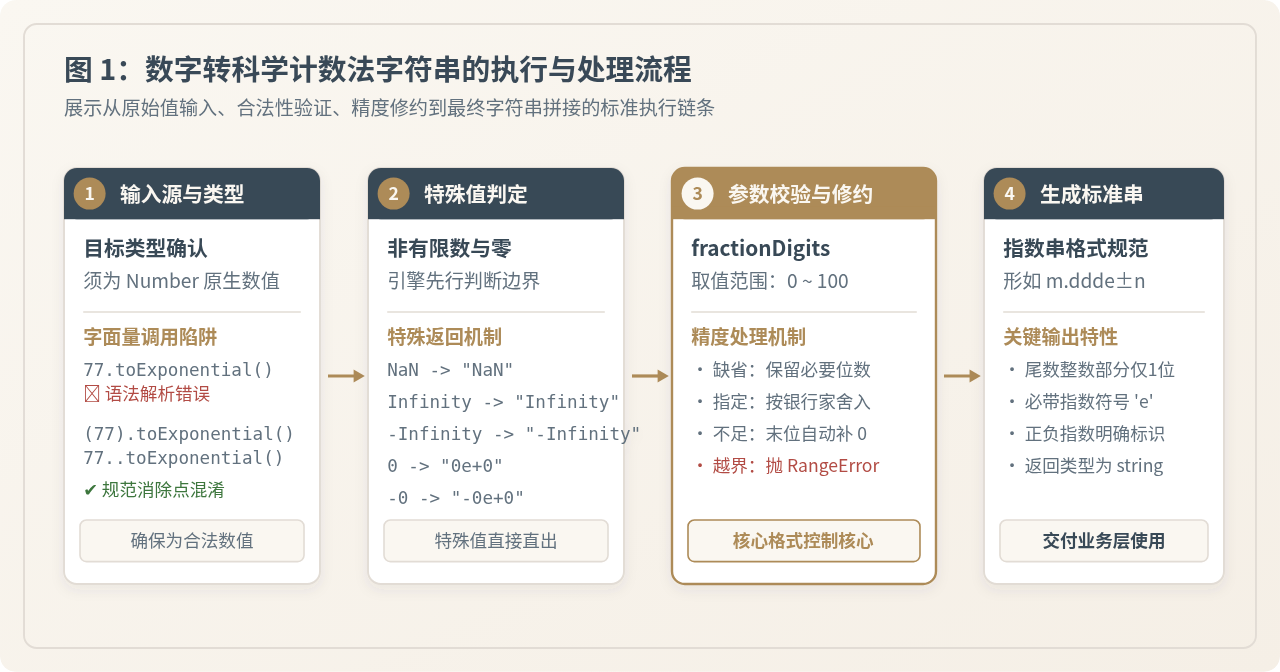
当对整数字面量直接调用方法时,如果写成 77.toExponential(),JavaScript 语法解析器会将数字后面的第一个点识别为浮点数的小数点,从而导致 SyntaxError: Invalid or unexpected token。正确的写法是使用括号包裹 (77).toExponential()、双点号 77..toExponential() 或在点前保留空格 77 .toExponential()。在工程实践中,推荐优先使用变量或括号包裹。
二、处理流程与精度控制注意事项
在实际业务中将数值转为科学计数法字符串时,除了获得标准结果,还需要明确引擎内部的执行步骤及潜在的运行时风险。
1. 参数合法范围与 RangeError 异常
ECMAScript 规范对 fractionDigits 做了严格界定,允许取值区间为 0 到 100。如果传入了负数、超出 100 的数值或非法类型,引擎会直接抛出 RangeError。
const value = 9876.5;

try {
  // 传入负数引发异常
  value.toExponential(-1);
} catch (error) {
  console.log(error.name); // 示例输出: "RangeError"
  console.log(error.message); // 示例输出: "toExponential() argument must be between 0 and 100"
}
2. 特殊数值的处理表现
在数据计算中,常会遇到非标准数值或临界零值。toExponential() 对这些情况均有标准且确定的返回:
- 正零与负零:
(0).toExponential()返回"0e+0";而(-0).toExponential()会保留符号位,返回"-0e+0"。 - 无穷大与无穷小:
Infinity.toExponential()直接返回普通字符串"Infinity";(-Infinity).toExponential()返回"-Infinity"。 - 非数字(NaN):
NaN.toExponential()返回"NaN",不会报错。
console.log((0).toExponential(2));     // 示例输出: "0.00e+0"
console.log((-0).toExponential(2));    // 示例输出: "-0.00e+0"
console.log(Infinity.toExponential()); // 示例输出: "Infinity"
console.log(NaN.toExponential());      // 示例输出: "NaN"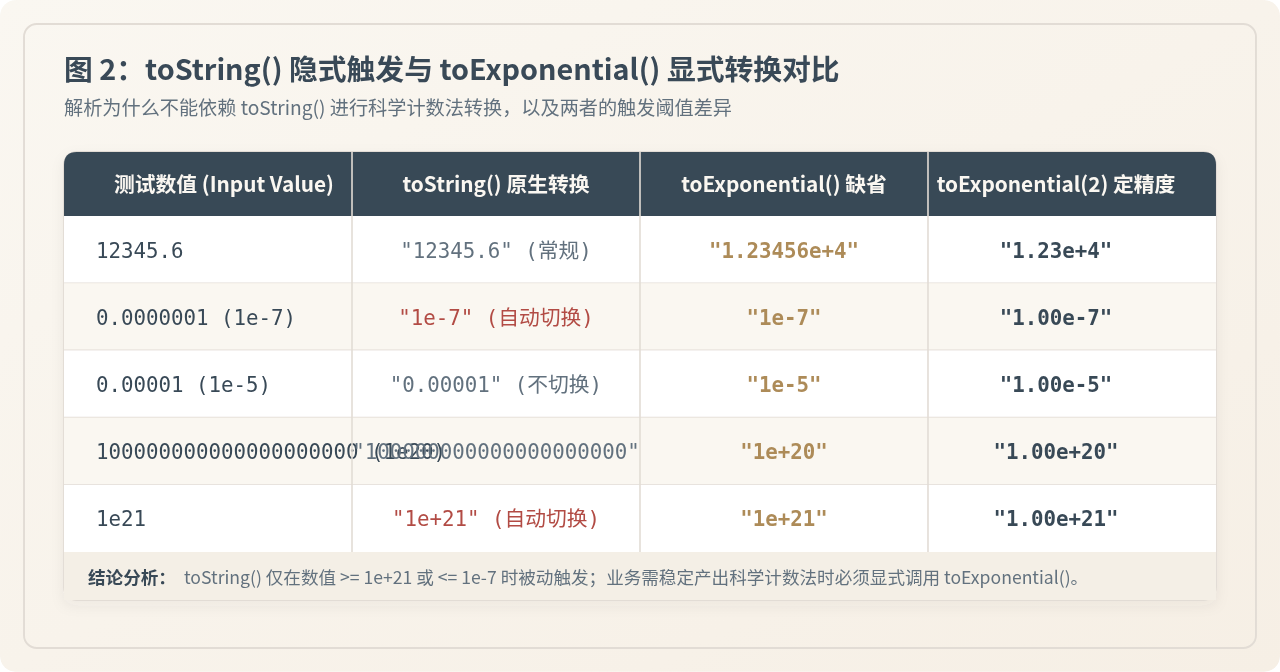
三、为什么不能依赖 toString() 转换科学计数法?
很多开发者在调试时发现,某些很大或很小的数字通过 toString() 打印出来本身就是科学计数法(例如 1e21.toString() 输出 "1e+21"),因此误以为直接调用 toString() 即可满足需求。然而,toString() 的指数输出是被动的、有固定阈值的,绝不能代替 toExponential()。
1. 原生 toString() 的转换阈值
根据 ECMAScript 规范,Number.prototype.toString() 仅在以下两种临界条件下才会输出指数形式:
- 极大值:数字绝对值大于或等于 \(10^{21}\)(即
1e+21)时。例如1e20.toString()依然是 21 位的平铺字符串,只有达到1e21才会变成指数形式。 - 极小值:数字绝对值小于或等于 \(10^{-7}\)(即小数点后连续有 6 个以上的 0,如
0.0000001)时。而像0.00001(\(10^{-5}\))则依然输出"0.00001"。
| 输入数值 | toString() 转换结果 | toExponential(2) 转换结果 | 机制说明 |
|---|---|---|---|
12345.6 |
"12345.6" |
"1.23e+4" |
未达 1e21 阈值,toString 保持原样 |
0.00005 |
"0.00005" |
"5.00e-5" |
未达 1e-7 阈值,toString 保持原样 |
0.0000001 |
"1e-7" |
"1.00e-7" |
触发 1e-7 临界,两者皆为科学记数 |
1e21 |
"1e+21" |
"1.00e+21" |
触发 1e21 临界,两者皆为科学记数 |
因此,当业务逻辑明确要求“必须输出科学计数法”或“对齐小数精度”时,toExponential() 是唯一符合预期的稳健 API。
四、进阶场景:BigInt 转换与人类可读格式化
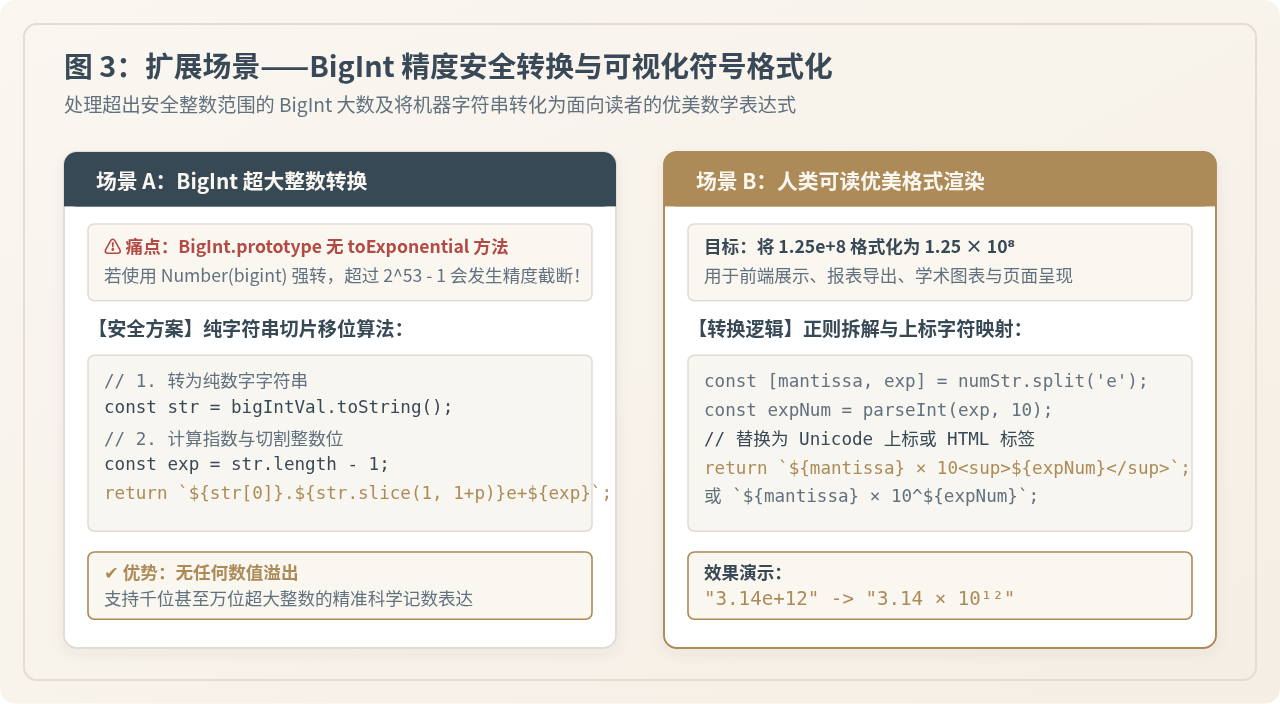
在实际工程应用中,我们常常会面对两类延伸诉求:一是如何对超过 64 位浮点安全范围的 BigInt 进行科学计数法转换;二是如何将带有小写 e 的机器串格式化为符合出版物排版的数学表达式。
1. BigInt 安全转科学计数法(防精度丢失)
JavaScript 的 BigInt 原型上没有提供 toExponential 方法。如果盲目将 BigInt 转换为 Number(bigintVal) 再调用 toExponential(),一旦数值超过 Number.MAX_SAFE_INTEGER(\(2^{53} - 1 pprox 9.007 imes 10^{15}\)),低位精度就会被直接抹去并发生舍入失真。
此时最安全的做法是直接基于 字符串切片与位移 实现:
/**
 * 安全地将 BigInt 转换为科学计数法字符串
 * @param {bigint} bigIntVal 待转换的 BigInt
 * @param {number} [fractionDigits] 保留的小数位数
 * @returns {string} 科学计数法字符串
 */
function bigIntToExponential(bigIntVal, fractionDigits) {
  const isNegative = bigIntVal < 0n;
  const absStr = (isNegative ? -bigIntVal : bigIntVal).toString();
  const sign = isNegative ? "-" : "";

  // 0n 的独立分支
  if (absStr === "0") {
    return fractionDigits !== undefined
      ? `0.${"0".repeat(fractionDigits)}e+0`
      : "0e+0";
  }

  const exponent = absStr.length - 1;
  const firstDigit = absStr[0];
  const restDigits = absStr.slice(1);

  if (fractionDigits === undefined) {
    // 去除末尾多余的 0
    const trimmedRest = restDigits.replace(/0+$/, "");
    const decimalPart = trimmedRest.length > 0 ? `.${trimmedRest}` : "";
    return `${sign}${firstDigit}${decimalPart}e+${exponent}`;
  }

  // 按指定位数截取或补零
  let formattedFraction = restDigits.slice(0, fractionDigits);
  if (formattedFraction.length < fractionDigits) {
    formattedFraction = formattedFraction.padEnd(fractionDigits, "0");
  }

  const dotPart = fractionDigits > 0 ? `.${formattedFraction}` : "";
  return `${sign}${firstDigit}${dotPart}e+${exponent}`;
}

// 验证超长 BigInt(远超 Number 安全上限)
const huge = 123456789012345678901234567890n;
console.log(bigIntToExponential(huge, 4));
// 示例输出: "1.2345e+29"
2. 将标准结果格式化为优美数学符号
toExponential() 生成的字符串(如 "3.14e+8")主要面向程序解析或控制台日志。如果在前台报表、数据大屏或学术页面中向用户呈现,通常需要将其美化为形如 3.14 × 10⁸ 或带有 HTML 上标标签的格式。
/**
 * 将科学计数法格式化为更直观的数学表达形式
 * @param {number} num 输入数值
 * @param {number} [precision=2] 保留小数位数
 * @param {'unicode' | 'html'} [format='unicode'] 输出形式
 * @returns {string}
 */
function formatScientificDisplay(num, precision = 2, format = 'unicode') {
  const rawStr = num.toExponential(precision);
  const [mantissa, rawExp] = rawStr.split('e');
  const exponentInt = parseInt(rawExp, 10);

  if (format === 'html') {
    return `${mantissa} × 10<sup>${exponentInt}</sup>`;
  }

  // 上标 Unicode 字符映射表
  const supMap = {
    '-': '⁻', '+': '', '0': '⁰', '1': '¹', '2': '²',
    '3': '³', '4': '⁴', '5': '⁵', '6': '⁶', '7': '⁷', '8': '⁸', '9': '⁹'
  };

  const expFormatted = String(exponentInt)
    .split('')
    .map(char => supMap[char] || char)
    .join('');

  return `${mantissa} × 10${expFormatted}`;
}

console.log(formatScientificDisplay(54321000, 2, 'unicode'));
// 示例输出: "5.43 × 10⁷"

console.log(formatScientificDisplay(0.0004567, 3, 'html'));
// 示例输出: "4.567 × 10<sup>-4</sup>"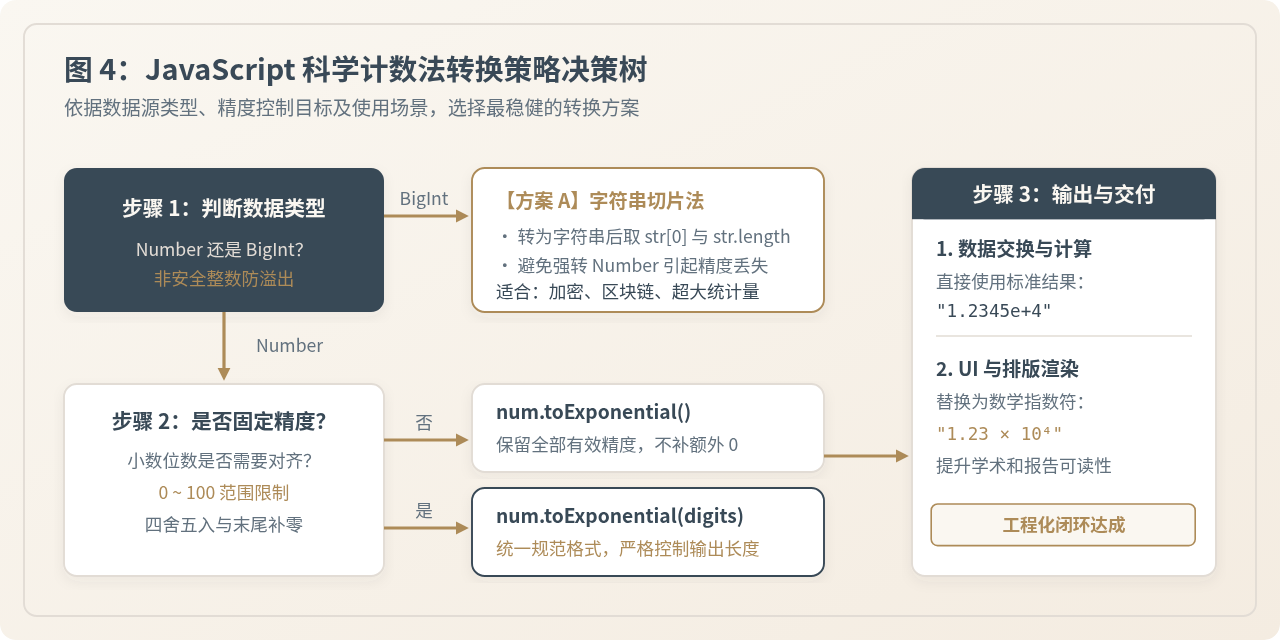
五、生产环境高容错包装函数
为了在实际项目中安全运行并兼容不同输入类型(数字、数字字符串、空值或非法输入),推荐封装一个具备类型防御的转换工具函数:
/**
 * 健壮的数字转科学计数法函数
 * @param {number | string | bigint} input 输入待转换内容
 * @param {number} [fractionDigits] 小数位数 (0-100)
 * @returns {string} 标准科学计数法字符串
 */
function toScientificString(input, fractionDigits) {
  // 1. 处理 BigInt
  if (typeof input === 'bigint') {
    return bigIntToExponential(input, fractionDigits);
  }

  // 2. 转换为 Number 类型
  const num = Number(input);

  // 3. 防御非法输入
  if (Number.isNaN(num)) {
    return "NaN";
  }

  // 4. 参数合法化裁剪 (0 到 100)
  let safeDigits = fractionDigits;
  if (typeof safeDigits === 'number') {
    safeDigits = Math.max(0, Math.min(100, Math.floor(safeDigits)));
  }

  return num.toExponential(safeDigits);
}

// 验证不同输入
console.log(toScientificString("987654321", 2));  // 示例输出: "9.88e+8"
console.log(toScientificString(0.0000321, 1));    // 示例输出: "3.2e-5"
console.log(toScientificString(NaN));             // 示例输出: "NaN"
console.log(toScientificString(100000000000000000000000n, 2)); // 示例输出: "1.00e+23"利用map方法批量生成JavaScript JSON对象数组
2026-11-19 22:44:29
JS提取数字时怎么保留小数点和负号
2026-11-19 20:48:15
JS字符串排序怎么忽略大小写?
2026-11-19 18:14:41
JS利用返回对象实现多值返回与解构赋值技巧
2026-11-19 17:58:30
JS计算时间差出现负数或时区误差怎么解决
2026-11-19 15:55:52