
面向对象重构:将JS计算器代码模块化封装
深入讲解如何将初学者常见的全局变量与DOM强耦合的JS计算器,重构为基于ES6类的面向对象模块化架构,实现状态内聚、逻辑解耦与多实例复用。
编写一个前端简易计算器是许多开发者练习 JavaScript 基础的必经之路。然而,大多数初学者在实现功能时,往往习惯将 DOM 按钮监听、显示屏字符串读取以及四则运算逻辑全部堆叠在几个全局函数和变量中。代码虽然能跑,但结构脆弱、充斥着隐蔽的状态 Bug,且完全无法在页面中复用。本文将直面这种典型的“面条式代码”,通过四个明确步骤,将其重构为基于 ES6 Class 的面向对象模块,实现业务逻辑、状态管理与 UI 渲染的彻底解耦。
一、重构前的典型代码与痛点分析
为了看清重构的必要性,先观察一段具有代表性的初学者计算器实现。在这类代码中,页面上的状态直接存放在全局作用域,运算过程中频繁通过 document.getElementById 读取或修改文本内容:
// 全局状态变量随意暴露在顶层
let currentVal = '';
let previousVal = '';
let currentOp = null;

const display = document.getElementById('calc-display');

// 数字按钮点击处理
function handleNumber(num) {
  if (num === '.' && currentVal.includes('.')) return;
  currentVal = currentVal.toString() + num.toString();
  display.value = currentVal; // 直接在业务分支操作 DOM
}

// 操作符点击处理
function handleOperator(op) {
  if (currentVal === '') return;
  if (previousVal !== '') {
    // 嵌套调用全局计算逻辑
    calculate();
  }
  currentOp = op;
  previousVal = currentVal;
  currentVal = '';
}

// 计算逻辑强依赖全局状态和字符串转换
function calculate() {
  let result;
  const prev = parseFloat(previousVal);
  const current = parseFloat(currentVal);
  if (isNaN(prev) || isNaN(current)) return;

  if (currentOp === '+') result = prev + current;
  else if (currentOp === '-') result = prev - current;
  else if (currentOp === '*') result = prev * current;
  else if (currentOp === '/') result = prev / current;

  currentVal = result;
  currentOp = null;
  previousVal = '';
  display.value = result;
}
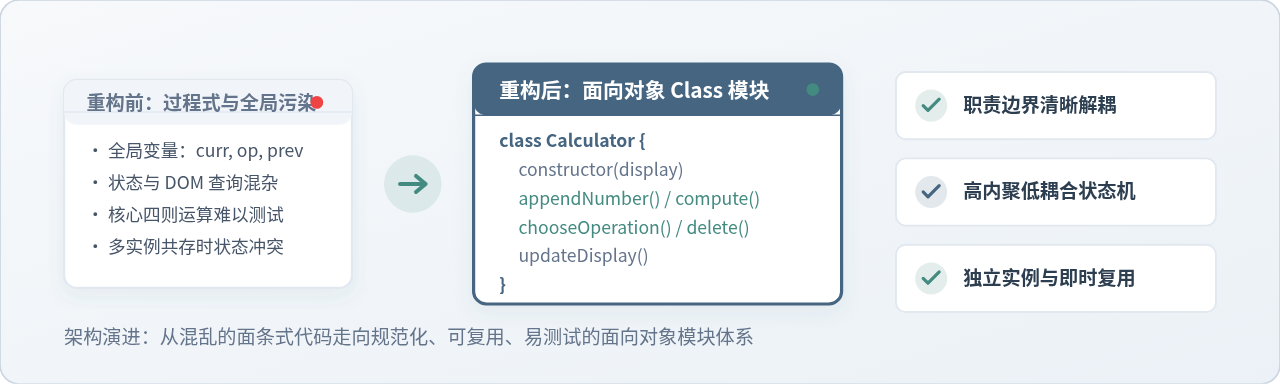
分析这段代码,可以总结出在软件工程实践中致命的三个核心问题:
- 全局变量污染与状态易损性:
currentVal、previousVal、currentOp散落在全局环境中。页面内引入的任何第三方脚本或新增功能,只要出现同名变量即可无意覆盖它们,导致计算器状态错乱。 - 业务逻辑与 DOM 强行捆绑:数据算术运算与
display.value紧密交织。若未来需要对四则运算做单元测试,必须在 Node.js 中模拟一个完整的虚拟 DOM 树;若 UI 设计由文本框改为复杂的多行<div>,所有包含display.value的函数都需要翻新重写。 - 单例死局,无法复用:由于逻辑绑定了唯一的元素 ID 与单组全局变量,若页面需要放置两台独立的计算器(例如“房贷首付计算”与“月供测算”并存),该脚本彻底失效,只能将整段代码复制一遍并手动修改变量名。
二、面向对象架构设计:职责划分与类模型
面向对象重构的核心心智模型在于:将数据与操作数据的行为封装在对象内部,向外暴露明确的语义接口,并把用户界面视为单纯的渲染表现层。
我们需要把计算器视作一个独立运转的“状态机”,其运行只与“操作数”和“运算符”打交道,对外界 DOM 结构毫不知情。UI 监听器只负责把用户的点击意图(如“追加数字 5”、“选择加号”)通知计算器,并在状态变更后请求计算器刷新显示。
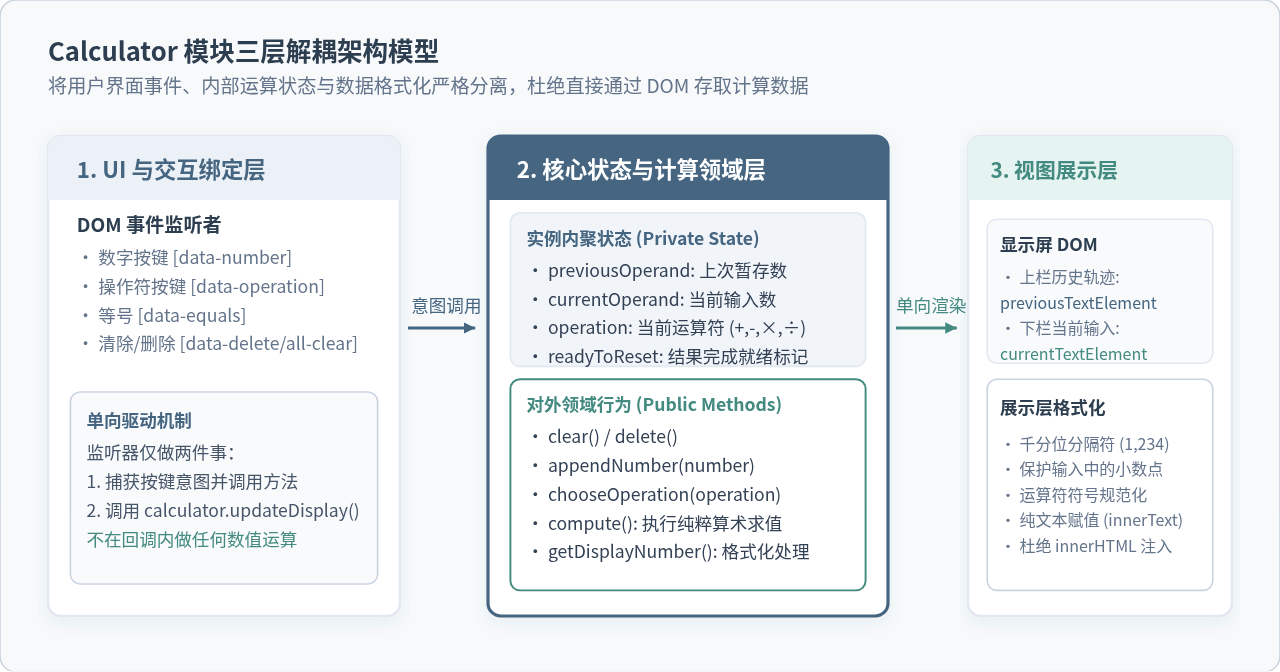
基于上述架构,我们规划 Calculator 类的核心接口与属性:
previousOperand:暂存的前一个操作数字符串currentOperand:当前正在键入的操作数字符串operation:当前选定的运算符号 (+,-,×,÷)readyToReset:记录上一次等号计算是否刚完成
clear():清空全部输入与缓存状态delete():退格删除当前输入的最后一位数字appendNumber(number):向当前数追加字符并拦截非法格式chooseOperation(operation):选择运算符并处理连续链式运算compute():执行纯数学计算并防护异常updateDisplay():将状态渲染至 DOM 节点
三、分步重构实施:从散乱逻辑到封装模块
重构过程应当小步前进、逐步替换。我们按照“抽取状态 → 封装行为 → 独立展示 → 解耦绑定”四个步骤有序落地。
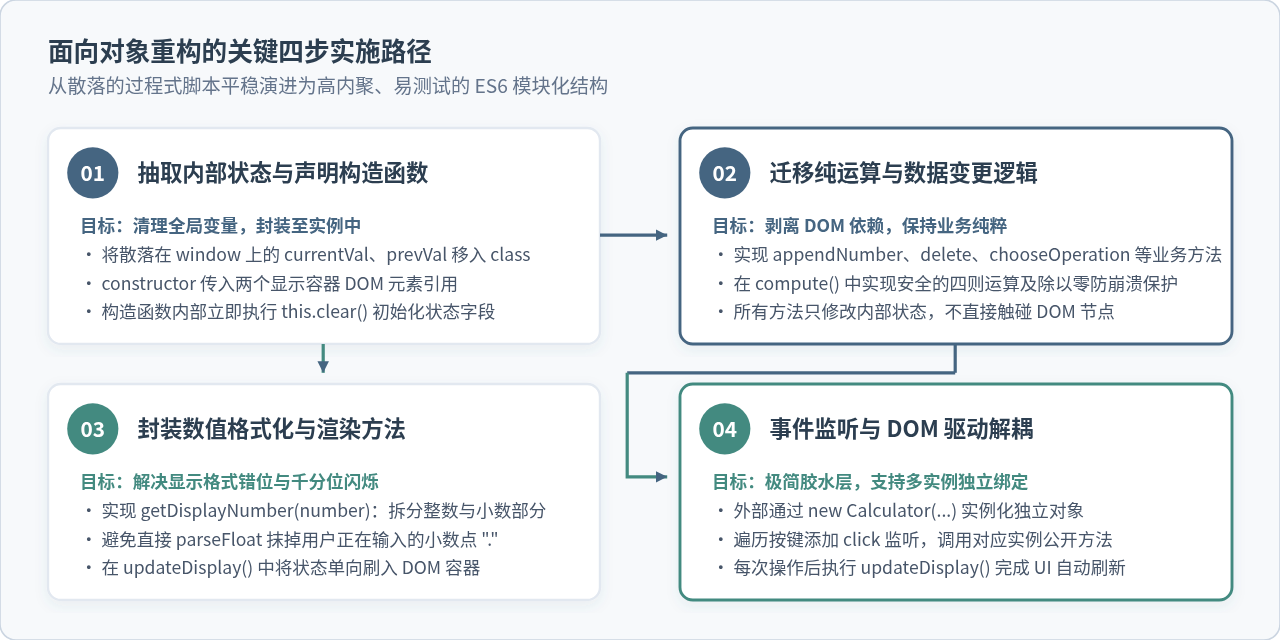
步骤一:定义 Class 并初始化实例状态
在 ES6 中使用 class 关键字声明计算器模块。构造函数接收两个显示容器元素的引用(一个显示上一行算式历史,一个显示当前主输入),并立即调用 this.clear() 进行属性初始化:
export class Calculator {
  constructor(previousOperandTextElement, currentOperandTextElement) {
    this.previousOperandTextElement = previousOperandTextElement;
    this.currentOperandTextElement = currentOperandTextElement;
    this.clear();
  }

  clear() {
    this.currentOperand = '';
    this.previousOperand = '';
    this.operation = undefined;
    this.readyToReset = false;
  }
}
通过 this.clear(),我们确保了实例无论在初次创建还是后续被重置时,状态初始化的逻辑都保持严格的一处定义。
步骤二:封装数据变更与纯运算逻辑
在类的内部,所有操作都以“操作内部属性”为核心,杜绝一切 DOM 读写。首先实现 appendNumber 与 delete:
  appendNumber(number) {
    // 若刚刚完成一次求值计算,用户再次按数字时自动开启新一轮输入
    if (this.readyToReset) {
      this.currentOperand = '';
      this.readyToReset = false;
    }
    // 边界防护:严禁在一个操作数中输入多个小数点
    if (number === '.' && this.currentOperand.includes('.')) return;
    // 如果首位直接输入小数点,规范化为 "0."
    if (number === '.' && this.currentOperand === '') {
      this.currentOperand = '0.';
      return;
    }
    this.currentOperand = this.currentOperand.toString() + number.toString();
  }

  delete() {
    if (this.readyToReset) {
      this.clear();
      return;
    }
    this.currentOperand = this.currentOperand.toString().slice(0, -1);
  }
接着实现 chooseOperation 与 compute。此处需要特别处理“用户连续点击不同运算符”以及“连环计算(例如 3 + 5 * ...)”的场景:
  chooseOperation(operation) {
    if (this.currentOperand === '' && this.previousOperand === '') return;

    // 防御处理:若用户先选了 +,没输数字又点了 *,仅替换当前运算符,不触发多余计算
    if (this.currentOperand === '' && this.previousOperand !== '') {
      this.operation = operation;
      return;
    }

    // 若上一个数已存在,选新运算符时自动先执行一次前序计算
    if (this.previousOperand !== '') {
      this.compute();
    }

    this.operation = operation;
    this.previousOperand = this.currentOperand;
    this.currentOperand = '';
  }

  compute() {
    let computation;
    const prev = parseFloat(this.previousOperand);
    const current = parseFloat(this.currentOperand);

    // 两个操作数只要有一个缺失,不执行计算
    if (isNaN(prev) || isNaN(current)) return;

    switch (this.operation) {
      case '+':
        computation = prev + current;
        break;
      case '-':
        computation = prev - current;
        break;
      case '×':
      case '*':
        computation = prev * current;
        break;
      case '÷':
      case '/':
        if (current === 0) {
          // 除以零边界保护
          this.currentOperand = '错误';
          this.previousOperand = '';
          this.operation = undefined;
          this.readyToReset = true;
          return;
        }
        computation = prev / current;
        break;
      default:
        return;
    }

    // 解决 JS 浮点数精度常见缺陷 (如 0.1 + 0.2 = 0.30000000000000004)
    this.currentOperand = parseFloat(computation.toFixed(12)).toString();
    this.operation = undefined;
    this.previousOperand = '';
    this.readyToReset = true;
  }
步骤三:提取独立的数据格式化算法
很多计算器在输入千分位(例如 1,234.56)时,会直接对字符串执行 parseFloat,这会导致正在输入的小数点 . 被截断或无法连贯输入。我们通过 getDisplayNumber 方法将字符串拆为整数与小数分别格式化:
  getDisplayNumber(number) {
    if (number === '错误') return number;
    const stringNumber = number.toString();
    const integerDigits = parseFloat(stringNumber.split('.')[0]);
    const decimalDigits = stringNumber.split('.')[1];

    let integerDisplay;
    if (isNaN(integerDigits)) {
      integerDisplay = '';
    } else {
      // 按照当前语言区域格式化千分位
      integerDisplay = integerDigits.toLocaleString('zh-CN', {
        maximumFractionDigits: 0
      });
    }

    if (decimalDigits != null) {
      return `${integerDisplay}.${decimalDigits}`;
    } else {
      return integerDisplay;
    }
  }

  updateDisplay() {
    this.currentTextElement.innerText = this.getDisplayNumber(this.currentOperand);
    if (this.operation != null) {
      this.previousTextElement.innerText =
        `${this.getDisplayNumber(this.previousOperand)} ${this.operation}`;
    } else {
      this.previousTextElement.innerText = '';
    }
  }
步骤四:DOM 事件监听与胶水层解耦
完成类定义后,HTML 页面的主脚本只需负责选择 DOM 元素、通过 new Calculator(...) 生成实例,并为按键绑定极其简短的委托分发代码:
import { Calculator } from './calculator.js';

// 获取 DOM 元素
const numberButtons = document.querySelectorAll('[data-number]');
const operationButtons = document.querySelectorAll('[data-operation]');
const equalsButton = document.querySelector('[data-equals]');
const deleteButton = document.querySelector('[data-delete]');
const allClearButton = document.querySelector('[data-all-clear]');
const previousTextElement = document.querySelector('[data-previous-operand]');
const currentTextElement = document.querySelector('[data-current-operand]');

// 实例化计算器
const calculator = new Calculator(previousTextElement, currentTextElement);

// 绑定数字按键
numberButtons.forEach(button => {
  button.addEventListener('click', () => {
    calculator.appendNumber(button.innerText.trim());
    calculator.updateDisplay();
  });
});

// 绑定运算符
operationButtons.forEach(button => {
  button.addEventListener('click', () => {
    calculator.chooseOperation(button.innerText.trim());
    calculator.updateDisplay();
  });
});

// 绑定等号与控制键
equalsButton.addEventListener('click', () => {
  calculator.compute();
  calculator.updateDisplay();
});

allClearButton.addEventListener('click', () => {
  calculator.clear();
  calculator.updateDisplay();
});

deleteButton.addEventListener('click', () => {
  calculator.delete();
  calculator.updateDisplay();
});
四、核心状态机流转与边界防御
面向对象封装之所以能够彻底杜绝 Bug,根本原因在于其形成了一个闭环的“有限状态机”。图 3 完整展示了计算器在接收不同事件时的状态跃迁,以及我们在各个节点设置的防护壁垒。
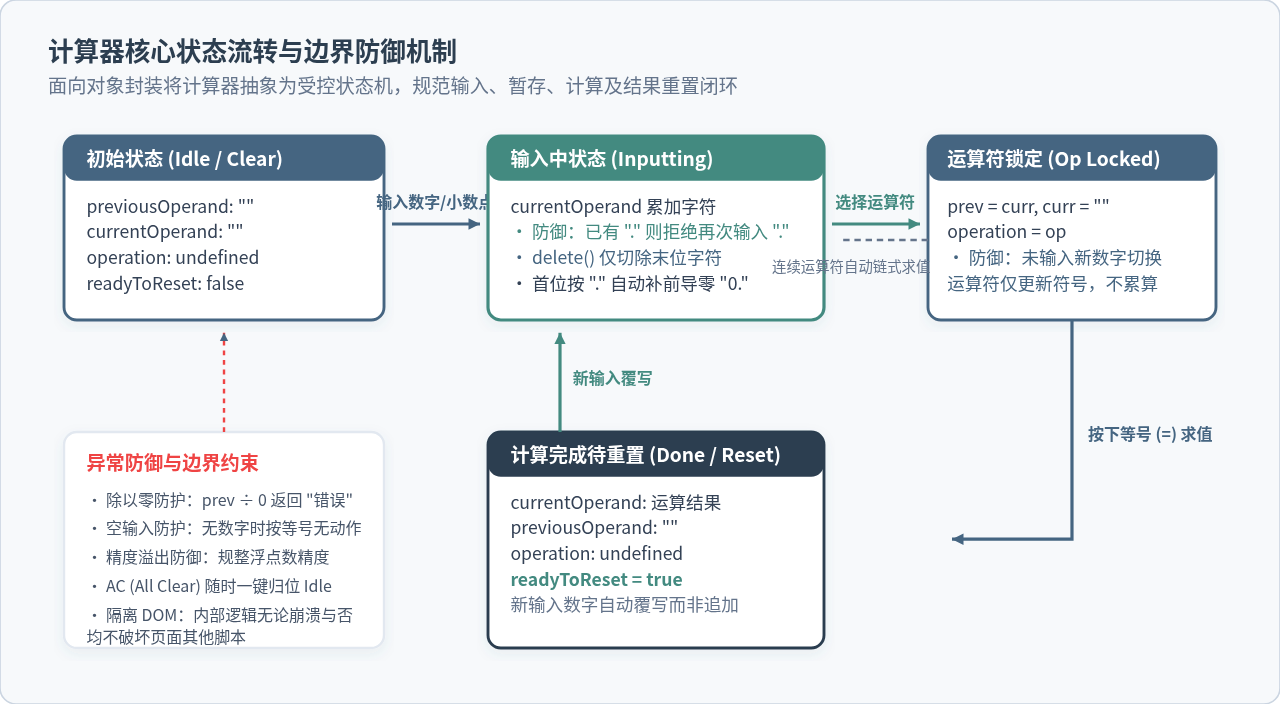
- 不要从 DOM 读取计算基数:永远以
this.currentOperand和this.previousOperand字符串作为真实数据源。一旦从界面经过千分位格式化的文本中二次提取数值,很容易出现NaN。 - 连续按运算键的处理:用户先按
+又改按-时,务必通过this.currentOperand === ''判断拦截,只替换this.operation,切忌直接调用compute()导致前操作数被清空。 - 结果就绪后的重置标记:引入
readyToReset字段是区分“连续运算”与“开启新一轮运算”的关键。若无此标记,算出的15之后点击2会变成152,严重违背用户直觉。
五、重构后的完整模块化代码与多实例演示
下面给出合并后的完整 ES Module 模块代码。该文件完全不包含对特定 DOM ID 的引用,可以被任意现代前端工程直接导入:
/**
 * 模块化面向对象计算器
 * 核心逻辑与 DOM 渲染完全解耦,支持任意容器多实例复用
 */
export class Calculator {
  /**
   * @param {HTMLElement} previousTextElement 上方算式显示容器
   * @param {HTMLElement} currentTextElement 主数值显示容器
   */
  constructor(previousTextElement, currentTextElement) {
    this.previousTextElement = previousTextElement;
    this.currentTextElement = currentTextElement;
    this.clear();
  }

  clear() {
    this.currentOperand = '';
    this.previousOperand = '';
    this.operation = undefined;
    this.readyToReset = false;
  }

  delete() {
    if (this.readyToReset) {
      this.clear();
      return;
    }
    this.currentOperand = this.currentOperand.toString().slice(0, -1);
  }

  appendNumber(number) {
    if (this.readyToReset) {
      this.currentOperand = '';
      this.readyToReset = false;
    }
    if (number === '.' && this.currentOperand.includes('.')) return;
    if (number === '.' && this.currentOperand === '') {
      this.currentOperand = '0.';
      return;
    }
    this.currentOperand = this.currentOperand.toString() + number.toString();
  }

  chooseOperation(operation) {
    if (this.currentOperand === '' && this.previousOperand === '') return;
    if (this.currentOperand === '' && this.previousOperand !== '') {
      this.operation = operation;
      return;
    }
    if (this.previousOperand !== '') {
      this.compute();
    }
    this.operation = operation;
    this.previousOperand = this.currentOperand;
    this.currentOperand = '';
  }

  compute() {
    let result;
    const prev = parseFloat(this.previousOperand);
    const current = parseFloat(this.currentOperand);
    if (isNaN(prev) || isNaN(current)) return;

    switch (this.operation) {
      case '+':
        result = prev + current;
        break;
      case '-':
        result = prev - current;
        break;
      case '×':
      case '*':
        result = prev * current;
        break;
      case '÷':
      case '/':
        if (current === 0) {
          this.currentOperand = '错误';
          this.previousOperand = '';
          this.operation = undefined;
          this.readyToReset = true;
          return;
        }
        result = prev / current;
        break;
      default:
        return;
    }

    // 规整浮点数精度并转回字符串
    this.currentOperand = parseFloat(result.toFixed(12)).toString();
    this.operation = undefined;
    this.previousOperand = '';
    this.readyToReset = true;
  }

  getDisplayNumber(number) {
    if (number === '错误') return number;
    const str = number.toString();
    const integerPart = parseFloat(str.split('.')[0]);
    const decimalPart = str.split('.')[1];

    let integerDisplay = '';
    if (!isNaN(integerPart)) {
      integerDisplay = integerPart.toLocaleString('zh-CN', {
        maximumFractionDigits: 0
      });
    }

    return decimalPart != null ? `${integerDisplay}.${decimalPart}` : integerDisplay;
  }

  updateDisplay() {
    if (this.currentTextElement) {
      this.currentTextElement.innerText = this.getDisplayNumber(this.currentOperand);
    }
    if (this.previousTextElement) {
      if (this.operation != null) {
        this.previousTextElement.innerText =
          `${this.getDisplayNumber(this.previousOperand)} ${this.operation}`;
      } else {
        this.previousTextElement.innerText = '';
      }
    }
  }
}
验证多实例复用能力
为了验证重构带来的复用收益,我们可以在同一个 HTML 页面中放置两个独立的计算器面板(如 #calc-a 和 #calc-b)。只需实例化两次:
// 实例 A:主计算器
const calcA = new Calculator(
  document.querySelector('#calc-a .prev'),
  document.querySelector('#calc-a .curr')
);

// 实例 B:汇率兑换计算器
const calcB = new Calculator(
  document.querySelector('#calc-b .prev'),
  document.querySelector('#calc-b .curr')
);

// 两者拥有完全隔离的内存堆与内部状态,计算互不干扰
六、重构前后对比与知识总结
通过面向对象方式对计算器代码进行模块化重构,我们完成了从过程式脚本到工程化组件的蜕变。图 4 从四个核心指针对重构前后的收益进行了系统总结。

面向对象重构的精髓不在于语法上是否使用了 class,而在于职责分离与边界清晰。
在处理交互式前端组件时,时刻牢记三条基本原则:
- 状态私有化与唯一真相源:真实数据保存在对象内部状态中,DOM 仅作为状态的反射,绝不能把 DOM 当作数据存储介质。
- 核心业务与渲染管道分离:四则运算、退格、清空是纯粹的逻辑计算,格式化和 DOM 赋值是展示任务,两者界限分明才能兼具高内聚与可测试性。
- 单向数据驱动:外部事件 → 调用对象方法更新状态 → 触发一次统一的视图同步更新。这种经典架构不仅适用于简单的原生计算器,更是现代 Vue、React 组件设计的基石思想。
JS倒计时出现时间漂移或不准确怎么解决
2026-11-18 11:52:36
JS解析二进制协议:用DataView映射内存结构体
2026-11-18 08:19:55
怎么用JS三元运算符替代简单的if-else语句
2026-11-17 22:05:50
JS俄罗斯方块核心逻辑:方块旋转算法与碰撞检测详解
2026-11-17 19:11:37
怎么将JSON字符串解析为JavaScript对象数组
2026-11-17 17:27:45