

JavaScript实现鼠标悬停指定Div时禁止页面滚动
作者:页面旅途时间:2026-10-23 21:52:27浏览:314
本文介绍在JavaScript中实现当鼠标移入指定Div区域时禁止页面滚动的功能。通过监听onmousewheel事件,利用preventDefault()阻止默认滚动行为,并兼容IE浏览器。代码包含HTML结构、CSS样式及JS逻辑,适用于需要局部锁定滚动的场景。
JavaScript实现鼠标悬停指定Div时禁止页面滚动
本文分享了一段使用JavaScript实现鼠标滑动到特定Div区域时禁止页面滚动的完整代码示例,供读者参考学习。
需求场景与实现思路
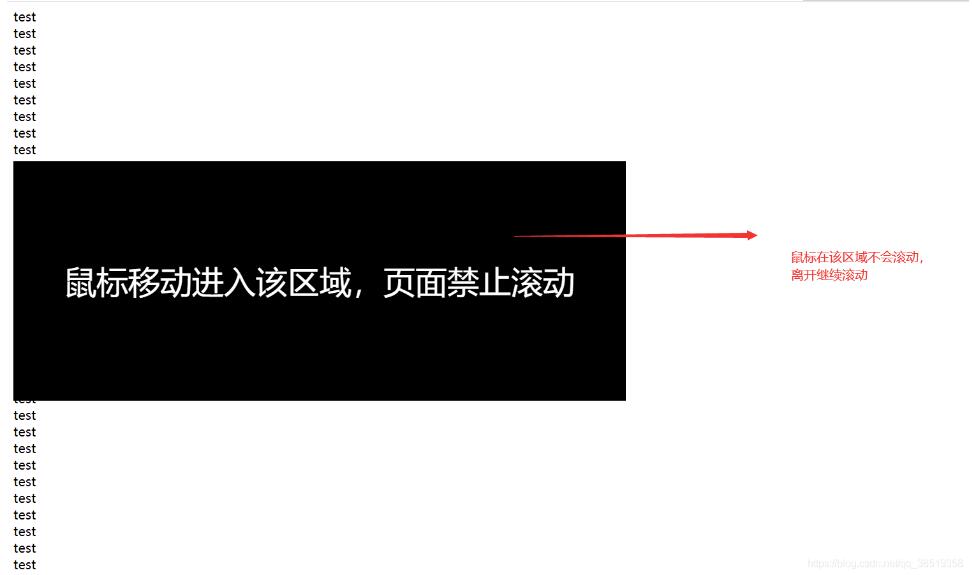
在实际项目开发中,常遇到一种需求:当鼠标指针移入某个特定的Div区域时,即使滚动鼠标滚轮,整个页面也不应发生滚动。
实现这一功能的核心思路是:当鼠标进入该Div时,监听其滚轮事件,并通过调用preventDefault()方法来阻止默认的滚动行为。以下是具体的实现示例。
代码实现示例
具体示例如下:
#wrap {
  position:absolute;
  top:200px;
  background:#000000;
  font-size: 40px;
  width:50vw;
  text-align: center;
  color: #ffffff;
  line-height: 300px;
  height:300px;
}
<div id="wrap">
 鼠标移动进入该区域,页面禁止滚动
</div>
window.onload = function () {
  for (i = 0; i < 50; i++) {
  var x = document.createElement('div');
  x.innerHTML = "test<br/>";
  document.body.appendChild(x);
  }

  function $(x) {
  return document.getElementById(x);
  };
  $("wrap").onmousewheel = function scrollWheel(e) {
  var sl;
  e = e || window.event;
  if (navigator.userAgent.toLowerCase().indexOf('msie') >= 0) {
   event.returnValue = false;
  } else {
   e.preventDefault();
  };
  };
  if (navigator.userAgent.toLowerCase().indexOf('firefox') >= 0) {
  //firefox支持onmousewheel
  addEventListener('DOMMouseScroll',
   function (e) {
   var obj = e.target;
   var onmousewheel;
   while (obj) {
    onmousewheel = obj.getAttribute('onmousewheel') || obj.onmousewheel;
    if (onmousewheel) break;
    if (obj.tagName == 'BODY') break;
    obj = obj.parentNode;
   };
   if (onmousewheel) {
    if (e.preventDefault) e.preventDefault();
    e.returnValue = false; //禁止页面滚动
    if (typeof obj.onmousewheel != 'function') {
    //将onmousewheel转换成function
    eval('window._tmpFun = function(event){' + onmousewheel + '}');
    obj.onmousewheel = window._tmpFun;
    window._tmpFun = null;
    };
    // 不直接执行是因为若onmousewheel(e)运行时间较长的话,会导致锁定滚动失效,使用setTimeout可避免
    setTimeout(function () {
     obj.onmousewheel(e);
    },
    1);
   };
   },
   false);
  };
}
以上就是本文的全部内容,希望对大家的学习有所帮助,也希望大家多多支持本站。
作者最新文章
JS监听滚动事件:回到顶部按钮的显示与隐藏逻辑
2026-11-05 16:19:37
JavaScript怎么读写LocalStorage与SessionStorage
2026-11-05 15:40:11
anime.js 与 GSAP 对比:轻量级项目该怎么选择动画库
2026-11-05 11:24:55
flv.js 与 hls.js 在直播场景下的选型对比
2026-11-05 08:18:52
JavaScript能做什么?前端开发中的作用与应用场景解析
2026-11-04 23:17:54