

深入理解 ES6 中的 Reflect 对象及其13个静态方法
本文深入解析 ES6 新增的 Reflect 对象,阐述其设计初衷与 Object 的关系。详细讲解 Reflect.get、set、apply、construct、defineProperty、deleteProperty、has、ownKeys、preventExtensions、isExtensible、getOwnPropertyDescriptor、getPrototypeOf 及 setPrototypeOf 共13个静态方法的参数、返回值及具体使用场景,并通过代码示例对比其与 ES5 传统方法的区别。
Reflect 对象概述与设计初衷
Reflect 是一个全局内置对象,其原型链指向 Object.prototype。
首先通过代码验证 Reflect 的原型是否为 Object,基础代码如下:
let obj = {};
console.log(Reflect.__proto__ === Object.prototype); // true
console.log(obj.__proto__ === Reflect.__proto__); // true

let str = '111';

console.log(str.__proto__); // String {"", length: 0, constructor: ƒ, anchor: ƒ, big: ƒ, blink: ƒ, …}
Reflect 是 ES6 规范中为操作对象而引入的新 API。引入该对象的设计目的和意图是什么?
首先,Reflect 将 Object 对象中一些明显属于语言内部机制的方法(例如 Object.defineProperty)迁移至 Reflect 对象上,使得开发者可以直接从 Reflect 对象获取这些语言内部方法。
其次,在使用 Object.defineProperty(obj, name, {}) 时,若操作失败会抛出错误,必须使用 try...catch 语句进行捕获;而使用 Reflect.defineProperty(obj, name, desc) 时,操作失败则返回 false,无需捕获异常。
例如,旧版写法如下:
try {
 Object.defineProperty(target, property, attributes);
} catch(e) {
 // 失败
}

// 新写法
if (Reflect.defineProperty(target, property, attributes)) {
 // success
} else {
 // failure
}
基于上述考量,ES6 规范新增了 Reflect 这个静态对象。
Reflect 对象共包含13个静态方法。
Reflect 静态方法详解
一:Reflect.get(target, name, receiver)
该方法用于读取目标对象的一个属性值。
参数解析如下:
target:目标对象。
name:需要读取的属性名。
receiver(可选):可理解为执行上下文中的 this 对象。
首先通过以下示例代码理解 Reflect.get 方法的使用方式:
const obj = {
 name: 'kongzhi',
 age: 30,
 get xxx() {
 console.log(this.name);
 console.log('-------');
 }
};

console.log(Reflect.get(obj, 'name')); // kongzhi
console.log(Reflect.get(obj, 'yyy')); // undefined

/*
 先执行 xxx 方法 打印 kongzhi 和 ----,
 然后在打印undefined, 因为该xxx()函数没有返回值
*/
console.log(Reflect.get(obj, 'xxx'));

/*
 会执行 xxx() 方法,打印 happy, 因此第三个参数指向上下文
 就指向了这个对象,然后打印 ----- ,最后打印undefined
 因为该函数没有返回值
*/
console.log(Reflect.get(obj, 'xxx', {name: 'happy'}));

/*
 会执行 xxx() 方法,打印 undefined, 因此第三个参数指向上下文
 就指向了这个对象,而这个对象里面又没有name属性,因此会打印undefined
 然后打印 ----- ,最后打印undefined. 因为该函数没有返回值
*/
console.log(Reflect.get(obj, 'xxx', {age: 'happy'}));

const obj2 = {
 name: 'kongzhi2',
 age: 30,
 get xxx() {
 console.log(this.name);
 console.log('----xxxx---');
 return 0;
 }
};
/*
 先执行 obj2 该对象中的 xxx 方法,指定了第三个参数作为该上下文对象,
 因此会打印 happy2, 然后继续打印 ----xxxx---, 最后我们可以看到
 有返回值为0,因此打印0了
*/
console.log(Reflect.get(obj2, 'xxx', {name: 'happy2'}));
Reflect.get 与 Reflect.set
二:Reflect.set(target, name, value, receiver)
前文提到的 get 方法用于获取对象属性值,而 set 方法用于设置对象的属性值,其参数解析如下:
target:需要操作的目标对象。
name:需要设置的属性名。
value:需要设置的属性值。
receiver:可理解为执行上下文中的 this 对象。如果在设置属性时遇到 setter 函数,该参数将指向 setter 函数中的 this 对象。
该方法返回一个布尔值,表示属性在目标对象上设置是否成功。
以下代码演示了具体用法:
const obj = {
 age: 30,
 set name(name) {
 console.log(this);
 console.log('-------');
 }
};

const res = Reflect.set(obj, 'age', 31);
console.log(res); // true
console.log(obj); // {age: 31, set name:function} 这样的
console.log(obj.age); // 打印 31

/*
 如下代码,设置 obj对象中的name属性,因此打印 console.log(this)
 返回 {age: 31, set name:function} 这样的, console.log(res2)返回true,设置成功
*/
const res2 = Reflect.set(obj, 'name', 'xxxx');
console.log(res2); // true

/*
 先执行 set 中的name方法,打印 console.log(this);this就指向了第四个参数 {test: 'test'}
 然后会打印 '-----';
*/
const r2 = Reflect.set(obj, 'name', 'dreamapple', {test: 'test'}); // this: --> { test: 'test' }
console.log(r2); // true
console.log(obj); // { name: [Setter], age: 31 }
Reflect.apply 与 Reflect.construct
三:Reflect.apply(target, thisArg, args)
该方法的作用是通过指定的参数列表调用目标函数,其功能类似于 ES5 中的 Function.prototype.apply 方法。
参数解析如下:
target:目标函数。
thisArg:目标函数调用时绑定的 this 对象。
args:传递给函数的参数列表。
以下代码演示了具体用法:
// 查找数组里面最小的元素值

const arrs = [1, 2, 3, 4];
// ES6 的语法如下
const min = Reflect.apply(Math.min, arrs, arrs);

console.log(min); // 1

// ES5的语法如下:

const min2 = Math.min.apply(arrs, arrs);
console.log(min2); // 1

// 或者我们使用 Finction.prototype 代码如下演示

const min3 = Function.prototype.apply.call(Math.min, arrs, arrs);
console.log(min3); // 1

// 下面是截取字符串的方法演示下

const strs = 'kongzhi';

// 使用ES6的语法 代码演示如下:

const str1 = Reflect.apply(String.prototype.slice, strs, [0, 3]);
console.log(str1); // 打印 kon

// 使用 ES5的语法
const str2 = strs.slice(0, 3);
console.log(str2); // 打印 kon

// 或者我们使用 String.prototype 代码如下演示
const str3 = String.prototype.slice.apply(strs, [0, 3]);
console.log(str3); // kon
四:Reflect.construct(target, args[, newTarget])
该方法的作用类似于使用 new AAA() 创建实例,它提供了一种不使用 new 关键字调用构造函数的替代方案。
参数含义如下:
target:被调用的目标构造函数。
args:调用构造函数时传递的参数数组或类数组对象。
newTarget(可选):也是一个构造函数,表示使用 Reflect.construct 生成的实例对象的原型指向哪个构造函数。若未提供该参数,生成的实例对象原型默认与 target 构造函数一致。
以下代码演示了具体用法:
function XXXX(name) {
 this.name = name;
}

XXXX.prototype.getName = function() {
 return this.name;
}

function YYYY(age) {
 this.age = age;
}

YYYY.prototype.getAge = function() {
 return this.age || 31;
}

// 使用 XXXX函数作为构造函数, 那么构造函数就指向了 XXXX函数
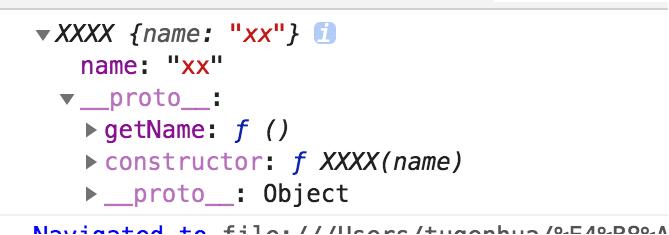
const xxxx = Reflect.construct(XXXX, ['xx']);
console.log(xxxx); // 打印 XXXX {name: xx}
console.log(xxxx.getName()); // 打印 xx
运行结果如下图所示:
// 使用 YYYY 函数作为构造函数,那么构造函数就指向了 YYYY函数
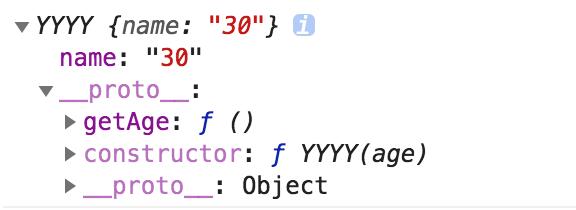
const yyyy = Reflect.construct(XXXX, ['30'], YYYY);

console.log(yyyy); // 打印 YYYY {name: 30}
console.log(yyyy.name); // 30
console.log(yyyy.age); // undefined
console.log(yyyy instanceof YYYY); // true
console.log(yyyy instanceof XXXX); // false
console.log(yyyy.getAge()); // 31
如上示例所示,当执行 const xxxx = Reflect.construct(XXXX, ['xx']) 且没有第三个参数时,生成的实例对象原型指向 XXXX 构造函数。
继续观察第二个示例,const yyyy = Reflect.construct(XXXX, ['30'], YYYY) 提供了第三个参数,因此 yyyy 的实例原型指向了 YYYY。
从上述代码打印信息可见,console.log(yyyy instanceof YYYY) 返回 true,而 console.log(yyyy instanceof XXXX) 返回 false。
然而,console.log(yyyy.getAge()) 返回的是 31。若未提供默认值 31,则应返回 undefined,具体可见下方的注意事项总结:
注意:若提供第三个参数,生成的实例由两部分组成:实例的属性部分由第一个参数(target)构造函数生成,而实例的方法部分由第三个参数(newTarget)对象生成。
例如上述打印的 console.log(yyyy) 输出为 YYYY {name: 30},仅显示了 XXXX 中的 name 属性,而未获取 XXXX 中的 getName 方法。
同理,console.log(yyyy.age) 结果为 undefined,而 console.log(yyyy.getAge()) 返回 31。具体表现如下图所示:
Reflect.defineProperty 与 Reflect.deleteProperty
五:Reflect.defineProperty(target, name, desc)
该方法与 Object.defineProperty 方法类似,唯一区别在于 Reflect.defineProperty 返回一个布尔值。
例如,以下代码进行了对比:
const obj = {};
// 使用 Object.defineProperty
try {
 Object.defineProperty(obj, 'a', {
 value: 22
 })
} catch(e) {
 console.log('define property failed');
}

// 使用 Reflect.defineProperty

const res = Reflect.defineProperty(obj, 'b', {
 configurable: true,
 enumerable: true
});

console.log(res); // true
既然两者的用法和配置项完全一致,此处不再赘述具体配置细节,仅强调返回值不同。关于 Object.defineProperty 的具体用法,
请参考笔者上一篇文章(https://www.jb51.net/article/191097.htm)。
因此总结:若使用 Object.defineProperty 定义属性失败,将抛出错误;成功则返回该对象;
若使用 Reflect.defineProperty 定义属性失败,则返回 false;成功定义则返回 true。
但如果使用 Reflect.defineProperty 函数时,其第一个参数不是对象,同样会抛出错误。
六:Reflect.deleteProperty(target, name)
该方法用于删除对象上的属性,其行为与 delete 操作符类似。
参数如下:
target:表示要操作的目标对象。
name:表示需要从该对象上删除的属性名。
该函数返回一个布尔值,成功删除返回 true,失败返回 false。例如以下示例演示:
const obj = {
 name: 'kongzhi',
 age: 30
};

let test1 = Reflect.deleteProperty(obj, 'name');
console.log(test1); // true
console.log(obj); // {age: 30}

// 如果删除对象上不存在的属性的话,也是返回true的
let test2 = Reflect.deleteProperty(obj, 'xx');
console.log(test2); // true
console.log(obj); // {age: 30}

let test3 = Reflect.deleteProperty(obj, 'age');
console.log(test3); // true
console.log(obj); // {}
Reflect.has 与 Reflect.ownKeys
七:Reflect.has(target, name)
该方法用于检查对象是否包含特定属性,功能相当于 ES5 中的 in 操作符。
参数 target 表示目标对象,name 表示该对象上的属性名。
具体示例演示如下:
// 一般的对象
const obj = {
 name: 'kongzhi',
 age: 30
};

console.log(Reflect.has(obj, 'name')); // true
console.log(Reflect.has(obj, 'username')); // 该对象上没有 username属性 返回false
console.log(Reflect.has(obj, 'age')); // true

// 函数的实列

function Obj(name) {
 this.name = name;
}
Obj.prototype.getName = function() {
 return this.name;
}
const test = new Obj();

// 使用in操作符测试
console.log('name' in test); // true
console.log('getName' in test); // true

// 使用Reflect.has 测试
console.log(Reflect.has(test, 'name')); // true
console.log(Reflect.has(test, 'getName')); // true
八:Reflect.ownKeys(target)
该函数的作用是返回由目标对象自身属性键组成的数组。若目标对象不是对象类型,该函数将抛出异常。target 参数必须是一个对象。以下代码演示:
const obj = {
 name: 'kongzhi',
 age: 30
};
console.log(Reflect.ownKeys(obj)); // ['name', 'age'];
Reflect.preventExtensions 与 Reflect.isExtensible
九:Reflect.preventExtensions(target)
该方法的作用是阻止向对象添加新属性。target 参数必须是一个对象,否则将抛出异常。
以下代码演示:
const obj = {};
// 判断该对象是否可以扩展,使用 Reflect.isExtensible 该方法
const t1 = Reflect.isExtensible(obj);
console.log(t1); // true

// 使用 Reflect.preventExtensions 来阻止该对象扩展

Reflect.preventExtensions(obj);

// 再来扩展下该对象,看是否可以
const t2 = Reflect.isExtensible(obj);
console.log(t2); // false
十:Reflect.isExtensible(target)
该方法用于检查对象是否可扩展,即是否可以向对象添加新的属性或方法。
target 参数表示目标对象。若该目标对象不是对象类型,函数将抛出异常。
该函数返回一个布尔值:若为 true,说明对象可扩展;若为 false,表示对象不可扩展。
以下示例演示:
const obj = {};
// 判断该对象是否可以扩展,使用 Reflect.isExtensible 该方法
const t1 = Reflect.isExtensible(obj);
console.log(t1); // true

// 使用 Reflect.preventExtensions 来阻止该对象扩展
Reflect.preventExtensions(obj);

// 再来扩展下该对象,看是否可以
const t2 = Reflect.isExtensible(obj);
console.log(t2); // false
Reflect.getOwnPropertyDescriptor 与 Reflect.getPrototypeOf
十一:Reflect.getOwnPropertyDescriptor(target, name)
该方法的参数解析如下:
target:表示目标对象。
name:表示目标对象的属性名。
该方法的具体含义是:若目标对象中的属性描述符存在,则返回该属性描述符;若不存在,则返回 undefined。
以下示例演示:
const obj = {};

Reflect.defineProperty(obj, 'name', {
 configurable: true,
 enumerable: true,
 writable: true,
 value: '30'
});

const test1 = Reflect.getOwnPropertyDescriptor(obj, 'name');
/*
 打印值如下:
 {
 configurable: true
 enumerable: true
 value: "30"
 writable: true
 }
*/
console.log(test1);

const test2 = Reflect.getOwnPropertyDescriptor(obj, 'age');
console.log(test2); // undefined

// 如果第一个参数不是对象
const test3 = Object.getOwnPropertyDescriptor('kkkk', 'name');
console.log(test3); // undefined

// 使用 try catch 包围,会执行 catch方法内部代码
try {
 const test4 = Reflect.getOwnPropertyDescriptor('kkkk', 'name');
 console.log(test4);
} catch (e) {
 console.log('error');
}
十二:Reflect.getPrototypeOf(target)
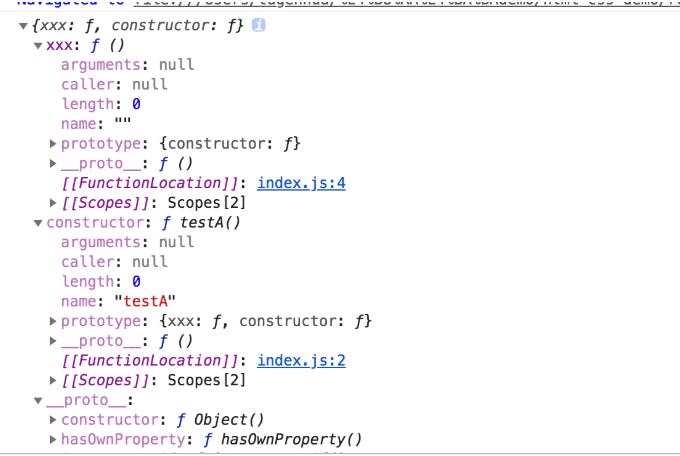
该方法用于返回对象的原型,即内部 [[Prototype]] 属性的值。参考以下代码:
function testA() {};
testA.prototype.xxx = function() {};
const a = new testA();
console.log(Object.getPrototypeOf(a));
打印结果如下图所示:
Reflect.setPrototypeOf
十三:Reflect.setPrototypeOf(target, prototype)
该方法的作用是设置对象的原型。若设置成功,返回 true;若设置失败,返回 false。
例如以下代码:
const obj = {};
const test1 = Reflect.setPrototypeOf(obj, Object.prototype);
console.log(test1); // true

let test2 = Reflect.setPrototypeOf(Object.freeze({}), null);
console.log(test2); // false
以上关于 ES6 中 Reflect 用法的深入解析即为全部内容,希望能对大家有所帮助,也希望大家多多支持本站。
JS语法错误会阻止加载吗?区分SyntaxError与资源加载失败
2026-11-05 16:08:46
JavaScript常见SyntaxError语法错误排查与修复方法
2026-11-05 13:58:44
JS中slice、substring和substr截取字符串的区别
2026-11-05 13:43:47
JS 转 TS 手动迁移最佳实践:从配置 tsconfig 到消除 any 类型
2026-11-05 11:53:32
为什么JS数组push后得到的是数字而不是数组?
2026-11-05 09:59:18