

JavaScript实现简易计算器的完整代码与逻辑解析
本文提供基于JavaScript的简易计算器实现代码,详细解析清空、正负切换、百分比及退格等功能逻辑。重点探讨eval函数在表达式计算中的应用,并深入分析substring与substr在退格处理中的行为差异及解决方案,帮助开发者理解字符串操作细节。
计算器功能概述
实现一个简易计算器的功能,具体效果如图所示。
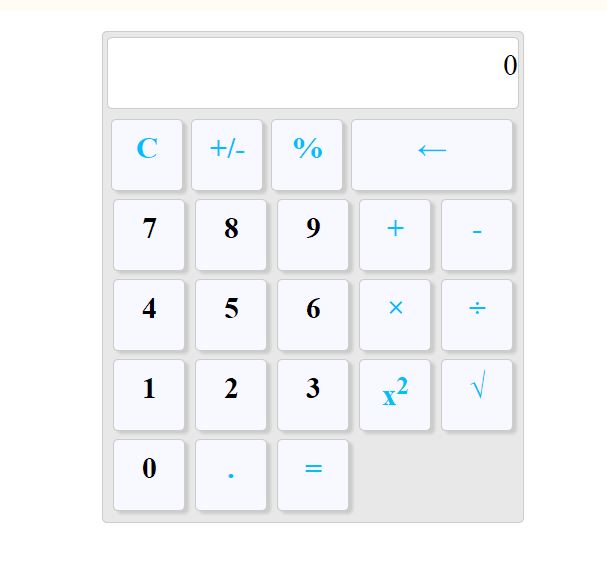
C键用于清空输入,其值为空字符串。
+/-键用于切换当前数值的正负号。
%键表示将当前值除以100。
←键用于退格操作,即向前删除一个字符。
eval函数用于计算字符串表达式或语句的结果,并返回计算后的值。
具体实现代码如下。
核心代码实现
<!DOCTYPE html>
<html>
 <head>
  <meta charset="UTF-8">
  <title></title>
  <style type="text/css">
   #div1{
    margin:20px auto;
    width:420px;
    height:490px;
    background-color:#E8E8E8;
    border:1px solid #ccc;
    border-radius:5px;
    }
   .div2{
    width:410px;
    height:60px;
    border:1px solid #ccc;
    margin:5px auto;
    border-radius:5px;
    text-align:right;
    font-size:30px;
    background-color:white;
    padding-top:10px;
       }

   .div3{
    width:410px;
    height:60px;
    margin:5px auto;
    float:left;
   }
   .div13{
    float:left;
    width:70px;
    height:60px;
    border:1px solid #ccc;
    background-color: ghostwhite;
    margin-left:8px;
    text-align:center;
    font-size:30px;
    color:deepskyblue;
    border-radius:5px;
    cursor:default;
    padding-top:10px;
    box-shadow:4px 3px 3px #CCCCCC;
    }
   .div133{width:160px;}
   .top{margin-top:10px;margin-left:10px;}
   .color{color:black;}
   .top1{margin-top:20px;margin-left:10px;}
   .top2{margin-top:30px;margin-left:10px;}
   .top3{margin-top:40px ;margin-left:10px;}
   .div23{float:left;}
   .div33{float:left;}
  </style>
 </head>
 <body>
  <div id="div1">
   <div class="div2" id="input"><b>0</b></div>
   <div class="div3">
    <div class="div13" onclick="w(' ')"><b>C</b></div>
    <div class="div13"onclick="w('opposite')"><b>+/-</b></div>
    <div class="div13" onclick="w('percent')"><b>%</b></div>
    <div class="div13 div133" onclick="w('backspace')"><b>←</b></div>
   </div>
    <div class="div3">
     <div class="div13 top color" onclick="a('7')"><b>7</b></div>
     <div class="div13 top color" onclick="a('8')"><b>8</b></div>
     <div class="div13 top color" onclick="a('9')"><b>9</b></div>
     <div class="div13 top " onclick="a('+')"><b>+</b></div>
     <div class="div13 top " onclick="a('-')"><b>-</b></div>

    </div>
    <div class="div3">
     <div class="div13 top1 color" onclick="a('4')"><b>4</b></div>
     <div class="div13 top1 color"onclick="a('5')"><b>5</b></div>
     <div class="div13 top1 color" onclick="a('6')"><b>6</b></div>
     <div class="div13 top1" onclick="a('*')"><b>×</b></div>
     <div class="div13 top1" onclick="a('/')"><b>÷</b></div>
     </div>
     <div class="div3">
     <div class="div13 top2 color" onclick="a('1')"><b>1</b></div>
     <div class="div13 top2 color" onclick="a('2')"><b>2</b></div>
     <div class="div13 top2 color"onclick="a('3')"><b>3</b></div>
     <div class="div13 top2"onclick="w('pow')"><b>x<sup>2</sup></b></div>
     <div class="div13 top2" onclick="w('sqrt')"><b>√</b></div>
     </div>
     <div class="div3">
      <div class="div13 top3 color" onclick="a('0')"><b>0</b></div>
      <div class="div13 top3"onclick="a('.')"><b>.</b></div>
      <div class="div13 top3"onclick="e('=')"><b>=</b></div>
     </div>

     </div>
    <script>
     input=document.getElementById("input");
    s="";
     function a(v)
     {
     s=s+v;
     input.innerHTML=s;
     }
    function e(v)
     {
     input.innerHTML=eval(s);
     }

    function w(type)
     {
     switch(type)
     { case ' ':s='';break;
      case 'opposite':s=-s;break;
      case 'percent':s=s/100;break;
      case 'pow':s=Math.pow(s,2);break;
      case 'sqrt':s=Math.sqrt(s);break;
      case 'backspace':s=s.substr(s,s.length-1);// case  'backspace':s=s.substring(0,s.length-1);
      }
      input.innerHTML=s;
      }


    </script>


 </body>
</html>
字符串处理逻辑分析
此处原本使用 substring 函数,但在仅剩余一个值时按退格键无效,改用 substr 后能正常清除。原因分析:s=s.substring(s,s.length-1);当 s 为 7 时,第一个参数为 0 表示字符串首地址,第二个参数为 0 无法正确截取;而 s=s.substring(0,s.length-1) 可行,但 s=s.substr(s,s.length-1) 在剩余一个值时能清除,推测当第二个参数为 0 时将空字符串赋给 s。
以上是关于JavaScript制作简易计算器的详细代码与解析,更多相关技术资料请查阅本站其他文章。
core-js v2 迁移到 v3 的破坏性变更与注意事项
2026-11-05 18:10:26
JavaScript中%是取余还是取模?与Math.floor实现的区别
2026-11-05 18:09:12
React中怎么不可变地删除JS数组元素
2026-11-05 18:06:01
JS动态构建复杂嵌套JSON对象的方法
2026-11-05 15:41:52
JS负数取余为什么是负数?详解余数与模运算区别
2026-11-05 13:34:41