

JavaScript实现简易计算器:除法与小数处理逻辑
作者:代码拾荒时间:2026-10-23 17:04:01浏览:119
本文介绍使用JavaScript实现简易计算器的方法,重点解决除法中被除数为0时的结果处理,以及运算结果保留两位小数的显示逻辑。通过具体代码示例,展示如何构建基础计算器界面与核心计算功能,适合前端初学者参考学习。
JavaScript计算器功能实现概述
本文提供了利用JavaScript实现计算器功能的具体代码示例,供读者参考学习。
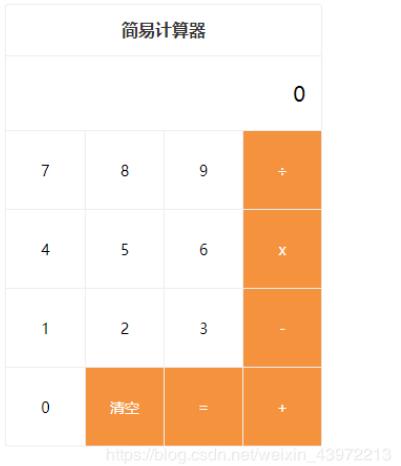
计算器核心逻辑与需求说明
具体需求如下:
1. 在执行除法运算时,若被除数为0,则计算结果应返回0。 2. 若计算结果为小数,需保留至小数点后两位。例如,2除以3显示为0.67,1除以2显示为0.5。
计算器代码实现
<!DOCTYPE html>
<html>
 <head>
 <meta charset="utf-8">
 <title>百度笔试0329</title>
 <style type="text/css">
 body, ul, li,select {
  margin: 0;
  padding: 0;
  box-sizing: border-box;
 }
 ul,li {list-style: none;}
 .calculator {
  max-width: 300px;
  margin: 20px auto;
  border: 1px solid #eee;
  border-radius: 3px;
 }
 .cal-header {
  font-size: 16px;
  color: #333;
  font-weight: bold;
  height: 48px;
  line-height: 48px;
  border-bottom: 1px solid #eee;
  text-align: center;
 }
 .cal-main {
  font-size: 14px;
 }
 .cal-main .origin-value {
  padding: 15px;
  height: 40px;
  line-height: 40px;
  font-size: 20px;
  text-align: right;
  overflow: hidden;
  text-overflow:ellipsis;
  white-space: nowrap;
 }
 .cal-main .origin-type,
 .cal-main .target-type {
  padding-left: 5px;
  width: 70px;
  font-size: 14px;
  height: 30px;
  border: 1px solid #eee;
  background-color: #fff;
  vertical-align: middle;
  margin-right: 10px;
  border-radius: 3px;
 }
 .cal-keyboard {
  overflow: hidden;
 }
 .cal-items {
  overflow: hidden;
 }
 .cal-items li {
  user-select: none;
  float: left;
  display: inline-block;
  width: 75px;
  height: 75px;
  text-align: center;
  line-height: 75px;
  border-top: 1px solid #eee;
  border-left: 1px solid #eee;
  box-sizing: border-box;
 }
 li:nth-of-type(4n+1) {
  border-left: none;
 }
 li[data-action=operator] {
  background: #f5923e;
  color: #fff;
 }
 .buttons {
  float: left;
  width: 75px;
 }
 .buttons .btn {
  width: 75px;
  background-color: #fff;
  border-top: 1px solid #eee;
  border-left: 1px solid #eee;
  height: 150px;
  line-height: 150px;
  text-align: center;
 }
 .btn-esc {
  color: #ff5a34;
 }
 .btn-backspace {
  position: relative;
 }
 </style>
 </head>
 <body>
 <div class="calculator">
  <header class="cal-header">简易计算器</header>
  <main class="cal-main">
   <div class="origin-value">0</div>
   <div class="cal-keyboard">
    <ul class="cal-items">
     <li data-action="num">7</li>
     <li data-action="num">8</li>
     <li data-action="num">9</li>
     <li data-action="operator">÷</li>
     <li data-action="num">4</li>
     <li data-action="num">5</li>
     <li data-action="num">6</li>
     <li data-action="operator">x</li>
     <li data-action="num">1</li>
     <li data-action="num">2</li>
     <li data-action="num">3</li>
     <li data-action="operator">-</li>
     <li data-action="num">0</li>
     <li data-action="operator">清空</li>
     <li data-action="operator">=</li>
     <li data-action="operator">+</li>
    </ul>
   </div>
  </main>
 </div>
 <script type="text/javascript">
 var Calculator = {
  init: function () {
   var that = this;
   if (!that.isInited) {
    that.isInited = true;
    // 保存操作信息
    // total: Number, 总的结果
    // next: String, 下一个和 total 进行运算的数据
    // action: String, 操作符号
    that.data = {total: 0, next: '', action: ''};
    that.bindEvent();
   }
  },
  bindEvent: function () {
   var that = this;
   // 请补充代码:获取 .cal-keyboard 元素
   var keyboardEl = document.getElementsByClassName('cal-keyboard')[0]
   keyboardEl && keyboardEl.addEventListener('click', function (event) {
    // 请补充代码:获取当前点击的dom元素
    var target = event.target;
    // 请补充代码:获取target的 data-action 值
    var action = target.getAttribute('data-action');
    // 请补充代码:获取target的内容
    var value = target.innerHTML;
    if (action === 'num' || action === 'operator') {
     that.result(value, action === 'num');
    }
   });
  },
  result: function (action, isNum) {
   var that = this;
   var data = that.data;
   if (isNum) {
    data.next = data.next === '0' ? action : (data.next + action);
    !data.action && (data.total = 0);
   } else if (action === '清空') {
    // 请补充代码:设置清空时的对应状态
    data.total = 0;
    data.next = '';
    data.action = '';
   } else if (action === '=') {
    if (data.next || data.action) {
     data.total = that.calculate(data.total, data.next, data.action);
     data.next = '';
     data.action = '';
    }
   } else if (!data.next) {
    data.action = action;
   } else if (data.action) {
    data.total = that.calculate(data.total, data.next, data.action);
    data.next = '';
    data.action = action;
   } else {
    data.total = +data.next || 0;
    data.next = '';
    data.action = action;
   }

   // ���补充代码:获取 .origin-value 元素
   var valEl = document.getElementsByClassName('origin-value')[0];
   valEl && (valEl.innerHTML = data.next || data.total || '0');
  },
  calculate: function (n1, n2, operator) {
   n1 = +n1 || 0;
   n2 = +n2 || 0;
   if (operator === '÷') {
    // 请补充代码:获取除法的结果
  if(n2 == 0 || n1 == 0) return 0
    return Math.round((n1/n2)*100)/100;
   } else if (operator === 'x') {
    // 请补充代码:获取乘法的结果
    return n1 * n2;
   } else if (operator === '+') {
    // 请补充代码:获取加法的结果
    return n1 + n2;
   } else if (operator === '-') {
    // 请补充代码:获取减法的结果
    return n1 - n2;
   }
  }
 };
 Calculator.init();
 </script>
 </body>
</html>
如需了解更多计算器功能的实现方式,可访问相关专题:计算器功能汇总进行深入学习。
以上内容为本文的全部介绍,希望能为读者的学习提供有益帮助,同时也欢迎大家对本站给予支持。
作者最新文章
JavaScript异步发送HTTP请求时怎么优雅地处理错误
2026-11-05 17:10:44
5款主流JS在线运行工具对比:CodePen、JSFiddle与StackBlitz怎么选
2026-11-05 17:04:04
JavaScript入门书籍避坑:这些书不适合初学者
2026-11-05 16:31:15
JS使用Math.round实现保留两位小数的原理与代码
2026-11-05 15:35:55
JavaScript 原生 Date 对象怎么实现日期加减
2026-11-05 14:30:00