

JS与jQuery实现列表模糊搜索功能的完整流程
本文详细解析了如何使用JavaScript和jQuery实现列表的模糊搜索功能。功能涵盖输入匹配、动态高度调整、选项选中、键盘导航(上下键及回车确认)以及下拉框的显示与隐藏控制。文章提供了具体的HTML结构要求、CSS类名定义及事件绑定方法,并解决了获取offsetTop时的定位问题,适合需要实现类似自动补全或搜索建议场景的前端开发参考。
功能需求概述
本功能旨在实现以下搜索交互效果:
首先,系统需根据用户输入的字符串对列表进行匹配,并动态调整列表框的高度,使其与匹配到的列表项数量相适应。
其次,支持用户通过鼠标点击选中列表中的特定项。
第三,提供键盘导航支持,允许用户通过按下“上”或“下”方向键来切换当前选中的列表项。
第四,当用户按下“回车”键时,系统应确认并选中当前高亮的列表项。
第五,点击文本框右侧的下拉箭头图标时,应切换下拉列表的显示与隐藏状态。
第六,当点击区域位于文本框外部时,下拉列表应自动隐藏。
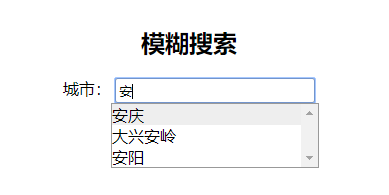
接下来展示功能的效果预览。
示例列表中包含以下城市或地区名称:
北京、上海、杭州、安庆、大兴安岭、安阳、广州、贵阳、哈尔滨、合肥、邯郸、呼伦贝尔、淮南、黄山、济南、济宁、嘉兴、南昌、南通、南宁、南京
在预览过程中,请输入与上述项目相匹配的文字,以便更直观地观察搜索效果。
代码实现与注意事项
以下是具体的代码实现细节。
<html xmlns="http://www.w3.org/1999/xhtml" xml:lang="en">
<head>
  <meta http-equiv="Content-Type" content="text/html;charset=UTF-8">
  <title>js、jquery实现列表模糊搜索功能</title>
 <script src="https://lib.baomitu.com/jquery/3.4.1/jquery.js"></script>
<style type="text/css">
  * {
    padding: 0;
    margin: 0;
  }
  h2 {
    margin-bottom: 20px;
  }
  #container {
    width: 500px;
    text-align: center;
    margin: 0 auto;
    font-family: "微软雅黑";
    margin-top: 50px;
  }
  .selectContainer {
    position: relative;
  }
  .selectInput {
    width: 200px;
    height: 25px;
    border-style: none;
    border: 1px solid #999;
    border-radius: 3px;
    padding: 0 3px;
  }
  .picture_click {
    background: url(img/select-default.png) no-repeat;
    opacity: 1;
    width: 15px;
    height: 8px;
    position: absolute;
    top: 10px;
    right: 125px;
  }
  .picture_click:hover {
    background-image: url(img/select-hover.png);
  }
  .selectList {
    width: 206px;
    height: 212px;
    overflow-y: scroll;
    text-align: left;
    margin: 0 172px;
    border: 1px solid #999;
    display: none;
    position: relative;
  }
  .selectList div {
    cursor: pointer;
  }
</style>
</head>
<body>
<div id="container">
  <h2>模糊搜索</h2>
  <div id="cityContainer" class="selectContainer">
    <label>城市:</label>
    <input type="text" placeholder="请输入城市名称" list="cityList" class="selectInput" name="cityName" id="cityName" value="" onfocus="fuzzySearch.call(this)" />
    <div class="picture_click dropDowns" style=""></div>
    <div id="cityList" class="selectList">
      <div id="001">北京</div>
      <div id="002">上海</div>
      <div id="003">杭州</div>
      <div id="004">安庆</div>
      <div id="005">大兴安岭</div>
      <div id="006">安阳</div>
      <div id="007">广州</div>
      <div id="008">贵阳</div>
      <div id="009">哈尔滨</div>
      <div id="010">合肥</div>
      <div id="011">邯郸</div>
      <div id="012">呼伦贝尔</div>
      <div id="013">淮南</div>
      <div id="014">黄山</div>
      <div id="015">济南</div>
      <div id="016">济宁</div>
      <div id="017">嘉兴</div>
      <div id="018">南昌</div>
      <div id="019">南通</div>
      <div id="020">南宁</div>
      <div id="021">南京</div>
    </div>
  </div>
</div>
</body>
<script type="text/javascript">
  //初始化下拉框
  initSearchInput();

  function fuzzySearch(e) {
    var that = this;
    //获取列表的ID
    var listId = $(this).attr("list");
    //列表
    var list = $('#' + listId + ' div');
    //列表项数组 包列表项的id、内容、元素
    var listArr = [];
    //遍历列表,将列表信息存入listArr中
    $.each(list, function(index, item){
      var obj = {'eleId': item.getAttribute('id'), 'eleName': item.innerHTML, 'ele': item};
      listArr.push(obj);
    })

    //current用来记录当前元素的索引值
    var current = 0;
    //showList为列表中和所输入的字符串匹配的项
    var showList = [];
    //为文本框绑定键盘引起事件
    $(this).keyup(function(e){
      //如果输入空格自动删除
      this.value=this.value.replace(' ','');
      //列表框显示
      $('#' + listId).show();
      if(e.keyCode == 38) {
        //up
        console.log('up');
        current --;
        if(current <= 0) {
          current = 0;
        }
        console.log(current);
      }else if(e.keyCode == 40) {
        //down
        console.log('down');
        current ++;
        if(current >= showList.length) {
          current = showList.length -1;
        }
        console.log(current);

      }else if(e.keyCode == 13) {
        //enter
        console.log('enter');
        //如果按下回车,将此列表项的内容填充到文本框中
        $(that).val(showList[current].innerHTML);
        //下拉框隐藏
        $('#' + listId).hide();
      }else {
        //other
        console.log('other');
        //文本框中输入的字符串
        var searchVal = $(that).val();
        showList = [];
        //将和所输入的字符串匹配的项存入showList
        //将匹配项显示,不匹配项隐藏
        $.each(listArr, function(index, item){
          if(item.eleName.indexOf(searchVal) != -1) {
            item.ele.style.display = "block";
            showList.push(item.ele);
          }else {
            item.ele.style.display = 'none';
          }
        })
        console.log(showList);
        current = 0;
      }
      //设置当前项的背景色及位置
      $.each(showList, function(index, item){
        if(index == current) {
          item.style.background = "#eee";
          $('#' + listId).scrollTop(item.offsetTop);
        }else {
          item.style.background = "";
        }
      })
      //设置下拉框的高度
      //212为列表框的最大高度
      if(212 > $('#' + listId + ' div').eq(0).height() * showList.length) {
        $('#' + listId).height($('#' + listId + ' div').eq(0).height() * showList.length);
      }else {
        $('#' + listId).height(212);
      }
    })
  }

  function initSearchInput() {
    //给下拉箭头绑定点击事件 点击下拉箭头显示/隐藏对应的列表
    //输入框的类名为selectInput
    //下拉箭头的类名为picture_click、dropDowns
    //下拉列表的类名为selectList
    for(var i = 0; i < $('.picture_click').length; i++) {
       $('.picture_click').eq(i).click(function(){
         $(this).parent().find('.selectList').toggle();
       })
    }
    //为列表中的每一项绑定鼠标经过事件
    $('.selectList div').mouseenter(function(){
      $(this).css("background", "#eee").siblings().css("background", "");
    });
    //为列表中的每一项绑定单击事件
    $('.selectList div').click(function(){
      //文本框为选中项的值
      $(this).parent().parent().find('.selectInput').val($(this).html());
      //下拉框隐藏
      $(this).parent().hide();
    });

    //点击下拉框外部的时候使下拉框隐藏
    var dropDowns = document.getElementsByClassName('dropDowns');
    var selectList = document.getElementsByClassName('selectList');
    document.body.onclick = function(e){
      e = e || window.event;
      var target = e.target || e.srcElement;
      for(var i = 0; i < dropDowns.length; i++) {
        if(target != dropDowns[i] && target != selectList[i]){
          selectList[i].style.display = 'none';
        }
      }
    }
  }
</script>
</html>
在实现过程中,需注意以下关键配置:
第一,使用该方法时,需为输入框添加类名“selectInput”,为下拉箭头图标添加类名“picture_click”和“dropDowns”,为列表容器添加类名“selectList”。
第二,输入框必须包含“list”属性,且该属性的值需对应列表容器的ID。
第三,需为文本框绑定“onfocus”事件,代码为“fuzzySearch.call(this)”。由于自定义函数内部的“this”默认指向window对象,因此必须使用“call”方法将“this”指向当前文本框,以便在函数内部正确引用该元素。
第四,在实现过程中曾遇到获取列表项“offsetTop”值为28的异常问题。经排查,原因是父元素未设置定位。解决方案是为父元素设置相对定位(position: relative),从而确保能获取到子元素正确的offsetTop值。
以上就是本文的全部内容,希望能为读者的学习提供有益帮助,也欢迎大家继续支持本站。
JavaScript异步发送HTTP请求时怎么优雅地处理错误
2026-11-05 17:10:44
5款主流JS在线运行工具对比:CodePen、JSFiddle与StackBlitz怎么选
2026-11-05 17:04:04
JavaScript入门书籍避坑:这些书不适合初学者
2026-11-05 16:31:15
JS使用Math.round实现保留两位小数的原理与代码
2026-11-05 15:35:55
JavaScript 原生 Date 对象怎么实现日期加减
2026-11-05 14:30:00