

JavaScript Canvas 实现鼠标跟随光效动画
作者:小圆点时间:2026-10-24 03:41:09浏览:102
本文介绍如何利用HTML5 Canvas和JavaScript实现鼠标移动时的光片跟随特效。通过监听鼠标坐标,动态创建并绘制圆形元素,利用requestAnimationFrame实现流畅动画,并在元素透明度低于阈值时自动移除,完成一个轻量级的交互视觉示例。
Canvas鼠标跟随特效实现
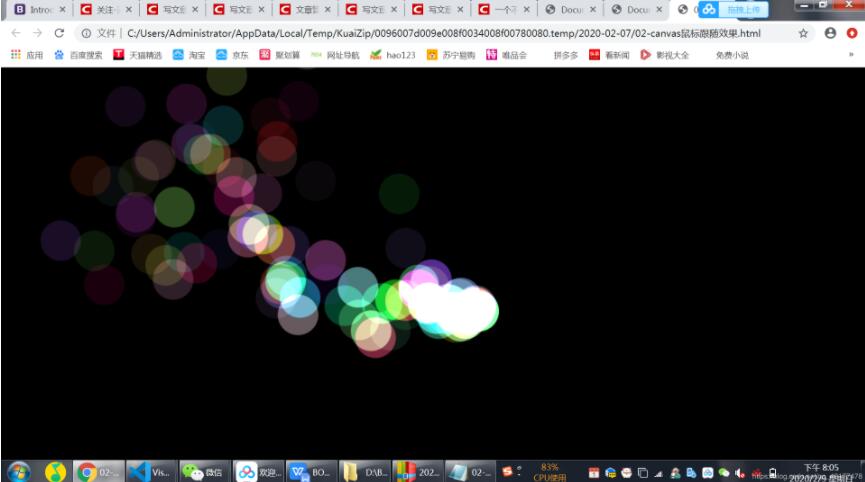
本示例展示了如何使用Canvas技术实现鼠标跟随的视觉效果,提供完整代码供参考。
核心逻辑在于监听鼠标移动事件,并在鼠标轨迹上生成光片元素。
<!DOCTYPE html>
<html>

<head>
 <meta charset="UTF-8">
 <title></title>
 <style>
 body {
 margin: 0;
 overflow: hidden;
 }

 #canvas {
 background: #000;
 }
 </style>
</head>

<body>
 <canvas id="canvas"></canvas>
 <script>
 var canvas = document.getElementById('canvas');
 var context = canvas.getContext('2d');
 var circleList = [];

 canvas.width = window.innerWidth;
 canvas.height = window.innerHeight;

 canvas.addEventListener('mousemove', function (e) {
 // 将对象push到数组中,画出来的彩色小点可以看作每一个对象中记录着信息 然后存在数组中
 circleList.push(new Circle(e.clientX, e.clientY));
 })

 //取x到y之间随机数:Math.round(Math.random()*(y-x)+x) 包括y
 function random(min, max) {
 return Math.round(Math.random() * (max - min) + min);
 }

 function Circle(x, y) {
 this.x = x;
 this.y = y;

 this.vx = (Math.random() - 0.5) * 3; //随机出来一个正数,或者负数。乘3是为了让速度变得大一点
 this.vy = (Math.random() - 0.5) * 3;

 this.color = 'rgb(' + random(0, 255) + ',' + random(0, 255) + ',' + random(0, 255) + ')';

 this.a = 1; // 初始透明度

 this.draw();
 }
 Circle.prototype = {
 draw() {
 context.beginPath();
 context.fillStyle = this.color;
 context.globalCompositeOperation = 'lighter';
 context.globalAlpha = this.a; //全局透明度
 context.arc(this.x, this.y, 30, 0, Math.PI * 2, false);
 context.fill();
 this.update();
 },
 update() {
 // 根据速度更新每一个小圆的位置
 this.x += this.vx;
 this.y += this.vy;
 this.a *= 0.98;
 }
 }

 function render() {
 //把原来的内容区域清除掉
 context.clearRect(0, 0, canvas.width, canvas.height);
 circleList.forEach(function (ele, i) {
 ele.draw();

 if (ele.a < 0.05) {
  circleList.splice(i, 1);
 }
 });

 requestAnimationFrame(render); //动画,会根据浏览器的刷新频率更新动画
 }
 render();
 </script>
</body>

</html>
以上就是本文的全部内容,希望对大家的学习有所帮助,也希望大家多多支持本站。
作者最新文章
JS在setTimeout或Ajax回调中打开新标签页失败怎么处理
2026-11-05 15:50:12
JS直播协议选型:HLS、FLV与WebRTC的延迟与兼容性对比
2026-11-05 12:16:14
JS实现回到顶部:scrollTop赋值与浏览器兼容性处理
2026-11-04 23:43:35
JS使用classList动态添加、移除和切换CSS类名
2026-11-04 23:40:58
在 D3.js 中实现平滑过渡动画的技巧
2026-11-03 23:46:09