

JavaScript 实现简易聊天对话框
作者:函数茶馆时间:2026-10-24 03:37:38浏览:413
本文提供了一段使用 JavaScript 实现的简易聊天对话框代码。通过 HTML 构建界面结构,利用 CSS 进行样式布局,并结合 JS 监听用户输入与按钮点击事件,动态生成聊天消息气泡。代码展示了如何操作 DOM 元素、处理文本内容以及实现自动滚动效果,适合前端初学者参考学习。
JavaScript 实现简易聊天对话框
下面展示了一段使用 JavaScript 编写的聊天对话框完整实现代码,供读者参考和借鉴。
<!DOCTYPE html>
<html>
 <head>
 <meta charset="utf-8">
 <title></title>
 <style type="text/css">
 .box{
 width:300px;
 height:400px;
 border:1px solid blue;
 margin:0 auto;
 }
 .inTer{
 width:280px;
 height:280px;
 border:1px solid deeppink;
 margin:0 auto;
 margin-top:10px;
 overflow-y:auto;
 }
 textarea{
 display:block;
 width: 276px;
 height:65px;
 margin:0 auto;
 margin-top:5px;
 }
 #btn{
 display:block;
 float:right;
 margin-right:10px;
 margin-top:5px;
 }
 p{
 display:inline-block;
 border-radius:5px;
 background:#dcdcdc;
 font-size:12px;
 padding:5px 5px;
 margin:5px 0;
 margin-left:5px;
 max-width:140px;
 word-wrap: break-word;
 }
 </style>
 </head>
 <body>
 <div class="box">
 <div class="inTer" id="father">
 <p>你好</p ></br>
 <p>你好</p ></br>
 <p>你好</p ></br>
 <p>heiheiheiheiehieheieheieheieheiheiehe</p ></br>
 </div>
 <textarea style="resize: none;" id="txt">
 </textarea>
 <input type="button" id="btn" value="发送" />
 </div>
 </body>
</html>
<script>
 var btn = document.getElementById("btn");
 var txt = document.getElementById("txt");
 var father = document.getElementById("father")
 var p = document.getElementsByTagName("p");
 btn.onclick=function(){
 if(txt.value==""){
 alert("请勿发送空内容");
 }
 else{
 var son = document.createElement("p");
 son.style.backgroundColor="yellowgreen";
 son.style.clear="both";
 son.style.float="right";
 son.style.marginRight="5px";
 son.innerText=txt.value;
 father.appendChild(son);
 txt.value="";
 son.scrollIntoView();
 }

 }
 document.onkeydown=function(evt){
 var e = evt || event;
 e.keyCode=e.which=e.charCode;
 if(e.keyCode==13 || e.keyCode==10){
 if(txt.value==""){
 alert("请勿发送空内容");
 }
 else{
 var son = document.createElement("p");
 son.style.backgroundColor="yellowgreen";
 son.style.clear="both";
 son.style.float="right";
 son.style.marginRight="5px";
 son.innerText=txt.value;
 father.appendChild(son);
 txt.value="";
 son.scrollIntoView();
 }
 }
 }
 </script>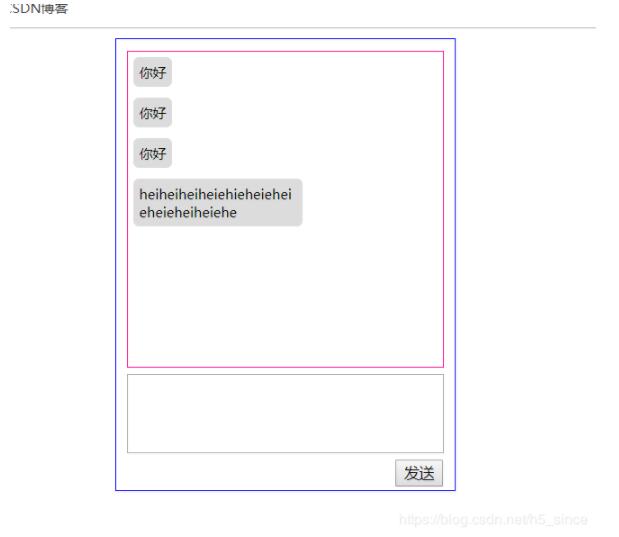
以上即为本文分享的全部内容,希望这段代码能对各位的学习有所启发。如果读者觉得有用,欢迎继续支持本站获取更多技术资源。
作者最新文章
JS大数值转字符串出现科学计数法怎么办
2026-11-05 17:09:21
JS split切割后出现空字符串怎么过滤
2026-11-05 16:00:30
在 React 或 Vue 项目中封装使用 JS 节流防抖
2026-11-05 15:27:29
JavaScript中怎么将带小数的字符串转为整数?
2026-11-05 14:32:38
怎么用JavaScript策略模式重构电商促销计算逻辑?
2026-11-05 14:01:09