

JavaScript实现自动播放匀速轮播图完整代码与原理
本文详细介绍如何使用JavaScript实现自动播放的匀速轮播图。核心包括封装匀速运动函数、动态生成导航条与列表项、利用深克隆实现无缝切换,以及处理鼠标悬停暂停等交互逻辑。提供完整HTML/CSS/JS代码示例,帮助开发者掌握轮播图开发技巧。
引言与概述
本文分享了一段使用JavaScript实现自动播放匀速轮播图的完整代码示例,供读者参考学习。
核心函数封装
首先进行函数封装,重点在于编写一个匀速运动函数。
function animate(obj,target,step,speed){
  clearInterval(obj.timer);
 var absStep = Math.abs(step);
 step = target > obj.offsetLeft ? absStep : -absStep;
 obj.timer = setInterval(function(){
  var distance = Math.abs(target - obj.offsetLeft);
  obj.style.left = obj.offsetLeft + step + 'px';
  if(distance < absStep){
  clearInterval(obj.timer);
  obj.style.left = target + 'px';
  }
 },speed);
 }
通过为对象动态添加属性,利用对象的timer属性来管理定时器,从而避免使用全局变量带来的潜在问题。
实现步骤详解
以下是具体的实现步骤:
1. 动态生成ol导航条,并将其作为子节点插入到all容器中。\n2. 根据ul中图片的数量,动态生成对应的li标签,使li成为ol的子节点。\n3. 为第0个li标签添加颜色样式,即添加current属性。\n4. 利用设置的属性值控制图片移动,实现鼠标悬停时图片切换的效果,并通过排他原理实现样式更新。\n5. 对ul中的第一张图片进行深克隆,并将克隆后的图片放置在ul的末尾。\n6. 引入自动播放函数,定义两个变量key和squre,其中key用于计算图片序号,squre用于计算当前li的序号。\n7. 在自动播放函数中,应用排他原理设置当前li标签的样式。\n8. 为容器添加onmouseover和onmouseout事件,实现鼠标悬停时暂停播放、鼠标离开时继续播放的功能。\n9. 当鼠标点击li标签时,将key设置为当前图片的index属性值,并将key的值赋给squre。
无缝滚动实现细节
接下来详细阐述实现过程中的关键细节:
1. 动态克隆ul中的第0张图片并追加到末尾,以实现自动轮播时的无缝效果。\n2. 克隆操作分为深克隆和浅克隆两种:深克隆会克隆标签内的所有内容,而浅克隆仅克隆外部标签。\n3. 深克隆的参数设置为true。
效果展示
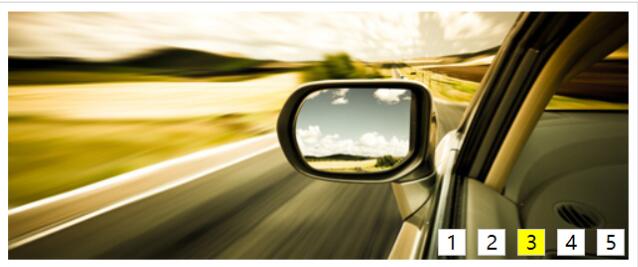
最终实现的视觉效果如下图所示:
完整代码示例
以下是完整的实现代码:
<!DOCTYPE html PUBLIC "-//W3C//DTD XHTML 1.0 Transitional//EN" "http://www.w3.org/TR/xhtml1/DTD/xhtml1-transitional.dtd">
<html xmlns="http://www.w3.org/1999/xhtml">
<head>
<meta http-equiv="Content-Type" content="text/html; charset=utf-8" />
<title>匀速轮播动画</title>
<style type="text/css">
 *{ padding:0; margin:0; list-style:none; border:0;}
 .all{
 width:500px;
 height:200px;
 padding:7px;
 border:1px solid #ccc;
 margin:100px auto;
 position:relative;
 }
 .screen{
 width:500px;
 height:200px;
 overflow:hidden;
 position:relative;
 }

 .screen li{
 width:500px;
 height:200px;
 overflow:hidden;
 float:left;
 }
 .screen ul{
 position:absolute;
 left:0;
 top:0px;
 width:3000px;
 }
 .all ol{
 position:absolute;
 right:10px;
 bottom:10px;
 line-height:20px;
 text-align:center;
 }
 .all ol li{
 float:left;
 width:20px;
 height:20px;
 background:#fff;
 border:1px solid #ccc;
 margin-left:10px;
 cursor:pointer;
 }
 .all ol li.current{
 background:yellow;
 }
</style>
<script src="js/匀速运动.js"></script>
<script>
 function $(id){
  return document.getElementById(id);
 }
 window.onload = function(){
  var ul = $('ul');
  var all = $('all');
  var imgs = ul.getElementsByTagName('img');
  var ol = document.createElement('ol');
  all.appendChild(ol);
  for(var i=0;i<imgs.length;i++){
   var li = document.createElement('li');
   li.innerHTML = i+1;
   li.setAttribute('index',i);
   ol.appendChild(li);
  }
  ol.childNodes[0].className = 'current';

  var olLis = ol.children;
  for(var i=0;i<olLis.length;i++){
   olLis[i].onmouseover = function(){
    for(var j=0;j<olLis.length;j++){
     olLis[j].className = '';
    }
    this.className = 'current';
    var index = -500*this.getAttribute('index');
    animate(ul,index,20,10);
    key=this.getAttribute('index');
    squre = key;
   }
  }

 ul.appendChild(ul.children[0].cloneNode(true));

  var timer=null;
  var key=0;
  var squre = 0;
  timer=setInterval(autoPlay, 1000);
   function autoPlay(){
   key++; //记录图片
   squre++;//记录导航条
   if(key>olLis.length){
    key=1;
    ul.style.left = 0 + 'px';
   }
   if(squre>=olLis.length){
    squre = 0;
   }
   animate(ul,-500*key,20,10);
   for(var i=0;i<olLis.length;i++){
    olLis[i].className = '';
   }
   olLis[squre].className = 'current';
   }
   all.onmouseover = function(){
   clearInterval(timer);
   }
   all.onmouseout = function(){
  timer=setInterval(autoPlay, 1000);
   }
 }
</script>
</head>
<body>
<div class="all" id='all'>
 <div class="screen">
  <ul id="ul">
   <li><img src="images/taobao/1.jpg" width="500" height="200" /></li>
   <li><img src="images/taobao/2.jpg" width="500" height="200" /></li>
   <li><img src="images/taobao/3.jpg" width="500" height="200" /></li>
   <li><img src="images/taobao/4.jpg" width="500" height="200" /></li>
   <li><img src="images/taobao/5.jpg" width="500" height="200" /></li>
  </ul>
 </div>

</div>
</body>
</html>
以上就是本文的全部内容,希望这些内容能对各位的学习有所帮助,同时也欢迎大家继续支持本站。
AOS.js 动画不触发怎么办?排查 DOM 加载与移动端兼容问题
2026-11-05 17:02:26
sigma.js 怎么实现节点点击、拖拽与悬停提示交互
2026-11-05 15:03:27
Matter.js 与 PixiJS/Three.js 集成:分离物理计算与渲染
2026-11-05 13:43:48
主流JS弹幕库选型指南:Danmaku.js等库的功能与体积对比
2026-11-05 09:28:19
JavaScript点击事件监听与交互效果实例
2026-11-05 09:10:19