

JavaScript实现简易网页计算器的完整示例
本文详细介绍如何使用JavaScript、CSS和HTML构建一个简易网页计算器。核心逻辑包括利用CSS进行界面布局,通过button按钮绑定点击事件,并采用this关键字统一处理多个按钮的点击回调。计算功能依赖eval()函数解析字符串表达式并执行运算,同时结合switch语句区分等号与清除键的操作。
JavaScript网页计算器实现概述
本文通过一个具体实例,展示如何使用JavaScript实现一个基础的网页计算器功能,供开发者参考学习。
界面布局与交互逻辑
<html>
    <head>
        <title>网页计算机</title>
        <meta charset="UTF-8"/>
        <style type="text/css">
            #jsjdiv{
                border: solid 1px black;
                border-radius: 5px;
                width: 200px;
                /*height: 400px;*/
                text-align: center; /*设置div内部居中*/
                margin: auto;    /*设置计算机居中*/
                background-color: darkgrey;
            }
            input[type=text]{
                width: 190px;          /*设置大小*/
                height: 35px;
                margin-top: 10px;   /*设置边框*/
                margin-bottom: 5px;
            }
            input[type=button]{
                width: 44px;
                height: 44px;
                /*margin-left: 5px;
                margin-right: 5px;*/
                margin-top: 5px;
                margin-bottom: 10px;
                font-size: 25px;  /*设置text的字体大小及深度*/
                font-weight: 600;
            }
        </style>
        <script type="text/javascript">
            function cal(btn){
                var num=btn.value;
                switch (num){   // 利用eval可以把string的内容转化成代码,在代码中输入可以直接进行计算
                    case "=":
                        document.getElementById("inp").value=eval(document.getElementById("inp").value);
                        break;
                    case "c":
                        document.getElementById("inp").value="";
                        break;
                    default:        //进行输入数据的拼接
                        document.getElementById("inp").value=document.getElementById("inp").value + num;
                        break;
                }
            }
        </script>
    </head>
    <body>
        <div id="jsjdiv">
            <input type="text" name="" id="inp" value="" /><br />
            <input type="button" name="" id="btn" value="1" onclick="cal(this)"/>
            <input type="button" name="" id="" value="2" onclick="cal(this)"/>
            <input type="button" name="" id="" value="3" onclick="cal(this)"/>
            <input type="button" name="" id="" value="4" onclick="cal(this)"/><br />
            <input type="button" name="" id="" value="5" onclick="cal(this)"/>
            <input type="button" name="" id="" value="6" onclick="cal(this)"/>
            <input type="button" name="" id="" value="7" onclick="cal(this)"/>
            <input type="button" name="" id="" value="8" onclick="cal(this)"/><br />
            <input type="button" name="" id="" value="9" onclick="cal(this)"/>
            <input type="button" name="" id="" value="+" onclick="cal(this)"/>
            <input type="button" name="" id="" value="-" onclick="cal(this)"/>
            <input type="button" name="" id="" value="*" onclick="cal(this)"/><br />
            <input type="button" name="" id="" value="0" onclick="cal(this)"/>
            <input type="button" name="" id="" value="/" onclick="cal(this)"/>
            <input type="button" name="" id="" value="c" onclick="cal(this)"/>
            <input type="button" name="" id="" value="=" onclick="cal(this)" />
        </div>
    </body>
</html>
以下是该计算器的实际运行效果展示。
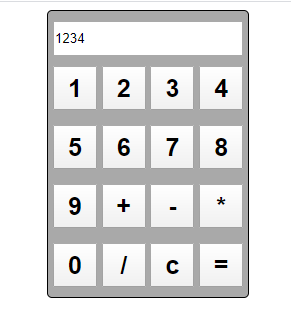
页面标题显示为“网页计算机”。
首先,使用CSS对div容器进行布局设计,搭建计算器的基本框架结构。
在框架内部,使用text类型的输入框用于显示数字或运算结果,并通过button元素添加各类功能按键。
按钮事件处理与this应用
实现的关键在于点击按钮时将数据输出到文本显示区。虽然可以通过为每个按钮单独定义函数并绑定onclick事件来实现,但这会导致代码冗余。因此,这里采用this关键字指向当前点击的对象,从而复用同一个处理函数,简化了代码结构。
核心计算逻辑:eval函数应用
在计算逻辑方面,利用eval()函数将输入的字符串表达式转换为可执行的代码。这使得程序可以直接对表达式进行运算并输出结果,实现了动态计算的功能。
特殊按键处理:switch分支控制
针对特殊按键如“=”(计算)和“c”(清除),通过switch语句进行判断区分,分别执行相应的计算或重置操作。
在线测试与相关工具推荐
感兴趣的用户可以使用在线HTML/CSS/JavaScript前端代码调试运行工具:http://tools.jb51.net/code/WebCodeRun来测试上述代码的运行效果。
此外,推荐以下几款实用的计算工具供进一步参考:
在线一元函数(方程)求解计算工具: http://tools.jb51.net/jisuanqi/equ_jisuanqi
科学计算器在线使用_高级计算器在线计算: http://tools.jb51.net/jisuanqi/jsqkexue
在线计算器_标准计算器: http://tools.jb51.net/jisuanqi/jsq
更多关于JavaScript相关内容还可查看本站专题:《JavaScript数学运算用法总结》、《JavaScript数据结构与算法技巧总结》、《JavaScript数组操作技巧总结》、《JavaScript事件相关操作与技巧大全》、《JavaScript操作DOM技巧总结》及《JavaScript字符与字符串操作技巧总结》
希望本文所述的实现思路与方法能对JavaScript程序设计有所帮助。
什么时候该用JS构造器:与工厂模式、字面量的选择对比
2026-11-05 16:18:22
推荐几款轻量级JS照片墙开源库及对比
2026-11-05 15:56:19
JavaScript递归写法有哪些常见陷阱及避免方法
2026-11-05 14:53:38
JS数组浅拷贝与深拷贝怎么选?场景与方法总结
2026-11-05 14:41:02
p5.js 中 setup() 和 draw() 函数的执行机制详解
2026-11-05 12:32:38