

JavaScript 实现简易秒表功能
作者:函数茶馆时间:2026-10-23 14:31:01浏览:105
本文介绍如何使用 JavaScript 实现一个具备启动、暂停和复位功能的简易秒表。通过操作 DOM 元素与定时器,点击按钮可切换计时状态,复位按钮可将时间重置为初始值,适合前端初学者参考学习。
JavaScript 实现简易秒表功能
本文分享了一段使用 JavaScript 编写的简易秒表代码示例,供读者参考学习。
功能描述:
该秒表需实现以下交互逻辑:点击启动按钮后开始计时,此时按钮文字变更为暂停;
点击暂停按钮时停止计时;点击复位按钮则清除所有状态,使界面回到初始的 00:00:00 状态。
运行效果:
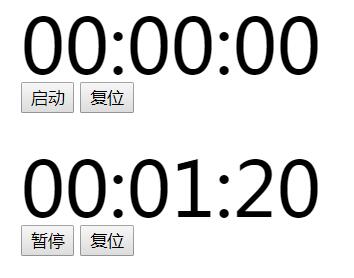
具体实现代码如下:
<!DOCTYPE html>
<html lang="en">
<head>
 <meta charset="UTF-8">
 <title>Title</title>
 <style>
 #showTime
 {
  width: 300px;
  height: 60px;
  font-size: 60px;
  line-height: 60px;
 }
 </style>
</head>
<body>
 <div>
 <div id="showTime">00:00:00</div>
 <button id="startBn">启动</button>
 <button id="restBn">复位</button>
 </div>
<script>
 //——————
 var time,showTime,startBn,restBn,pauseDate;
 //布尔开关
 var bool=false;
 //暂停的累计时间
 var pauseTime=0;

 init();
 function init() {
 showTime=document.getElementById("showTime");
 startBn=document.getElementById("startBn");
 restBn=document.getElementById("restBn");
 startBn.addEventListener("click",clickHandler);//开始按钮 ~ 暂停按钮
 restBn.addEventListener("click",clickHandler);//复位按钮
 setInterval(animation,16);
 }

 //转化时间函数
 function animation() {
 if(!bool) return;
 //前时间减去上次开启时间减去暂停累计时间
 var times=new Date().getTime()-time-pauseTime;
 var minutes=Math.floor(times/60000);//毫秒转化为分钟
 var seconds=Math.floor((times-minutes*60000)/1000);//已知分钟
 将time减去分钟 除去1000得出 秒
 var ms=Math.floor((times-minutes*60000-seconds*1000)/10);//
 showTime.innerHTML=
  (minutes<10 ? "0" +minutes : minutes)+":"
  +(seconds<10 ? "0"+seconds :seconds)+":"
 +(ms<10 ? "0"+ms : ms);
 }

 //点击时的事件
 function clickHandler(e) {
 e= e || window.event;
 if(this===startBn){
  bool=!bool;
  if(bool){
  this.innerHTML="暂停";
  //如果我们上一次暂停时间是空,表示没有暂停过,因此,直接返回0
  //如果上次的暂停时间是有值得,用当前毫秒数减去上次的毫秒数,这样就会得到暂停时间
  pauseTime+=(!pauseDate ? 0 : new Date().getTime()-pauseDate);
  if(time) return;
  time=new Date().getTime();
  return;//是为bool判断跳出
  }

  this.innerHTML="启动";
  pauseDate=new Date().getTime();
  return;//是为this是否等于startBn判断跳出
 }
 startBn.innerHTML="启动";
 pauseTime=0;
 pauseDate=null;
 bool=false;
 time=0;
 showTime.innerHTML="00:00:00";
 }

</script>
</body>
</html>
以上即为本文的全部内容,希望这段代码能对读者的学习有所帮助,欢迎继续支持本站获取更多资源。
作者最新文章
大型前端项目该选什么JavaScript编辑器?
2026-11-05 18:32:43
JavaScript正则替换中美元符号$与反斜杠的转义处理
2026-11-05 18:23:52
Object.assign合并JS对象的用法与注意事项
2026-11-05 17:56:08
JS大数值转字符串出现科学计数法怎么办
2026-11-05 17:09:21
JS split切割后出现空字符串怎么过滤
2026-11-05 16:00:30