

JavaScript 实现随机抽奖程序
作者:小括号时间:2026-10-23 12:55:36浏览:182
本文介绍了如何使用 JavaScript 实现一个随机抽奖程序。通过定义 CSS 样式美化界面,利用定时器控制抽奖动画的停止,并随机选取获奖者。代码包含 HTML 结构、CSS 样式及核心 JS 逻辑,适合前端初学者参考学习。
JS 随机抽奖代码实现
以下展示了利用 JavaScript 实现随机抽奖功能的具体代码,供读者参考。
<!--2018年9月12日——————幸运抽奖-->
<!DOCTYPE html>
<html>
<head>
 <title></title>
 <style type="text/css">

 .select{
 background: #3399FF;
 color:white;
 }
 .button{
 border-radius: 10px;
 height: 100px;
  font-size: 25px;
 width: 100px;
 background-color: #3399FF;
  color: white;
 }
 .title{
 font-family: cursive;
 }
 </style>

</head>
<body>
 <div style="text-align:-webkit-center;font-size: 57px;color: #3399FF;" class="title">抽奖人员名单</div>

 <table style="border:1px solid #ccc; width:800px; height:400px; text-align: center; margin: auto;" background="C:\Users\Administrator\Desktop\%application%\360壁纸\50736.jpg" >
 <tr>
 <td id="student_1">谢林峰</td>
 <td id="student_2">卿明珠</td>
 <td id="student_3">袁龙</td>
 <td id="student_4">周志明</td>
 <td id="student_5">秦玉萍</td>
 <td id="student_6">金晖</td>
 <td id="student_7">陶灵峰</td>
 <td id="student_8">廖杨明</td>


 </tr>
 <tr>
 <td id="student_9">胡雄</td>
 <td id="student_10">胡俊凡</td>
 <td id="student_11">李欣</td>
 <td id="student_12">易君</td>
 <td id="student_13">湛威</td>
 <td id="student_14">古海平</td>
 <td id="student_15">潘杰杰</td>
 <td id="student_16">伍光政</td>
 </tr>
 <tr>
 <td id="student_17">谭谈</td>
 <td id="student_18">周强</td>
 <td id="student_19">陈辉</td>
 <td id="student_20">李庚云</td>
 <td id="student_21">吴玉风</td>
 <td id="student_22">伍鹏</td>
 <td id="student_23">蔡东龙</td>
 <td id="student_24">胡俊飞</td>
 </tr>
 <tr>
 <td id="student_25">文捷频</td>
 <td id="student_26">唐明</td>
 <td id="student_27">吴鑫培</td>
 <td id="student_28">唐翌</td>
 <td id="student_29">邹家欢</td>
 <td id="student_30">刘朋</td>
 <td id="student_31">周文才</td>
 <td id="student_32">阳小松</td>
 </tr>
 <tr>
 <td id="student_33">张明博</td>
 <td id="student_34">严伟</td>
 <td id="student_"></td>
 <td id="student_"></td>
 <td id="student_"></td>
 <td id="student_"></td>
 <td id="student_"></td>
 <td id="student_"></td>
 </tr>


 </table>

 <sapn style="margin-left: 430px;">抽奖倒计时:</sapn><span id="Ten" style="color:red;font-size: 70px;">10</span>
 <span style="color:red">s</span>
 <span style="margin-left: 220px;">幸运星:</span>
 <span style="font-size: 70px; color: red;" id="Lucky" class="title"></span>

 <div style="text-align: -webkit-center;"><button onclick="go()" class="button">走你</button></div>


</body>

 <script type="text/javascript">
 //鼠标单击事件
 var stuInterval;
 var flag = false;

 //点击开始事件
 function go(){
 if(flag != false){
 return;
 }
 flag = true;
 setTimeout(function(){
 flag = false;
 },15000);

 time();//调用时间倒计时方法

 //循环选取学生
 stuInterval=setInterval(function(){
 var ran=Math.floor(Math.random()*34+1);
 var id="student_"+ran;
 //获取到文本值并且赋属性
 var td=document.getElementById(id);

 //删除之前的样式
 var stuO = document.getElementsByClassName("select");
 if(stuO.length != 0){
  stuO[0].setAttribute("class","");
 }if(stuO){
 td.setAttribute("class","select");
 var stuname = td.innerText;
 document.getElementById("Lucky").innerText = stuname;
 }

 },200)

 }

 //时间倒计时
 function time(){
 var t=10;
 var int=setInterval(function(){
 --t;
 var tspan=document.getElementById("Ten");
 tspan.innerText=t;
 if(t==0){
 clearInterval(int);
 clearInterval(stuInterval);//延时特殊情况
 }
 },1000);
 }
 </script>

</html>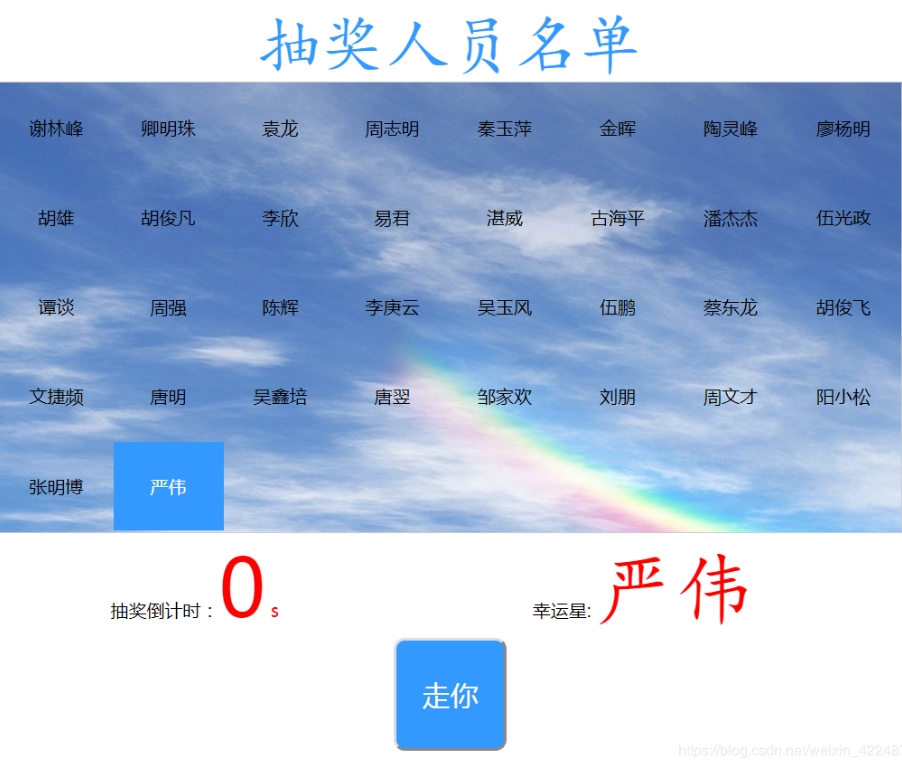
以上内容即为本文的全部介绍,希望能为读者的学习提供便利,同时也欢迎持续关注本站以获取更多技术分享。
作者最新文章
JS语法错误会阻止加载吗?区分SyntaxError与资源加载失败
2026-11-05 16:08:46
JavaScript常见SyntaxError语法错误排查与修复方法
2026-11-05 13:58:44
JS中slice、substring和substr截取字符串的区别
2026-11-05 13:43:47
JS 转 TS 手动迁移最佳实践:从配置 tsconfig 到消除 any 类型
2026-11-05 11:53:32
为什么JS数组push后得到的是数字而不是数组?
2026-11-05 09:59:18