

Layui数据表格结合SpringMVC实现搜索与分页功能
作者:工具松鼠时间:2026-10-23 11:35:47浏览:93
本文详解如何使用Layui数据表格结合SpringMVC框架实现前端搜索与后端分页功能。通过配置Layui的reload方法传递搜索关键词与类型参数,后端接收参数执行模糊查询,并封装符合Layui规范的ResultMap返回JSON数据,从而完成完整的数据交互流程。
具体实现步骤如下所示:
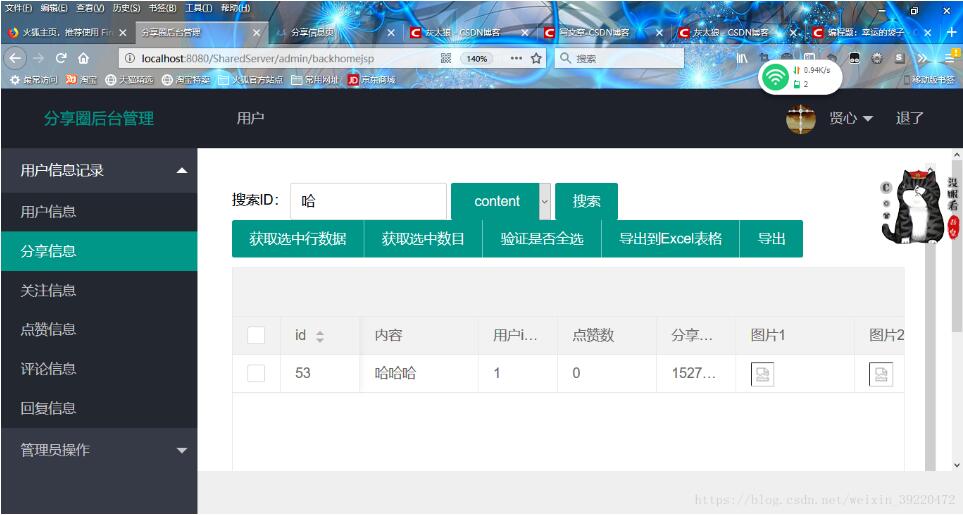
前端搜索界面与交互逻辑
首先在前端页面中添加搜索区域的HTML结构:
<div class="demoTable">
  搜索ID:
  <div class="layui-inline">
    <input class="layui-input" name="keyWord" id="keyWord" autocomplete="off">
  </div>
  <span class="input-group-btn">
              <select name="keyType" id="key_type" class="layui-btn">
                <option value="userid" selected="selected">userid</option>
                 <option value="content" >content</option>
              </select>
    </span>
  <button class="layui-btn" data-type="reload">搜索</button>

</div>
接着在JavaScript中编写触发搜索的逻辑:
reload:function () {
  var keyWord=$("#keyWord").val();
  var keyType=$("#key_type option:selected").val();
  table.reload('contenttable',{
    method:'post',
    where:{keyWord:keyWord,keyType:keyType}
  });
}
以下是完整的JavaScript代码示例:
<script>
  layui.use('table', function(){
    var table = layui.table;

    //渲染
    table.render({
      elem: '#test' //绑定table表格
      ,height: 450
      ,url: '<%=request.getContextPath()%>/admin/backContent' //后台springmvc接收路径
      ,page:true  //true表示分页
      ,limit: 10
      ,id:'contenttable'
      ,toolbar: '#toolbarDemo'
      ,cols: [[
        {type: 'checkbox', fixed: 'left'}
        ,{field:'id', title:'id', width:80, fixed: 'left', unresize: true, sort: true}
        ,{field:'content', title:'内容', width:120}
        ,{field:'userid', title:'用户id', width:80, sort: true}
        ,{field:'nice', title:'点赞数', width:100}
        ,{field:'createtime', title:'分享时间', width:80, sort: true}
        ,{field:'pic1', title:'图片1', width:120,templet:'<div><img src="http://localhost:8089/SharedImageServer/contentpic/{{ d.pic1}}"></div>'}
        ,{field:'pic2', title:'图片2', width:120,templet:'<div><img src="http://localhost:8089/SharedImageServer/contentpic/{{ d.pic2}}"></div>'}
        ,{field:'pic3', title:'图片3', width:120,templet:'<div><img src="http://localhost:8089/SharedImageServer/contentpic/{{ d.pic3}}"></div>'}
      ]]
    });


    //监听表格行点击
    table.on('tr', function(obj){
      console.log(obj)
    });

    //监听表格复选框选择
    table.on('checkbox(test)', function(obj){
      console.log(obj)
    });

    //监听表格单选框选择
    table.on('radio(test2)', function(obj){
      console.log(obj)
    });

    //监听单元格编辑
    table.on('edit(test2)', function(obj){
      var value = obj.value //得到修改后的值
        ,data = obj.data //得到所在行所有键值
        ,field = obj.field; //得到字段

    });

    //监听工具条
    table.on('tool(test)', function(obj){
      var data = obj.data;
      if(obj.event === 'del'){
        layer.confirm('真的删除行么', function(index){
          obj.del();
          layer.close(index);
        });
      } else if(obj.event === 'edit'){
        layer.prompt({
          formType: 2
          ,value: data.username
        }, function(value, index){
          obj.update({
            username: value
          });
          layer.close(index);
        });
      }
    });

    var $ = layui.jquery, active = {
      getCheckData: function(){//获取选中数据
        var checkStatus = table.checkStatus('contenttable')
          ,data = checkStatus.data;
        layer.alert(JSON.stringify(data));
      }
      ,getCheckLength: function(){//获取选中数目
        var checkStatus = table.checkStatus('contenttable')
          ,data = checkStatus.data;
        layer.msg('选中了:'+ data.length + ' 个');
      }
      ,isAll: function(){//验证是否全选
        var checkStatus = table.checkStatus('contenttable');
        layer.msg(checkStatus.isAll ? '全选': '未全选')
      }
      ,parseTable: function(){
        table.init('parse-table-demo', {
          limit: 3
        });
      }
      ,add: function(){
        table.addRow('test')
      }
      ,delete: function(){
        layer.confirm('确认删除吗?', function(index){
          table.deleteRow('test')
          layer.close(index);
        });
      }
      ,reload:function () {
        var keyWord=$("#keyWord").val();
        var keyType=$("#key_type option:selected").val();
        table.reload('contenttable',{
          method:'post',
          where:{keyWord:keyWord,keyType:keyType}
        });
      }
    };
    $('i').on('click', function(){
      var type = $(this).data('type');
      active[type] ? active[type].call(this) : '';
    });
    $('.layui-btn').on('click', function(){
      var type = $(this).data('type');
      active[type] ? active[type].call(this) : '';
    });

  });

</script>
通过调用reload方法重载表格,将搜索参数传递至SpringMVC后台执行模糊查询,并将查询结果返回即可。
后端控制器与数据封装
SpringMVC控制层的相关代码如下:
/**
 * layui-content后台代码
 * @return
 */
@RequestMapping(value = "/backContent")
@ResponseBody
public ResultMap<List<Content>> backContent(Page page, @RequestParam("limit") int limit){
  page.setRows(limit);

  List<Content>contentList=contentService.selectPageList(page);
  int totals=contentService.selectPageCount(page);

  page.setTotalRecord(totals);
  return new ResultMap<List<Content>>(0,"",totals,contentList);
}
由于Layui返回的参数不仅包含JSON数组,还需符合其特定的数据格式才能在JSP页面正确显示,因此需要定义ResultMap类来处理返回数据的格式。
package net.stxy.one.model;

/**
 *
 * layui数据表格返回数据处理类
 * Created by ASUS on 2018/5/19
 *
 * @Authod Grey Wolf
 */
public class ResultMap<T> {
  private String msg;
  private T data;
  private int code;
  private int count;

  public String getMsg() {
    return msg;
  }

  public void setMsg(String msg) {
    this.msg = msg;
  }

  public T getData() {
    return data;
  }

  public void setData(T data) {
    this.data = data;
  }

  public int getCode() {
    return code;
  }

  public void setCode(int code) {
    this.code = code;
  }

  public int getCount() {
    return count;
  }

  public void setCount(int count) {
    this.count = count;
  }

  public ResultMap(int code,String msg, int count,T data) {
    this.code = code;
    this.msg = msg;
    this.count = count;
    this.data = data;
  }

  public ResultMap() {
  }
}
数据库查询实现
对应的Mapper SQL语句如下:
<!-- 通过条件分页查询,返回数据集 -->
<select id="selectPageList" parameterType="net.stxy.one.model.Page" resultMap="BaseResultMap" >
 select
 <include refid="Base_Column_List" />
 from content
 <where>

  <if test="keyWord!='' and keyType=='userid' ">
    AND userid like '%' #{keyWord} '%'
  </if>
  <if test="keyWord!='' and keyType=='content' ">
    AND content like '%' #{keyWord} '%'
  </if>

 </where>
 order by id DESC
 limit #{start},#{rows}
</select>

<!-- 通过条件分页查询,返回总记录数 -->
<select id="selectPageCount" parameterType="net.stxy.one.model.Page" resultType="java.lang.Integer">
 select count(1) from content
  <where>

   <if test="keyWord!='' and keyType=='userid' ">
    AND userid like '%' #{keyWord} '%'
   </if>
   <if test="keyWord!='' and keyType=='content' ">
     AND content like '%' #{keyWord} '%'
   </if>

 </where>
</select>
以上即为Layui数据表格结合SpringMVC实现搜索功能的完整示例,希望能为读者提供参考,感谢支持。
作者最新文章
WebStorm内置JS代码格式化功能怎么用
2026-11-05 10:10:47
在线JS代码格式化与混淆压缩工具推荐及使用指南
2026-11-03 20:31:53
CodePen、JSFiddle与RunJS对比:哪款在线JavaScript编辑器更好用
2026-11-03 18:52:45
无需安装环境,5款主流JavaScript在线运行工具推荐
2026-11-03 18:23:26
JS怎么将地址栏查询字符串转换为JSON对象
2026-11-03 18:10:29