

Layui数据表格前后端JSON数据交互与封装实现
作者:接口漫谈时间:2026-10-23 11:20:33浏览:94
本文详细解析Layui数据表格的前后端JSON数据交互流程。通过展示前端表格配置、JS加载代码及后端返回的标准JSON格式,说明数据接收的关键点。同时提供PageUtil工具类示例,帮助开发者封装符合Layui规范的后端返回数据,实现高效的分页与列表展示。
Layui数据表格前后端JSON交互实现
首先展示最终实现的界面效果。
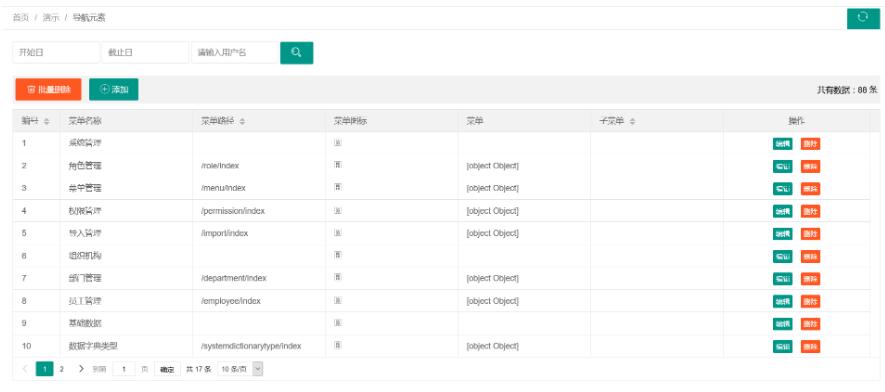
接下来是前端数据表格的具体配置与展示部分。
 <div class="x-body">
  <%-- 数据表格 --%>
  <table class="layui-table" lay-data="{
   id:'test',
   url:'/menu/page',
   page:true,
   limits: [10,20,50], //每页条数的选择项,默认:[10,20,30,40,50,60,70,80,90]
   limit: 10, //每页默认显示的数量
   method:'post' //提交方式
   }" lay-filter="test">
   <thead>
    <tr>
     <th lay-data="{field:'id', width:80, sort: true}">编号</th>
     <th lay-data="{field:'name'}">菜单名称</th>
     <th lay-data="{field:'url', sort: true}">菜单路径</th>
     <th lay-data="{field:'icon'}">菜单图标</th>
     <th lay-data="{field:'parent'}">菜单</th>
     <th lay-data="{field:'children', sort: true}">子菜单</th>
     <th lay-data="{fixed: 'right', toolbar: '#barDemo', width:250, align:'center'}">操作</th>
    </tr>
   </thead>
  </table>
 </div>

 <%-- 这里可以放CRUD按钮 --%>
 <script type="text/html" id="barDemo">
  <a class="layui-btn layui-btn-xs" lay-event="detail">编辑</a>
  <a class="layui-btn layui-btn-danger layui-btn-xs" lay-event="del">删除</a>
 </script>
以下是前端JavaScript核心代码的实现逻辑。
$(function () {
 //注意:这里是数据表格的加载数据,必须写
 layui.use(['table', 'layer', 'form'], function () {
  var table = layui.table;
  layer = layui.layer;
  form = layui.form;
  //CURD...
 });

});
后端接口必须返回符合Layui规范要求的JSON数据结构。
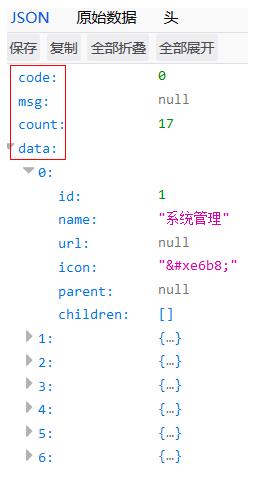
建议将后端返回的数据结构抽取为通用工具类,以便统一封装前端所需的JSON格式。
public class PageUtil<T> {

 private int code=0;
 private String msg;
 private Long count; //总条数
 private List<T> data = new ArrayList(); //装前台当前页的数据
 //getter/setter方法...

}
以上就是Layui数据表格前后端JSON数据接收方法的完整内容。希望本文的介绍能为大家提供有效的参考,同时也欢迎大家继续支持本站获取更多技术分享。
作者最新文章
全栈开发中JavaScript与Java怎么协作?前后端技术栈配合解析
2026-11-04 11:08:24
Node.js官网访问慢?国内镜像加速下载方案
2026-11-03 18:57:24
Node.js 连接 MySQL 数据库实现增删改查操作
2026-11-03 14:31:14
Windows系统安装Node.js:下载、配置与环境验证
2026-11-03 14:15:56
Linux (Ubuntu/CentOS) 环境下安装Node.js的常用方法
2026-11-03 10:18:39