

原生JavaScript实现网页滑动解锁功能
本文介绍如何使用原生JavaScript和CSS实现类似iPhone风格的网页滑动解锁功能。通过控制CSS显示与隐藏,无需jQuery即可在IE、Firefox、Chrome等浏览器中实现滑动后解锁评论框的交互效果,适合需要轻量级前端交互的场景。
滑动解锁功能概述
本文通过具体实例,讲解如何利用JavaScript实现类似iPhone风格的网页滑动解锁效果。内容包含详细实现思路与代码示例,供开发者参考学习。
iPhone带来的用户体验革新已延伸至网页设计领域。近期不少博客评论区采用了类似的滑动解锁机制,用户必须完成滑动操作后方可进行评论或其他交互。该功能实现难度适中,核心在于优质的滑动图标设计,配合JavaScript与CSS即可完成。此处提供一个基础实现方案,主要功能如下:
核心功能实现细节
1. 页面加载时默认隐藏评论输入框,开发者可根据需求将其设为禁用状态(disabled),具体逻辑可在源码中调整。 2. 当用户完成滑动解锁动作后,评论输入框随之显示,可通过启用(enable)textarea元素来实现。 3. 全程使用原生JavaScript编写,确保在IE、Firefox、Chrome及Safari等主流浏览器中兼容运行。
效果展示与源码说明
最终效果大致如下所示:
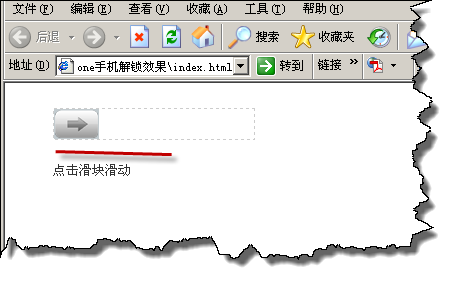
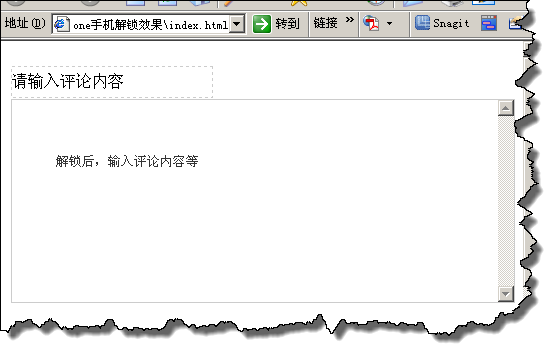
开发者可根据实际需求修改部分源代码,以集成自定义的业务逻辑。
完整代码示例如下,文末也提供了源码下载链接:
<!DOCTYPE html PUBLIC "-//W3C//DTD XHTML 1.0 Transitional//EN" "http://www.w3.org/TR/xhtml1/DTD/xhtml1-transitional.dtd">
<html xmlns="http://www.w3.org/1999/xhtml">
<head>
<meta http-equiv="Content-Type" content="text/html; charset=utf-8" />
<title>yihaomen.com js滑屏解锁</title>
<style type="text/css">
#slider_comment{position:relative;width:426px;height:640px;margin:10px auto;}
#lock{width:200px;height:30px;border:1px dashed #ccc;line-height:30px;}
#lock span{position:absolute;width:45px;height:30px;cursor:pointer;background:url(img/arrow.png) no-repeat;}
</style>
<script type="text/javascript">
window.onload = function ()
{
  var slider_comment = document.getElementById("slider_comment");
  var oLock = document.getElementById("lock");
  var oBtn = oLock.getElementsByTagName("span")[0];
  var comment=document.getElementById('comment');
  var disX = 0;
  var maxL = oLock.clientWidth - oBtn.offsetWidth;
  oBtn.onmousedown = function (e)
  {
    var e = e || window.event;
    disX = e.clientX - this.offsetLeft;
    document.onmousemove = function (e)
    {
      var e = e || window.event;
      var l = e.clientX - disX;
      l < 0 && (l = 0);
      l > maxL && (l = maxL);
      oBtn.style.left = l + "px";
      oBtn.offsetLeft == maxL && (comment.style.display="block",oLock.innerHTML = "请输入评论内容");
      return false;
    };
    document.onmouseup = function ()
    {
      document.onmousemove = null;
      document.onmouseup = null;
      oBtn.releaseCapture && oBtn.releaseCapture();
      oBtn.offsetLeft > maxL / 2 ?
        startMove(maxL, function ()
        {
          comment.style.display="block";
          oLock.innerHTML = "请输入评论内容";
          oLock.style.display = "block";
        }) :
        startMove(0)
    };
    this.setCapture && this.setCapture();
    return false
  };
  function startMove (iTarget, onEnd)
  {
    clearInterval(oBtn.timer);
    oBtn.timer = setInterval(function ()
    {
      doMove(iTarget, onEnd)
    }, 30)
  }
  function doMove (iTarget, onEnd)
  {
    var iSpeed = (iTarget - oBtn.offsetLeft) / 5;
    iSpeed = iSpeed > 0 ? Math.ceil(iSpeed) : Math.floor(iSpeed);
    iTarget == oBtn.offsetLeft ? (clearInterval(oBtn.timer), onEnd && onEnd()) : oBtn.style.left = iSpeed + oBtn.offsetLeft + "px"
  }
};
</script>
</head>
<body>
<div id="slider_comment">
<div id="lock"><span></span></div>
<div id="comment" style="width:500px;height:200px;display:none;">
  <textarea id="comment_text" rows=5 style="width:500px;height:200px;border:1px solid #ccc;"></textarea>
</div>
</div>
</body>
</html>
如需获取完整源代码,请点击此处本站下载。
对jQuery相关技术感兴趣的读者,可进一步查阅本站专题:《jQuery页面元素操作技巧汇总》、《jQuery常见事件用法与技巧总结》、《jQuery常用插件及用法总结》、《jQuery扩展技巧总结》及《jquery选择器用法总结》。
希望上述内容能对您的前端开发工作提供有益帮助。
JS动态构建复杂嵌套JSON对象的方法
2026-11-05 15:41:52
JS负数取余为什么是负数?详解余数与模运算区别
2026-11-05 13:34:41
JS 解压出现乱码或报错怎么解决?
2026-11-05 12:32:38
JS 中 startsWith、indexOf 与正则判断字符串前缀的对比
2026-11-04 22:19:43
JS解析Excel后怎么将数据转换为JSON格式
2026-11-04 20:58:28