

解决ECharts多折线数据坐标与数值不对应问题
作者:工具松鼠时间:2026-10-22 19:55:18浏览:268
本文针对ECharts中多个折线数据显示时坐标与数值不对齐的问题,分析了stack参数的作用机制。通过对比配置stack与移除stack的代码示例,说明了该参数如何影响纵坐标刻度的计算方式,从而提供解决数据展示异常的具体配置建议。
ECharts多折线图stack参数配置解析
当图表中包含多条折线数据时,ECharts允许通过配置stack属性来决定数据是以堆积形式展示还是以独立数值展示。
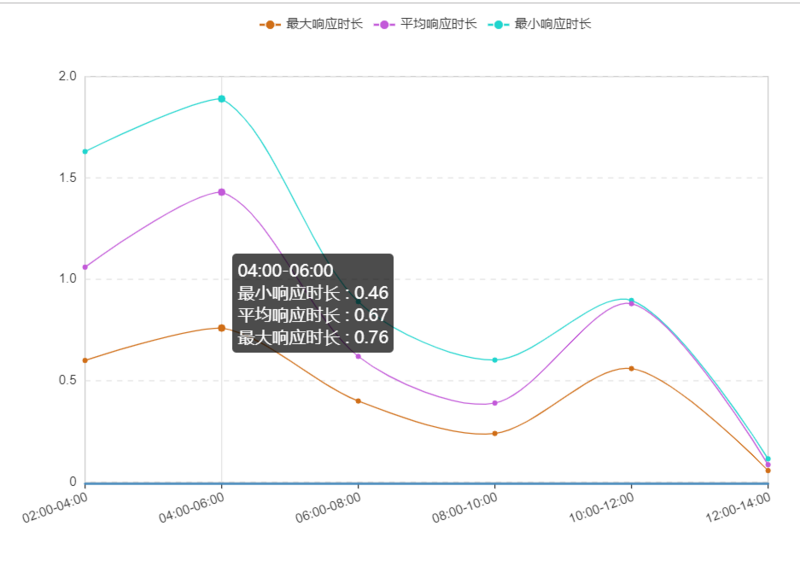
option = {
    noDataLoadingOption: {
     text: '暂无数据',
     effect: 'bubble',
     effectOption: {effect: {n: 0}}, textStyle: {fontSize: 24}
    },
    symbolList: ['circle'],
    tooltip: {
     trigger: 'axis', textStyle: {align: 'left'},
     axisPointer: {lineStyle: {color: '#E3E3E3', width: 1, type: 'solid'},}
    },
    // grid: {x: '60px', x2: '60px', borderWidth: 0},
    legend: {data: ['最大响应时长', '平均响应时长', '最小响应时长']},
    toolbox: {show: true},
    // calculable: true,
    xAxis: [{
      type: 'category',
      boundaryGap: false,
      data: ['00:00-02:00', '02:00-04:00', '04:00-06:00', '06:00-08:00', '08:00-10:00', '10:00-12:00'],
      splitLine: {lineStyle: {width: 0}},
      axisLabel: {interval: 0,/*横轴信息全部显示*/  rotate: 20,/*20度角倾斜显示*/}
     }],
    yAxis: [{
      type: 'value',
      axisLine: {lineStyle: {color: '#333', width: 0, type: 'solid'}},
      splitLine: {lineStyle: {color: '#e3e3e3', width: 1, type: 'dashed'}},
     }],
    series: [
     {
      name: '最大响应时长',
      smooth: true,
      type: 'line',
      stack: '总量', // 重要的点 这个参数会使用堆积值作为纵坐标的刻量值。
      data:[........],
      itemStyle: {normal: {color: '#D06E17', lineStyle: {width: 1, color: '#D06E17'}}}
     },{
      name: '平均响应时长',
      smooth: true,
      type: 'line',
      stack: '总量', // 重要的点 这个参数会使用堆积值作为纵坐标的刻量值。
      data:[........],
      itemStyle: {normal: {color: '#C35AD9', lineStyle: {width: 1, color: '#C35AD9'}}}
     },{
      name: '最小响应时长',
      smooth: true,
      type: 'line',
      stack: '总量', // 重要的点 这个参数会使用堆积值作为纵坐标的刻量值。
      data:[........],
      itemStyle: {normal: {color: '#1FD5CE', lineStyle: {width: 1, color: '#1FD5CE'}}}
     },
   ]
移除stack属性配置后,折线将不再进行数值累加,而是基于原始数据值进行绘制。
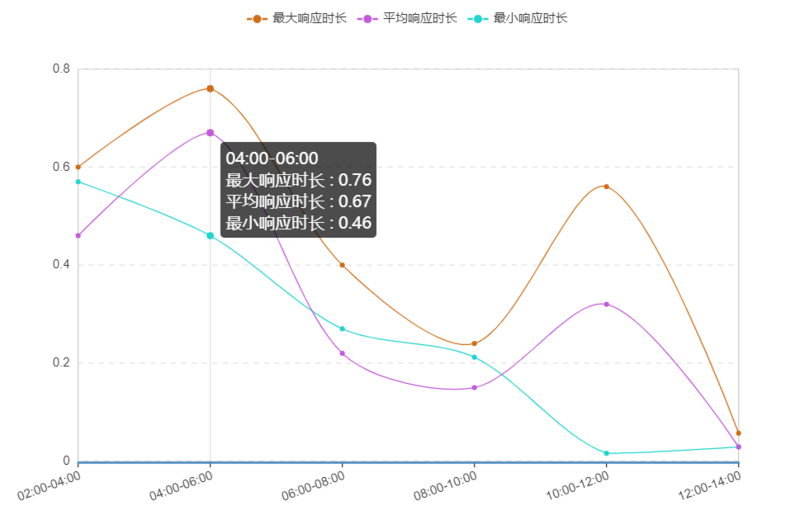
 option3 = {
    noDataLoadingOption: {
     text: '暂无数据',
     effect: 'bubble',
     effectOption: {effect: {n: 0}}, textStyle: {fontSize: 24}
    },
    symbolList: ['circle'],
    tooltip: {
     trigger: 'axis', textStyle: {align: 'left'},
     axisPointer: {lineStyle: {color: '#E3E3E3', width: 1, type: 'solid'},}
    },
    // grid: {x: '60px', x2: '60px', borderWidth: 0},
    legend: {data: ['最大响应时长', '平均响应时长', '最小响应时长']},
    toolbox: {show: true},
    // calculable: true,
    xAxis: [{
      type: 'category',
      boundaryGap: false,
      data: ['00:00-02:00', '02:00-04:00', '04:00-06:00', '06:00-08:00', '08:00-10:00', '10:00-12:00'],
      splitLine: {lineStyle: {width: 0}},
      axisLabel: {interval: 0,/*横轴信息全部显示*/  rotate: 20,/*20度角倾斜显示*/}
     }],
    yAxis: [{
      type: 'value',
      axisLine: {lineStyle: {color: '#333', width: 0, type: 'solid'}},
      splitLine: {lineStyle: {color: '#e3e3e3', width: 1, type: 'dashed'}},
     }],
    series: [
     {
      name: '最大响应时长',
      smooth: true,
      type: 'line',
      // stack: '总量', // 去除stack这个参数
      itemStyle: {normal: {color: '#D06E17', lineStyle: {width: 1, color: '#D06E17'}}}
     },{
      name: '平均响应时长',
      smooth: true,
      type: 'line',
      // stack: '总量', // 去除stack这个参数
      itemStyle: {normal: {color: '#C35AD9', lineStyle: {width: 1, color: '#C35AD9'}}}
     },{
      name: '最小响应时长',
      smooth: true,
      type: 'line',
      // stack: '总量', // 去除stack这个参数
      itemStyle: {normal: {color: '#1FD5CE', lineStyle: {width: 1, color: '#1FD5CE'}}}
     },
   ]
 };
以上内容为本文核心要点,旨在帮助读者解决相关学习中的疑惑,欢迎继续支持本站获取更多技术分享。
作者最新文章
WebStorm内置JS代码格式化功能怎么用
2026-11-05 10:10:47
在线JS代码格式化与混淆压缩工具推荐及使用指南
2026-11-03 20:31:53
CodePen、JSFiddle与RunJS对比:哪款在线JavaScript编辑器更好用
2026-11-03 18:52:45
无需安装环境,5款主流JavaScript在线运行工具推荐
2026-11-03 18:23:26
JS怎么将地址栏查询字符串转换为JSON对象
2026-11-03 18:10:29