

原生JavaScript实现Flappy Bird小游戏教程
作者:代码拾荒时间:2026-10-22 19:49:49浏览:417
本文详细介绍如何使用原生JavaScript、HTML和CSS从零实现一个简易版的Flappy Bird游戏。内容涵盖游戏基础结构搭建、CSS样式布局以及核心JS逻辑,包括封装的动画函数、小鸟运动控制及碰撞检测机制。适合前端初学者通过实际案例掌握DOM操作、定时器应用及基础游戏循环逻辑。
项目概述与目标
本教程旨在通过原生JavaScript实现一个结构简单的Flappy Bird(愤怒的小鸟)风格小游戏。该案例代码精简,逻辑清晰,非常适合作为前端新手的练习项目,帮助理解基础的游戏开发流程。
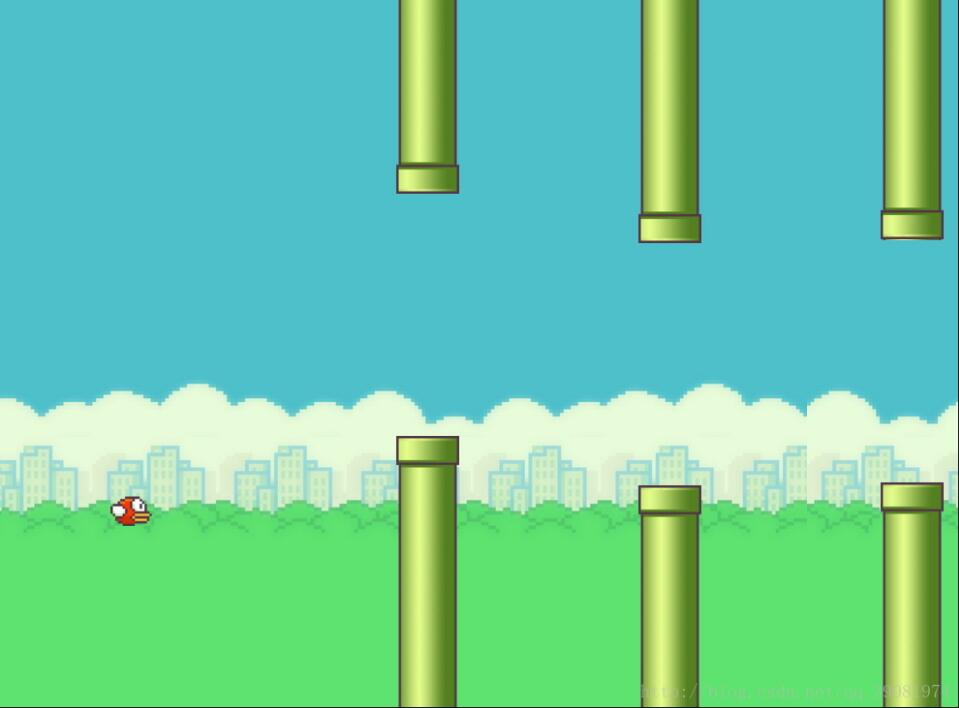
HTML结构搭建
首先构建游戏的HTML基础结构。
<div id="game">
  <div id="bird"></div>
</div>
CSS样式设计
接着定义CSS样式,设置游戏容器尺寸、背景及元素定位。
#game {
    width: 800px;
    height: 600px;
    border: 1px solid #000;
    background: url(images/sky.png);
    overflow: hidden;
    position: relative;
  }

  #game .pipeD {
    background: url(images/pipe1.png) top center;
    position: absolute;
  }

  #game .pipeU {
    background: url(images/pipe2.png) bottom center;
    position: absolute;
  }

  #bird {
    width: 34px;
    height: 25px;
    /*border-radius: 10px;*/
    /*background-color: red;*/
    position: absolute;
    top: 100px;
    left: 100px;
    background: url(images/birds.png) -8px -10px no-repeat;
  }
动画函数封装
核心逻辑部分由原生JavaScript编写。本案例中复用了前期封装的一个通用动画函数,用于处理元素的平滑移动效果。
function animate(obj, json, fn) {
  clearInterval(obj.timer);
  obj.timer = setInterval(function () {
    var flag = true;
    for (var k in json) {
      if (k === "opacity") {
        var leader = getStyle(obj, k) * 100;
        var target = json[k] * 100;
        var step = (target - leader) / 10;
        step = step > 0 ? Math.ceil(step) : Math.floor(step);
        leader = leader + step;
        obj.style[k] = leader / 100;
      } else if (k === "zIndex") {
        obj.style.zIndex = json[k];
      } else {
        var leader = parseInt(getStyle(obj, k)) || 0;
        var target = json[k];
        var step = (target - leader) / 10;
        step = step > 0 ? Math.ceil(step) : Math.floor(step);
        leader = leader + step;
        obj.style[k] = leader + "px";
      }
      if (leader !== target) {
        flag = false;
      }
    }
    if (flag) {
      clearInterval(obj.timer);
      if (fn) {
        fn();
      }
    }
  }, 15);
}
function getStyle(obj, attr) {
  if (window.getComputedStyle) {
    return window.getComputedStyle(obj)[attr];
  } else {
    return obj.currentStyle[attr];
  }
}
游戏核心逻辑实现
以下是控制游戏运行逻辑的JavaScript代码,包括小鸟状态、管道生成及碰撞检测等核心功能。
var birdElement = document.getElementById("bird");
var game = document.getElementById("game");
var gameover = false;
var g = 1;
var i = 0;
var timer=null;
var bird = {
  x: birdElement.offsetLeft,
  y: birdElement.offsetTop,
  speedX: 5,
  speedY: 0,
  entity: birdElement
};
var sky = {
  x: 0
};

//var timer=setInterval(function(){
//  birdElement.style.backgroundPositionX=-52*i+"px";
//  i++;
//  if(i===3){
//    i=0;
//  }
//},100);

setInterval(function () {
  //游戏没有结束的时候运行代码
  if (!gameover) {
    //整个游戏背景x轴移动的距离
    sky.x = sky.x - bird.speedX;
    game.style.backgroundPositionX = sky.x + "px";
    //小鸟下落时y轴的坐标
    bird.speedY = bird.speedY + g;
    //设置一个变量用来接收小鸟下落时y轴的坐标,用来设置小鸟下降时的速度
    var step = bird.speedY;
    bird.y = bird.y + step;
    //用一个变量来设定小鸟下落的最低高度,用来 判断游戏是否结束
    var overY = game.offsetHeight - birdElement.offsetHeight;
    //小鸟的y轴坐标大于最低高度,所以游戏停止
    if (bird.y > overY) {
      bird.y = overY;
      stop();
    }
    //小鸟的y轴坐标小于0,说明碰到顶部边框,所以游戏结束
    if (bird.y < 0) {
      bird.y = 0;
      stop();
    }
    //设置游戏开始时小鸟出现的位置
    bird.entity.style.top = bird.y + "px";
  }
}, 25);
//添加键盘事件,实现键盘上下键控制小鸟
document.onkeyup = function (e) {
  if (e.keyCode === 38) {
    bird.speedY = -10;
  }
}

function Pipe(positonX) {
  //管子的坐标
  this.x = positonX;
  this.upPipeY = 0;
  this.width = 52;
  this.upPipeH = parseInt(Math.random() * 175 + 100);
  this.downPipeY = this.upPipeH + 200;
  this.downPipeH = game.offsetHeight - this.downPipeY;
  // 动态添加管子
  var divUp = document.createElement("div");
  divUp.className = "pipeU";
  divUp.style.width = this.width + "px";
  divUp.style.height = this.upPipeH + "px";
  divUp.style.left = this.x + "px";
  divUp.style.top = this.upPipeY + "px";
  game.appendChild(divUp);
  var divDown = document.createElement("div");
  divDown.className = "pipeD";
  divDown.style.width = this.width + "px";
  divDown.style.height = this.downPipeH + "px";
  divDown.style.left = this.x + "px";
  divDown.style.top = this.downPipeY + "px";
  game.appendChild(divDown);
  //因为定时器会混乱this的指向问题,所以提前保存this的指向,这里的this指向调用该方法的实例
  var that = this;
  // 设置定时器让管子向后移动
  this.timer=setInterval(function () {
    that.x = that.x - 1;
    //简单实现管子无缝滚动
    if (that.x < -52) {
      that.x = 800;
    }
    if (!gameover) {
      divUp.style.left = that.x + "px";
      divDown.style.left = that.x + "px";
    }
    // 设置变量,进行游戏碰撞检测,并停止游戏
    var downCrash = (bird.x + 34 > that.x) && (bird.x < that.x + 52) && (bird.y + 25 > that.downPipeY);
    var upCrash = (bird.x + 34 > that.x) && (bird.x < that.x + 52) && (bird.y < that.upPipeH);
    if (downCrash || upCrash) {
      //gameover = true;
      stop();
    }
  }, 10);
}
//执行上面的函数方法
var arr=[];
for (var i = 0; i < 4; i++) {
  arr[i]=new Pipe(i * 200 + 400);
}
//封装一个用来停止游戏的方法,
function stop(){
  gameover=true;
  clearInterval(timer);
  for(var i=0;i<arr.length;i++){
    clearInterval(arr[i].timer);
  }
}
代码注释与完成说明
代码中已添加详细注释,便于理解每个步骤的作用。完成上述HTML、CSS及JS代码的编写后,一个基础的小游戏即可运行。
总结
本文完整展示了该小游戏的制作过程,希望能为读者的学习提供有益参考。欢迎继续支持本站获取更多技术内容。
作者最新文章
JavaScript异步发送HTTP请求时怎么优雅地处理错误
2026-11-05 17:10:44
5款主流JS在线运行工具对比:CodePen、JSFiddle与StackBlitz怎么选
2026-11-05 17:04:04
JavaScript入门书籍避坑:这些书不适合初学者
2026-11-05 16:31:15
JS使用Math.round实现保留两位小数的原理与代码
2026-11-05 15:35:55
JavaScript 原生 Date 对象怎么实现日期加减
2026-11-05 14:30:00