

JavaScript 四叉树算法实现与碰撞检测详解
本文详细解析了JavaScript中四叉树(QuadTree)的实现原理及其在游戏开发中的应用。通过递归分割二维空间,四叉树能有效优化碰撞检测性能,减少不必要的计算。文章提供了完整的代码实现,包括节点分裂、对象插入与检索等核心方法,帮助开发者理解如何利用空间数据结构提升2D空间中的对象交互效率。
四叉树算法概述
本文通过具体实例介绍了JavaScript中四叉树算法的实现方法,供读者参考学习。
在阅读Canvas动画教程时,作者了解到利用四叉树进行碰撞检测的技术。此前虽听说过四叉树这一概念,但理解尚浅,因此查阅相关资料并整理成笔记,以便日后回顾。
四叉树(QuadTree)是一种树状数据结构,每个节点包含四个子节点,用于将二维平面递归划分为子区域。它常用于空间数据库索引、3D视锥体可见区域裁剪以及图像处理等领域。本文重点介绍四叉树在游戏开发中最常见的应用:碰撞检测。使用四叉树算法可以显著减少需要测试碰撞的对象数量,从而提升游戏的刷新性能。
四叉树的基本原理是将一块2D区域等分为4份,如图所示。我们将这4个区域从右上象限开始编号,并按逆时针方向进行标记。
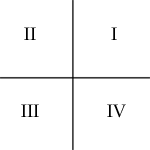
四叉树的构建始于单个节点。所有对象最初都会被添加到这个初始的单节点中。

随着更多对象被添加到四叉树中,它们最终会被分配到四个子节点中。(理解如下:前述图片将区域分为四块,每一块即为一个子节点或孩子节点。)每个物体会根据其所在的2D空间位置被放入对应的子节点中。对于那些无法完全落入某个单一节点区域内的物体,则会被保留在父节点中。(此处存在疑问:如图所示,根节点的子节点数量似乎超过了四个,这点尚待厘清。)
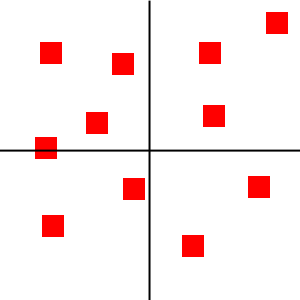
如果继续添加更多对象,每个子节点将继续进行划分,生成四个新的子节点。
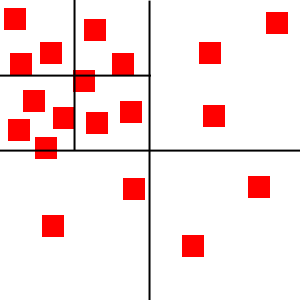
如前所述,每个节点仅包含少量物体。这解释了为何我们可以应用前述规则:例如,位于左上角节点内的物体不可能与右下角节点内的物体发生碰撞。因此,我们无需运行高耗时的碰撞检测算法来验证它们之间是否会发生碰撞。
四叉树核心参数与结构
接下来,我们将对四叉树进行具体代码实现。
以下是主要代码片段(代码源自完整的四叉树类,因此包含this关键字,请忽略此细节,文末附有完整代码)。
function QuadTree(boundBox, lvl) {
  var maxObjects = 10;
  this.bounds = boundBox || {
    x: 0,
    y: 0,
    width: 0,
    height: 0
  };
  var objects = [];
  this.nodes = [];
  var level = lvl || 0;
  var maxLevels = 5;
}
maxObjects定义了每个节点能容纳的最大对象数量。当超过该阈值时,节点将分裂为4个子节点。我们并非预先划分好网格,而是在插入对象时才进行动态划分。
maxLevels是四叉树的最大层数,超过则不再划分,从根节点开始最多6层。
level表示当前节点所在的层级数。
objects存储当前节点内待检测的对象列表。
bounds表示当前节点所代表的2D区域范围。
nodes是包含4个子节点的队列。
关键方法实现解析
四叉树中每个节点的面积可以是任意形状。我们将使用四叉树中的五个核心方法:clear、split、getIndex、insert和retrieve。
function clear() {
    objects = [];
    for (var i = 0; i < this.nodes.length; i++) {
      this.nodes[i].clear();
    }
    this.nodes = [];
  };
Clear函数通过循环遍历,清除四叉树所有节点中的所有对象。
function split() {
    // Bitwise or [html5rocks]
    var subWidth = (this.bounds.width / 2) | 0;
    var subHeight = (this.bounds.height / 2) | 0;
    this.nodes[0] = new QuadTree({
      x: this.bounds.x + subWidth,
      y: this.bounds.y,
      width: subWidth,
      height: subHeight
    }, level+1);
    this.nodes[1] = new QuadTree({
      x: this.bounds.x,
      y: this.bounds.y,
      width: subWidth,
      height: subHeight
    }, level+1);
    this.nodes[2] = new QuadTree({
      x: this.bounds.x,
      y: this.bounds.y + subHeight,
      width: subWidth,
      height: subHeight
    }, level+1);
    this.nodes[3] = new QuadTree({
      x: this.bounds.x + subWidth,
      y: this.bounds.y + subHeight,
      width: subWidth,
      height: subHeight
    }, level+1);
}
Split方法用于将节点面积等分为四份,并使用新的边界初始化四个新的子节点。
function getIndex(obj) {
    var index = -1;
    var verticalMidpoint = this.bounds.x + this.bounds.width / 2;
    var horizontalMidpoint = this.bounds.y + this.bounds.height / 2;
    // Object can fit completely within the top quadrant
    var topQuadrant = (obj.y < horizontalMidpoint && obj.y + obj.height < horizontalMidpoint);
    // Object can fit completely within the bottom quandrant
    var bottomQuadrant = (obj.y > horizontalMidpoint);
    // Object can fit completely within the left quadrants
    if (obj.x < verticalMidpoint &&
        obj.x + obj.width < verticalMidpoint) {
      if (topQuadrant) {
        index = 1;
      }
      else if (bottomQuadrant) {
        index = 2;
      }
    }
    // Object can fix completely within the right quandrants
    else if (obj.x > verticalMidpoint) {
      if (topQuadrant) {
        index = 0;
      }
      else if (bottomQuadrant) {
        index = 3;
      }
    }
    return index;
};
getIndex方法是四叉树的辅助方法,用于确定对象所属的象限。通过检查对象位于哪个象限,该方法决定节点归属。(参考第一幅图,在单一面积内逆时针划分了四块区域并标有序号,该方法即用于计算父节点下子节点的序号。)
例如,当前区域为Rectange(0, 0, 600, 600),待检测矩形为Rectangel(0, 0, 30, 30),则其位于左上象限,index = 1;如果是Rectange(400, 400, 30, 30),则位于右下象限,index = 3。
function insert(obj) {
    if (typeof obj === "undefined") {
      return;
    }
    if (obj instanceof Array) {
      for (var i = 0, len = obj.length; i < len; i++) {
        this.insert(obj[i]);
      }
      return;
    }
    if (this.nodes.length) {
      var index = this.getIndex(obj);
      // Only add the object to a subnode if it can fit completely
      // within one
      if (index != -1) {
        this.nodes[index].insert(obj);
        return;
      }
    }
    objects.push(obj);
    // Prevent infinite splitting
    if (objects.length > maxObjects && level < maxLevels) {
      if (this.nodes[0] == null) {
        this.split();
      }
      var i = 0;
      while (i < objects.length) {
        var index = this.getIndex(objects[i]);
        if (index != -1) {
          this.nodes[index].insert((objects.splice(i,1))[0]);
        }
        else {
          i++;
        }
      }
    }
};
每次插入一个对象时,我们先检查当前节点是否有子节点。如果有,则尝试插入子节点,直到检测到没有子节点为止,然后将对象插入该节点。如果该节点的对象数量大于10个且当前节点层级小于MAX_LEVELS,则继续将该节点划分为4个子节点。随后,将当前对象循环删除并重新插入到子节点中。如果对象位于中心线上,getIndex会返回-1,这些对象将被插入到父节点上。
对象添加后,需检查该节点是否会分裂,即检查加入对象后是否超过节点最大容纳数量。分裂源于节点可以插入任何符合子节点条件的对象;否则,对象将加入父节点。
function retrieve(returnedObjects, obj) {
    if (typeof obj === "undefined") {
      console.log("UNDEFINED OBJECT");
      return;
    }
    var index = this.getIndex(obj);
    if (index != -1 && this.nodes.length) {
      this.nodes[index].findObjects(returnedObjects, obj);
    }
    for (var i = 0, len = objects.length; i < len; i++) {
      returnedObjects.push(objects[i]);
    }
    return returnedObjects;
};
最后一个四叉树方法是retrieve方法,它返回与指定节点可能发生碰撞的所有节点(即不断寻找与给定节点处于同一象限的节点)。该方法成倍地减少了碰撞检测的数量。
四叉树的代码实现至此结束。
完整代码实现
完整代码如下:
在完整代码中,retrieve方法对应findObjects。
/**
 * QuadTree object.
 *
 * The quadrant indexes are numbered as below:
 *   |
 * 1 | 0
 * ----+----
 * 2 | 3
 *   |
 */
function QuadTree(boundBox, lvl) {
  var maxObjects = 10;
  this.bounds = boundBox || {
    x: 0,
    y: 0,
    width: 0,
    height: 0
  };
  var objects = [];
  this.nodes = [];
  var level = lvl || 0;
  var maxLevels = 5;
  /*
   * Clears the quadTree and all nodes of objects
   */
  this.clear = function() {
    objects = [];
    for (var i = 0; i < this.nodes.length; i++) {
      this.nodes[i].clear();
    }
    this.nodes = [];
  };
  /*
   * Get all objects in the quadTree
   */
  this.getAllObjects = function(returnedObjects) {
    for (var i = 0; i < this.nodes.length; i++) {
      this.nodes[i].getAllObjects(returnedObjects);
    }
    for (var i = 0, len = objects.length; i < len; i++) {
      returnedObjects.push(objects[i]);
    }
    return returnedObjects;
  };
  /*
   * Return all objects that the object could collide with
   */
  this.findObjects = function(returnedObjects, obj) {
    if (typeof obj === "undefined") {
      console.log("UNDEFINED OBJECT");
      return;
    }
    var index = this.getIndex(obj);
    if (index != -1 && this.nodes.length) {
      this.nodes[index].findObjects(returnedObjects, obj);
    }
    for (var i = 0, len = objects.length; i < len; i++) {
      returnedObjects.push(objects[i]);
    }
    return returnedObjects;
  };
  /*
   * Insert the object into the quadTree. If the tree
   * excedes the capacity, it will split and add all
   * objects to their corresponding nodes.
   */
  this.insert = function(obj) {
    if (typeof obj === "undefined") {
      return;
    }
    if (obj instanceof Array) {
      for (var i = 0, len = obj.length; i < len; i++) {
        this.insert(obj[i]);
      }
      return;
    }
    if (this.nodes.length) {
      var index = this.getIndex(obj);
      // Only add the object to a subnode if it can fit completely
      // within one
      if (index != -1) {
        this.nodes[index].insert(obj);
        return;
      }
    }
    objects.push(obj);
    // Prevent infinite splitting
    if (objects.length > maxObjects && level < maxLevels) {
      if (this.nodes[0] == null) {
        this.split();
      }
      var i = 0;
      while (i < objects.length) {
        var index = this.getIndex(objects[i]);
        if (index != -1) {
          this.nodes[index].insert((objects.splice(i,1))[0]);
        }
        else {
          i++;
        }
      }
    }
  };
  /*
   * Determine which node the object belongs to. -1 means
   * object cannot completely fit within a node and is part
   * of the current node
   */
  this.getIndex = function(obj) {
    var index = -1;
    var verticalMidpoint = this.bounds.x + this.bounds.width / 2;
    var horizontalMidpoint = this.bounds.y + this.bounds.height / 2;
    // Object can fit completely within the top quadrant
    var topQuadrant = (obj.y < horizontalMidpoint && obj.y + obj.height < horizontalMidpoint);
    // Object can fit completely within the bottom quandrant
    var bottomQuadrant = (obj.y > horizontalMidpoint);
    // Object can fit completely within the left quadrants
    if (obj.x < verticalMidpoint &&
        obj.x + obj.width < verticalMidpoint) {
      if (topQuadrant) {
        index = 1;
      }
      else if (bottomQuadrant) {
        index = 2;
      }
    }
    // Object can fix completely within the right quandrants
    else if (obj.x > verticalMidpoint) {
      if (topQuadrant) {
        index = 0;
      }
      else if (bottomQuadrant) {
        index = 3;
      }
    }
    return index;
  };
  /*
   * Splits the node into 4 subnodes
   */
  this.split = function() {
    // Bitwise or [html5rocks]
    var subWidth = (this.bounds.width / 2) | 0;
    var subHeight = (this.bounds.height / 2) | 0;
    this.nodes[0] = new QuadTree({
      x: this.bounds.x + subWidth,
      y: this.bounds.y,
      width: subWidth,
      height: subHeight
    }, level+1);
    this.nodes[1] = new QuadTree({
      x: this.bounds.x,
      y: this.bounds.y,
      width: subWidth,
      height: subHeight
    }, level+1);
    this.nodes[2] = new QuadTree({
      x: this.bounds.x,
      y: this.bounds.y + subHeight,
      width: subWidth,
      height: subHeight
    }, level+1);
    this.nodes[3] = new QuadTree({
      x: this.bounds.x + subWidth,
      y: this.bounds.y + subHeight,
      width: subWidth,
      height: subHeight
    }, level+1);
  };
}
参考文章:
Quick Tip: Use Quadtrees to Detect Likely Collisions in 2D Space
更多关于JavaScript相关内容感兴趣的读者可查看本站专题:《JavaScript数学运算用法总结》、《JavaScript数据结构与算法技巧总结》、《JavaScript数组操作技巧总结》、《JavaScript排序算法总结》、《JavaScript遍历算法与技巧总结》、《JavaScript查找算法技巧总结》及《JavaScript错误与调试技巧总结》。
希望本文所述内容对大家JavaScript程序设计有所帮助。
JS动态构建复杂嵌套JSON对象的方法
2026-11-05 15:41:52
JS负数取余为什么是负数?详解余数与模运算区别
2026-11-05 13:34:41
JS 解压出现乱码或报错怎么解决?
2026-11-05 12:32:38
JS 中 startsWith、indexOf 与正则判断字符串前缀的对比
2026-11-04 22:19:43
JS解析Excel后怎么将数据转换为JSON格式
2026-11-04 20:58:28