

JS结合tween.js实现带切换功能的轮播图
作者:纸飞机时间:2026-10-22 16:03:27浏览:292
本文介绍如何利用tween.js动画库在JavaScript中实现轮播图效果,并包含点击切换功能。通过示例代码展示了CSS布局与JS逻辑的结合,帮助开发者掌握相关技术实现。
JS结合tween.js实现轮播图
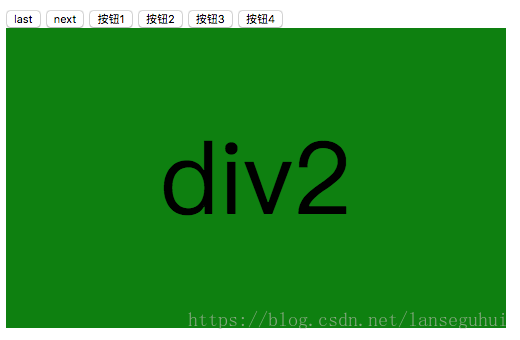
最终效果如图所示。
<!DOCTYPE html>
<html lang="zh-CN">
<head>
 <meta charset="UTF-8">
 <title>Document</title>
 <style>
 .wrap{
  width: 500px;
  height: 300px;
  position: relative;
  overflow: hidden;
 }
 .box{
  width: 500%;
  height: 100%;
  position: absolute;
  left: 0;
 }
 .box>div{
  width: 500px;
  height: 300px;
  float: left;
  font-size: 100px;
  text-align: center;
  line-height: 300px;
 }
 div:nth-child(1){
  background-color: red;
 }
 div:nth-child(2){
  background-color: green;
 }
 div:nth-child(3){
  background-color: pink;
 }
 div:nth-child(4){
  background-color: blue;
 }
 </style>
</head>
<body>
 <input type="button" value="last">
 <input type="button" value="next">
 <input type="button" value="按钮1" class="ha">
 <input type="button" value="按钮2" class="ha">
 <input type="button" value="按钮3" class="ha">
 <input type="button" value="按钮4" class="ha">
 <div class="wrap">
 <div class="box">
  <div id="one">div1</div>
  <div>div2</div>
  <div>div3</div>
  <div>div4</div>
  <div id="one">div1</div>
 </div>
 </div>
</body>
<script src="./tween.js"></script>
<script>
 //获取元素
 var inps = document.querySelectorAll("input");
 var box = document.querySelector(".box");
 var ha = document.querySelectorAll(".ha");
 //记录图片下标
 var index = 0;
 var w = -500;
 var timer = null;
 //自动播放
 //放在计时器就是自动播放,骑士就是下一张的操作
 function autoImg(){
 index++;
 if(index>3){
  // console.log(index);
  index=0;
  // console.log(index);
 }
 //动画开始时间
 var t = 0;
 //动画结束时间
 var d = 30;
 //动画的起始位置
 var b = box.offsetLeft;
 //动画的终止位置减去动画的起始位置,该变量为-500
 // var c =index*w-b;
 console.log(c);
 var c = -500;
 if(b<=-1500){
  b=0;
 }
 clearInterval(timer);
 timer = setInterval(function(){
  t++;
  box.style.left=Tween.Linear(t,b,c,d)+"px";
  if(t>=d){
  clearInterval(timer);
  }
 },30);
 }
//关闭轮播
 function clearAuto(){
 clearInterval(autotimer);
  autotimer = setInterval(autoImg,3000);
 }
 var autotimer = setInterval(autoImg,3000);
 //下一张
 inps[1].onclick = function(){
  clearAuto();
  autoImg();
 }
 //上一张
 function prevImg(){
 index--;
 if(index<0){
  index=3;
 }
 //动画开始时间
 var t = 0;
 //动画结束时间
 var d = 30;
 //动画的起始位置
 var b = box.offsetLeft;
 //动画的终止位置减去动画的起始位置
 var c =index*w-b;
 clearInterval(timer);
 timer = setInterval(function(){
  t++;
  box.style.left=Tween.Linear(t,b,c,d)+"px";
  if(t>=d){
  clearInterval(timer);
  }
 },30);
 }
 inps[0].onclick = function(){
 clearAuto();
 prevImg();
 }
function indexImg(n){
  index = n;
 var t = 0;
 //动画结束时间
 var d = 30;
 //动画的起始位置
 var b = box.offsetLeft;
 //动画的终止位置减去动画的起始位置
 var c =index*w-b;
 clearInterval(timer);
 timer = setInterval(function(){
  t++;
  box.style.left=Tween.Linear(t,b,c,d)+"px";
  if(t>=d){
  clearInterval(timer);
  }
 },30);
 }

 for(var i=0;i<ha.length;i++){
  (function(i){
  ha[i].onclick = function(){
   // box.style.left = (-500*(i-2))+"px";
   clearAuto();
   indexImg(i);
   console.log(i);
  }
  })(i);
 }
</script>
</html>
总结
以上内容为小编分享的利用JS和tween.js库实现具备切换功能的轮播图教程,希望能对大家有所帮助。如有任何疑问,欢迎留言,小编会及时回复。在此感谢大家对本站的支持!
作者最新文章
JS动态构建复杂嵌套JSON对象的方法
2026-11-05 15:41:52
JS负数取余为什么是负数?详解余数与模运算区别
2026-11-05 13:34:41
JS 解压出现乱码或报错怎么解决?
2026-11-05 12:32:38
JS 中 startsWith、indexOf 与正则判断字符串前缀的对比
2026-11-04 22:19:43
JS解析Excel后怎么将数据转换为JSON格式
2026-11-04 20:58:28