

Vue.js实现简易计算器的完整代码示例
本文提供基于Vue.js实现的简易计算器完整示例,涵盖HTML结构、CSS样式及JS逻辑代码。文中包含在线运行测试工具链接,方便开发者直接查看效果。此外,还推荐了多个实用的在线数学计算与求解工具,供前端开发参考。
Vue.js计算器实现概述
本文分享一个基于Vue.js开发的计算器功能实例,供读者参考学习。
首先是HTML部分的代码实现。
HTML结构代码
<!DOCTYPE html>
<html lang="en">
<head>
  <link rel="stylesheet" type="text/css" href="css/css.css" rel="external nofollow" >
  <script type="text/javascript" src="https://cdn.bootcss.com/vue/2.5.16/vue.min.js"></script>
  <meta charset="UTF-8">
  <title>my-calculator</title>
</head>
<body>
<div id="calculator">
  <!--显示框-->
  <input-box v-bind:input-show="inputShow">
  </input-box>
  <btn-list>
    <div @click="clearValue()" class=" btn-30 btn-radius color-red clear-marginleft">C</div>
    <div class=" btn-30 btn-radius color-blue">+/-</div>
    <div @click="inputValue('%')" class=" btn-30 btn-radius color-blue">%</div>
    <div @click="backValue()" class=" btn-70 btn-radius color-red font-14">←</div>
    <div @click="inputValue('7')" class=" btn-30 btn-radius clear-marginleft">7</div>
    <div @click="inputValue('8')" class=" btn-30 btn-radius">8</div>
    <div @click="inputValue('9')" class=" btn-30 btn-radius">9</div>
    <div @click="squareValue()" class=" btn-30 btn-radius color-blue font-14">ײ</div>
    <div @click="radicalValue()" class=" btn-30 btn-radius color-blue font-12">√</div>
    <div @click="inputValue('4')" class=" btn-30 btn-radius clear-marginleft">4</div>
    <div @click="inputValue('5')" class=" btn-30 btn-radius">5</div>
    <div @click="inputValue('6')" class=" btn-30 btn-radius">6</div>
    <div @click="inputValue('×')" class=" btn-30 btn-radius color-blue font-14">×</div>
    <div @click="inputValue('÷')" class=" btn-30 btn-radius color-blue font-12">÷</div>
    <div @click="inputValue('1')" class=" btn-30 btn-radius clear-marginleft">1</div>
    <div @click="inputValue('2')" class=" btn-30 btn-radius">2</div>
    <div @click="inputValue('3')" class=" btn-30 btn-radius">3</div>
    <div @click="inputValue('+')" class=" btn-30 btn-radius color-blue font-14">+</div>
    <div @click="inputValue('-')" class=" btn-30 btn-radius color-blue font-14">-</div>
    <div @click="inputValue('0')" class=" btn-70 btn-radius clear-marginleft">0</div>
    <div @click="inputValue('.')" class=" btn-30 btn-radius">.</div>
    <div @click="calValue()" class=" btn-70 btn-radius color-red font-14">=</div>
  </btn-list>
</div>
<script>
var calculator = new Vue({
  el:'#calculator',
  data:{
    inputShow:{
      value:'0'
    }
  },
  components:{
    'input-box':{
      props:['inputShow'],
      computed: {
        value:function () {
          return this.inputShow.value
        }
      },
      template:'<input id="input-box" type="text" size="21" maxlength="21" v-model="value" readonly="readonly">'
    },
    'btn-list':{
      template:'<div id="btn-list"><slot></slot></div>'
    }
  },
  methods:{
    inputValue(param){
      if(Object.prototype.toString.call(this.inputShow.value) == "[object Number]"){   //判断输入框内容是否为数字类型
        this.inputShow.value = "0";   //数字类型说明是上个计算结果,清空内容
      }
      var str ='' + this.inputShow.value; //输入内容时,将输入框内容转为字符串类型
      var len = str.length;
      var arr = ["+","-","×","÷"];
      var num = (''+parseFloat(str.split('').reverse().join(''))).split('').reverse().join('');   //parseInt(str.split('').reverse().join('')))是获取输入框内最后一串数字,再反转回来 ,num为输入框内最后一串数字
      var nlen = num.length;
      if((num!= '0' && param != '.')|| (param == '.'&& num.indexOf(".")==-1)){   //输入框内最后一串数字不为0时拼接字符串
        if(arr.indexOf(str.charAt(len-1)) != -1 && arr.indexOf(param) != -1){    //若一开始输入内容为运算符,输入无效
          return;
        }
        this.inputShow.value += param;   //拼接输入内容
      }else{
        arr.push("%");
        if(param == '.'){      //若num中已有小数点,输入内容为小数点,视为无效
          return;
        }else if(!(arr.indexOf(param) != -1)){    //判断输入框内最后一个字符不为运算符
          this.inputShow.value =str.substring(0,str.length-nlen) + param;  //输入框内最后一串数字为0时,删除0拼接
        }
      }
    },
    clearValue(){      //清空输入框内容
      this.inputShow.value = '0';
    },
    calValue(){       //计算结果
      var str = this.inputShow.value;
      str = str.replace('×','*').replace('÷','/').replace('%','*0.01');    //替换运算符
      try{
        this.inputShow.value = eval(str);      //若用户输入内容不符合运算规则,不计算
      }catch(error){
        return;
      }
    },
    squareValue(){             //平方计算
      var str = this.inputShow.value;
      this.inputShow.value = Math.pow(eval(str),2)
    },
    radicalValue(){             //开根号计算
      var str = this.inputShow.value;
      this.inputShow.value = Math.sqrt(eval(str));
    },
    backValue(){              //删除键,删除单个字符
      var str = this.inputShow.value;
      if(str.length == 1){
        this.inputShow.value = "0";
      }else{
         this.inputShow.value = str.slice(0,str.length-1);
      }
    },
    /*oppositeValue(){            //正负号取值
      var str = this.inputShow.value;
      var num = (''+parseInt(str.split('').reverse().join(''))).split('').reverse().join('');   //获取输入框内最后遗传数字
      var nlen = num.length;
      debugger;
      if(!isNaN( parseInt(str.charAt(str.length-1))) && num != 0){  //当输入框末位字符为数字且最后一串数字不为0时,取正负
        this.inputShow.value = str.substring(0,str.length-nlen)+`(-${num})`;
      }
    }*/
  }
})
</script>
</body>
</html>
接着是CSS样式的定义代码。
CSS样式代码
@charset "utf-8";
body, ul, dl, dd, dt, ol, li, p, h1, h2, h3, h4, h5, h6, textarea, form, select, fieldset, table, td, div, input{margin:0;padding:0;-webkit-text-size-adjust:none}
h1, h2, h3, h4, h5, h6{font-size:12px;font-weight:normal}
body>div{margin:0 auto}
div{text-align:left}
a img{border:0}
body{color:#333;text-align:center;font:12px "微软雅黑";}
ul, ol, li{list-style-type:none;vertical-align:0}
a{outline-style:none;color:#535353;text-decoration:none}
a:hover{color:#D40000;text-decoration:none}
.clear{height:0;overflow:hidden;clear:both}
/* calculator */
#calculator{width:200px;height:245px;padding:10px;border:1px solid #e5e5e5;background:#f8f8f8;-moz-border-radius:3px;-webkit-border-radius:3px;border-radius:3px;box-shadow:0px 0px 10px #f2f2f2;-moz-box-shadow:0px 0px 10px #f2f2f2;-webkit-box-shadow:0px 0px 10px #f2f2f2;margin:40px auto 0 auto;}
#calculator #input-box{margin:0;width:187px;padding:9px 5px;height:14px;border:1px solid #e5e5e5;border-radius:3px;-webkit-border-radius:3px;-moz-border-radius:3px;background:#FFF;text-align:right;line-height:14px;font-size:12px;font-family:Verdana, Geneva, sans-serif;color:#666;outline:none; text-transform:uppercase;}
#calculator #btn-list{width:200px;overflow:hidden;}
#calculator #btn-list .btn-radius{border-radius:2px;-webkit-border-radius:2px;-moz-border-radius:2px;border:1px solid #e5e5e5;background:-webkit-gradient(linear, 0 0, 0 100%, from(#f7f7f7), to(#ebebeb));background:-moz-linear-gradient(top, #f7f7f7,#ebebeb);filter:progid:DXImageTransform.Microsoft.gradient(startColorstr=#f7f7f7,endColorstr=#ebebeb,grandientType=1);line-height:29px;text-align:center;text-shadow:0px 1px 1px #FFF;font-weight:bold;font-family:Verdana, Geneva, sans-serif;color:#666;float:left;margin-left:11px;margin-top:11px;font-size:12px;cursor:pointer;}
#calculator #btn-list .btn-radius:active{background:#ffffff;}
#calculator #btn-list .clear-marginleft{margin-left:0;}
#calculator #btn-list .font-14{font-size:14px;}
#calculator #btn-list .color-red{color:#ff5050}
#calculator #btn-list .color-blue{color:#00b4ff}
#calculator #btn-list .btn-30{width:29px;height:29px;}
#calculator #btn-list .btn-70{width:70px;height:29px;}
在线测试与注意事项
可以使用本站提供的HTML/CSS/JS在线运行测试工具(http://tools.jb51.net/code/HtmlJsRun)查看实际运行效果。
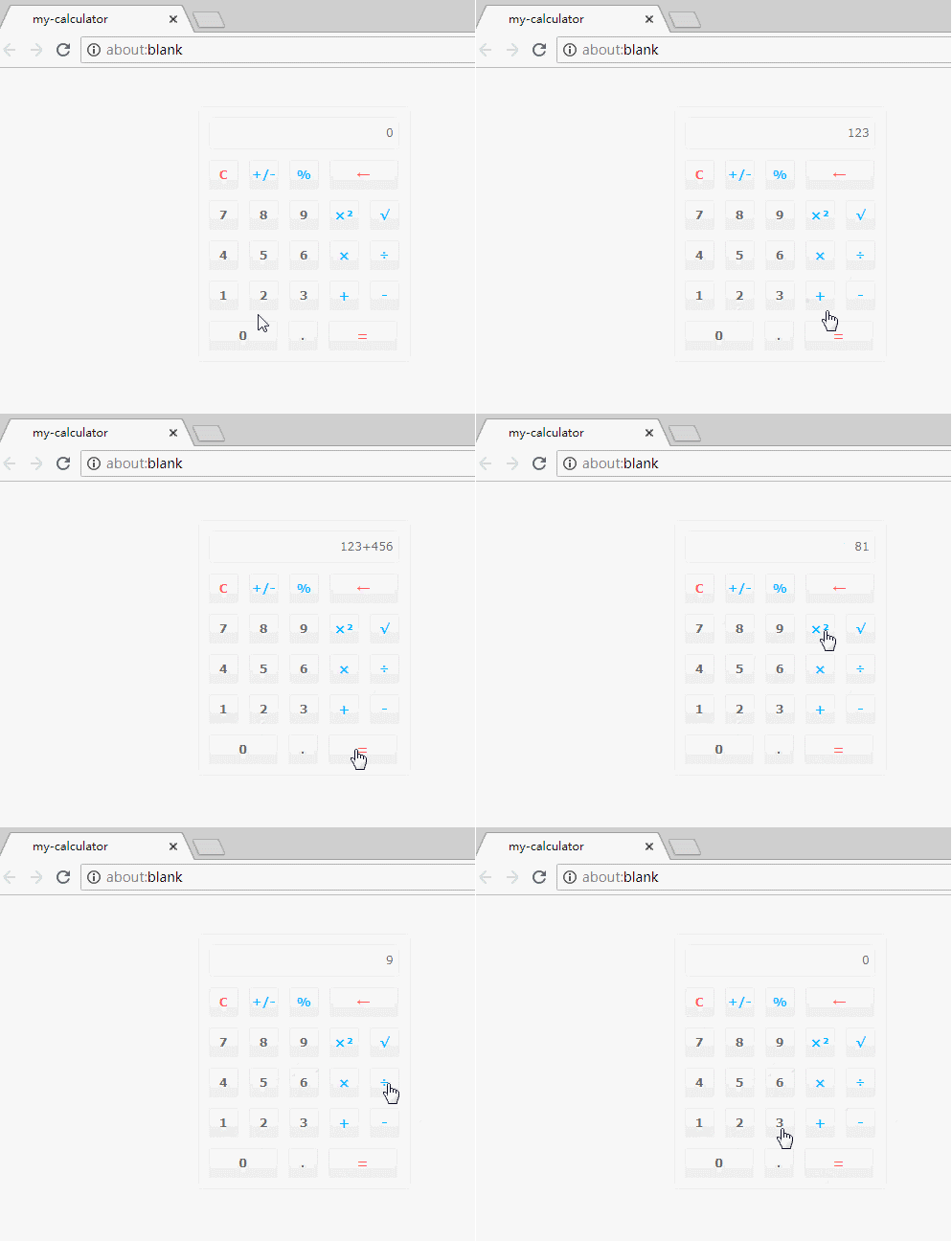
在实际使用时,请注意修改CSS文件的路径,并在HTML中正确引入Vue库。
功能局限与扩展建议
由于作者技术水平有限,正负号处理等功能尚存瑕疵,计算器也可能存在其他未发现的Bug。感兴趣的读者可以在此基础上进行扩展和完善。
推荐在线计算工具
此外,推荐几款常用的在线计算工具供参考:
在线数学表达式转换与计算工具: http://tools.jb51.net/jisuanqi/exp_jisuanqi
在线一元函数(方程)求解计算工具: http://tools.jb51.net/jisuanqi/equ_jisuanqi
科学计算器在线使用及高级计算: http://tools.jb51.net/jisuanqi/jsqkexue
在线标准计算器: http://tools.jb51.net/jisuanqi/jsq
希望上述内容能对Vue.js程序设计有所帮助。
Vue.js 是什么:渐进式 JavaScript 框架的核心优势与适用场景
2026-11-03 20:00:13
为什么JS代码执行了但页面没有跳转
2026-11-03 16:29:09
Vue.js 项目中 Axios 拦截器封装与接口对接实战
2026-11-02 10:22:43
前端PC端自适应开发:两种常见适配方案解析
2026-11-01 03:30:54
Vue3中通过JS全局调用弹窗组件的实现方案
2026-10-31 21:34:31