

JS实现带手机号验证与60秒倒计时的注册页面
作者:函数茶馆时间:2026-10-22 11:28:05浏览:105
本文介绍如何使用JavaScript实现一个包含手机号格式验证与验证码发送功能的注册页面。核心逻辑包括:在用户点击发送后启动60秒倒计时,倒计时期间禁用重发按钮,若60秒内未填写验证码则允许重新发送,确保用户体验与安全验证流程的完整实现。
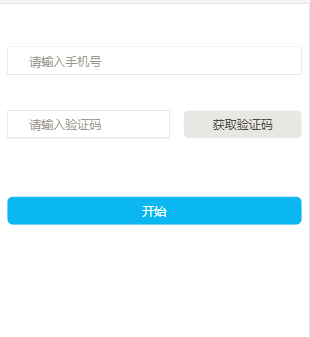
注册页面功能实现
页面原型设计参考原图。
功能需求:实现手机号格式验证。
交互逻辑:用户点击发送验证码后,立即启动60秒倒计时。
状态处理:若60秒倒计时结束且用户未填写验证码,则允许重新发送验证码。
<!doctype html>
<html>
   <head>
      <meta charset="utf-8">
      <title>注册</title>
      <meta http-equiv="X-UA-Compatible" content="IE=edge">
      <meta name="viewport" content="width=device-width, initial-scale=1.0, minimum-scale=1.0, maximum-scale=1.0, user-scalable=no">
      <meta name="format-detection" content="telephone=no">
      <meta name="renderer" content="webkit">
      <meta http-equiv="Cache-Control" content="no-siteapp" />
      <script src="http://code.jquery.com/jquery-latest.js";></script>
   </head>
   <body>
      <input type="text" id="phone" class="am-form-field my-radius" placeholder="请输入手机号" style="">
      <div style="height:2rem;">
         <font id="errMsg1" color="red" style=""></font>
      </div>
      <div>
         <input id="rpcode" type="text" placeholder="请输入验证码">
         <input id="getCode" type="button" value="获取验证码" onclick="sendMessages()"></input>
         <font id="errMsg2" color="red" style="display:none; position:absolution; top:2rem;"></font>
      </div>
      <p id="start">
         <span>开始</span>
      </p>
      <!-- 保存验证码 -->
      <input type="text" id="code" hidden="true">
      <script>
         var InterValObj; //timer变量,控制时间
         var count = 60; //间隔函数,1秒执行
         var curCount; //当前剩余秒数
         var code = ""; //验证码
         var codeLength = 6; //验证码长度
         function sendMessages() {
            curCount = count;
            var phone = $("#phone").val()
            if(validatePhone(phone)) {
               return;
            }
            if(phone != "") {
               //设置button效果,开始计时
               $("#getCode").attr("disabled", "true");
               $("#getCode").val("请在" + curCount + "秒内输入");
               InterValObj = window.setInterval(SetRemainTimes, 1000); //启动计时器,1秒执行一次
               //向后台发送处理数据
               $.ajax({
                  url: "getCode.action",
                  dataType: "json",
                  type: "get",
                  data: "phone=" + phone,
                  success: function(data) {
                     //保存验证码
                     $("#code").val(data);
                  }
               });
            } else {
               alert("手机号码不能为空!!!!!!");
            }
         }
         //timer处理函数
         function SetRemainTimes() {
            if(curCount == 0) {
               window.clearInterval(InterValObj); //停止计时器
               $("#getCode").removeAttr("disabled"); //启用按钮
               $("#getCode").val("重新发送验证码");
               code = ""; //清除验证码。如果不清除,过时间后,输入收到的验证码依然有效
            } else {
               curCount--;
               $("#getCode").val("请在" + curCount + "秒内输入");
            }
         }
         //开始按钮点击事件
         $("#start").click(function() {
            window.location.href = "regafter.html?phone=" + $("#phone").val();
         })
         //验证手机号
         function validatePhone(phone) {
            if(phone == '') {
               $("#errMsg1").html("  请先填写手机号");
               $("#errMsg1").show();
               return true;
            }
            var myreg = /^(((13[0-9]{1})|(15[0-9]{1})|(18[0-9]{1}))+\d{8})$/;
            if(!myreg.test(phone)) {
               $("#errMsg1").html("  请输入有效的手机号");
               $("#errMsg1").show();
               return true;
            }
            return false;
         }
         //验证码非空和错误验证
         function validateCode() {
            var phone = $("#phone").val();
            var code = $("#code").val();
            var rpcode = $("#rpcode").val();
            if(validatePhone(phone)) {
               return true;
            }
            if(code == '') {
               $("#errMsg2").html("  请先获取验证码");
               $("#errMsg2").show();
               return true;
            }
            if(rpcode == '' || code != rpcode) {
               $("#errMsg2").html("  请正确输入验证码");
               $("#errMsg2").show();
               return true;
            }
            alert(code != rpcode);
            return false;
         }
         $("#phone").on("focus", function() {
            $("#errMsg1").hide();
         })
         $("#rpcode").on("focus", function() {
            $("#errMsg2").hide();
         })
      </script>
   </body>
</html>
作者最新文章
JS大数值转字符串出现科学计数法怎么办
2026-11-05 17:09:21
JS split切割后出现空字符串怎么过滤
2026-11-05 16:00:30
在 React 或 Vue 项目中封装使用 JS 节流防抖
2026-11-05 15:27:29
JavaScript中怎么将带小数的字符串转为整数?
2026-11-05 14:32:38
怎么用JavaScript策略模式重构电商促销计算逻辑?
2026-11-05 14:01:09