

基于Konva.js实现Canvas内外圈反向旋转动画
作者:像素猫时间:2026-10-22 09:55:22浏览:283
本文介绍如何使用Konva.js库在HTML5 Canvas中实现内外圈反向旋转的动画效果。通过定义圆形对象属性,利用Konva的Group和Shape组件绘制外圈顺时针与内圈逆时针旋转,并支持鼠标悬停加速交互。
实现内外圈反向旋转动画
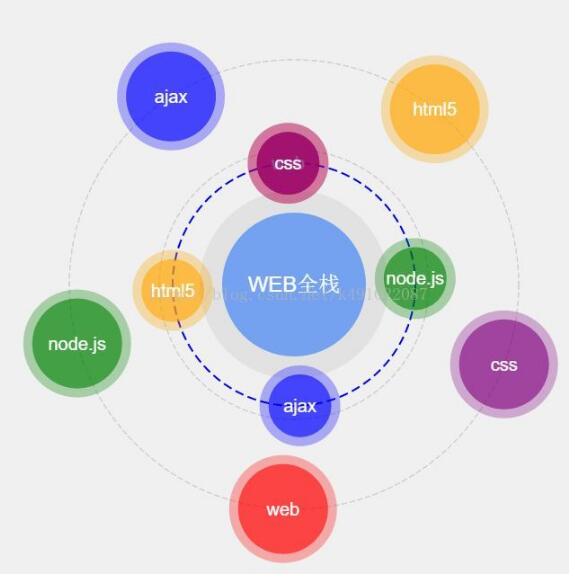
利用Canvas技术实现围绕中心点的旋转动画,具体表现为外圈进行顺时针旋转,而内层则进行逆时针旋转。
相关代码演示链接地址:代码demo链接地址
HTML文件结构如下:
HTML文件配置
<!DOCTYPE html>
<html>
<head lang="en">
 <meta charset="UTF-8">
 <title></title>
 <style>
  body {
   margin: 0;
   padding: 0;
   overflow: hidden;
   background-color: #f0f0f0;
  }
 </style>
 <script src="js/konva.js"></script>
 <script src="js/circle.js"></script>
</head>
<body>
<div id="cas"></div>

<script>
 var width = window.innerWidth;
 var height = window.innerHeight;
 //创建舞台
 var stage = new Konva.Stage({
  container: "cas",
  width: width,
  height: height
 });
 //创建层
 var layer = new Konva.Layer();
 //创建组1
 var group = new Konva.Group({
  x: stage.width() / 2,
  y: stage.height() / 2,
 });
 //最外层圆
 var circle1 = new Konva.Circle({
  x: 0,
  y: 0,
  radius: 250,
  stroke: "#ccc",
  strokeWidth: 1,
  dash: [6, 3]
 });
 group.add(circle1);
 //第二个圆
 var circle2 = new Konva.Circle({
  x: 0,
  y: 0,
  radius: 150,
  stroke: "#ccc",
  strokeWidth: 1,
  dash: [6, 3]
 });
 group.add(circle2);
 //第三个圆
 var circle3 = new Konva.Circle({
  x: 0,
  y: 0,
  radius: 135,
  stroke: "blue",
  strokeWidth: 2,
  dash: [10, 5]
 });
 group.add(circle3);
 //第四个圆
 var circle4 = new Konva.Circle({
  x: 0,
  y: 0,
  radius: 105,
  fill: "#ccc",
  opacity: 0.4
 });
 group.add(circle4);
 //第五个圆
 var circle5 = new Konva.Circle({
  x: 0,
  y: 0,
  radius: 80,
  fill: "#74A2F0"

 });
 group.add(circle5);
 //添加文字
 var text = new Konva.Text({
  x: -80,
  y: -12,
  text: "WEB全栈",
  fill: "white",
  fontSize: 24,
  width: 160,
  align: "center"
 });
 group.add(text);
 layer.add(group);
 //*****************************************************
 //创建组2
 var outGroup = new Konva.Group({
  x: stage.width() / 2,
  y: stage.height() / 2,
 });
 var arrColor = ["red", "green", "blue", "orange", "purple"];
 var arrText = ["web", "node.js", "ajax", "html5", "css"];
 for(var i = 0; i < 5; i++) {
  var cir = new Circle({
   x : 250 * Math.cos(72 * i * Math.PI / 180), //圆心x轴的坐标
   y : 250 * Math.sin(72 * i * Math.PI / 180), //圆心y轴的坐标
   outR : 60, //外圆的半径
   inR : 50, //内圆的半径
   fill : arrColor[i], //填充颜色
   text: arrText[i], //文字
   outOpacity : 0.3, //外圆的透明度
   inOpacity : 0.6  //内圆的透明度
  });
  cir.drawCircle(outGroup);
 }
 layer.add(outGroup);

 //***********************************************
 //创建组3
 var inGroup = new Konva.Group({
  x: stage.width() / 2,
  y: stage.height() / 2,
 });
 var arrColor = ["red", "green", "blue", "orange", "purple"];
 var arrText = ["web", "node.js", "ajax", "html5", "css"];
 for(var i = 0; i < 5; i++) {
  var cir = new Circle({
   x : 135 * Math.cos(90 * i * Math.PI / 180), //圆心x轴的坐标
   y : 135 * Math.sin(90 * i * Math.PI / 180), //圆心y轴的坐标
   outR : 45, //外圆的半径
   inR : 35, //内圆的半径
   fill : arrColor[i], //填充颜色
   text: arrText[i], //文字
   outOpacity : 0.3, //外圆的透明度
   inOpacity : 0.6  //内圆的透明度
  });
  cir.drawCircle(inGroup);
 }
 layer.add(inGroup);

 //************************************************
 //运动动画
 var step = 1; //转动的角度
 var anim = new Konva.Animation(function() {
  outGroup.rotate(step);
  outGroup.getChildren().each(function (ele, index) {
   ele.rotate(-step);
  });
  inGroup.rotate(-step);
  inGroup.getChildren().each(function (ele, index) {
    ele.rotate(step);
  });
 }, layer);
 anim.start();
 stage.add(layer);

 stage.on("mouseover", function () {
  step = 0.3;
 });
 stage.on("mouseout", function () {
  step = 1;
 });
</script>
</body>
</html>
JavaScript逻辑文件内容如下:
JavaScript核心逻辑
function Circle(obj) {
 this._init(obj);
}
Circle.prototype = {
 _init: function (obj) {
  this.x = obj.x, //圆心x轴的坐标
  this.y = obj.y, //圆心y轴的坐标
  this.outR = obj.outR, //外圆的半径
  this.inR = obj.inR, //内圆的半径
  this.color = obj.fill, //填充颜色
  this.text = obj.text, //内圆的文字
  this.outOpacity = obj.outOpacity, //外圆的透明度
  this.inOpacity = obj.inOpacity  //内圆的透明度
 },
 drawCircle: function (group) {
  //创建一个组
  var groupCir = new Konva.Group({
   x: this.x,
   y: this.y
  });
  //外圆
  var outCir = new Konva.Circle({
   x: 0,
   y: 0,
   radius: this.outR,
   fill: this.color,
   opacity: this.outOpacity
  });
  groupCir.add(outCir);
  //内圆
  var inCir = new Konva.Circle({
   x: 0,
   y: 0,
   radius: this.inR,
   fill: this.color,
   opacity: this.inOpacity
  });
  groupCir.add(inCir);
  //添加文字
  var text = new Konva.Text({
   x: -this.inR,
   y: -10,
   text: this.text,
   fill: "white",
   fontSize: 20,
   width: 2 * this.inR,
   align: "center"
  });
  groupCir.add(text);

  group.add(groupCir);
 }
}
最终运行效果图片展示如下:
以上就是本文的全部内容,希望对大家的学习有所帮助,也希望大家多多支持本站。
作者最新文章
js-cookie 安装与基础用法:set、get、remove 详解
2026-11-05 16:35:06
适合JavaScript初学者的实战项目:制作简易待办事项列表
2026-11-05 16:17:07
JS打开新标签页时怎么通过URL传递参数
2026-11-05 12:21:08
sigma.js 自定义节点样式:设置颜色、大小及标签显示的技巧
2026-11-05 09:55:00
JS 生成的统计图怎么导出为 PNG 图片或 PDF 文件?
2026-11-05 09:37:58