

JavaScript实现QQ风格好友列表展开与收缩功能(基础篇)
作者:白露时间:2026-10-22 05:49:07浏览:499
本文介绍如何使用原生JavaScript实现类似QQ好友列表的展开与收缩交互效果。通过HTML构建层级结构,CSS设置初始样式与状态切换类,JS监听点击事件并动态修改display属性及class名,实现列表项的折叠与展开功能。
实现效果预览
实现效果如下图所示:
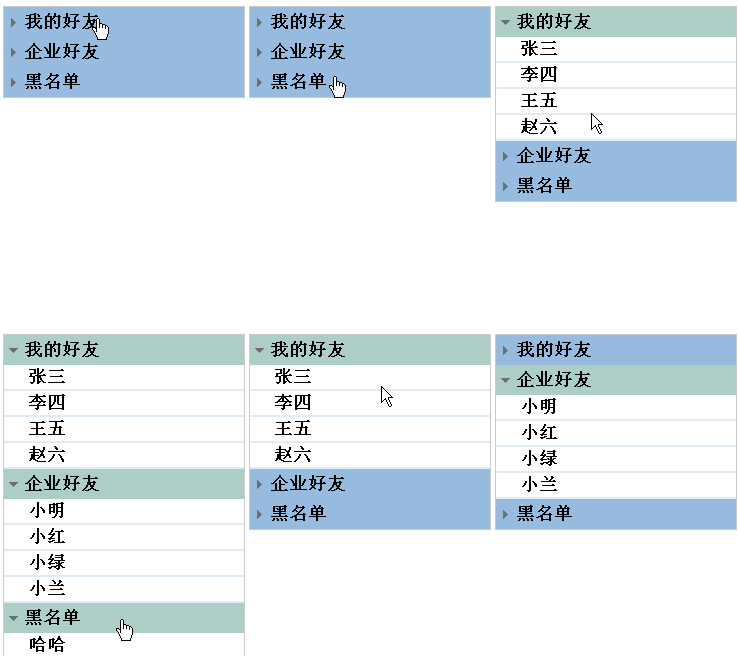
HTML结构构建
HTML结构如下:
<ul id="list">
 <li class="lis">
  <h2>我的好友</h2>
  <ul>
   <li>张三</li>
   <li>李四</li>
   ...
  </ul>
 </li>
 <li class="lis">
  <h2>企业好友</h2>
  <ul>
   <li>小明</li>
   <li>小红</li>
   ...
  </ul>
 </li>
 <li class="lis">
  <h2>黑名单</h2>
  <ul>
   <li>哈哈</li>
   ...
  </ul>
 </li>
</ul>
CSS样式设计
CSS样式定义如下:
ul,h2 {padding: 0;margin: 0;}
li {list-style: none;}
#list {
 width: 240px;
 border: 1px solid #ccc;
 margin: 0 auto;
}
#list .lis { }
#list h2 {
 height: 30px;
 line-height: 30px;
 text-indent: 20px;/*文字缩进20px*/
 background: url(img/ico1.gif) no-repeat 5px center pink;/*前面小箭头*/
 cursor: pointer;
}
#list .active { /* 点击时添加的类名 */
 background: url(img/ico2.gif) no-repeat 5px center #ff9;
}
#list ul {display: none;}
#list ul li {
 line-height: 24px;
 border-bottom: 2px solid #fc4;
 text-indent: 24px;/*文字缩进24px*/
}
JavaScript交互逻辑
JavaScript逻辑代码如下:
window.onload = function(){
 var list = document.getElementById('list');
 var ah2 = list.getElementsByTagName('h2');
 var uls = list.getElementsByTagName('ul');
 // h2要和下面的ul进行匹配,所以我们要用索引值,给h2身上添加索引值
 for(var i=0;i<ah2.length;i++){
  ah2[i].index = i;//给h2添加索引值,点击谁就给谁添加索引值
  ah2[i].onclick = function(){
   if(this.className == ''){//判断所点击的h2标签是否有类,
    //this.index指h2身上的索引数,this指h2,h2的索引值为this.index
    uls[this.index].style.display = 'block';
    this.className = 'active';//给当前点击的h2添加类,更改箭头方向
   }else{
    uls[this.index].style.display = 'none';
    this.className = '';
   }
  }
 }
}
后续内容预告
后续章节将介绍进阶实现:JS仿QQ好友列表展开、收缩功能(第二篇)
以上是关于JS仿QQ好友列表展开、收缩功能(第一篇)的详细介绍,希望能对读者有所帮助。如有任何疑问,欢迎留言,小编会及时回复。感谢大家对本站的支持!
作者最新文章
AOS.js 动画不触发怎么办?排查 DOM 加载与移动端兼容问题
2026-11-05 17:02:26
sigma.js 怎么实现节点点击、拖拽与悬停提示交互
2026-11-05 15:03:27
Matter.js 与 PixiJS/Three.js 集成:分离物理计算与渲染
2026-11-05 13:43:48
主流JS弹幕库选型指南:Danmaku.js等库的功能与体积对比
2026-11-05 09:28:19
JavaScript点击事件监听与交互效果实例
2026-11-05 09:10:19