

基于HTML5与CSS3的JavaScript自定义提示窗口实现
作者:木棉时间:2026-10-22 04:57:06浏览:104
本文介绍如何利用HTML5、CSS3和JavaScript技术栈,通过原生代码实现一个可配置的自定义提示窗口。该方案无需依赖第三方库,支持动态设置标题、内容及自动关闭时间,适用于需要定制化交互体验的Web项目。
自定义提示窗口实现概述
JavaScript自定义提示窗口的运行效果如图所示:
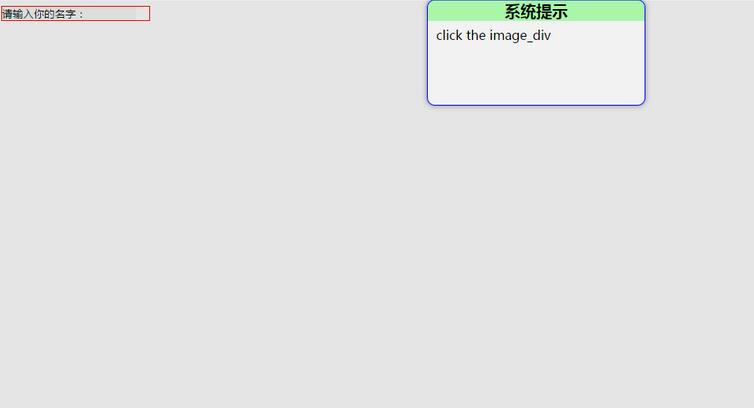
具体实现源码如下:
1. demo.jsp文件内容
<%@ page contentType="text/html;charset=UTF-8" language="java" %>
<html>
<head>
  <title>自定义提示窗口</title>
  <script type="text/javascript" src="js/myAlert.js"></script>
  <script type="text/javascript">
    function bodyOnload() {
      var myInput = document.getElementById("myInput");
      myInput.style.border = "none";
      myInput.style.backgroundColor = "rgba(223, 230, 223, 0.3)";
      myInput.value = "请输入你的名字:";
      myInput.onfocus = function () {
        myInput.style.outline = "none";
        myInput.value = "";
      };
      var image_div = document.createElement("div");
      image_div.style.width = myInput.offsetHeight ;
      image_div.style.height = myInput.offsetHeight;
      image_div.style.float = "right";
      image_div.style.cursor = "pointer";
      image_div.onclick = function () {
       new MyAlert().alert("系统提示","click the image_div",5000);
      };
      var outer_div = document.createElement("div");
      outer_div.style.border = "1px solid red";
      outer_div.style.width = parseInt(myInput.offsetWidth) + parseInt(image_div.style.width);
      outer_div.style.height = myInput.offsetHeight;
      document.body.appendChild(outer_div);
      outer_div.appendChild(myInput);
      outer_div.appendChild(image_div);
    }
  </script>
</head>
<body onload="bodyOnload()">
   <input id="myInput" type="text" name="name" title="名字"/>
</body>
</html>
2. myAlert.js核心逻辑文件
/**
 * Created by zhuwenqi on 2017/6/20.
 */
/**
 * @param options 基本配置
 * @constructor
 */
function MyAlert(options) {
  this.options = options ;
}
/**
 * 提示窗口
 * @param title 提示标题,默认为""
 * @param content 提示内容,默认为""
 * @param closeTime 提示窗口自动关闭时间,单位为ms,默认为2000ms
 */
MyAlert.prototype.alert = function (title,content,closeTime) {
  var div_background = document.createElement("div");
  div_background.style.position = "absolute";
  div_background.style.left = "0";
  div_background.style.top = "0";
  div_background.style.width = "100%";
  div_background.style.height = "100%";
  div_background.style.backgroundColor = "rgba(0,0,0,0.1)";
  div_background.style.zIndex = "1001";
  var div_alert = document.createElement("div");
  div_alert.style.position = "absolute";
  div_alert.style.left = "40%";
  div_alert.style.top = "0";
  div_alert.style.width = "20%";
  div_alert.style.height = "20%";
  div_alert.style.overflow = "auto";
  div_alert.style.backgroundColor = "rgba(255,255,255,0.5)";
  div_alert.style.zIndex = "1002";
  div_alert.style.border = "1px solid blue";
  div_alert.style.borderRadius = "10px";
  div_alert.style.boxShadow = "0 0 10px gray";
  var div_title = document.createElement("div");
  div_title.style.backgroundColor = "rgba(0,255,0,0.3)";
  div_title.style.textAlign = "center";
  var span_title = document.createElement("span");
  span_title.style.fontSize = "20px";
  span_title.style.fontWeight = "bold";
  var text_title = document.createTextNode((title === undefined || title === null) ? "" : title) ;
  span_title.appendChild(text_title);
  div_title.appendChild(span_title);
  div_alert.appendChild(div_title);
  var div_content = document.createElement("div");
  div_content.style.lineHeight = "35px";
  div_content.style.paddingLeft = "10px";
  var span_content = document.createElement("span");
  var text_content = document.createTextNode((content === undefined || content === null) ? "" : content);
  span_content.appendChild(text_content);
  div_content.appendChild(span_content);
  div_alert.appendChild(div_content);
  document.body.appendChild(div_background);
  document.body.appendChild(div_alert);
  setTimeout(function () {
    document.body.removeChild(div_alert);
    document.body.removeChild(div_background);
  },(closeTime === undefined || closeTime === null || closeTime === "") ? 2000 : closeTime);
};
以上内容为本文的全部分享,希望能为读者的学习提供有益参考,同时也欢迎持续关注本站以获取更多技术资源。
作者最新文章
JS中将数组和对象混合组装为JSON字符串
2026-11-05 16:41:42
JS运算符优先级与结合性的区别是什么?
2026-11-05 13:22:02
JS Map怎么只遍历Key或Value
2026-11-05 13:00:36
D3.js 与 ECharts 选型对比:灵活性 vs 开发效率
2026-11-05 09:45:01
为什么JS中typeof []返回object:数组类型检测误区解析
2026-11-04 19:50:47