

AngularJS 双向绑定中字符串转数字及计算结果异常处理
作者:橙子时间:2026-10-22 04:45:41浏览:521
在AngularJS双向绑定中,输入框默认获取字符串类型,直接相加会导致字符串拼接而非数值计算。本文介绍两种解决方法:一是在模板表达式中使用*1强制转换为数字;二是利用$watch监听模型变化,通过parseInt进行显式类型转换,确保计算结果正确。
AngularJS字符串类型导致计算异常
问题描述:
<!DOCTYPE html>
<html>
<head>
<meta charset="utf-8">
<script src="http://cdn.static.runoob.com/libs/angular.js/1.4.6/angular.min.js"></script>
</head>
<body>
<div ng-app="myApp">
<p ng-controller = "myContrl">结果为 <span ng-bind=""  ></span>
<input type="text" ng-model="first">{{first+second}}
  </p>
</div>
<script>
  var app = angular.module("myApp",[]);
  app.controller("myContrl",function($scope){
    $scope.first = 5;
    $scope.second =10;
  });
</script>
</body>
</html>
当前的显示结果为:

然而,当用户输入数值50时,期望得到的计算结果是60。
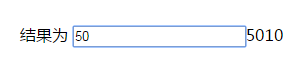
造成该现象的原因是,输入框通过ng-model绑定的数据默认为字符串类型,导致加法运算变成了字符串拼接。
解决方法:
模板内隐式类型转换方案
<!DOCTYPE html>
<html>
<head>
<meta charset="utf-8">
<script src="http://cdn.static.runoob.com/libs/angular.js/1.4.6/angular.min.js"></script>
</head>
<body>
<div ng-app="myApp">
<p ng-controller = "myContrl">结果为 <span ng-bind=""  ></span>
<input type="text" ng-model="first">{{first *1+second*1}}
  </p>
</div>
<script>
  var app = angular.module("myApp",[]);
  app.controller("myContrl",function($scope){
    $scope.first = 5;
    $scope.second =10;
  });
</script>
</body>
</html>
可以在模板表达式中通过乘以1的方式实现隐式类型转换,例如在{{first *1+second*1}}中,这样即可正常显示数值计算结果。
另一种方案是启用事件监听机制:
$watch监听与显式转换方案
<!DOCTYPE html>
<html>
<head>
<meta charset="utf-8">
<script src="http://cdn.static.runoob.com/libs/angular.js/1.4.6/angular.min.js"></script>
</head>
<body>
<div ng-app="myApp">
<p ng-controller = "myContrl">结果为 <span ng-bind=""  ></span>
<input type="text" ng-model="first">{{total}}
  </p>
</div>
<script>
  var app = angular.module("myApp",[]);
  app.controller("myContrl",function($scope){
    $scope.first = 5;
    $scope.second =10;
    $scope.total = parseInt($scope.first)+parseInt($scope.second);
    $scope.$watch(function(){
    return $scope.first;
    },function(newValue,oldValue){
     if(newValue != oldValue){
      $scope.total = parseInt($scope.first)+parseInt($scope.second);
     }
    });
  });
</script>
</body>
</html>
通过上述方式也能输出正确的计算结果。
以上介绍了AngularJS双向绑定过程中字符串转换为数字类型的问题及解决方案,希望能对大家有所帮助。如有任何疑问,欢迎留言,小编会及时回复。在此感谢大家对本站的支持!
作者最新文章
JS脚本在App中运行报错怎么解决
2026-11-04 23:11:03
JS怎么使用padStart方法给数字补零
2026-11-04 11:12:03
JS是什么意思?JavaScript全称及基本定义
2026-11-04 08:05:29
JS 使用 toFixed(1) 保留一位小数的基本用法与注意事项
2026-11-03 18:34:57
JS字符串转整数:parseInt与Number的区别及用法
2026-11-03 17:26:54