

d3.js实现立体柱图的方法详解
本文详解如何利用d3.js v4+版本绘制立体柱状图。通过分解几何结构,结合rect与path路径生成器,利用三角函数计算关键点坐标,实现柱体的正面、顶面及侧面绘制。文章涵盖比例尺配置、自定义坐标轴绘制及交互提示功能,提供完整代码逻辑与算法思路。
前言
前言
随着大数据时代的到来,数据可视化的重要性日益凸显。本文将基于d3.js介绍一种进阶的基础图表——立体柱图。此前已介绍过基础的d3.js柱状图实现,感兴趣的读者可参考相关文章。
关于d3.js
关于d3.js
d3.js是一个用于操作SVG的图表库,它封装了多种图表算法。若对d3.js不熟悉,建议前往d3.js官网进行学习。
此外,感谢司机大傻和司机呆等人对d3.js进行的翻译工作。
HTML+CSS
HTML+CSS
<!DOCTYPE html>
<html lang="en">
<head>
 <meta charset="UTF-8">
 <title>Title</title>
 <style>
 * {
 margin: 0;
 padding: 0;
 }

 div.tip-hill-div {
 background: rgba(0, 0, 0, 0.7);
 color: #fff;
 padding: 10px;
 border-radius: 5px;
 font-family: Microsoft Yahei;
 }

 div.tip-hill-div > h1 {
 font-size: 14px;
 }

 div.tip-hill-div > h2 {
 font-size: 12px;
 }
 </style>
</head>
<body>
<div id="chart"></div>
</body>
</html>
JS
JS
当前使用d3.v4+版本
当前示例使用d3.v4及以上版本。
<script src="d3-4.js"></script>图表所需数据
图表所需数据
var data = [{
 "letter": "白皮鸡蛋",
 "child": {
 "category": "0",
 "value": "459.00"
 }
 }, {
 "letter": "红皮鸡蛋",
 "child": {
 "category": "0",
 "value": "389.00"
 }
 }, {
 "letter": "鸡蛋",
 "child": {
 "category": "0",
 "value": "336.00"
 }
 }, {
 "letter": "牛肉",
 "child": {
 "category": "0",
 "value": "282.00"
 }
 }, {
 "letter": "羊肉",
 "child": {
 "category": "0",
 "value": "249.00"
 }
 }, {
 "letter": "鸭蛋",
 "child": {
 "category": "0",
 "value": "242.00"
 }
 }, {
 "letter": "红薯",
 "child": {
 "category": "0",
 "value": "222.00"
 }
 }, {
 "letter": "白菜",
 "child": {
 "category": "0",
 "value": "182.00"
 }
 }, {
 "letter": "鸡肉",
 "child": {
 "category": "0",
 "value": "102.00"
 }
 }];
图表的一些基础配置数据
图表的一些基础配置数据
var margin = {
 top: 20,
 right: 50,
 bottom: 50,
 left: 90
 };

var svgWidth = 1000;
var svgHeight = 500;


//创建各个面的颜色数组
var mainColorList = ['#f6e242', '#ebec5b', '#d2ef5f', '#b1d894','#97d5ad', '#82d1c0', '#70cfd2', '#63c8ce', '#50bab8', '#38a99d'];
var topColorList = ['#e9d748', '#d1d252', '#c0d75f', '#a2d37d','#83d09e', '#68ccb6', '#5bc8cb', '#59c0c6', '#3aadab', '#2da094'];
var rightColorList = ['#dfce51', '#d9db59', '#b9d54a', '#9ece7c','#8ac69f', '#70c3b1', '#65c5c8', '#57bac0', '#42aba9', '#2c9b8f'];

var svg = d3.select('#chart')
 .append('svg')
 .attr('width', svgWidth)
 .attr('height', svgHeight)
 .attr('id', 'svg-column');
创建X轴序数比例尺
创建X轴序数比例尺
function addXAxis() {
 var transform = d3.geoTransform({
 point: function (x, y) {
 this.stream.point(x, y)
 }
 });
 //定义几何路径
 var path = d3.geoPath()
 .projection(transform);

 xLinearScale = d3.scaleBand()
 .domain(data.map(function (d) {
  return d.letter;
 }))
 .range([0, svgWidth - margin.right - margin.left], 0.1);
 var xAxis = d3.axisBottom(xLinearScale)
 .ticks(data.length);
 //绘制X轴
 var xAxisG = svg.append("g")
 .call(xAxis)
 .attr("transform", "translate(" + (margin.left) + "," + (svgHeight - margin.bottom) + ")");

 //删除原X轴
 xAxisG.select("path").remove();
 xAxisG.selectAll('line').remove();
 //绘制新的立体X轴
 xAxisG.append("path")
 .datum({
  type: "Polygon",
  coordinates: [
  [
  [20, 0],
  [0, 15],
  [svgWidth - margin.right - margin.left, 15],
  [svgWidth + 20 - margin.right - margin.left, 0],
  [20, 0]
  ]
  ]
 })
 .attr("d", path)
 .attr('fill', 'rgb(187,187,187)');
 xAxisG.selectAll('text')
 .attr('font-size', '18px')
 .attr('fill', '#646464')
 .attr('transform', 'translate(0,20)');

 dataProcessing(xLinearScale)//核心算法
 }
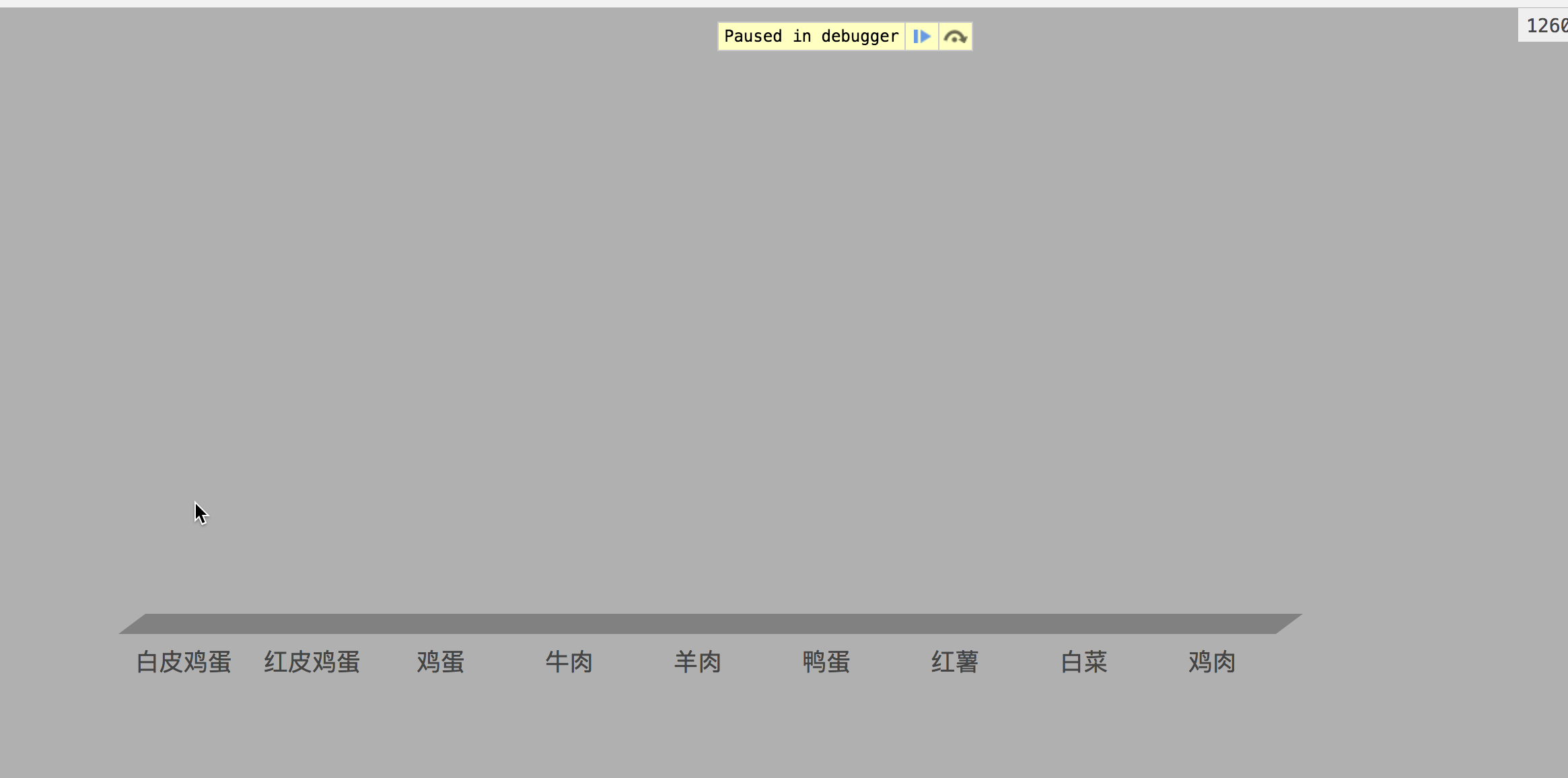
在上述代码中,除了使用序数比例尺外,还使用了地理路径生成器。由于需要生成立体柱图,因此需要移除原有的X轴并重新绘制。下图展示了重新绘制的path路径效果:
创建Y轴线性比例尺
创建Y轴线性比例尺
var yLinearScale;
 //创建y轴的比例尺渲染y轴
 function addYScale() {
 yLinearScale = d3.scaleLinear()
 .domain([0, d3.max(data, function (d, i) {
  return d.child.value * 1;
 }) * 1.2])
 .range([svgHeight - margin.top - margin.bottom, 0]);

 //定义Y轴比例尺以及刻度
 var yAxis = d3.axisLeft(yLinearScale)
 .ticks(6);

 //绘制Y轴
 var yAxisG = svg.append("g")
 .call(yAxis)
 .attr('transform', 'translate(' + (margin.left + 10) + "," + margin.top + ")");
 yAxisG.selectAll('text')
 .attr('font-size', '18px')
 .attr('fill', '#636363');
 //删除原Y轴路径和tick
 yAxisG.select("path").remove();
 yAxisG.selectAll('line').remove();
 }
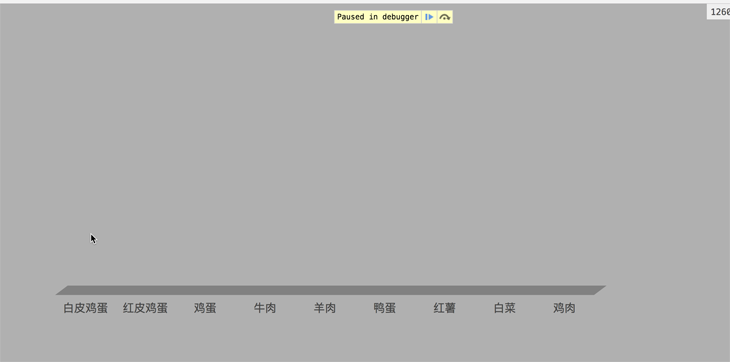
在创建Y轴时,同样需要移除原有的路径和刻度线。下图展示了最终效果:
至此,基础搭建完毕,接下来进入核心算法部分。
核心算法
核心算法
为了便于理解最终效果,建议将立体柱图分解为多个部分进行分析。
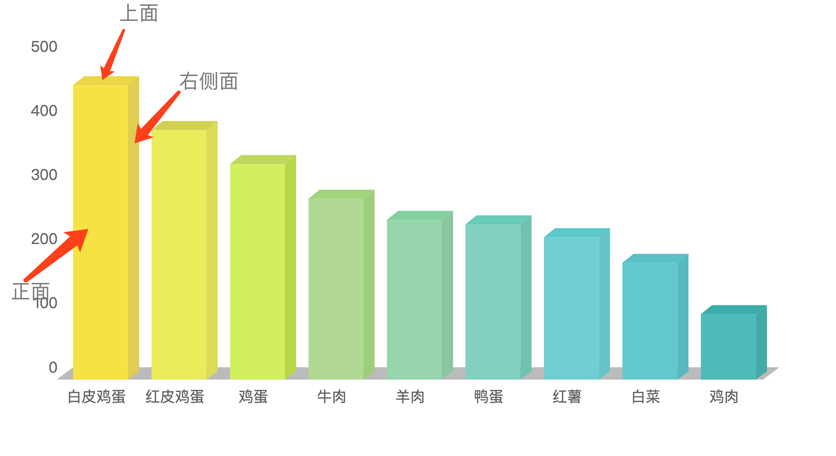
实现立体柱图的思路是通过两个path路径和一个rect元素进行组合拼接。
正面由一个rect构成,上面和右面则利用path路径生成。
利用三角函数,通过给定的angle角度计算上面的一个点,进而推导出其他所有点的位置以完成绘制。
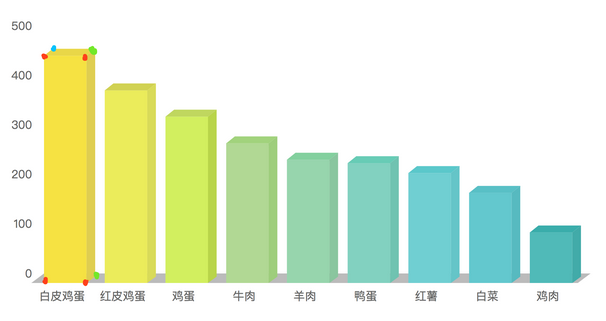
从上图可以看出,一个立体柱图仅需知道7个点的位置即可绘制完成。
已知正面rect的4个红色点位置,以及柱子的宽度和高度,只要求出Top面左上角点的位置,即可确定其余绿色点的位置。具体算法如下:
//核心算法思路是Big boss教的,我借花献佛
function dataProcessing(xLinearScale) {
 var angle = Math.PI / 2.3;
 for (var i = 0; i < data.length; i++) {
  var d = data[i];
  var depth = 10;
  d.ow = xLinearScale.bandwidth() * 0.7;
  d.ox = xLinearScale(d.letter);
  d.oh = 1;
  d.p1 = {
  x: Math.cos(angle) * d.ow,
  y: -Math.sin(angle) - depth
  };
  d.p2 = {
  x: d.p1.x + d.ow,
  y: d.p1.y
  };
  d.p3 = {
  x: d.p2.x,
  y: d.p2.y + d.oh
  };
 }
 }
渲染
渲染
最终需要支持鼠标交互,因此先添加tip生成函数。
//tip的创建方法(方法来自敬爱的鸣哥)
 var tipTimerConfig = {
 longer: 0,
 target: null,
 exist: false,
 winEvent: window.event,
 boxHeight: 398,
 boxWidth: 376,
 maxWidth: 376,
 maxHeight: 398,
 tooltip: null,

 showTime: 3500,
 hoverTime: 300,
 displayText: "",
 show: function (val, e) {
  "use strict";
  var me = this;

  if (e != null) {
  me.winEvent = e;
  }

  me.displayText = val;

  me.calculateBoxAndShow();

  me.createTimer();
 },
 calculateBoxAndShow: function () {
  "use strict";
  var me = this;
  var _x = 0;
  var _y = 0;
  var _w = document.documentElement.scrollWidth;
  var _h = document.documentElement.scrollHeight;
  var wScrollX = window.scrollX || document.body.scrollLeft;
  var wScrollY = window.scrollY || document.body.scrollTop;
  var xMouse = me.winEvent.x + wScrollX;
  if (_w - xMouse < me.boxWidth) {
  _x = xMouse - me.boxWidth - 10;
  } else {
  _x = xMouse;
  }

  var _yMouse = me.winEvent.y + wScrollY;
  if (_h - _yMouse < me.boxHeight + 18) {
  _y = _yMouse - me.boxHeight - 25;
  } else {

  _y = _yMouse + 18;
  }

  me.addTooltip(_x, _y);
 },
 addTooltip: function (page_x, page_y) {
  "use strict";
  var me = this;

  me.tooltip = document.createElement("div");
  me.tooltip.style.left = page_x + "px";
  me.tooltip.style.top = page_y + "px";
  me.tooltip.style.position = "absolute";

  me.tooltip.style.width = me.boxWidth + "px";
  me.tooltip.style.height = me.boxHeight + "px";
  me.tooltip.className = "three-tooltip";

  var divInnerHeader = me.createInner();
  divInnerHeader.innerHTML = me.displayText;
  me.tooltip.appendChild(divInnerHeader);

  document.body.appendChild(me.tooltip);
 },
 createInner: function () {
  "use strict";
  var me = this;
  var divInnerHeader = document.createElement('div');
  divInnerHeader.style.width = me.boxWidth + "px";
  divInnerHeader.style.height = me.boxHeight + "px";
  return divInnerHeader;
 },
 ClearDiv: function () {
  "use strict";
  var delDiv = document.body.getElementsByClassName("three-tooltip");
  for (var i = delDiv.length - 1; i >= 0; i--) {
  document.body.removeChild(delDiv[i]);
  }
 },
 createTimer: function (delTarget) {
  "use strict";
  var me = this;
  var delTip = me.tooltip;
  var delTarget = tipTimerConfig.target;
  var removeTimer = window.setTimeout(function () {
  try {
   if (delTip != null) {
   document.body.removeChild(delTip);
   if (tipTimerConfig.target == delTarget) {
    me.exist = false;
   }
   }
   clearTimeout(removeTimer);
  } catch (e) {
   clearTimeout(removeTimer);
  }
  }, me.showTime);
 },
 hoverTimerFn: function (showTip, showTarget) {
  "use strict";
  var me = this;

  var showTarget = tipTimerConfig.target;

  var hoverTimer = window.setInterval(function () {
  try {
   if (tipTimerConfig.target != showTarget) {
   clearInterval(hoverTimer);
   } else if (!tipTimerConfig.exist && (new Date()).getTime() - me.longer > me.hoverTime) {
   //show
   tipTimerConfig.show(showTip);
   tipTimerConfig.exist = true;
   clearInterval(hoverTimer);
   }
  } catch (e) {
   clearInterval(hoverTimer);
  }
  }, tipTimerConfig.hoverTime);
 }
 };

 var createTooltipTableData = function (info) {
 var ary = [];
 ary.push("<div class='tip-hill-div'>");
 ary.push("<h1>品种信息:" + info.letter + "</h1>");
 ary.push("<h2>成交量: " + info.child.value);
 ary.push("</div>");
 return ary.join("");
 };
核心算法编写完成后,进入最终的渲染阶段。
function addColumn() {
 function clumnMouseover(d) {
  d3.select(this).selectAll(".transparentPath").attr("opacity", 0.8);
  // 添加 div
  tipTimerConfig.target = this;
  tipTimerConfig.longer = new Date().getTime();
  tipTimerConfig.exist = false;
  //获取坐标
  tipTimerConfig.winEvent = {
  x: event.clientX - 100,
  y: event.clientY
  };
  tipTimerConfig.boxHeight = 50;
  tipTimerConfig.boxWidth = 140;

  //hide
  tipTimerConfig.ClearDiv();
  //show
  tipTimerConfig.hoverTimerFn(createTooltipTableData(d));
 }

 function clumnMouseout(d) {
  d3.select(this).selectAll(".transparentPath").attr("opacity", 1);
  tipTimerConfig.target = null;
  tipTimerConfig.ClearDiv();
 }

 var g = svg.selectAll('.g')
  .data(data)
  .enter()
  .append('g')
  .on("mouseover", clumnMouseover)
  .on("mouseout", clumnMouseout)
  .attr('transform', function (d) {
   return "translate(" + (d.ox + margin.left + 20) + "," + (svgHeight - margin.bottom + 15) + ")"
  });
 g.transition()
  .duration(2500)
  .attr("transform", function (d) {
   return "translate(" + (d.ox + margin.left + 20) + ", " + (yLinearScale(d.child.value) + margin.bottom - 15) + ")"
  });

 g.append('rect')
  .attr('x', 0)
  .attr('y', 0)
  .attr("class", "transparentPath")
  .attr('width', function (d, i) {
   return d.ow;
  })
  .attr('height', function (d) {
   return d.oh;
  })
  .style('fill', function (d, i) {
   return mainColorList[i]
  })
  .transition()
  .duration(2500)
  .attr("height", function (d, i) {
   return svgHeight - margin.bottom - margin.top - yLinearScale(d.child.value);
  });

 g.append('path')
  .attr("class", "transparentPath")
  .attr('d', function (d) {
   return "M0,0 L" + d.p1.x + "," + d.p1.y + " L" + d.p2.x + "," + d.p2.y + " L" + d.ow + ",0 L0,0";
  })
  .style('fill', function (d, i) {
   return topColorList[i]
  });

 g.append('path')
  .attr("class", "transparentPath")
  .attr('d', function (d) {
   return "M" + d.ow + ",0 L" + d.p2.x + "," + d.p2.y + " L" + d.p3.x + "," + d.p3.y + " L" + d.ow + "," + d.oh + " L" + d.ow + ",0"
  })
  .style('fill', function (d, i) {
   return rightColorList[i]
  })
  .transition()
  .duration(2500)
  .attr("d", function (d, i) {
   return "M" + d.ow + ",0 L" + d.p2.x + "," + d.p2.y + " L" + d.p3.x + "," + (d.p3.y + svgHeight - margin.top - margin.bottom - yLinearScale(d.child.value)) + " L" + d.ow + "," + (svgHeight - margin.top - margin.bottom - yLinearScale(d.child.value)) + " L" + d.ow + ",0"
  });
 }
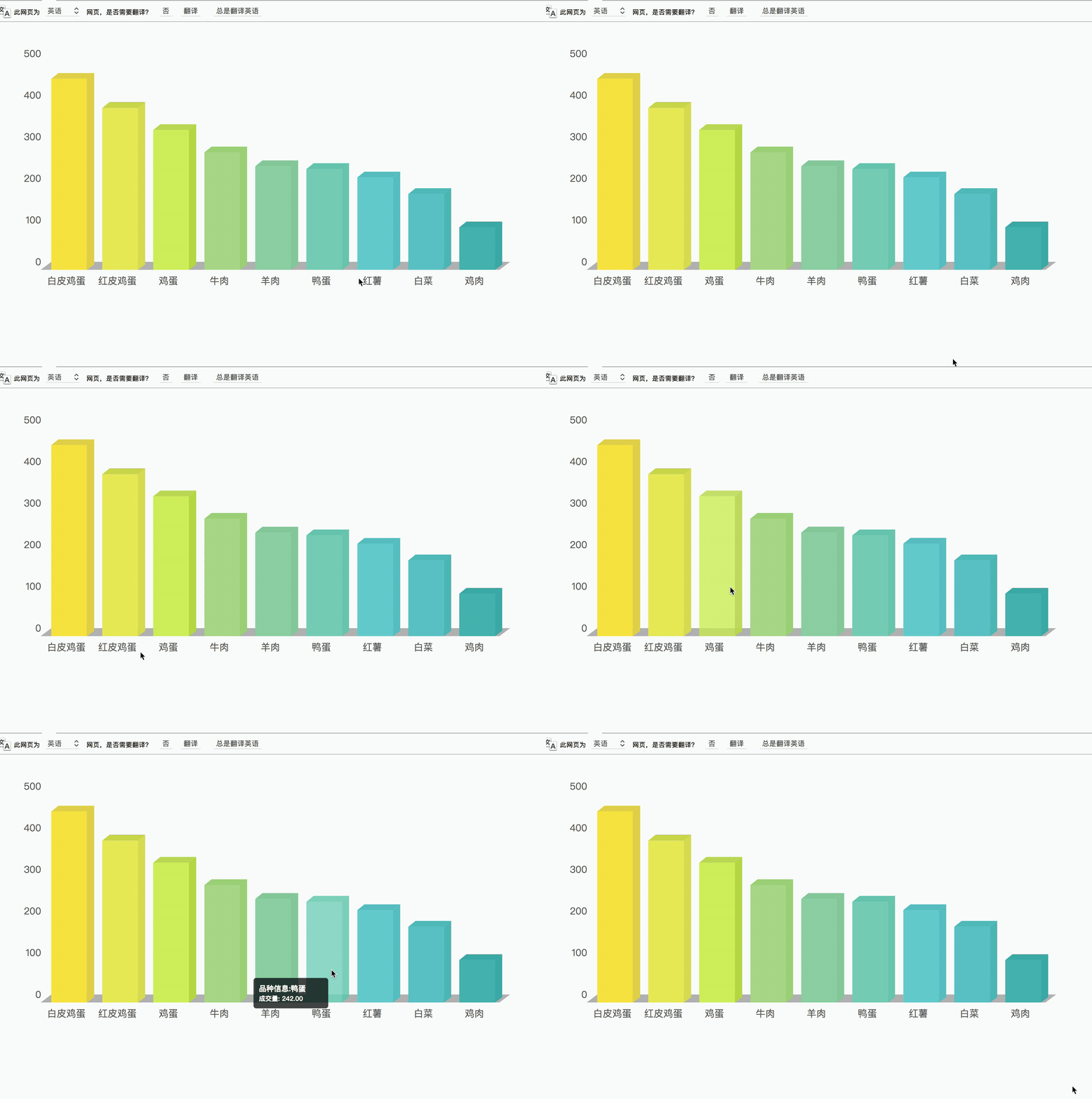
考虑到动画效果,对渲染时的柱子位置进行了特殊处理。若对此部分不理解,欢迎留言讨论。
总结
总结
以上就是本文的全部内容,希望本文的内容对大家学习或者工作能带来一定的帮助,如果有疑问大家可以留言交流,谢谢大家对本站的支持。
Mock.js 拦截失效或数据格式错误的常见原因及排查
2026-11-05 10:11:59
Java和JavaScript名字像但没关系:辨析Java、JavaWeb与JS
2026-11-04 09:30:54
CodePen、JSFiddle与RunJS对比:哪款JS在线运行工具更适合你?
2026-11-03 16:46:57
JS 统计图渲染空白或报错怎么排查?常见问题解决指南
2026-11-03 09:49:40
flv.js 常见报错 MediaError 与解码失败排查指南
2026-11-02 10:29:29