

uniapp scroll-view 组件实战:Vue3 改造与滚动逻辑详解
本文详解 uniapp 中 scroll-view 组件的使用,重点讲解如何将其从 Vue2 改造为 Vue3 的 setup 语法。通过拆解垂直滚动、水平滚动及回到顶部功能,深入分析 scroll-y、scroll-top 等核心属性的作用机制,并提供完整的代码示例与关键参数说明。
参考资料
文档地址:https://uniapp.dcloud.net.cn/component/scroll-view.html
官方给的完整代码
<script>
	export default {
		data() {
			return {
				scrollTop: 0,
				old: {
					scrollTop: 0
				}
			}
		},
		methods: {
			upper: function(e) {
				console.log(e)
			},
			lower: function(e) {
				console.log(e)
			},
			scroll: function(e) {
				console.log(e)
				this.old.scrollTop = e.detail.scrollTop
			},
			goTop: function(e) {
				// 解决view层不同步的问题
				this.scrollTop = this.old.scrollTop
				this.$nextTick(function() {
					this.scrollTop = 0
				});
				uni.showToast({
					icon: "none",
					title: "纵向滚动 scrollTop 值已被修改为 0"
				})
			}
		}
	}
</script>
<template>
	<view>
		<view class="uni-padding-wrap uni-common-mt">
			<view class="uni-title uni-common-mt">
				Vertical Scroll
				<text>\n纵向滚动</text>
			</view>
			<view>
				<scroll-view :scroll-top="scrollTop" scroll-y="true" class="scroll-Y" @scrolltoupper="upper"
					@scrolltolower="lower" @scroll="scroll">
					<view id="demo1" class="scroll-view-item uni-bg-red">A</view>
					<view id="demo2" class="scroll-view-item uni-bg-green">B</view>
					<view id="demo3" class="scroll-view-item uni-bg-blue">C</view>
				</scroll-view>
			</view>
			<view @tap="goTop" class="uni-link uni-center uni-common-mt">
				点击这里返回顶部
			</view>
			<view class="uni-title uni-common-mt">
				Horizontal Scroll
				<text>\n横向滚动</text>
			</view>
			<view>
				<scroll-view class="scroll-view_H" scroll-x="true" @scroll="scroll" scroll-left="120">
					<view id="demo1" class="scroll-view-item_H uni-bg-red">A</view>
					<view id="demo2" class="scroll-view-item_H uni-bg-green">B</view>
					<view id="demo3" class="scroll-view-item_H uni-bg-blue">C</view>
				</scroll-view>
			</view>
			<view class="uni-common-pb"></view>
		</view>
	</view>
</template>
<style>
	.scroll-Y {
		height: 300rpx;
	}
	.scroll-view_H {
		white-space: nowrap;
		width: 100%;
	}
	.scroll-view-item {
		height: 300rpx;
		line-height: 300rpx;
		text-align: center;
		font-size: 36rpx;
	}
	.scroll-view-item_H {
		display: inline-block;
		width: 100%;
		height: 300rpx;
		line-height: 300rpx;
		text-align: center;
		font-size: 36rpx;
	}
</style>
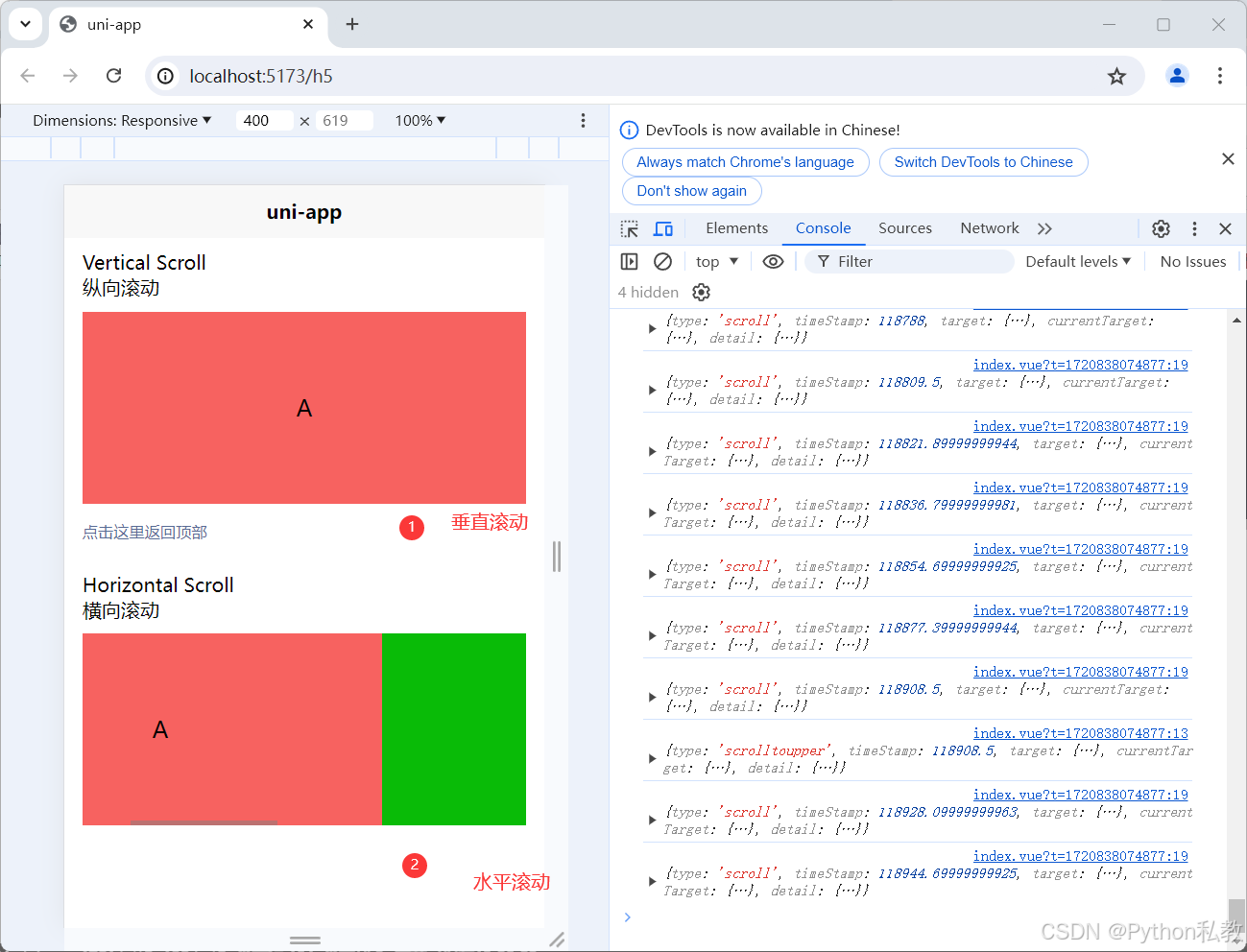
此时的渲染效果
小目标
该案例代码相对复杂,建议将其拆解为垂直滚动和横向滚动两个独立部分进行理解。
原始代码基于 Vue2 编写,需要将其重构为符合 Vue3 规范的代码。
首先将代码转换为 Vue3 的 setup 语法结构。
原始代码示例如下:
export default {
		data() {
			return {
				scrollTop: 0,
				old: {
					scrollTop: 0
				}
			}
		},
		methods: {
			upper: function(e) {
				console.log(e)
			},
			lower: function(e) {
				console.log(e)
			},
			scroll: function(e) {
				console.log(e)
				this.old.scrollTop = e.detail.scrollTop
			},
			goTop: function(e) {
				// 解决view层不同步的问题
				this.scrollTop = this.old.scrollTop
				this.$nextTick(function() {
					this.scrollTop = 0
				});
				uni.showToast({
					icon: "none",
					title: "纵向滚动 scrollTop 值已被修改为 0"
				})
			}
		}
	}
重构后的代码如下:
import {
		ref
	} from 'vue';
	const scrollTop = ref(0)
	const old = ref({
		scrollTop: 0
	})
	function upper(e) {
		console.log(e)
	}
	function lower(e) {
		console.log(e)
	}
	function scroll(e) {
		console.log(e)
		old.value.scrollTop = e.detail.scrollTop
	}
	function goTop(e) {
		// 解决view层不同步的问题
		scrollTop.value = old.value.scrollTop
		nextTick(function() {
			scrollTop.value = 0
		});
		uni.showToast({
			icon: "none",
			title: "纵向滚动 scrollTop 值已被修改为 0"
		})
	}
垂直滚动案例
接下来对案例进行拆分,先保存当前的完整代码,以防修改过程中出现错误无法恢复。
<script setup>
	import {
		ref
	} from 'vue';
	const scrollTop = ref(0)
	const old = ref({
		scrollTop: 0
	})
	function upper(e) {
		console.log(e)
	}
	function lower(e) {
		console.log(e)
	}
	function scroll(e) {
		console.log(e)
		old.value.scrollTop = e.detail.scrollTop
	}
	function goTop(e) {
		// 解决view层不同步的问题
		scrollTop.value = old.value.scrollTop
		nextTick(function() {
			scrollTop.value = 0
		});
		uni.showToast({
			icon: "none",
			title: "纵向滚动 scrollTop 值已被修改为 0"
		})
	}
</script>
<template>
	<view>
		<view class="uni-padding-wrap uni-common-mt">
			<view class="uni-title uni-common-mt">
				Vertical Scroll
				<text>\n纵向滚动</text>
			</view>
			<view>
				<scroll-view :scroll-top="scrollTop" scroll-y="true" class="scroll-Y" @scrolltoupper="upper"
					@scrolltolower="lower" @scroll="scroll">
					<view id="demo1" class="scroll-view-item uni-bg-red">A</view>
					<view id="demo2" class="scroll-view-item uni-bg-green">B</view>
					<view id="demo3" class="scroll-view-item uni-bg-blue">C</view>
				</scroll-view>
			</view>
			<view @tap="goTop" class="uni-link uni-center uni-common-mt">
				点击这里返回顶部
			</view>
			<view class="uni-title uni-common-mt">
				Horizontal Scroll
				<text>\n横向滚动</text>
			</view>
			<view>
				<scroll-view class="scroll-view_H" scroll-x="true" @scroll="scroll" scroll-left="120">
					<view id="demo1" class="scroll-view-item_H uni-bg-red">A</view>
					<view id="demo2" class="scroll-view-item_H uni-bg-green">B</view>
					<view id="demo3" class="scroll-view-item_H uni-bg-blue">C</view>
				</scroll-view>
			</view>
			<view class="uni-common-pb"></view>
		</view>
	</view>
</template>
<style>
	.scroll-Y {
		height: 300rpx;
	}
	.scroll-view_H {
		white-space: nowrap;
		width: 100%;
	}
	.scroll-view-item {
		height: 300rpx;
		line-height: 300rpx;
		text-align: center;
		font-size: 36rpx;
	}
	.scroll-view-item_H {
		display: inline-block;
		width: 100%;
		height: 300rpx;
		line-height: 300rpx;
		text-align: center;
		font-size: 36rpx;
	}
</style>
随后移除与水平滚动相关的代码,得到以下代码结构:
<template>
	<view>
		<view class="uni-padding-wrap uni-common-mt">
			<view class="uni-title uni-common-mt">
				Vertical Scroll
				<text>\n纵向滚动</text>
			</view>
			<view>
				<scroll-view :scroll-top="scrollTop" scroll-y="true" class="scroll-Y" @scrolltoupper="upper"
					@scrolltolower="lower" @scroll="scroll">
					<view id="demo1" class="scroll-view-item uni-bg-red">A</view>
					<view id="demo2" class="scroll-view-item uni-bg-green">B</view>
					<view id="demo3" class="scroll-view-item uni-bg-blue">C</view>
				</scroll-view>
			</view>
			<view @tap="goTop" class="uni-link uni-center uni-common-mt">
				点击这里返回顶部
			</view>
			<view class="uni-common-pb"></view>
		</view>
	</view>
</template>
此处涉及一个细节知识点,即回到顶部的功能实现。我们先对该功能进行分析。
回到顶部的功能
HTML 代码如下:
<view @tap="goTop" class="uni-link uni-center uni-common-mt">
				点击这里返回顶部
			</view>
JavaScript 代码如下:
async function goTop(e) {
		// 解决view层不同步的问题
		scrollTop.value = old.value.scrollTop
		await nextTick(function() {
			scrollTop.value = 0
		});
		uni.showToast({
			icon: "none",
			title: "纵向滚动 scrollTop 值已被修改为 0"
		})
	}
注意,该函数是异步执行的,因为 是一个异步方法,必须使用 await 关键字。该方法从 vue 模块中引入:
import {
		ref,
		nextTick,
	} from 'vue';
回到顶部的功能是如何生效的?
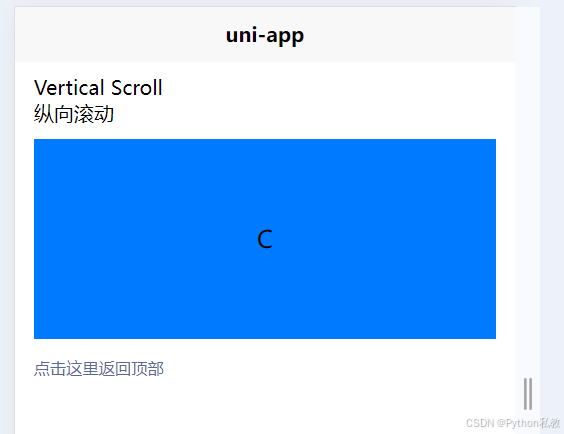
经过测试,当前垂直滚动位置位于 C 处:
接着点击返回顶部按钮:
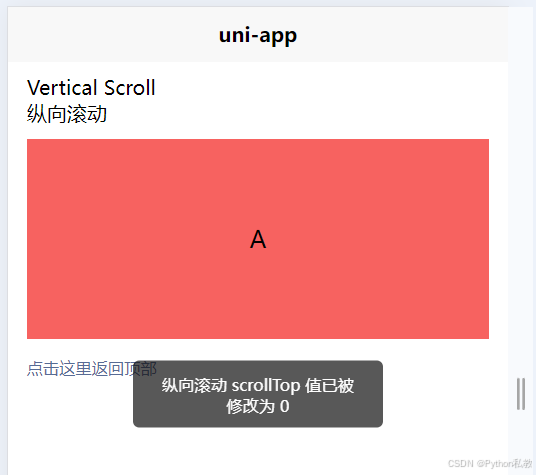
可以发现,垂直滚动的位置重新回到了 A 处。
不过在学习过程中,建议先掌握垂直滚动的实现原理,再学习如何实现回到顶部的功能。
继续分析如何实现垂直滚动
核心的 HTML 代码如下:
<scroll-view
:scroll-top="scrollTop"
scroll-y="true"
class="scroll-Y"
@scrolltoupper="upper"
	@scrolltolower="lower" @scroll="scroll">
	<view id="demo1" class="scroll-view-item uni-bg-red">A</view>
	<view id="demo2" class="scroll-view-item uni-bg-green">B</view>
	<view id="demo3" class="scroll-view-item uni-bg-blue">C</view>
</scroll-view>
代码分析:
- 首先组件使用了
- 动态绑定了一个值,用于记录滚动的顶部位置 :scroll-top="scrollTop",该值的初始值为 0,在 js 中定义如下 const scrollTop = ref(0)
- 属性 scroll-y="true" 是最关键的,它将滚动方向设置为垂直方向
- 通过 class="scroll-Y" 样式,给容器设置了固定高度 height: 300rpx;,由于父盒子的高度是固定的,而内容的高度超过了父元素的限制,因此出现了滚动效果
- @scrolltoupper="upper" 根据官方文档解释,滚动到顶部/左边时,会触发 scrolltoupper 事件。由于我们进行的是垂直滚动,不会滚动到左边,因此当滚动到最顶部时,会触发此事件
- @scrolltolower="lower" 表示滚动到最底部时触发的事件
- @scroll="scroll" 表示只要发生滚动,就会触发的事件
- <view id="demo1" class="scroll-view-item uni-bg-red">A</view> 内容相对简单,核心在于每个内容 item 的高度都与父元素的高度一致,即 height: 300rpx;
因此得出以下结论:
- 使用
scroll-view可以得到一个滚动的容器 - 设置
scroll-y="true"可以实现垂直滚动 - 将父元素的高度和每个子元素的高度都设置为相同的高度,会产生类似于整个屏幕滚动的效果 如何实现水平滚动
核心代码如下:
<scroll-view
	class="scroll-view_H"
	scroll-x="true"
	@scroll="scroll"
	scroll-left="120">
	<view id="demo1" class="scroll-view-item_H uni-bg-red">A</view>
	<view id="demo2" class="scroll-view-item_H uni-bg-green">B</view>
	<view id="demo3" class="scroll-view-item_H uni-bg-blue">C</view>
</scroll-view>
可以发现,与水平滚动类似,只不过通过 scroll-x="true" 设置了水平滚动。
scroll-left="120" 根据官方文档解释,用于设置滚动条的位置。
实现垂直滚动的完整代码
<script setup>
	import {
		ref,
		nextTick,
	} from 'vue';
	const scrollTop = ref(0)
	const old = ref({
		scrollTop: 0
	})
	function upper(e) {
		console.log(e)
	}
	function lower(e) {
		console.log(e)
	}
	function scroll(e) {
		console.log(e)
		old.value.scrollTop = e.detail.scrollTop
	}
	async function goTop(e) {
		// 解决view层不同步的问题
		scrollTop.value = old.value.scrollTop
		await nextTick(function() {
			scrollTop.value = 0
		});
		uni.showToast({
			icon: "none",
			title: "纵向滚动 scrollTop 值已被修改为 0"
		})
	}
</script>
<template>
	<view>
		<view class="uni-padding-wrap uni-common-mt">
			<view class="uni-title uni-common-mt">
				Vertical Scroll
				<text>\n纵向滚动</text>
			</view>
			<view>
				<scroll-view :scroll-top="scrollTop" scroll-y="true" class="scroll-Y" @scrolltoupper="upper"
					@scrolltolower="lower" @scroll="scroll">
					<view id="demo1" class="scroll-view-item uni-bg-red">A</view>
					<view id="demo2" class="scroll-view-item uni-bg-green">B</view>
					<view id="demo3" class="scroll-view-item uni-bg-blue">C</view>
				</scroll-view>
			</view>
			<view @tap="goTop" class="uni-link uni-center uni-common-mt">
				点击这里返回顶部
			</view>
			<view class="uni-common-pb"></view>
		</view>
	</view>
</template>
<style>
	.scroll-Y {
		height: 300rpx;
	}
	.scroll-view_H {
		white-space: nowrap;
		width: 100%;
	}
	.scroll-view-item {
		height: 300rpx;
		line-height: 300rpx;
		text-align: center;
		font-size: 36rpx;
	}
	.scroll-view-item_H {
		display: inline-block;
		width: 100%;
		height: 300rpx;
		line-height: 300rpx;
		text-align: center;
		font-size: 36rpx;
	}
</style>
设置水平滚动的完整代码
<script setup>
	import {
		ref,
		nextTick,
	} from 'vue';
	const scrollTop = ref(0)
	const old = ref({
		scrollTop: 0
	})
	function upper(e) {
		console.log(e)
	}
	function lower(e) {
		console.log(e)
	}
	function scroll(e) {
		console.log(e)
		old.value.scrollTop = e.detail.scrollTop
	}
	async function goTop(e) {
		// 解决view层不同步的问题
		scrollTop.value = old.value.scrollTop
		await nextTick(function() {
			scrollTop.value = 0
		});
		uni.showToast({
			icon: "none",
			title: "纵向滚动 scrollTop 值已被修改为 0"
		})
	}
</script>
<template>
	<view>
		<scroll-view
			class="scroll-view_H"
			scroll-x="true"
			@scroll="scroll"
			scroll-left="120">
			<view id="demo1" class="scroll-view-item_H uni-bg-red">A</view>
			<view id="demo2" class="scroll-view-item_H uni-bg-green">B</view>
			<view id="demo3" class="scroll-view-item_H uni-bg-blue">C</view>
		</scroll-view>
	</view>
</template>
<style>
	.scroll-Y {
		height: 300rpx;
	}
	.scroll-view_H {
		white-space: nowrap;
		width: 100%;
	}
	.scroll-view-item {
		height: 300rpx;
		line-height: 300rpx;
		text-align: center;
		font-size: 36rpx;
	}
	.scroll-view-item_H {
		display: inline-block;
		width: 100%;
		height: 300rpx;
		line-height: 300rpx;
		text-align: center;
		font-size: 36rpx;
	}
</style>
到此这篇关于 uniapp 内置组件 scroll-view 案例解析的文章就介绍到这了,更多相关 uniapp 内置组件 scroll-view 内容请搜索本站以前的文章或继续浏览下面的相关文章,希望大家以后多多支持本站!
Vue前端日历插件VCalendar集成与使用指南
2026-10-31 18:16:55
ElementUI el-calendar 周月视图切换与自定义实现
2026-10-31 14:48:43
Vue Element UI 结合 sortable.js 实现嵌套表格行内拖拽排序
2026-10-31 13:57:34
el-input 限制输入只允许输入浮点型的解决思路
2026-10-31 12:30:12
Vue解决跨域问题的三种常用方案:JSONP、CORS与代理服务器
2026-10-31 07:07:05