

JavaScript 实现百度分享功能代码示例
作者:木棉时间:2026-10-21 22:48:11浏览:622
本文介绍了如何在网页中通过 JavaScript 调用百度分享功能。内容包含分享按钮未展开与展开状态的效果图对比,以及完整的 HTML 和 JS 代码示例。代码展示了如何引入百度分享接口并配置相关参数,旨在帮助开发者快速实现网站内容的社交分享功能。
百度分享功能效果与代码实现
效果展示如下:

图(1)显示按钮未展开时的状态。
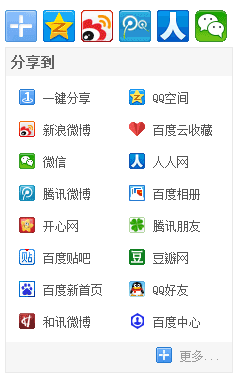
图(2)展示按钮展开后的效果。
具体实现代码如下:
<!DOCTYPE html>
<html>
<head>
<meta charset="UTF-8">
<title></title>
</head>
<body>
<div class="bdsharebuttonbox">
 <a href="#" rel="external nofollow" rel="external nofollow" rel="external nofollow" rel="external nofollow" rel="external nofollow" rel="external nofollow" class="bds_more" data-cmd="more"></a>
 <a href="#" rel="external nofollow" rel="external nofollow" rel="external nofollow" rel="external nofollow" rel="external nofollow" rel="external nofollow" class="bds_qzone" data-cmd="qzone" title="分享到QQ空间"></a>
 <a href="#" rel="external nofollow" rel="external nofollow" rel="external nofollow" rel="external nofollow" rel="external nofollow" rel="external nofollow" class="bds_tsina" data-cmd="tsina" title="分享到新浪微博"></a>
 <a href="#" rel="external nofollow" rel="external nofollow" rel="external nofollow" rel="external nofollow" rel="external nofollow" rel="external nofollow" class="bds_tqq" data-cmd="tqq" title="分享到腾讯微博"></a>
 <a href="#" rel="external nofollow" rel="external nofollow" rel="external nofollow" rel="external nofollow" rel="external nofollow" rel="external nofollow" class="bds_renren" data-cmd="renren" title="分享到人人网"></a>
 <a href="#" rel="external nofollow" rel="external nofollow" rel="external nofollow" rel="external nofollow" rel="external nofollow" rel="external nofollow" class="bds_weixin" data-cmd="weixin" title="分享到微信"></a>
</div>
<script>
 window._bd_share_config = {
 "common": {
 "bdSnsKey": {},
 "bdText": "",
 "bdMini": "2",
 "bdMiniList": false,
 "bdPic": "",
 "bdStyle": "0",
 "bdSize": "32"
 },
 "share": {},
 "image": {
 "viewList": ["qzone", "tsina", "tqq", "renren", "weixin"],
 "viewText": "分享到:",
 "viewSize": "16"
 },
 "selectShare": {
 "bdContainerClass": null,
 "bdSelectMiniList": ["qzone", "tsina", "tqq", "renren", "weixin"]
 }
 };
 with(document) 0[(getElementsByTagName('head')[0] || body).appendChild(createElement('script')).src = 'http://bdimg.share.baidu.com/static/api/js/share.js?v=89860593.js?cdnversion=' + ~(-new Date() / 36e5)];
</script>
</body>
</html>
以上即为本文分享的全部内容,希望这些内容能对您的学习或工作有所帮助。同时也欢迎大家继续支持本站!
作者最新文章
JS合并多个数组的三种方法:concat、spread与flat
2026-11-05 17:39:45
JavaScript怎么准确判断数据类型:typeof、instanceof与Object.prototype.toString
2026-11-05 17:09:21
JS中将数组和对象混合组装为JSON字符串
2026-11-05 16:41:42
JS运算符优先级与结合性的区别是什么?
2026-11-05 13:22:02
JS Map怎么只遍历Key或Value
2026-11-05 13:00:36