

JS中国标准时间转化为年月日时分秒'yyyy-MM-dd hh:mm:ss'的示例详解
本文详解JavaScript中中国标准时间(如Sat Jan 30 2022...)向指定格式yyyy-MM-dd hh:mm:ss的转换方法。涵盖在Vue项目中通过main.js全局注册$formatDate函数的实现,以及Date.parse、Date.UTC、Date.now等核心API的使用。同时梳理时间戳、标准时间与格式化字符串之间的相互转换逻辑,并提供判断是否为当天的实用代码示例。
将JavaScript中的中国标准时间格式化为年月日时分秒,即'yyyy-MM-dd hh:mm:ss'格式。
新建一个名为formatDate.js的文件,具体代码如下:
function padLeftZero(str) {
  return ('00' + str).substr(str.length)
}
export function formatDate(date, fmt) {
  if (!date) {
    return ''
  }
  if (/(y+)/.test(fmt)) {
    fmt = fmt.replace(
      RegExp.$1,
      (date.getFullYear() + '').substr(4 - RegExp.$1.length)
    )
  }
  const o = {
    'M+': date.getMonth() + 1,
    'd+': date.getDate(),
    'h+': date.getHours(),
    'm+': date.getMinutes(),
    's+': date.getSeconds()
  }
  for (const k in o) {
    if (new RegExp(`(${k})`).test(fmt)) {
      const str = o[k] + ''
      fmt = fmt.replace(
        RegExp.$1,
        RegExp.$1.length === 1 ? str : padLeftZero(str)
      )
    }
  }
  return fmt
}
export default formatDate
若项目基于Vue框架,需在main.js中进行全局引用配置。
import formatDate from '@/utils/formatDate.js'
Vue.prototype.$formatDate = formatDate
随后在页面中直接调用$formatDate方法即可使用。
// 获取当前时间年月日时分秒,即 2022-10-14 16:11:58
this.$formatDate(new Date(), 'yyyy-MM-dd hh:mm:ss')
// 如果时分秒不需要精确到,即 2022-10-14 00:00:00
this.$formatDate(new Date(), 'yyyy-MM-dd 00:00:00')
// 意思就是说时分秒你需要什么时间就写什么时间;需要是下午4点11分58秒,即 2022-10-14 16:11:58
this.$formatDate(new Date(), 'yyyy-MM-dd 16:11:58')
补充说明:
JavaScript中常见的时间转换问题,包括YYYY-MM-DD格式、时间戳及中国标准时间的处理。
1. 类型总结
- 指定格式为YYYY-MM-DD HH:MM:SS的情况。
- 时间戳的处理方式。
- 中国标准时间通常表现为Sat Jan 30 2022 08:26:26 GMT+0800 (中国标准时间)
new Date()的形式,调用系统当前时间即得此结果。
2.类型之间的转换
- 将时间戳转换为yyyy-mm-dd或yyyy-MM-dd HH-mm-ss格式。
function timestampToTime(timestamp) {
        var date = new Date(timestamp * 1000);//时间戳为10位需*1000,时间戳为13位的话不需乘1000
        var Y = date.getFullYear() + '-';
        var M = (date.getMonth()+1 < 10 ? '0'+(date.getMonth()+1):date.getMonth()+1) + '-';
        var D = (date.getDate()< 10 ? '0'+date.getDate():date.getDate())+ ' ';
        var h = (date.getHours() < 10 ? '0'+date.getHours():date.getHours())+ ':';
        var m = (date.getMinutes() < 10 ? '0'+date.getMinutes():date.getMinutes()) + ':';
        var s = date.getSeconds() < 10 ? '0'+date.getSeconds():date.getSeconds();
        return Y+M+D+h+m+s;
    }
将yyyy-mm-dd或yyyy-MM-dd HH-mm-ss格式转换为时间戳。
var stringTime = '2012-10-12 22:37:33';
//将获取到的时间转换成时间戳
var timestamp = Date.parse(new Date(stringTime));
将中国标准时间转换为yyyy-mm-dd hh-mm-ss格式。
 let y = date.getFullYear()
 let m = date.getMonth() + 1
 m = m < 10 ? ('0' + m) : m
 let d = date.getDate()
 d = d < 10 ? ('0' + d) : d
 let h =date.getHours()
 h = h < 10 ? ('0' + h) : h
 let M =date.getMinutes()
 M = M < 10 ? ('0' + M) : M
 let s =date.getSeconds()
 s = s < 10 ? ('0' + s) : s
 let dateTime= y + '-' + m + '-' + d + ' ' + h + ':' + M + ':' + s;
将yyyy-mm-dd hh-mm-ss格式转换为中国标准时间的方法包括: 1、new Date(“month dd,yyyy hh:mm:ss”); 2、new Date(“month dd,yyyy”); 3、new Date(yyyy,mth,dd,hh,mm,ss); 注意:这种方式下,必须传递整型; 4、new Date(yyyy,mth,dd); 5、new Date(ms); 注意:ms:是需要创建的时间和 GMT时间1970年1月1日之间相差的毫秒数;当前时间与GMT1970.1.1之间的毫秒数:var mills = new Date().getTime();
5.时间戳转为中国标准时间
const time = 1531065600000;//时间戳(数字)
const youData = new Data(time);
6.中国标准时间转为时间戳
Date.parse(Time)3. Date类型
创建日期对象:let now = new Date();

在Date构造函数未传参时,创建的对象将保存当前日期和时间。若需基于其他日期和时间创建对象,需传入以毫秒表示的时间值。
常用方法包括:Date.parse()、Date.UTC()、Date.now()以及Date.toLocaleString()和Date.toString()。
Date.parse() 支持的参数类型: 1) 月/日/年 eg:’1/18/2023‘

2) 月名 日,年 eg: ‘May 23, 2019’

3) 周几 月名 日 年 时:分:秒 时区 eg:’Wed Jan 18 2023 16:21:53 GMT+0800‘

4) YYYY-MM-DDTHH:mm:ss.sssZ eg: 2019-05-23T00:00:00

如果传入的参数不表示有效日期,则返回NaN。
用法示例:

Date.UTC() 用于表示2000年1月1日零点的时间。
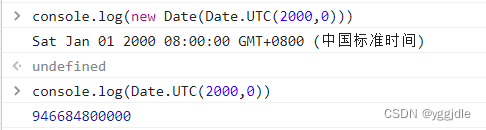
表示2005年5月5日下午5点55分55秒(注意月份是从0开始计算的)。

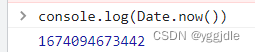
Date.now() 用于获取当前时间。
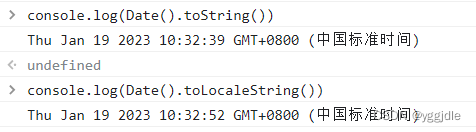
Date.toLocaleString() && Date.toString() 用于获取本地化或字符串形式的时间。
4. 日期格式化
toDateString() 方法。

toTimeString() 方法。

toLocaleDateString() 方法。

toLocaleTimeString() 方法。

toUTCString() 方法。

5. 如何判断是否为当天时间
if (new Date(str).toDateString() === new Date().toDateString()) {
    //今天
    console.log("当天");
} else if (new Date(str) < new Date()){
    //之前
    console.log(new Date(str).toISOString().slice(0,10));
}
到此这篇关于JS中国标准时间转化为年月日时分秒‘yyyy-MM-dd hh:mm:ss‘的文章就介绍到这了,更多相关js中国标准时间转换年月日时分秒内容请搜索本站以前的文章或继续浏览下面的相关文章希望大家以后多多支持本站!
JS脚本在App中运行报错怎么解决
2026-11-04 23:11:03
JS怎么使用padStart方法给数字补零
2026-11-04 11:12:03
JS是什么意思?JavaScript全称及基本定义
2026-11-04 08:05:29
JS 使用 toFixed(1) 保留一位小数的基本用法与注意事项
2026-11-03 18:34:57
JS字符串转整数:parseInt与Number的区别及用法
2026-11-03 17:26:54