

JavaScript验证URL的三种常用方法
本文总结了JavaScript中验证URL的三种主要方式。首先介绍利用原生URL构造函数结合try...catch进行基础校验及HTTP协议过滤;其次讲解使用is-url和is-url-http等NPM第三方库进行验证;最后提供基于正则表达式的验证方案,涵盖通用URL与仅HTTP协议的两种场景,帮助开发者根据需求选择合适方案。
1.使用 URL 构造函数来验证 URL
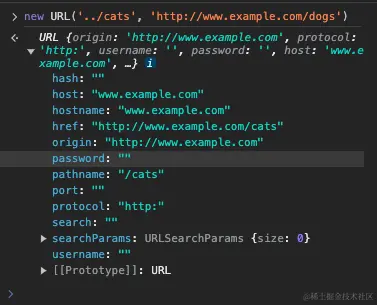
当向 URL 构造函数传入一个字符串时,若该字符串符合有效 URL 格式,则返回一个新的 URL 对象;反之,若格式无效,则会抛出错误。
const url = new URL('../cats', 'http://www.example.com/dogs');
console.log(url.hostname); // "www.example.com"
console.log(url.pathname); // "/cats"
在控制台输出的 URL 对象示例如下:
当传入无效的 URL 字符串时:
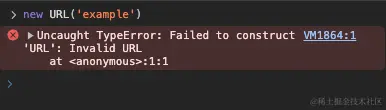
const exampleUrl = new URL('example');
console.log(exampleUrl);
例如字符串 'example' 并非有效 URL,因此会触发 TypeError 错误:
1.1 使用 URL 构造函数创建一个 URL 验证器函数
结合 URL 构造函数与 try...catch 语句,可以构建如下验证函数:
function isValidUrl(string) {
  try {
    new URL(string);
    return true;
  } catch (err) {
    return false;
  }
}
若传入参数为有效 URL,isValidUrl 函数返回 true;否则返回 false:
console.log(isValidUrl('https://www.example.com/')); // true
console.log(isValidUrl('mailto://mail@example.com')); // true
console.log(isValidUrl('freecodecamp')); // false
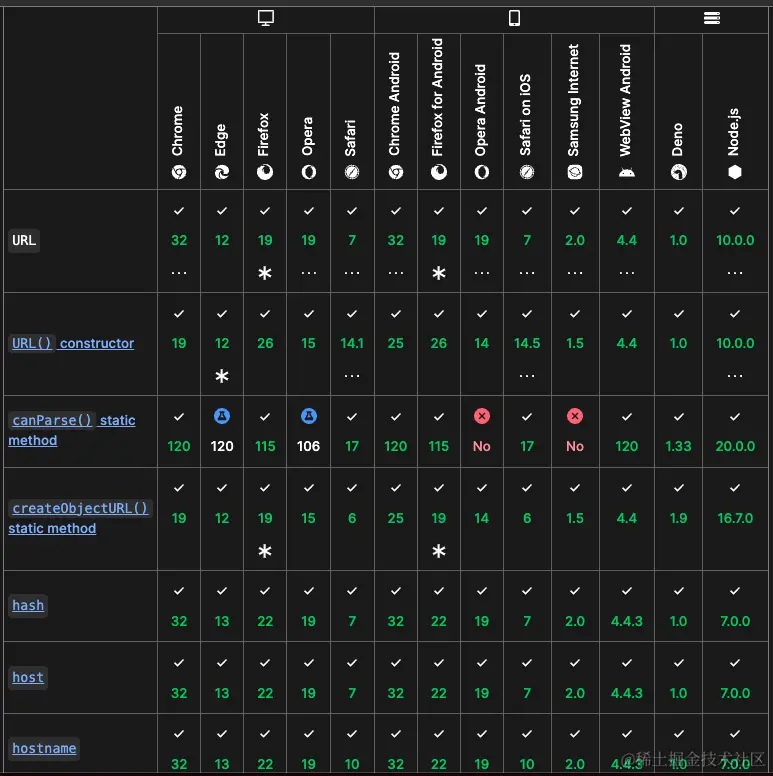
浏览器兼容性:
该方法在大多数主流浏览器中均得到支持。
1.2 使用 URL 构造器只验证 HTTP URL
若需仅检查 URL 是否为有效的 HTTP 地址,而排除其他协议(如 'mailto://mail@example.com'),
可通过检查 URL 对象的 protocol 属性来实现:
function isValidHttpUrl(string) {
  try {
    const newUrl = new URL(string);
    return newUrl.protocol === 'http:' || newUrl.protocol === 'https:';
  } catch (err) {
    return false;
  }
}

console.log(isValidUrl('https://www.example.com/')); // true
console.log(isValidUrl('mailto://mail@example.com')); // false
console.log(isValidUrl('freecodecamp')); // false
2.使用 npm 包来验证 URL
常用的 NPM 验证包包括:is-url 和 is-url-http
2.1 使用 is-url 包验证 URL
借助 is-url 包可检测字符串是否为有效 URL。需注意,该包不校验 URL 的协议类型。
安装命令如下:
npm install is-url --save使用示例:
import isUrl from 'is-url';
const firstCheck = isUrl('https://kikobeats.com'); // true
const secondCheck = isUrl('mailto://kiko@beats.com'); // true
const thirdCheck = isUrl('example'); // false
2.2 使用 is-url-http 包来验证 HTTP URL
安装命令:
npm install is-url-http --save
使用示例:
import isUrlHttp from 'is-url-http';


isUrlHttp('https://kikobeats.com') // ==> true
isUrlHttp('https://kikobeats.com') // ==> true
isUrlHttp('mailto://kiko@beats.com') // ==> false
isUrlHttp('callto:192.168.103.77+type=ip') // ==> false
3.使用 Regex 来验证 URL
通过正则表达式检查字符串是否为有效 URL。
所有有效 URL 均遵循特定模式,主要包含三个部分:
协议 域名(或 IP 地址) 端口和路径 部分路径后可能跟随查询字符串或片段定位符。
3.1 使用正则验证 URL
function isValidUrl(str) {
  const pattern = new RegExp(
    '^([a-zA-Z]+:\\/\\/)?' + // protocol
      '((([a-z\\d]([a-z\\d-]*[a-z\\d])*)\\.)+[a-z]{2,}|' + // domain name
      '((\\d{1,3}\\.){3}\\d{1,3}))' + // OR IP (v4) address
      '(\\:\\d+)?(\\/[-a-z\\d%_.~+]*)*' + // port and path
      '(\\?[;&a-z\\d%_.~+=-]*)?' + // query string
      '(\\#[-a-z\\d_]*)?$', // fragment locator
    'i'
  );
  return pattern.test(str);
}

console.log(isValidUrl('https://www.kikobeats.com/')); // true
console.log(isValidUrl('mailto://kikobeats.com')); // true
console.log(isValidUrl('example')); // false
3.2 使用正则验证 HTTP URL
若需通过正则表达式仅检查有效 HTTP URL,需加入协议校验逻辑。
将协议部分改为 '^(https?:\/\/)?',替代原有的 ^([a-zA-Z]+:\/\/)?:
function isValidHttpUrl(str) {
  const pattern = new RegExp(
    '^(https?:\\/\\/)?' + // protocol
      '((([a-z\\d]([a-z\\d-]*[a-z\\d])*)\\.)+[a-z]{2,}|' + // domain name
      '((\\d{1,3}\\.){3}\\d{1,3}))' + // OR ip (v4) address
      '(\\:\\d+)?(\\/[-a-z\\d%_.~+]*)*' + // port and path
      '(\\?[;&a-z\\d%_.~+=-]*)?' + // query string
      '(\\#[-a-z\\d_]*)?$', // fragment locator
    'i'
  );
  return pattern.test(str);
}

console.log(isValidUrl('https://www.kikobeats.com/')); // true
console.log(isValidUrl('mailto://kikobeats.com')); // false
console.log(isValidUrl('example')); // false
本文介绍了 JavaScript 验证 URL 的多种方法,更多相关内容可参考本站过往文章或继续浏览后续内容,感谢支持。
JavaScript闭包与类(Class)的区别及适用场景对比
2026-11-05 15:48:57
JavaScript入门要学ES6吗?let与箭头函数等新特性解析
2026-11-05 14:49:16
JavaScript 8种数据类型详解:基本类型与引用类型的区别
2026-11-05 14:25:15
怎么在JavaScript中使用async/await优化Ajax异步流程
2026-11-05 13:56:15
JavaScript replace回调函数实现动态正则替换逻辑
2026-11-05 13:52:13