

基于jQuery与JSONP实现百度搜索框智能提示
作者:键盘侠时间:2026-10-30 17:29:01浏览:535
本文介绍利用jQuery和JSONP技术实现百度搜索框智能提示功能的完整案例。通过动态创建输入框与列表容器,监听用户输入事件,使用$.ajax发起跨域请求获取联想词数据,并动态渲染下拉列表,为前端开发提供实用的搜索建议实现方案。
百度搜索框智能提示效果展示
首先展示该功能的运行效果,如下图所示:
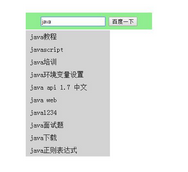
接下来分享实现百度搜索框智能提示的具体代码,核心逻辑如下:
基于jQuery与JSONP的代码实现
<!DOCTYPE html>
<html lang="en">
<head>
<meta charset="UTF-8">
<title>百度下拉_sug-jquery</title>
<script src="jquery-1.11.3.js"></script>
<style>
#sug{
position: absolute;
left: 50%;
margin-left: -150px;
margin-top: 200px;
width: 300px;
background: lightGreen;
height: 40px;
text-align: center;
}
#sug input{
margin-top: 10px;
}
#list{
position: absolute;
left: 50%;
top:50px;
width: 200px;
margin-left: -150px;
margin-top: 200px;
height: auto;
background: lightBlue;
}
#list ul{
padding-left: 0px;
margin: 0px;
}
#list ul li{
background: lightGray;
line-height: 30px;
list-style: none;
padding-left: 10px;
margin-top: 0px;
cursor: pointer;
}
#list ul li.on{
background: lightGreen;
}
</style>
</head>
<body>
<div id="sug">
<div>
<input type="text" id="keyWord" autocomplete=off>
<input type="button" value="百度一下" id="btn">
</div>
</div>
<div id="list">
</div>
<script>
$(function(){
$("#keyWord").keyup(function(e){
var kd = $("#keyWord").val();
var url = 'https://sp0.baidu.com/5a1Fazu8AA54nxGko9WTAnF6hhy/su?wd='+kd;
querySUG(url);
});
});
function querySUG(url){
document.getElementById('list').innerHTML = '';
$.ajax({
type : "get",
async: true,
url : url,
dataType : "jsonp",
jsonp: "cb",
jsonpCallback:"callback",
success : function(data){
var ul = $("<ul></ul>");
$.each(data.s,function(i,element){
var e = $("<li></li>").append(element);
$(ul).append(e);
});
$("#list").append(ul);
},
error:function(){
console.log('fail');
}
});
}
</script>
</body>
</html>
以上即为利用JSONP实现百度搜索框智能提示的完整示例,希望能为读者提供有价值的参考。若在使用过程中遇到任何问题,欢迎留言交流,小编将尽快回复。同时感谢大家对本网站的支持!
作者最新文章
免登录快速分享代码:适合面试协作的轻量级JS在线运行工具推荐
2026-11-05 14:45:59
JS空字符串和纯空格转浮点数的结果是什么
2026-11-05 11:04:42
JS在线格式化缩进混乱怎么办?配置项调整技巧
2026-11-04 23:27:25
JS怎么获取秒级时间戳
2026-11-03 21:45:29
JS时间戳怎么从毫秒转换为秒
2026-11-03 20:04:14