

js带闹铃功能的倒计时代码
作者:木棉时间:2026-10-30 14:49:56浏览:439
本文分享一段带有闹铃功能的JavaScript倒计时代码。通过自定义小时、分钟和秒数,点击开始按钮即可启动倒数。当时间归零时触发弹窗提醒。代码包含开始、停止和重置功能,结构清晰,适合新手学习参考。
JS带闹铃功能的倒计时代码实现
这是一段带有闹铃功能的JavaScript倒计时代码,支持自定义闹钟倒计时功能。用户只需点击开始按钮,即可启动倒数过程。该代码实现逻辑并不复杂,适合初学者阅读和理解。以下是运行效果的展示:
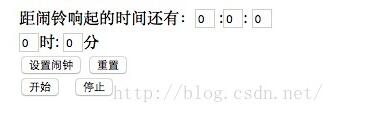
具体源码如下:
<html>
<head>
<title>Js倒计时,闹铃功能</title>
<script language="javascript">
function $(id){
 return document.getElementById(id);
}
function down(){
 $("second").value-=1;

 if($("second").value==0&&$("minutes").value==0&&$("hours").value==0)
 {
 window.alert("干正事了!!!");
 clearInterval(timeout);

 }


 if($("second").value==-1)
 {
 $("second").value=59;
 $("minutes").value-=1;
 }
 if($("minutes").value==-1)
 {
 $("minutes").value=59;
 $("hours").value-=1;
 }
}
var timeout;
function begin(){
 timeout=setInterval("down()",1000);
}
function stop(){
 clearInterval(timeout);
}
var dt=new Date();
function setclock()
{
 var hours=$("clock_hours").value-dt.getHours();
 var minutes=$("clock_minutes").value-dt.getMinutes();
 if(minutes<0)
 {
 if(hours<0)
 {
 $("minutes").value=60-Math.abs(minutes);
 $("hours").value=24-Math.abs(hours);
 }
 else if(hours==0)
 {
 $("minutes").value=60-Math.abs(minutes);
 $("hours").value=Math.abs(hours);
 }
 else
 {
 $("minutes").value=60-Math.abs(minutes);
 $("hours").value=Math.abs(hours)-1;
 }
 }
 else if(minutes==0)
 {
 if(hours<0)
 {
 $("minutes").value=Math.abs(minutes);
 $("hours").value=24-Math.abs(hours);
 }
 else if(hours==0)
 {
 $("minutes").value=Math.abs(minutes);
 $("hours").value=Math.abs(hours)+24;
 }
 else
 {
 $("minutes").value=Math.abs(minutes);
 $("hours").value=Math.abs(hours);
 }
 }
 else
 {
 if(hours<0)
 {
 $("minutes").value=60-Math.abs(minutes);
 $("hours").value=24-Math.abs(hours);
 }
 else if(hours==0)
 {
 $("minutes").value=Math.abs(minutes);
 $("hours").value=Math.abs(hours);
 }
 else
 {
 $("minutes").value=Math.abs(minutes);
 $("hours").value=Math.abs(hours);
 }
 }
}
function reset()
{
 var time=document.getElementsByName("time");
 for(i=0;i<time.length;i++)
 {
 time[i].value=0;
 }
}
</script>
</head>
<body>
距闹铃响起的时间还有:<input type="text" id="hours" style="width:20px" value="0" name="time" />
:<input type="text" id="minutes" value="0" style="width:20px" name="time"/>:
<input type="text" id="second" value="0" style="width:20px" name="time"/><br/>
<input type="text" id="clock_hours" value="0" style="width:20px" name="time"/>时:
<input type="text" id="clock_minutes" value="0" style="width:20px" name="time"/>分<br/>
<input type="button" value="设置闹钟" onclick="setclock()" />
<input type="button" value="重置" onclick="reset()" /><br/>
<input type="button" value="开始" onclick="begin()">
<input type="button" value="停止" onclick="stop()">
</body>
</html>
以上就是本文的全部内容,希望对大家的学习有所帮助,也希望大家多多支持本站。
作者最新文章
JavaScript怎么准确判断数据类型:typeof、instanceof与Object.prototype.toString
2026-11-05 17:09:21
JS中将数组和对象混合组装为JSON字符串
2026-11-05 16:41:42
JS运算符优先级与结合性的区别是什么?
2026-11-05 13:22:02
JS Map怎么只遍历Key或Value
2026-11-05 13:00:36
D3.js 与 ECharts 选型对比:灵活性 vs 开发效率
2026-11-05 09:45:01