

基于HTML/CSS/JS原生实现Select下拉框美化与交互
本文介绍如何利用HTML结构、CSS样式及原生JavaScript,无需jQuery等第三方库,实现Select下拉框的美化与交互功能。通过构造-原型组合模式封装DropDown对象,结合CSS伪元素处理箭头样式,实现点击展开、选择替换及动态监控,提供轻量级前端解决方案。
Select下拉框美化方案概述
网络上存在多种Select选择框的美化方案,但经过筛选发现,许多方案在样式表现上并不理想。因此,本文采用基于ul和li标签构建的自定义下拉框方案,旨在提供清晰直观的视觉效果。具体实现效果如下所示:
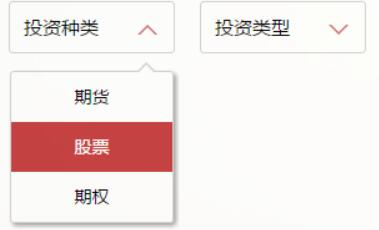
交互逻辑方面,点击触发区域即可展开列表,再次点击则隐藏列表。当用户选中某个li选项时,span标签内的文本将自动替换为所选li的内容。开发者可通过JavaScript监听span内容的变化,从而触发后续业务代码的执行。效果演示如下:
HTML/CSS/JS实现细节
实现该功能所需的HTML结构代码如下:
<div id="type" class="test">
 <span>投资种类</span>
 <ul class="dropdown">
 <li>期货</li>
 <li>股票</li>
 <li>期权</li>
 </ul>
</div>
<div id="kind" class="test">
 <span>投资类型</span>
 <ul class="dropdown">
 <li>趋势</li>
 <li>震荡</li>
 <li>套利</li>
 <li>选股</li>
 <li>择时</li>
 </ul>
</div>
负责样式呈现的CSS代码如下:
ul li{
 list-style: none;
}
.test {
 position: relative;
 float: left;
 width: 120px;
 height: 40px;
 padding-left: 11px;
 font-size: 15px;
 line-height: 40px;
 cursor: pointer;
 border: 1px solid #d2d2d2;
 border-radius: 3px;
 margin-right: 20px;
 outline: none;
}
.test:before {
 position: absolute;
 right: 13px;
 top: 18px;
 width: 0;
 height: 0;
 content: "";
 border-width: 8px 8px 0 8px;
 border-style: solid;
 border-color: #d36969 transparent;
 -webkit-transition: transform .25s;
 -moz-transition: transform .25s;
 -ms-transition: transform .25s;
  -o-transition: transform .25s;
  transition: transform .25s;
}
.test:after {
 position: absolute;
 right: 15px;
 top: 18px;
 width: 0;
 height: 0;
 content: "";
 border-width: 6px 6px 0 6px;
 border-style: solid;
 border-color: #fff transparent;
 -webkit-transition: all .25s;
 -moz-transition: all .25s;
 -ms-transition: all .25s;
  -o-transition: all .25s;
  transition: all .25s;
}
.test.active:before{
 -webkit-transform: rotate(180deg);
 -moz-transform: rotate(180deg);
 -ms-transform: rotate(180deg);
  -o-transform: rotate(180deg);
  transform: rotate(180deg);
}
.test.active:after{
 top: 20px;
 -webkit-transform: rotate(180deg);
 -moz-transform: rotate(180deg);
 -ms-transform: rotate(180deg);
  -o-transform: rotate(180deg);
  transform: rotate(180deg);
}
.test .dropdown {
 position: absolute;
 right: 0;
 left: 0;
 display: none;
 padding: 0;
 border-radius: inherit;
 border: 1px solid #d2d2d2;
 box-shadow: 2px 2px 5px rgba(0,0,0,.4);
}
.test.active .dropdown {
 display: block;
}
.test .dropdown:before {
 position: absolute;
 right: 13px;
 bottom: 100%;
 width: 0;
 height: 0;
 content: "";
 border-width: 0 8px 8px 8px;
 border-style: solid;
 border-color: #d2d2d2 transparent;
}
.test .dropdown:after {
 position: absolute;
 right: 15px;
 bottom: 100%;
 width: 0;
 height: 0;
 content: "";
 border-width: 0 6px 6px 6px;
 border-style: solid;
 border-color: #fff transparent;
}
.test .dropdown li {
 float: left;
 width: 129px;
 font-size: 14px;
 -webkit-transition: all .3s ease-out;
 -moz-transition: all .3s ease-out;
 -ms-transition: all .3s ease-out;
  -o-transition: all .3s ease-out;
  transition: all .3s ease-out;
 text-align: center;
}
.test .dropdown li:first-of-type {
 border-radius: 3px 3px 0 0;
}
.test .dropdown li:last-of-type {
 border-radius: 0 0 3px 3px;
}
.test .dropdown li:hover {
 color: #fff;
 background: #c43c3d;
}
若对CSS中的:before和:after伪元素用法不熟悉,可参考相关技术博客获取详细说明。
实现交互逻辑的JavaScript代码如下:
function DropDown(el) {
 this.dd = el;
 this.span = this.dd.children('span');
 this.li = this.dd.find('ul.dropdown li');
 this.val = '';
}
DropDown.prototype.initEvents = function() {
 var obj = this;
 obj.dd.on('click', function(event){
 $(this).toggleClass('active').siblings().removeClass('active');
 event.stopPropagation();
 });
 obj.li.on('click', function() {
 var opt = $(this);
 obj.val = opt.html();
 if (obj.span.html() == obj.val) return;
 obj.span.html(obj.val);
 $(document).click(function() {
  $('.test').removeClass('active');
 });
 })
}
var test1 = new DropDown($('#type'));
var test2 = new DropDown($('#kind'));
test1.initEvents();
test2.initEvents()
代码中采用了构造-原型组合模式来创建DropDown对象。该模式的核心在于:将属性定义在构造函数内部,以确保每个实例拥有独立的属性;而将方法定义在构造函数外部(即原型上),以实现所有实例共享方法,从而优化内存使用。
该方案的一个局限性在于,它强制要求HTML结构遵循特定的布局规范,灵活性相对受限。
相关资源推荐:JavaScript选择框操作汇总、jQuery选择框操作汇总。
以上内容为本文全部介绍,希望能为读者的学习带来帮助,同时也欢迎继续支持本站。
JS在setTimeout或Ajax回调中打开新标签页失败怎么处理
2026-11-05 15:50:12
JS直播协议选型:HLS、FLV与WebRTC的延迟与兼容性对比
2026-11-05 12:16:14
JS实现回到顶部:scrollTop赋值与浏览器兼容性处理
2026-11-04 23:43:35
JS使用classList动态添加、移除和切换CSS类名
2026-11-04 23:40:58
在 D3.js 中实现平滑过渡动画的技巧
2026-11-03 23:46:09