

HTML+JS+Highcharts绘制圆饼图的完整代码示例
作者:白露时间:2026-10-30 11:44:26浏览:413
本文提供了一个基于HTML、JavaScript和Highcharts库绘制圆饼图的完整代码示例。通过引入jQuery和Highcharts脚本,配置series数据选项,包括名称、颜色和数值,即可在网页中渲染出直观的饼状图表。该实例适合需要快速集成简单统计图表的Web开发场景。
Highcharts圆饼图代码实现
以下是一个具体的实现示例。
<!DOCTYPE html PUBLIC "-//W3C//DTD XHTML 1.0 Strict//EN" "http://www.w3.org/TR/xhtml1/DTD/xhtml1-strict.dtd">
<html xmlns="http://www.w3.org/1999/xhtml">
<head>
<meta http-equiv="Content-Type" content="text/html; charset=gb2312" />
<title>html+js+highcharts绘制圆饼图表的简单实例</title>
<script type="text/javascript" src="jquery-1.4.2.min.js" ></script>
<script type="text/javascript" src="highcharts.js" ></script>

</head>
<body>

  <div id="content">

<br><br><br>
<!--DEMO start-->
<div id="pie_chart" class="chart_combo"></div>

<script type="text/javascript">
  var chart;
 $(function () {
   var totalMoney=999
<span style="white-space:pre">	</span>var zccw=178
<span style="white-space:pre">	</span>var sycw=821
  $(document).ready(function() {
    chart = new Highcharts.Chart({
      chart: {
        renderTo: 'pie_chart',
        plotBackgroundColor: 'white',//背景颜色
        plotBorderWidth: 0,
        plotShadow: false
      },
      title: {
        text: '总车位:'+totalMoney	+' 剩余车位:'+ sycw ,
				verticalAlign:'bottom',
				y:-60
      },
      tooltip: {//鼠标移动到每个饼图显示的内容
        pointFormat: '{point.name}: <b>{point.percentage}%</b>',
        percentageDecimals: 1,
				formatter: function() {
          return this.point.name+':'+totalMoney*this.point.percentage/100;
        }
      },
      plotOptions: {
        pie: {
					size:'60%',
					borderWidth: 0,
          allowPointSelect: true,
          cursor: 'pointer',
          dataLabels: {
					enabled: true,
          color: '#000',
					distance: -50,//通过设置这个属性,将每个小饼图的显示名称和每个饼图重叠
					style: {
						fontSize: '10px',
						lineHeight: '10px'
					},
					formatter: function(index) {
              return '<span style="color:#00008B;font-weight:bold">' + this.point.name + '</span>';
            }
         },
				 padding:20
        }
      },
      series: [{//设置每小个饼图的颜色、名称、百分比
        type: 'pie',
        name: null,
        data: [
          {name:'在场车辆',color:'#3DA9FF',y:zccw},
					{name:'剩余车位',color:'#008FE0',y:sycw},

        ]
      }]
    });
  });

});


</script>

</div>
 </body>
</html>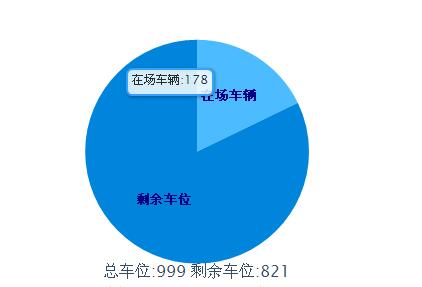
上述内容即为利用HTML、JavaScript结合Highcharts库来生成圆饼图的完整代码分享,旨在为读者提供实用的参考方案。如果您觉得有帮助,欢迎继续支持我们的网站。
作者最新文章
AOS.js 动画不触发怎么办?排查 DOM 加载与移动端兼容问题
2026-11-05 17:02:26
sigma.js 怎么实现节点点击、拖拽与悬停提示交互
2026-11-05 15:03:27
Matter.js 与 PixiJS/Three.js 集成:分离物理计算与渲染
2026-11-05 13:43:48
主流JS弹幕库选型指南:Danmaku.js等库的功能与体积对比
2026-11-05 09:28:19
JavaScript点击事件监听与交互效果实例
2026-11-05 09:10:19