

jQuery实现带动画淡出效果的二级折叠菜单
作者:像素漫游时间:2026-10-29 15:34:14浏览:622
本文提供一段基于jQuery实现的二级折叠菜单代码,特色在于点击展开时带有动画淡出效果。代码结构清晰,未做过多样式美化,便于开发者在此基础上自由调整外观,适合需要交互菜单且追求简洁实现的项目参考。
jQuery二级折叠菜单实现
本文分享一个使用jQuery编写的二级折叠菜单示例,该菜单在展开和收起时具备动画淡出效果。
该示例重点展示功能实现,因此未进行复杂的视觉美化,这种简洁的设计方式留给开发者更大的自定义空间,方便根据实际需求进行样式调整。
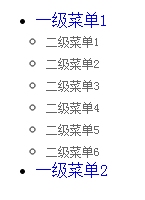
具体运行效果如下图所示:
如需在线查看演示,可访问以下地址:
http://demo.jb51.net/js/2015/jquery-dh-flash-fade-in-out-2-menu-demo/
完整的实现代码如下:
<!DOCTYPE html PUBLIC "-//W3C//DTD XHTML 1.0 Transitional//EN"
"http://www.w3.org/TR/xhtml1/DTD/xhtml1-transitional.dtd">
<html xmlns="http://www.w3.org/1999/xhtml">
<head>
<title>jQuery有动画淡出的二级折叠菜单代码</title>
<SCRIPT src="jquery1.3.2.js" type=text/javascript></SCRIPT>
<SCRIPT>
$(function(){
 $("a").bind("focus",function(){if(this.blur)this.blur();});
 $("#menu > li:first-child").addClass("first_menu");
 $("#menu > li:first-child.current_page_item, #menu > li:first-child.current-cat").addClass("first_menu_active");
 $("#menu > li:last-child").addClass("last_menu");
 $("#menu > li:last-child.current_page_item, #menu > li:last-child.current-cat").addClass("last_menu_active");
 $("#menu li ul li:has(ul)").addClass("parent_menu");
 $("#right_col ul > li:last-child").css({marginBottom:"0"});
 $("#comment_area ol > li:even").addClass("even_comment");
 $("#comment_area ol > li:odd").addClass("odd_comment");
 $(".even_comment > .children > li").addClass("even_comment_children");
 $(".odd_comment > .children > li").addClass("odd_comment_children");
 $(".even_comment_children > .children > li").addClass("odd_comment_children");
 $(".odd_comment_children > .children > li").addClass("even_comment_children");
 $(".even_comment_children > .children > li").addClass("odd_comment_children");
 $(".odd_comment_children > .children > li").addClass("even_comment_children");
 $("#guest_info input,#comment_textarea textarea")
 .focus( function () { $(this).css({borderColor:"#33a8e5"}) } )
 .blur( function () { $(this).css({borderColor:"#ccc"}) } );
 $(".search_tag").toggle(function(){
 $(".search_tag").addClass("active_search_tag");
 $("#tag_list ul").animate({ opacity: 'show', height:"show" }, {duration:1000 ,easing:"easeOutBack"});
 return false;
 },function(){
 $("#tag_list ul").fadeTo("slow", 0).slideUp("slow").fadeTo("fast", 1);
 $(".search_tag").removeClass("active_search_tag")
 return false;
 });
 $("#trackback_switch").click(function(){
 $("#comment_switch").removeClass("comment_switch_active");
 $(this).addClass("comment_switch_active");
 $("#comment_area").animate({opacity: 'hide'}, 0);
 $("#trackback_area").animate({opacity: 'show'}, 1000);
 return false;
 });
 $("#comment_switch").click(function(){
 $("#trackback_switch").removeClass("comment_switch_active");
 $(this).addClass("comment_switch_active");
 $("#trackback_area").animate({opacity: 'hide'}, 0);
 $("#comment_area").animate({opacity: 'show'}, 1000);
 return false;
 });
 $("#guest_info input,#comment_textarea textarea")
 .focus( function () { $(this).css({borderColor:"#33a8e5"}) } )
 .blur( function () { $(this).css({borderColor:"#ccc"}) } );
 $("blockquote").append('<div class="quote_bottom"></div>');
 $(".side_box:first").addClass("first_side_box");
});
function changefc(color){
 document.getElementById("search_input").style.color=color;
}
/*dropdowm menu*/
var menu=function(){
 var t=15,z=50,s=6,a;
 function dd(n){this.n=n; this.h=[]; this.c=[]}
 dd.prototype.init=function(p,c){
  a=c; var w=document.getElementById(p), s=w.getElementsByTagName('ul'), l=s.length, i=0;
  for(i;i<l;i++){
   var h=s[i].parentNode; this.h[i]=h; this.c[i]=s[i];
   h.onmouseover=new Function(this.n+'.st('+i+',true)');
   h.onmouseout=new Function(this.n+'.st('+i+')');
  }
 }
 dd.prototype.st=function(x,f){
  var c=this.c[x], h=this.h[x], p=h.getElementsByTagName('a')[0];
  clearInterval(c.t); c.style.overflow='hidden';
  if(f){
   p.className+=' '+a;
   if(!c.mh){c.style.display='block'; c.style.height=''; c.mh=c.offsetHeight; c.style.height=0}
   if(c.mh==c.offsetHeight){c.style.overflow='visible'}
   else{c.style.zIndex=z; z++; c.t=setInterval(function(){sl(c,1)},t)}
  }else{p.className=p.className.replace(a,''); c.t=setInterval(function(){sl(c,-1)},t)}
 }
 function sl(c,f){
  var h=c.offsetHeight;
  if((h<=0&&f!=1)||(h>=c.mh&&f==1)){
   if(f==1){c.style.filter=''; c.style.opacity=1; c.style.overflow='visible'}
   clearInterval(c.t); return
  }
  var d=(f==1)?Math.ceil((c.mh-h)/s):Math.ceil(h/s), o=h/c.mh;
  c.style.opacity=o; c.style.filter='alpha(opacity='+(o*100)+')';
  c.style.height=h+(d*f)+'px'
 }
 return{dd:dd}
}();
</SCRIPT>
<style type="text/css">
a{text-decoration:none}
.menu ul{
 margin:0 0 0 10px;
 padding:0;
 display:none;
}
.menu ul li{
 height:22px;
 line-height:22px;
 border:none;
}
.menu ul li a{
 font-size:12px;
 font-weight:normal;
 color:#666;
}
.menu ul ul{
 position:absolute;
 z-index:3;
 background:#CC3366;
}
.menu ul ul li{text-indent:10px;padding-right:10px}
.menu ul ul li a{color:#fff}
</style>
</head>
<body>
 <ul class="menu" id="menu">
 <li><a href="#">一级菜单1</a>
 <ul>
 <li><a href="#">二级菜单1</a></li>
 <li><a href="#">二级菜单2</a></li>
 <li><a href="#">二级菜单3</a></li>
 <li><a href="#">二级菜单4</a></li>
 <li><a href="#">二级菜单5</a></li>
 <li><a href="#">二级菜单6</a></li>
 </ul>
 </li>
 <li><a href="#">一级菜单2</a>
 <ul>
 <li><a href="#">二级菜单1</a>
  <ul>
  <li><a href="#">三级菜单1</a></li>
  <li><a href="#">三级菜单2</a></li>
  </ul>
 </li>
 <li><a href="#">二级菜单2</a></li>
 </ul>
 </li>
 </ul>
 <SCRIPT type=text/javascript>
 var menu=new menu.dd("menu");
 menu.init("menu","menuhover");
</SCRIPT>
</body>
</html>
希望这段代码能为您的jQuery开发工作提供有益参考。
作者最新文章
D3.js 处理大规模数据点的性能优化策略
2026-11-05 15:37:25
JS实现网页摄像头实时扫码:结合getUserMedia与jsQR教程
2026-11-05 15:27:28
D3.js v5 迁移到 v7 的 API 变更与注意事项
2026-11-05 11:57:17
使用 animate.js 实现多元素协同的序列动画
2026-11-04 22:27:53
JS拖拽排序时怎么添加平滑动画效果?FLIP技术实战
2026-11-04 10:12:22