

JS实现黑色风格网页TAB选项卡效果
作者:半夏时间:2026-10-29 15:16:15浏览:351
本文介绍一款采用黑色超酷风格的JavaScript TAB选项卡实现代码。该效果具有经典且熟悉的视觉设计,通过简单的JS函数控制多个内容面板的显示与隐藏。文章提供了在线演示地址及完整HTML与JS代码示例,适合需要简洁美观交互效果的网页开发者参考使用。
黑色风格TAB选项卡实现
本文分享了一段使用JavaScript实现的黑色风格网页TAB选项卡效果代码。
该示例展示了一种具有黑色超酷视觉风格的TAB切换功能,设计风格经典且熟悉,旨在提供流畅的用户交互体验。
具体运行效果如下图所示:
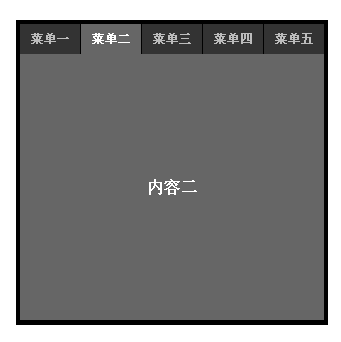
如需查看实际运行效果,可访问以下在线演示地址:
http://demo.jb51.net/js/2015/js-black-style-web-tab-demo/
以下是实现该效果的具体代码:
<!DOCTYPE html PUBLIC "-//W3C//DTD XHTML 1.0 Transitional//EN"
"http://www.w3.org/TR/xhtml1/DTD/xhtml1-transitional.dtd">
<html xmlns="http://www.w3.org/1999/xhtml">
<head>
<meta http-equiv="Content-Type" content="text/html; charset=utf-8" />
<title>Tab切换</title>
<script type="text/jscript">
function setTab(name,cursel,n){
 for(i=1;i<=n;i++){
 var menu=document.getElementById(name+i);
 var con=document.getElementById("con_"+name+"_"+i);
 menu.className=i==cursel?"hover":"";
 con.style.display=i==cursel?"block":"none";
 }
}
</script>
<style type="text/css">
*{
 margin:0px;
 padding:0px;
 list-style:none;
}
.main{
 width:306px;
 height:299px;
 float:left;
 margin:300px;
 display:inline;
 background:#000;
 padding:3px;
}
.main .menu{
 width:306px;
 height:31px;
 overflow:hidden;
 float:left;
}
.main .menu span{
 width:60px;
 height:30px;
 line-height:30px;
 overflow:hidden;
 text-align:center;
 float:left;
 margin:1px 0 0 1px;
 background:#333;
 color:#BCBCBC;
 font-weight:bold;
 cursor:pointer;
 font-size:12px;
}
.main .menu .hover{
 background:#666;
 color:#FFF;
}
.main .content{
 width:304px;
 height:266px;
 overflow:hidden;
 float:left;
 margin:1px;
 margin-top:0px;
 display:inline;
 background:#333333;
}
.main .content div{
 width:304px;
 height:266px;
 line-height:266px;
 text-align:center;
 color:#FFFFFF;
 font-weight:bold;
 background:#666;
}
</style>
</head>
<body>
<div class="main">
 <div class="menu">
  <span id="one1" onclick="setTab('one',1,5)" class="hover">菜单一</span>
  <span id="one2" onclick="setTab('one',2,5)">菜单二</span>
  <span id="one3" onclick="setTab('one',3,5)">菜单三</span>
  <span id="one4" onclick="setTab('one',4,5)">菜单四</span>
  <span id="one5" onclick="setTab('one',5,5)">菜单五</span>
 </div>
 <div class="content">
  <div id="con_one_1">内容一</div>
  <div id="con_one_2" style="display:none">内容二</div>
  <div id="con_one_3" style="display:none">内容三</div>
  <div id="con_one_4" style="display:none">内容四</div>
  <div id="con_one_5" style="display:none">内容五</div>
 </div>
</div>
</body>
</html>
希望这段代码能为您的JavaScript程序设计提供有益参考。
作者最新文章
JavaScript闭包与类(Class)的区别及适用场景对比
2026-11-05 15:48:57
JavaScript入门要学ES6吗?let与箭头函数等新特性解析
2026-11-05 14:49:16
JavaScript 8种数据类型详解:基本类型与引用类型的区别
2026-11-05 14:25:15
怎么在JavaScript中使用async/await优化Ajax异步流程
2026-11-05 13:56:15
JavaScript replace回调函数实现动态正则替换逻辑
2026-11-05 13:52:13