

JS与CSS实现简易滑动门菜单教程
作者:流萤时间:2026-10-29 14:56:13浏览:372
本文介绍一种基于JavaScript和CSS实现的简易滑动门菜单效果。通过鼠标悬停主菜单项,内容区域随之切换。代码包含详细注释,适合初学者学习JS与CSS交互逻辑,并提供了在线演示及完整源码供参考。
JS与CSS实现简易滑动门菜单教程
本文通过一个具体实例,详细讲解如何利用JavaScript配合CSS实现简易的滑动门效果。内容旨在为读者提供参考与借鉴。
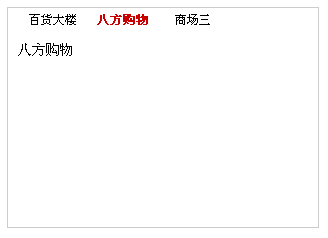
该滑动门菜单设计风格极为简约。当鼠标移入主菜单项时,对应的内容区域会同步切换显示。此演示主要作为学习范例,代码中每一步均附有详细注释,有助于理解JavaScript与CSS的交互原理,也为后续开发更美观实用的滑动门组件奠定基础。
实际运行效果如下图所示:
在线演示地址如下:
http://demo.jb51.net/js/2015/js-css-jdhd-menu-style-codes/
具体实现代码如下:
<!DOCTYPE html PUBLIC "-//W3C//DTD XHTML 1.0 Transitional//EN"
"http://www.w3.org/TR/xhtml1/DTD/xhtml1-transitional.dtd">
<html xmlns="http://www.w3.org/1999/xhtml">
<head>
<meta http-equiv="Content-Type" content="text/html; charset=gb2312" />
<title>滑动门测试</title>
<style>
#tab_container1{width:310px;text-align:left;border:1px solid #cccccc;background:url() repeat-x top;}
.cls_tab_nav{height:24px;overflow:hidden;font-size:12px;background:url() repeat-x bottom; padding-left:10px;}
.cls_tab_nav ul{font-size:9pt;margin:0;padding:0;}
.cls_tab_nav_li{background:url() no-repeat -70px 0;width:70px;height:24px;line-height:24px;float:left;display:inline;overflow:hidden;text-align:center;cursor:pointer;}
.cls_tab_nav_li_first{font-weight:bolder;background-position:0px 0px;}
.cls_tab_nav_li a{text-decoration:none;color:#000000;font-size:12px;}
.cls_tab_body{border-top:none;min-height:175px;padding:10px;height:175px;}
.cls_div{display:none;font-size:14px;}
.cls_tab_nav_li_first a{color:#c80000;}
</style>
</head>
  <body>
  <div id="tab_container1" >
 <div class="cls_tab_nav">
 <ul>
  <li class="cls_tab_nav_li cls_tab_nav_li_first"><a href="#">百货大楼</a></li>
  <li class="cls_tab_nav_li"><a href="#">八方购物</a></li>
  <li class="cls_tab_nav_li"><a href="#">商场三</a></li>
 </ul>
 </div>
 <div class="cls_tab_body">
 <div class="cls_div" style="display:block;">
 百货大楼
 </div>
 <div class="cls_div">八方购物</div>
 <div class="cls_div">商场三</div>
 </div>
</div>
</body>
</html>
<script type="text/javascript">
try{
 document.execCommand("BackgroundImageCache", false, true);
}catch(e){}
function $(element){
 if(arguments.length>1){
 for(var i=0,elements=[],length=arguments.length;i<length;i++)
  elements.push($(arguments[i]));
 return elements;
 }
 if(typeof element=="string")
 return document.getElementById(element);
 else
 return element;
}
var Class={
 create:function(){
 return function(){
  this.initialize.apply(this,arguments);
 }
 }
}
Object.extend=function(destination,source){
 for(var property in source){
 destination[property]=source[property];
 }
 return destination;
}
var tabMenu=Class.create();
tabMenu.prototype={
 initialize:function(container,selfOpt,otherOpt){
 this.container=$(container);
  var selfOptions=Object.extend({fontWeight:"bold",fontSize:"12px",color:"#FFBC44"},selfOpt||{});
 var otherOptions=Object.extend({fontWeight:"normal",fontSize:"12px",color:"#666"},otherOpt||{});
 //用for循环得到objs数组,主要是为了兼容非IE浏览器把空白也当作子对象
 for(var i=0,length=this.container.childNodes.length,objs=[];i<length;i++){
  if(this.container.childNodes[i].nodeType==1)
  objs.push(this.container.childNodes[i]);
 }
 var tabArray=objs[0].getElementsByTagName("li");
 //用for循环得到divArray数组,主要是为了兼容非IE浏览器把空白也当作子对象
 var divArray=new Array();
 for(i=0,length=objs[1].childNodes.length;i<length;i++){
  if(objs[1].childNodes[i].nodeType==1)
  divArray.push(objs[1].childNodes[i]);
 }
 for(i=0,length=tabArray.length;i<length;i++){
  tabArray[i].length=length;
  tabArray[i].index=i;
  tabArray[i].onmouseover=function(){
  //其它选项卡样式设置
  for(var j=0;j<this.length;j++){
   tabArray[j].style.backgroundPosition="-"+tabArray[j].offsetWidth+"px 0";
   for(var property in selfOptions){
   tabArray[j].firstChild.style[property]=otherOptions[property];
   }
  }
  //当前选项卡样式
  this.style.backgroundPosition="0 0";
  for(var property in selfOptions){
   this.firstChild.style[property]=selfOptions[property];
  }
  //隐藏其它选项卡
  for(j=0;j<this.length;j++){
   divArray[j].style.display="none";
  }
  //显示当前选项卡
  divArray[this.index].style["display"]="block";
  }
 }
 }
}
var tab1=new tabMenu("tab_container1",{fontSize:"12px",color:"#c80000",fontWeight:"bolder"},{fontWeight:"normal",color:"#000000"});
</script>
希望本文所述内容能对读者的JavaScript程序设计工作有所帮助。
作者最新文章
JavaScript将图片转换为Base64编码的两种途径
2026-11-05 16:43:05
怎么在 Vue 或 React 项目中正确集成 animate.js
2026-11-05 10:23:38
JS注册事件:addEventListener基础语法与参数详解
2026-11-05 08:44:56
JSP和JS的区别:运行环境与服务端/客户端职责解析
2026-11-04 23:34:36
pdf.js 官方下载地址:GitHub Release 获取预编译包
2026-11-04 23:07:27