

JavaScript实现密码强度校验的两种常用方法
作者:异步漫步时间:2026-10-29 13:29:52浏览:190
本文介绍了两种在JavaScript中实现密码强度校验的方法。第一种通过扩展String原型,利用正则表达式统计字母、数字及特殊字符的数量来判定强度等级;第二种通过AuthPasswd函数结合正则匹配与DOM操作,动态更新密码强度指示器的样式。两种方案均展示了如何判断密码复杂度并给出相应反馈,适用于前端表单验证场景。
密码强度校验效果预览
首先查看效果演示:
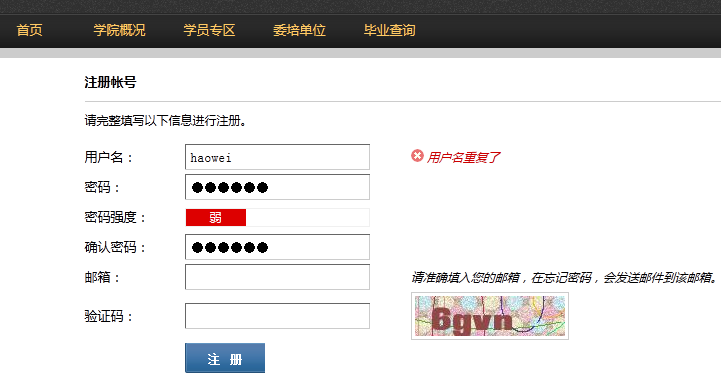
关于JavaScript密码强度校验的具体实现思路,此处不再赘述,请直接参考下方的代码示例及在线演示。
基于原型扩展的强度计算方法
第一种实现方式如下:
/*
 *密码安全程度
 *return :全部为字母或者数字,或者密码长度小于
 *return : 字母数字组成,或者字母特殊字符,或者数字和特殊字符
 *return : 字母和数字和特殊字符
 */
 String.prototype.passwordStrength=function(){
 if(this.length> && this.length<=) return ;
 var n = (this.search(/[a-zA-Z]/) != -) ? : ,
 n = (this.search(/[-]/) != -) ? : ,
 n =(this.search(/[\~\`\!\@\#\$\%\^\&\*\(\)\_\+\-\=\[\]|{\}\;\'\:\"\,\.\/\<\>\?]{,}/) != -) ? : ;
 return n+n+n;
 }
演示效果见下图:
 <!doctype html>
 <html>
 <head>
 <meta charset="utf-">
 <title>js密码强度</title>
 <style type="text/css">
 .pw_letter{ margin-top:px; font-size: px; }
 .pw_letter label{float: left; margin-right:px; cursor: default; font-size: px; line-height: px;;}
 .pw_letter span{ float: left; display:inline-block; width:px; height:px; line-height:px; text-align:center; color:#FFF; background-color:#ccc; border-left: px solid #FFF;}
 .pw_letter span.pw_strength_color{ background-color:green;}
 </style>
 </head>
 <body>
 <input id="password" type="password" name="password" placeholder="密码" onKeyUp="setPasswordStrength(this.value.trim())">
 <div class="pw_letter"><label>安全程度</label> <span class="strength">弱</span> <span class="strength">中</span> <span class="strength">强</span> </div>
 <script type="text/javascript">
 /*
 *密码安全程度
 *return :全部为字母或者数字,或者密码长度小于
 *return : 字母数字组成,或者字母特殊字符,或者数字和特殊字符
 *return : 字母和数字和特殊字符
 */
 String.prototype.passwordStrength=function(){
 if(this.length> && this.length<=) return ;
 var n = (this.search(/[a-zA-Z]/) != -) ? : ,
 n = (this.search(/[-]/) != -) ? : ,
 n =(this.search(/[\~\`\!\@\#\$\%\^\&\*\(\)\_\+\-\=\[\]|{\}\;\'\:\"\,\.\/\<\>\?]{,}/) != -) ? : ;
 return n+n+n;
 }
 String.prototype.trim = String.prototype.trim || function(){
 return this.replace(/^\s+|\s+$/g,"");
 }
 function setPasswordStrength(pwd){
 var strength_span = document.getElementsByClassName("strength");
 for(var i=; i<strength_span.length; i++){
  strength_span.item(i).className="strength";
 }
 for(var i=; i<pwd.passwordStrength(); i++){
  document.getElementsByClassName("strength").item(i).className="strength pw_strength_color";
 }
 }
 </script>
 </body>
基于正则匹配与DOM操作的验证方案
第二种实现方式如下:
对应的JavaScript核心代码如下:
<script>
function AuthPasswd(string) {
if(string.length >=6) {
if(/[a-zA-Z]+/.test(string) && /[0-9]+/.test(string) && /\W+\D+/.test(string)) {
noticeAssign(1);
}else if(/[a-zA-Z]+/.test(string) || /[0-9]+/.test(string) || /\W+\D+/.test(string)) {
if(/[a-zA-Z]+/.test(string) && /[0-9]+/.test(string)) {
noticeAssign(-1);
}else if(/\[a-zA-Z]+/.test(string) && /\W+\D+/.test(string)) {
noticeAssign(-1);
}else if(/[0-9]+/.test(string) && /\W+\D+/.test(string)) {
noticeAssign(-1);
}else{
noticeAssign(0);
}
}
}else{
noticeAssign(null);
}
}
function noticeAssign(num) {
if(num == 1) {
$('#weak').css({backgroundColor:'#009900'});
$('#middle').css({backgroundColor:'#009900'});
$('#strength').css({backgroundColor:'#009900'});
$('#strength').html('很强');
$('#middle').html('');
$('#weak').html('');
}else if(num == -1){
$('#weak').css({backgroundColor:'#ffcc33'});
$('#middle').css({backgroundColor:'#ffcc33'});
$('#strength').css({backgroundColor:''});
$('#weak').html('');
$('#middle').html('中');
$('#strength').html('');
}else if(num ==0) {
$('#weak').css({backgroundColor:'#dd0000'});
$('#middle').css({backgroundColor:''});
$('#strength').css({backgroundColor:''});
$('#weak').html('弱');
$('#middle').html('');
$('#strength').html('');
}else{
$('#weak').html(' ');
$('#middle').html(' ');
$('#strength').html(' ');
$('#weak').css({backgroundColor:''});
$('#middle').css({backgroundColor:''});
$('#strength').css({backgroundColor:''});
}
}
</script>上述内容通过两种不同的技术手段介绍了JavaScript密码强度校验的实现代码,希望能为读者提供实用的参考与帮助。
作者最新文章
D3.js 比例尺与坐标轴的配置详解
2026-11-05 16:54:46
JavaScript怎么遍历对象的Symbol键和不可枚举属性
2026-11-05 13:13:39
封装一个健壮的JS字符串判空工具函数
2026-11-05 12:16:14
JavaScript合并数组的三种常用方法:concat、扩展运算符与push
2026-11-05 11:22:29
JavaScript立即执行函数(IIFE)是什么及基本语法
2026-11-05 10:51:19