

纯JavaScript与jQuery实现无限循环图片轮播详解
本文详细解析如何使用纯JavaScript和jQuery实现支持无限循环的图片轮播效果。通过CSS relative与absolute定位结合overflow:hidden处理可视区域,利用定时器控制自动播放与鼠标悬停暂停。文章涵盖左右无限滚动的逻辑判断、动画状态锁机制以及点击小圆点切换的计算公式,提供完整HTML、CSS及JS/jQuery源码供参考下载。
纯JavaScript与jQuery实现无限循环图片轮播详解
本文介绍如何使用纯JavaScript实现个性化的图片轮播功能。
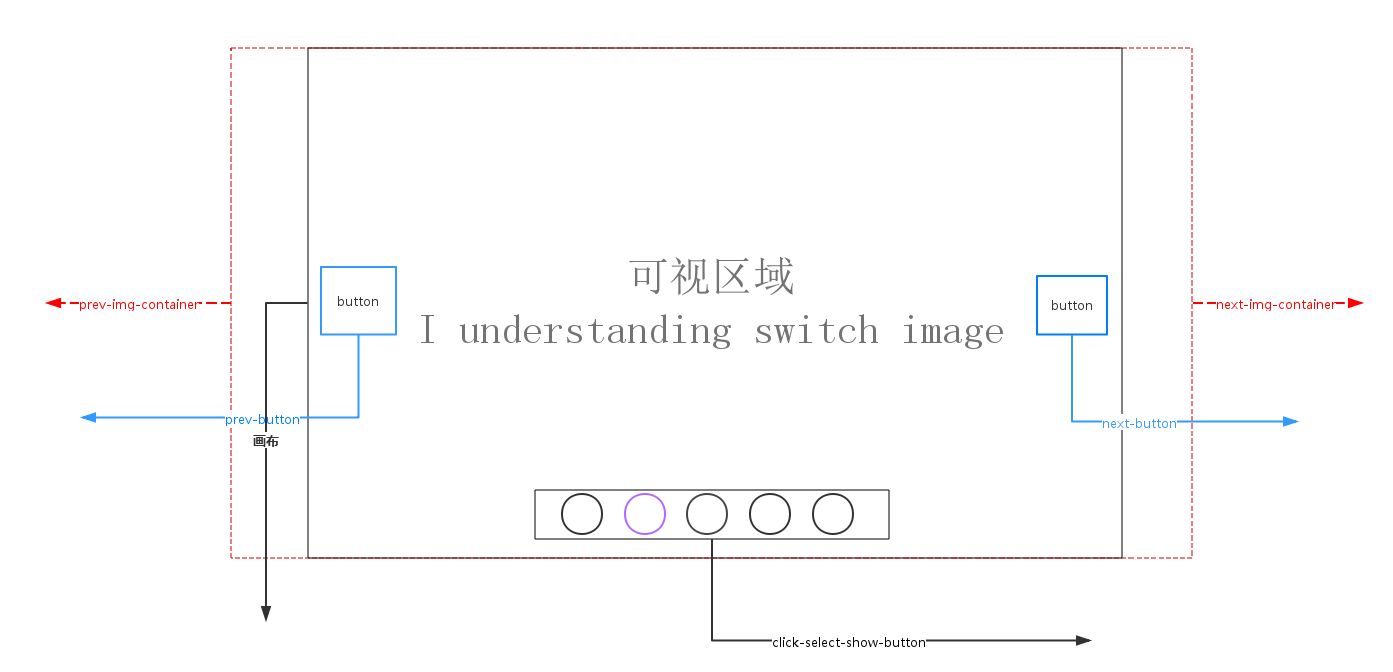
轮播原理与CSS定位分析
轮播原理说明(如上图所示):
首先分析画布部分(即可视区域)的属性设置:通过设置overflow:hidden隐藏超出可视范围的内容;使用position:relative使容器产生相对定位,这不会影响其他元素的位置和大小,但允许内部使用position:absolute的元素相对于该画布进行定位。
absolute定位的元素会脱离标准文档流,导致父元素高度坍塌。同时,float元素也会脱离文档结构。absolute元素会悬浮在页面上方,可能遮挡其他内容,这一点类似于Photoshop中的图层概念,因此需要使用z-index来控制显示层级顺序。
无限滚动逻辑与偏移计算
轮播实现的关键注意点之一是实现左右无限滚动效果。
当点击prev-button(上一张按钮)且当前显示第一张图片时,视觉上应跳转到最后一张图片。
当点击next-button(下一张按钮)且当前显示最后一张图片时,视觉上应跳转到第一张图片。
prev-button和next-button的位置偏移是通过设置prev-img-container和next-img-container的left属性(相对于画布)的值来实现的。
在click-select-show-button区域,点击小圆圈切换图片时,需要记录上一次图片所在的index和当前点击的myIndex,通过计算公式(myIndex - index)乘以图片宽度width来计算偏移量。
动画状态控制与定时器管理
动画过渡的注意点:在点击prev-button、next-button或click-select-show-button小圆圈时,必须判定当前是否处于动画状态中,防止快速点击导致动画队列堆积或逻辑错误。
使用setTimeout()设置自动播放定时器,并在需要时通过clearTimeout进行清除。
(实现效果图)

CSS样式部分代码:
CSS样式实现
/**CSS-style**/
/**画布大小*/
#container {
 margin:0 auto;
 width: 600px;
 height: 400px;
 overflow: hidden;/*超出画布部分隐藏*/
 position: relative;/*相对定位*/
 cursor: pointer;
}
/**图片容器*/
#list {
 width: 4200px;
 height: 400px;
 position: absolute;
 z-index:1;
}
#list img { float: left; }
/**轮播选中按钮样式*/
#button {
 position: absolute;
 bottom: 25px;
 left: 175px;
 width: 250px;
 z-index: 2;
}
#button ul li {
 list-style: none;
 width: 15px;
 border-radius: 50%;
 padding: 7.5px;
 height: 15px;
 margin-right: 10px;
 background: green;
 float: left;
 font:15px/15px "microsoft yahei";
 text-align: center;
 font-weight: bold;
 color: white;
 cursor: pointer;
}
#button ul li.chos {
 background: orange;
}
#container:hover .arrow{
 display: block;
}
#pre {
 left: 20px;
}
#next {
 right: 20px;
}
/**pre next定位*/
.arrow {
 position: absolute;
 width: 40px;
 height: 40px;
 background: black;
 z-index: 3;
 top: 180px;
 text-decoration: none;
 text-align: center;
 line-height: 40px;
 font-size: 40px;
 color: white;
 opacity: 0.3;
 filter: alpha(opacity=0.3);
 display: none;
}
/**pre next按钮透明度*/
#container a:hover {
 opacity: 0.7;
 filter: alpha(opacity=0.7);
}
HTML结构代码:
HTML结构代码
<!DOCTYPE html>
<html lang="en">
<head>
 <meta charset="UTF-8">
 <title>纯javaScript实现个性化图片轮播</title>
 <link rel="stylesheet" type="text/css" href="styles/main.css">
 <script type="text/javascript" src="scripts/scroImg.js"></script>
</head>
<body>
 <div id="container">
 <div id="list" style="left:-600px">
  <img src="images/5.jpg">
  <img src="images/1.jpg">
  <img src="images/2.jpg">
  <img src="images/3.jpg">
  <img src="images/4.jpg">
  <img src="images/5.jpg">
  <img src="images/1.jpg">
 </div>
 <div id="button">
  <ul>
  <li index='1'>1</li>
  <li index='2'>2</li>
  <li index='3'>3</li>
  <li index='4'>4</li>
  <li index='5'>5</li>
  </ul>
 </div>
 <a href="#" class="arrow" id="prev"><</a>
 <a href="#" class="arrow" id="next">></a>
 </div>
</body>
</html>
一、使用JavaScript实现图片轮播的代码逻辑:
JavaScript原生实现
window.onload=function(){
 var container=document.getElementById('container');
 var list=document.getElementById('list');
 var buttons=document.getElementById('button').getElementsByTagName('li');
 var prev=document.getElementById('prev');
 var next=document.getElementById('next');
 var index=1;
 var interval=1000;
 var timer=null;
 var animated=false;
 //next
 next.onclick=function(){
 if (!animated) {
  animate(-600);
 };
 index+=1;
 if (index>5) {
  index=1;
 };
 showButton();
 console.info('next'+index);
 }
 //prev
 prev.onclick=function(){
 if(!animated){
  animate(600);
 }
 index-=1;
 if(index<1){
  index=5;
 }
 showButton();
 console.info('prev'+index);
 }
 //animate
 function animate(offset){
 animated=true;
 var left=parseInt(list.style.left)+offset;
 var animateTime=600;//位移总时间
 var interval=10;//时间间隔
 var speed=offset/(animateTime/interval);//每次位移量
 var go=function(){//animate内部函数
  if ((speed<0 && parseInt(list.style.left)>left) || (speed>0 && parseInt(list.style.left)<left)) {//是否位移
  list.style.left=parseInt(list.style.left)+speed+'px';
  setTimeout(go,interval)
  }else{
  list.style.left=left+'px';
  if (left<-3000) { //最后一张后面
   list.style.left=-600+'px'; //显示前一张
  };
  if(left>-600){//第一张最前面
   list.style.left=-3000+'px';//显示最后一张
  }
  animated=false;
  };
 }
 go();
 }
 //chos
 function showButton(){
 for (var i = 0; i < buttons.length; i++) {
  buttons[i].className='';
 };
 buttons[index-1].className='chos';
 }
 //buttons-click
 for (var i = 0; i < buttons.length; i++) {
 buttons[i].onclick=function(){
  if(this.className=='chos'){
  return;
  }
  var myIndex=parseInt(this.getAttribute('index'));
  var offset=(myIndex-index)*-600; //偏移量
  animate(offset);
  index=myIndex;//set Index
  showButton();
 }
 };
 function play(){
 timer=setTimeout(function(){
  next.click();
  play();
 },interval)
 }
 function stop(){
 clearInterval(timer);
 }
 play();
 container.onmouseover=function(){
 stop();
 }
 container.onmouseout=function(){
 play();
 }
}
二、使用jQuery实现图片轮播的代码逻辑:
jQuery实现方案
$(function () {
 var container = $('#container');
 var list = $('#list');
 var buttons = $('#container').find('li');
 var prev = $('#pre');
 var next = $('#next');
 var index = 1;
 var len = 5;
 var interval = 3000;
 var timer;
 function animate (offset) {
  var left = parseInt(list.css('left')) + offset;
  if (offset>0) {
  offset = '+=' + offset;
  }
  else {
  offset = '-=' + Math.abs(offset);
  }
  list.animate({'left': offset}, 300, function () {
  if(left > -200){
   list.css('left', -600 * len);
  }
  if(left < (-600 * len)) {
   list.css('left', -600);
  }
  });
 }
 function showButton() {
  buttons.eq(index-1).addClass('chos').siblings().removeClass('chos');
 }
 function play() {
  timer = setTimeout(function () {
  next.trigger('click');
  play();
  }, interval);
 }
 function stop() {
  clearTimeout(timer);
 }
 next.bind('click', function () {
  if (list.is(':animated')) {
  return;
  }
  if (index == 5) {
  index = 1;
  }
  else {
  index += 1;
  }
  animate(-600);
  showButton();
 });
 prev.bind('click', function () {
  if (list.is(':animated')) {
  return;
  }
  if (index == 1) {
  index = 5;
  }
  else {
  index -= 1;
  }
  animate(600);
  showButton();
 });
 buttons.each(function () {
  $(this).bind('click', function () {
   if (list.is(':animated') || $(this).attr('class')=='chos') {
   return;
   }
   var myIndex = parseInt($(this).attr('index'));
   var offset = -600 * (myIndex - index);
   animate(offset);
   index = myIndex;
   showButton();
  })
 });
 container.hover(stop, play);
 play();
});
源码下载链接:http://pan.baidu.com/s/1kVfnGF1
以上就是本文的全部内容,希望本文的内容对大家的学习或者工作能带来一定的帮助,同时也希望多多支持本站!
JS语法错误会阻止加载吗?区分SyntaxError与资源加载失败
2026-11-05 16:08:46
JavaScript常见SyntaxError语法错误排查与修复方法
2026-11-05 13:58:44
JS中slice、substring和substr截取字符串的区别
2026-11-05 13:43:47
JS 转 TS 手动迁移最佳实践:从配置 tsconfig 到消除 any 类型
2026-11-05 11:53:32
为什么JS数组push后得到的是数字而不是数组?
2026-11-05 09:59:18