

使用AmCharts实现动态圆盘速度计表
作者:桌面漫游时间:2026-10-29 13:02:19浏览:443
本文介绍如何利用AmCharts库创建汽车风格的圆盘速度计表,并通过JavaScript动态修改速度数值以控制指针位置。文章提供了完整的引入代码和配置示例,展示如何实现数字输入与图表指针的实时联动效果。
AmCharts动态速度计实现
探讨如何使用AmCharts库构建汽车仪表盘样式的速度计,并通过调整速度数值来动态更新指针位置。
效果展示如下:
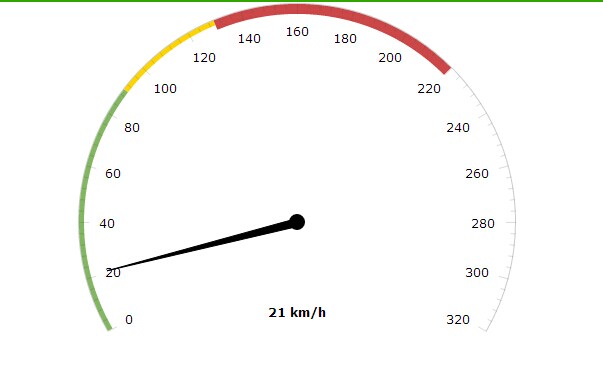
相关JavaScript实现逻辑:
var chart = AmCharts.makeChart("chartdiv", {
        "type": "gauge",
        "theme": "none",
        "axes": [{
          "axisThickness": 1,
          "axisAlpha": 0.2,
          "tickAlpha": 0.2,
          "valueInterval": 20,
          "bands": [{
            "color": "#84b761",
            "endValue": 90,
            "startValue": 0
          }, {
            "color": "#fdd400",
            "endValue": 130,
            "startValue": 90
          }, {
            "color": "#cc4748",
            "endValue": 220,
            "innerRadius": "95%",
            "startValue": 130
          }],
          "bottomText": "0 km/h",
          "bottomTextYOffset": -20,
          "endValue": 320
        }],
        "arrows": [{}]
      });
      window.onload=function(){
        chart.arrows[0].setValue(80);
        chart.axes[0].setBottomText(80  " km/h");
      }
      document.getElementById("btnSure").onclick=function(){
        if(document.getElementById("txtNum").value>320){
          alert("超出最大值");
          return;
        }
        if(document.getElementById("txtNum").value<0){
          alert("不能低于0");
          return;
        }
        chart.arrows[0].setValue(document.getElementById("txtNum").value);
        chart.axes[0].setBottomText(document.getElementById("txtNum").value  " km/h");
      }
首先需要引入必要的JS文件:
<script type="text/javascript" src="amcharts.js"></script>
 <script type="text/javascript" src="gauge.js"></script>
<script type="text/javascript" src="none.js"></script>
以上内容为本文核心分享,希望读者能够从中受益。
作者最新文章
Mock.js 拦截失效或数据格式错误的常见原因及排查
2026-11-05 10:11:59
Java和JavaScript名字像但没关系:辨析Java、JavaWeb与JS
2026-11-04 09:30:54
CodePen、JSFiddle与RunJS对比:哪款JS在线运行工具更适合你?
2026-11-03 16:46:57
JS 统计图渲染空白或报错怎么排查?常见问题解决指南
2026-11-03 09:49:40
flv.js 常见报错 MediaError 与解码失败排查指南
2026-11-02 10:29:29