

jQuery实现input数值增量和减量的方法
本文介绍如何使用jQuery和Bootstrap TouchSpin插件实现input框数值的增量和减量功能。通过配置min、max、step等参数,可以控制数值的精度、自增自减量以及允许的最小和最大数值。
jQuery实现input数值增量和减量的方法
本文通过实例演示了利用jQuery实现input框数值增减的方法,供读者参考学习。
在电商网站的购物车页面中,通常需要提供+和-按钮来调整商品数量,且限制input框仅能输入数值。Bootstrap TouchSpin插件正是为了解决这一需求而设计(本站提供该插件下载)。
首先,需要引入必要的CSS和JS文件。
具体代码如下:
<link href="bootstrap/css/bootstrap.min.css" rel="stylesheet" />
<link href="css/jquery.bootstrap-touchspin.min.css" rel="stylesheet" />
<script src="Scripts/jquery-2.1.3.min.js"></script>
<script src="bootstrap/js/bootstrap.min.js"></script>
<script src="Scripts/jquery.bootstrap-touchspin.min.js"></script>
一、控制数值的精度和自增自减量
代码如下:
<br />
<div style="margin-left: 10px;">
<form class="form-horizontal" role="form">
<div class="form-group">
<div class="col-xs-2">
<input id="demo1" type="text" value="55" name="demo1" class="form-control" />
</div>
</div>
</form>
</div>
<script type="text/javascript">
$(function () {
$("input[name='demo1']").TouchSpin({
min: 0,
max: 100,
step: 0.1,//增量或减量
decimals: 2, //精度
boostat: 5,
maxboostedstep: 10,
postfix: '%' //后缀
            });
        });
</script>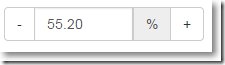
● 点击+号按钮自增0.1 ● 点击-号按钮自减0.1 ● 保留2位小数点 ● 允许的最小数值0.00 ● 允许的最大数值100.00 ● 只允许输入数值,否则失去焦点显示最小值0.00
二、只允许从1开始的整数,这也是购物车页面常用的做法
代码如下:
<div style="margin-left: 10px;">
<form class="form-horizontal" role="form">
<div class="form-group">
<div class="col-xs-2">
<input id="demo2" type="text" value="1" name="demo2" class="form-control" />
</div>
</div>
</form>
</div>
<script type="text/javascript">
$(function () {
$("input[name='demo2']").TouchSpin({
min: 1,
max: 100,
step: 1//增量或减量
            });
        });
</script>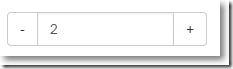
● 点击+号按钮自增1 ● 点击-号按钮自减1 ● 允许的最小数值1 ● 允许的最大数值100 ● 只允许输入数值,否则失去焦点显示最小值1
至于其它用法,感兴趣的朋友可参考相关文档。
希望本文所述对大家的jQuery程序设计有所帮助。
JS转整数出现NaN怎么办?常见异常处理方案
2026-11-05 16:27:31
推荐几款免安装的在线JS压缩工具
2026-11-05 14:54:53
JS怎么使用JSON.stringify实现JSON格式化与缩进
2026-11-04 10:47:30
CodePen、JSFiddle 与 StackBlitz:主流 JS 在线编辑器对比
2026-11-03 21:07:49
JS字符串转数字后怎么正确判断是否为有效数值
2026-11-03 20:04:15