

JS、CSS与图片对DOMContentLoaded事件的影响机制解析
本文深入解析DOMContentLoaded事件的触发机制,探讨JavaScript、CSS及图片加载对事件触发的影响。通过实验验证,明确了该事件不等待图片和CSS加载,但需等待静态JS执行完毕。研究揭示了现代浏览器中JS不再阻塞图片解码的新特性,为前端性能优化提供了关键依据。
DOMContentLoaded事件触发机制解析
前端开发的核心技术基础在于对Web规范的深入理解。
什么是DOMContentLoaded事件?
首先,我们需要查阅W3C的HTML5规范,以明确DOMContentLoaded事件的触发时机。
Once the user agent stops parsing the document, the user agent must run the following steps: 1. Set the current document readiness to “interactive” and the insertion point to undefined. Pop all the nodes off the stack of open elements. 2. If the list of scripts that will execute when the document has finished parsing is not empty, run these substeps: 2.1 Spin the event loop until the first script in the list of scripts that will execute when the document has finished parsing has its “ready to be parser-executed” flag set and the parser's Document has no style sheet that is blocking scripts. 2.2 Execute the first script in the list of scripts that will execute when the document has finished parsing. 2.3 Remove the first script element from the list of scripts that will execute when the document has finished parsing (i.e. shift out the first entry in the list). 2.4 If the list of scripts that will execute when the document has finished parsing is still not empty, repeat these substeps again from substep 1. 3. Queue a task to fire a simple event that bubbles named DOMContentLoaded at the Document.
尽管规范表述晦涩,但可以明确一点:DOMContentLoaded事件仅在JS(不包括动态插入的JS)执行完毕后触发。
接下来,我们参考MDN上关于DOMContentLoaded事件的文档说明。
The DOMContentLoaded event is fired when the document has been completely loaded and parsed, without waiting for stylesheets, images, and subframes to finish loading Note: Stylesheet loads block script execution, so if you have a
<script>after a<link rel="stylesheet" ...>, the page will not finish parsing – and DOMContentLoaded will not fire – until the stylesheet is loaded.
由此可见,DOMContentLoaded事件本身并不等待CSS文件、图片或iframe加载完成。其触发时机为:页面加载完毕,所有标签解析完成(不包括执行CSS和JS),如规范所述设置 interactive 并执行每个静态script标签中的JS,随后触发事件。而JS的执行,需等待其前面的CSS加载(若是外联)并执行完成,因为JS可能依赖前面CSS计算出的样式。
实验验证:JS、CSS与图片的影响
实践是检验真理的唯一标准。
实验1:DOMContentLoaded事件不直接等待CSS文件、图片的加载完成。
index.html:
<!DOCTYPE html>
<html lang="zh-CN">
<head>
  <meta charset="UTF-8">
  <title></title>
  <link rel="stylesheet" type="text/css" href="./css/main.css" rel="external nofollow" rel="external nofollow" >
</head>
<body>
  <p>Content</p>
  <img src="./img/chrome-girl.jpg">
</body>
</html>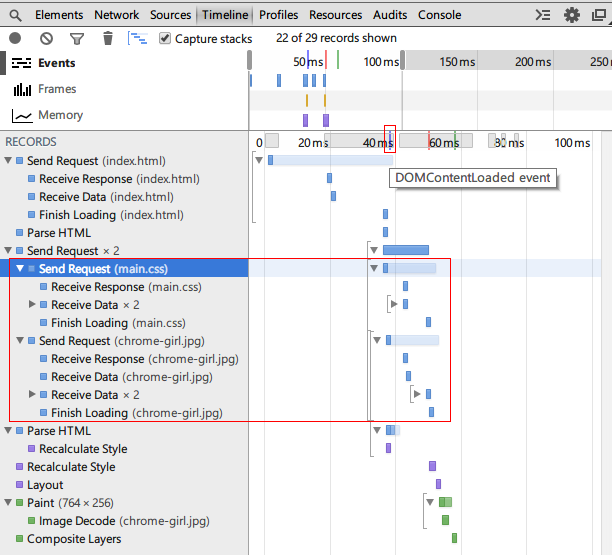
图一
若页面中无script标签,DOMContentLoaded事件并未等待CSS文件或图片加载完成。
Chrome开发者工具的Timeline面板可记录浏览器行为。图一中红色小方框内的蓝线代表DOMContentLoaded事件,右侧的红线和绿线分别代表load事件和First paint。鼠标悬停在线条露出的灰色方框下方一小部分时,会显示带有说明文字的tips(此交互设计颇具特色)。
实验2:DOMContentLoaded事件需等待JS执行完毕才触发。
index.html:
<!DOCTYPE html>
<html lang="zh-CN">
<head>
  <meta charset="UTF-8">
  <title></title>
  <script type="text/javascript">
    console.timeStamp('Inline script before link in head');
    window.addEventListener('DOMContentLoaded', function(){
      console.timeStamp('DOMContentLoaded event');
    });
  </script>
  <link rel="stylesheet" type="text/css" href="./css/main.css" rel="external nofollow" rel="external nofollow" >
  <script type="text/javascript">
    console.timeStamp('Inline script after link in head');
  </script>
</head>
<body>
  <p>Content</p>
  <img src="./img/chrome-girl.jpg">
  <script type="text/javascript" src="./js/main.js"></script>
</body>
</html>
main.js: console.timeStamp('External script after link in body');
图二
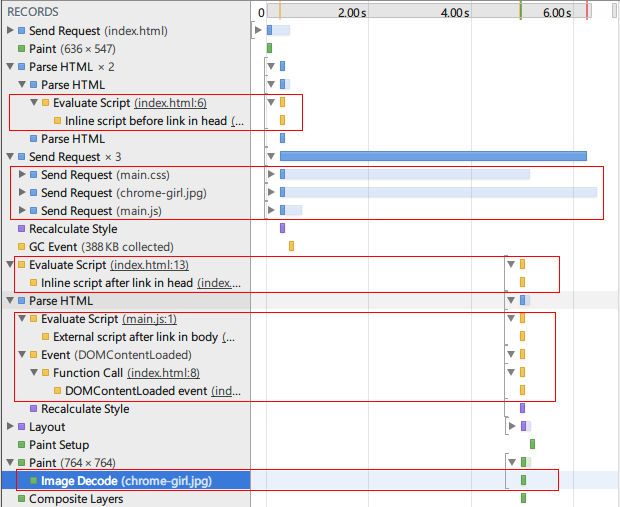
若页面中静态包含script标签,DOMContentLoaded事件需等待JS执行完毕才触发。
而script标签中的JS需等待其前面的CSS加载完成。
console.timeStamp() 可向Timeline添加记录,对应上方的黄线。
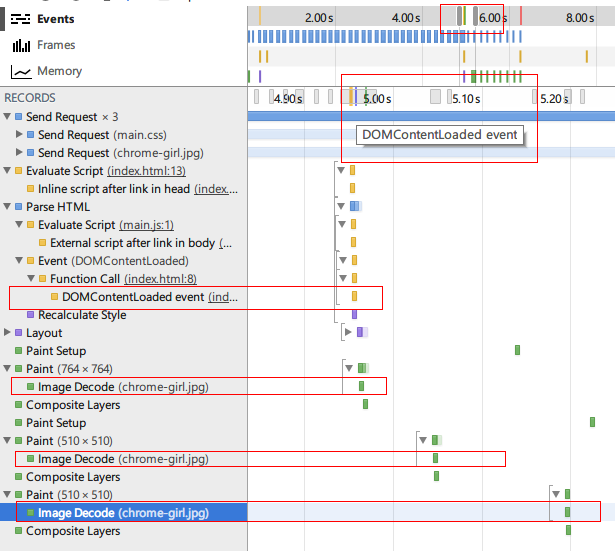
从图二可见,CSS之前的JS立即执行,而CSS之后的JS需等待CSS加载完成后才执行。明显的是main.js早已加载完毕,但仍需等待main.css加载完才能执行。DOMContentLoaded事件则在JS执行完毕后触发。滑动Timeline面板中的滑块,如图三放大后,可看到代表DOMContentLoaded事件的蓝线(此前与黄线和绿线靠得太近)。通过 console.timeStamp() 向TimeLine添加的记录也可证明其触发时间。
图三
现代浏览器会并发预加载CSS和JS,即一开始就并发请求这些资源,但执行顺序仍遵循依赖顺序(JS执行需等待前面的CSS和JS加载、执行完)。先加载完成的资源,若其依赖未加载或执行完,则只能等待。
实验3:img何时开始解码、绘制?
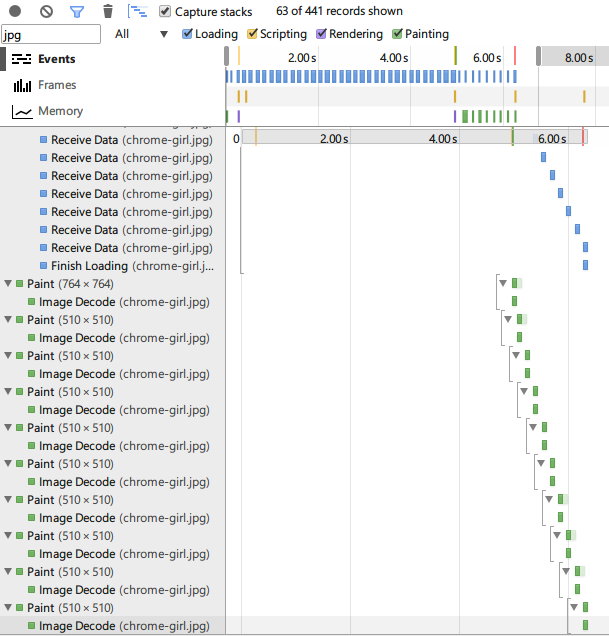
从图三可发现一个有趣现象:img请求早已发出,但延迟了一段时间才开始解码。如图二、图三中的红框所示,截图中仅框出部分表示解码的记录,实际上这些记录持续至img加载结束,如图四所示,img是一边加载一边解码的:
图三
现代浏览器会并发预加载CSS和JS,即一开始就并发请求这些资源,但执行顺序仍遵循依赖顺序(JS执行需等待前面的CSS和JS加载、执行完)。先加载完成的资源,若其依赖未加载或执行完,则只能等待。
实验3:img何时开始解码、绘制?
从图三可发现一个有趣现象:img请求早已发出,但延迟了一段时间才开始解码。如图二、图三中的红框所示,截图中仅框出部分表示解码的记录,实际上这些记录持续至img加载结束,如图四所示,img是一边加载一边解码的:
图四
抱着“猜想——验证”的想法,我猜想这是因为img这个资源是否需要展现出来,需要等 所有的JS和CSS的执行完 才知道,因为main.js可能会执行某些DOM操作,比如删除这个img元素,或者修改其src属性,而CSS可能会将其 display: none 。
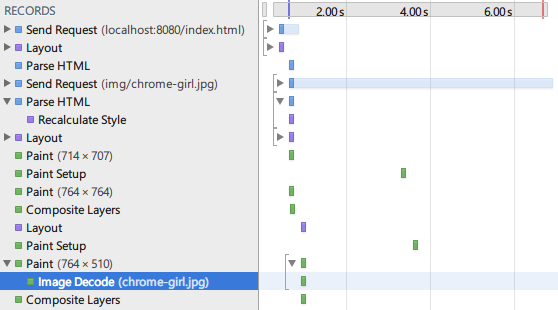 图五
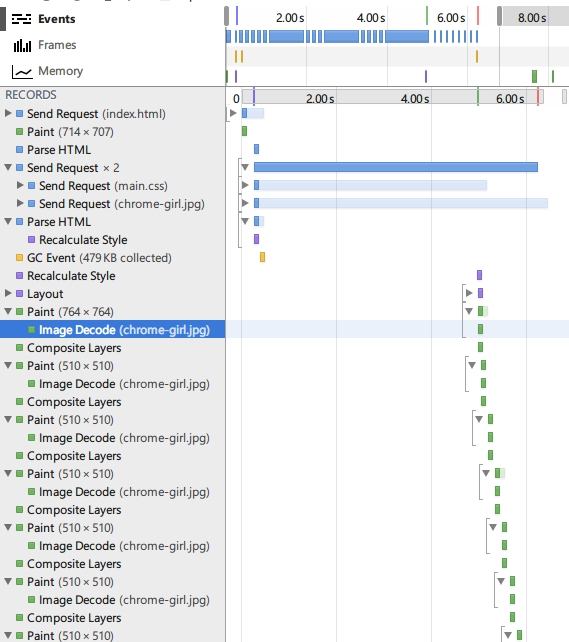 图六
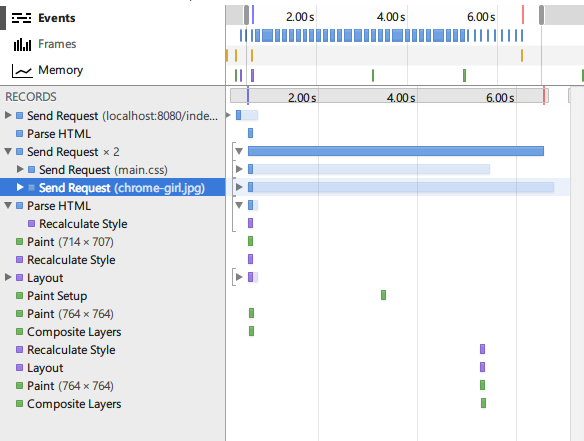 图七
图五中没有JS和CSS,img的数据一接收到就马上开始解码了。图六中没有JS,但img要等到CSS加载完才开始解码。图七的代码跟图六的代码唯一的区别是CSS把img给 display: none; ,这使得img虽然请求了,但根本没有进行解码。这说明,img是否需要解码、绘图(paint)出来,确实需要等CSS加载、执行完才能知道。也就是说,CSS会阻塞img的展现!那么JS呢?
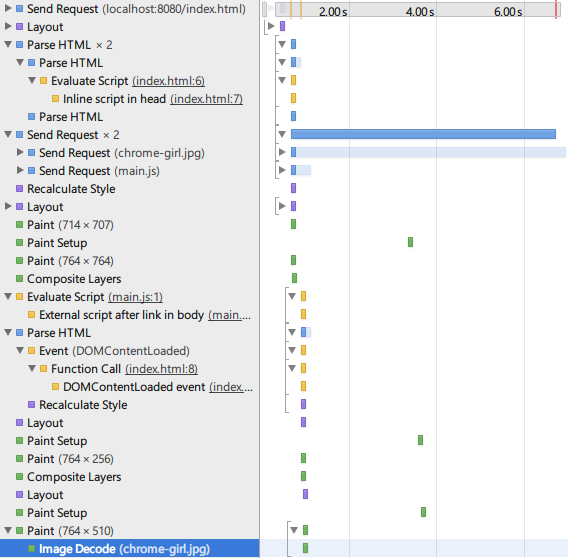 图八
图八对应的代码:
<!DOCTYPE html>
<html lang="zh-CN">
<head>
  <meta charset="UTF-8">
  <title></title>
  <script type="text/javascript">
    console.timeStamp('Inline script in head');
    window.addEventListener('DOMContentLoaded', function(){
      console.timeStamp('DOMContentLoaded event');
    });
  </script>
</head>
<body>
  <p>Content</p>
  <img src="./img/chrome-girl.jpg">
  <script type="text/javascript" src="./js/main.js"></script>
</body>
</html>
非常令人惊讶,在有JS而没有CSS的页面中,img居然能够在收到数据后就立刻开始解码、绘图(paint),也就是说,JS并没有阻塞img的展现!这跟我们以前理解的JS会阻塞img资源的传统观念不太一样,看来Chrome对img的加载和展现做了新的优化。
前端性能优化建议
我们常用的jQuery的 $(document).ready() 方法,就是对DOMContentLoaded事件的监听(当然,其内部还会通过模拟DOMContentLoaded事件和监听onload事件来提供降级方案)。通常推荐在DOMContentLoaded事件触发的时候为DOM元素注册事件。所以尽快的让DOMContentLoaded事件触发,就意味着能够尽快让页面可交互:
减小CSS文件体积,把单个CSS文件分成几个文件以并行加载,减少CSS对JS的阻塞时间
次要的JS文件,通过动态插入script标签来加载(动态插入的script标签不阻塞DOMContentLoaded事件的触发)
CSS中使用的精灵图,可以利用对img的预加载,放在html中跟CSS文件一起加载
在做实验的过程中,感觉Chrome开发者工具的Timeline面板非常强大,浏览器的一举一动都记录下来。以前我们前端开发要想理解、探索浏览器的内部行为,或者摸着石头过河的做黑盒测试,或者事倍功半的研究浏览器源码,唯一高效点的做法就是学习别人的研究经验,看老外的文章,但浏览器的发展日新月异(比如这次实验发现的JS不阻塞img的展现),别人的经验始终不是最新、最适合的,关键是要结合自己的业务、需求场景,有针对性的做分析和优化。
PS. 以上测试环境为windows/chrome,并用Fiddler模拟慢速网络
js-cookie 安装与基础用法:set、get、remove 详解
2026-11-05 16:35:06
适合JavaScript初学者的实战项目:制作简易待办事项列表
2026-11-05 16:17:07
JS打开新标签页时怎么通过URL传递参数
2026-11-05 12:21:08
sigma.js 自定义节点样式:设置颜色、大小及标签显示的技巧
2026-11-05 09:55:00
JS 生成的统计图怎么导出为 PNG 图片或 PDF 文件?
2026-11-05 09:37:58