

微信小程序集成Three.js实现3D模型渲染教程
作者:提示词匠时间:2026-10-26 11:17:01浏览:88
本文详细介绍如何在微信小程序中集成three.weapp.js库,实现3D场景初始化、相机控制及GLTF模型加载。通过绑定Canvas节点、配置场景与灯光,并处理线上模型加载限制,提供从环境搭建到代码实现的完整步骤,帮助开发者在移动端实现高性能3D展示。
首先引入下载材料,最后有完整源码。
假设读者已熟悉小程序开发流程。
直接搜索three.weapp.js官网下载,具体哪里下载的我也忘记了。
import * as THREE from '../../libs/three.weapp.js'
import { OrbitControls } from '../../libs/OrbitControls.js'
import GLTF from '../../libs/GLTFLoader.js'
将three.js和canvas绑定。
在小程序的生命周期中onLoad使用。
  bindThree() {
    wx.createSelectorQuery()
      .select('#c')
      .node()
      .exec((res) => {
        let canvasId = res[0].node._canvasId
        canvas = THREE.global.registerCanvas(canvasId, res[0].node)
        this.setData({ canvasId })
        this.init()
      })
  },
初始化场景这些。
// 场景,相机,渲染器,控制器
let scene, camera, renderer, controls, canvas,

  // 初始化场景
  initScene() {
    scene = new THREE.Scene()
    // scene.background = new THREE.Color(0xffffff)
    //灯光 黄光环境
    scene.add(new THREE.AmbientLight(0xffffff))
    scene.background = new THREE.Color(0xaa000000)
  },

  // 初始化相机
  initCamera() {
    camera = new THREE.PerspectiveCamera(
      75,
      canvas.width / canvas.height,
      0.1,
      4000
    )
    camera.position.set(0, 70, 1200)
    // camera.lookAt(0, 0, 0)
  },

  // 初始化渲染器
  initRenderer() {
    renderer = new THREE.WebGLRenderer({ antialias: true, alpha: true })
    renderer.setSize(
      wx.getSystemInfoSync().windowWidth,
      wx.getSystemInfoSync().windowHeight
    )
  },

  // 初始化控制器
  initControls() {
    controls = new OrbitControls(camera, renderer.domElement)
    controls.enableDamping = true // 设置阻尼,需要在 update 调用
  },
到这一步你已经完成了初始化了接下来就是对gltf模型的渲染了。
渲染模型的代码如下:
 // 添加测试模型
  addGuangzhouta() {

    loader.load(this.data.testUrl, (gltf) => {


      // 位置更正
      gltf.scene.position.set(200, 580, -700)
      gltf.scene.scale.set(2, 2, 2)
      scene.add(gltf.scene)
    })
  },
话不多少,可能还有一些人看的云里雾里的,直接上源码。
import * as THREE from '../../libs/three.weapp.js'
import { OrbitControls } from '../../libs/OrbitControls.js'
import GLTF from '../../libs/GLTFLoader.js'

// 场景,相机,渲染器,控制器
let scene, camera, renderer, controls, canvas, textureGuangzhouta

// gltf加载器
let GLTFloader = GLTF(THREE)
const loader = new GLTFloader()

Page({
  data: {
    canvasId: null,
    testUrl: 'https://threejsfundamentals.org/threejs/resources/models/cartoon_lowpoly_small_city_free_pack/scene.gltf'
  },

  // 将微信dom和three.js绑定
  bindThree() {
    wx.createSelectorQuery()
      .select('#c')
      .node()
      .exec((res) => {
        let canvasId = res[0].node._canvasId
        canvas = THREE.global.registerCanvas(canvasId, res[0].node)
        this.setData({ canvasId })
        this.init()
      })
  },

  // 初始化场景
  initScene() {
    scene = new THREE.Scene()
    // scene.background = new THREE.Color(0xffffff)
    //灯光 黄光环境
    scene.add(new THREE.AmbientLight(0xffffff))
    scene.background = new THREE.Color(0xaa000000)
  },

  // 初始化相机
  initCamera() {
    camera = new THREE.PerspectiveCamera(
      75,
      canvas.width / canvas.height,
      0.1,
      4000
    )
    camera.position.set(0, 700, 1700)
    // camera.lookAt(0, 0, 0)
  },

  // 初始化渲染器
  initRenderer() {
    renderer = new THREE.WebGLRenderer({ antialias: true, alpha: true })
    renderer.setSize(
      wx.getSystemInfoSync().windowWidth,
      wx.getSystemInfoSync().windowHeight
    )
  },

  // 初始化控制器
  initControls() {
    controls = new OrbitControls(camera, renderer.domElement)
    controls.enableDamping = true // 设置阻尼,需要在 update 调用
  },


  // 添加测试模型
  addGuangzhouta() {

    loader.load(this.data.testUrl, (gltf) => {


      // 位置更正
      gltf.scene.position.set(200, 580, -700)
      gltf.scene.scale.set(2, 2, 2)
      scene.add(gltf.scene)
    })
  },


  // 动画帧函数
  animate() {
    canvas.requestAnimationFrame(this.animate)

    if (textureGuangzhouta) {
      textureGuangzhouta.offset.y -= 0.009
      // console.log(textureGuangzhouta.offset.y)
      if (textureGuangzhouta.offset.y < -0.5) {
        textureGuangzhouta.offset.y = 0
      }
    }
    controls.update()
    renderer.render(scene, camera)
  },

  // 初始化函数
  init() {
    this.initScene()
    this.initCamera()
    this.initRenderer()
    this.initControls()
    this.addGuangzhouta()
    this.onWindowResize()
    this.animate()
  },

  // 页面自适应
  onWindowResize() {
    console.log(canvas.width)
    // camera.aspect = window.innerWidth / window.innerHeight
    camera.aspect =
      wx.getSystemInfoSync().windowWidth / wx.getSystemInfoSync().windowHeight
    camera.updateProjectionMatrix()
    renderer.setSize(canvas.width, canvas.height)
  },

  // 生命周期函数:小程序初始化完成时触发,全局只触发一次
  onLoad: function () {
    this.bindThree()
  },
  onUnload: function () {
    //清理global中的canvas对象
    THREE.global.clearCanvas()

    THREE.global.unregisterCanvas(this.data.canvasId)
  },

})
注意事项。
到这一步之后你就可以自己写模型丢里面了,gltf加载器和pc的用法是一样的,目前我这里就提供一个测试用的模型吧。
目前代码里没有提供滑动的方法,也没有提供适配任意gltf模型的办法,需要注意的是小程序中没办法加载本地模型,只能通过https的方式加载线上的模型。
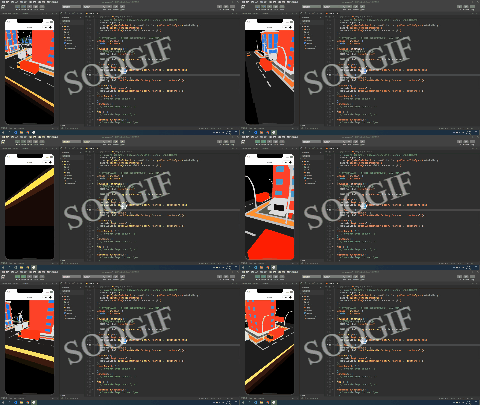
效果查看。
总结。
到此这篇关于在微信小程序中使用three.js的文章就介绍到这了,更多相关微信小程序使用three.js内容请搜索本站以前的文章或继续浏览下面的相关文章希望大家以后多多支持本站!
作者最新文章
Wiki.js 权限管理实战:用户组与页面访问控制设置
2026-11-05 14:03:42
Three.js 怎么加载 GLTF/GLB 模型及处理纹理缺失
2026-11-02 10:28:27
JS设置背景图片后不显示的常见原因及排查
2026-10-30 19:12:31
JavaScript事件模型演进:从原始模型到DOM2与IE兼容方案
2026-10-30 07:48:51
Three.js 加载 GLTF 模型完整流程:从场景搭建到动画控制
2026-10-27 02:38:20