

Vue3父子组件通信与插槽机制详解
本文详解Vue3中父子组件的两种核心通信方式:父传子通过props传递数据,子传父利用emit触发自定义事件。同时介绍setup函数的参数构成,并演示具名插槽的定义与使用,帮助开发者掌握Vue3组件交互的关键技术。
在Vue3框架下,父子组件之间的数据交互与通信是构建复杂应用的基础。理解其通信机制对于高效开发至关重要。
Vue3父传子(props)
父组件的代码实现如下所示:
<template>
  <div class="about">
    <h1>This is an about page</h1>
    <children :num="num" age="30"></children>
  </div>
</template>
<script>
import children from "../components/children.vue";
import { ref } from "vue";
export default {
  setup() {
    let num = ref("《nanchen》");
    return {
      num,
    };
  },
  components: {
    children,
  },
};
</script>
子组件的代码实现如下所示:
<template>
  <div>我是子组件 我的父组件值为:{{ yy }}</div>
</template>

<script>
import { ref } from "vue";
export default {
  name: "Vue3appChildren",
  props: {
    num: {
      type: Number,
    },
  },
  setup(props) {
    let yy = ref(props.num);
    return {
      yy,
    };
  },

  mounted() {},

  methods: {},
};
</script>

<style lang="scss" scoped>
</style>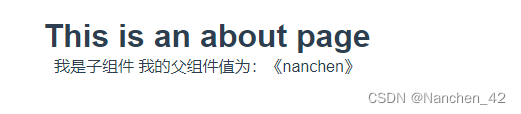
在setup函数中,接收的参数主要包括以下几项:
props:该参数为对象类型,用于接收父组件传递且子组件在props配置中明确声明的属性。 context:上下文对象,提供组件运行时的额外信息。 attrs:该参数为对象类型,包含父组件传递但未在props中声明的属性,其功能类似于this.$attrs。 slots:接收父组件传递的插槽内容,其功能类似于this.$slots。 emit:用于分发自定义事件的函数,其功能类似于this.$emit。
通过props配置,子组件可以接收并处理来自父组件传递的具体参数。
Vue3子传父({emit})
父组件的代码实现如下:
<template>
  <div class="about">
    <h1>This is an about page</h1>
    <children :num="num" age="30" @test="showHello"></children>
  </div>
</template>
<script>
import children from "../components/children.vue";
import { ref } from "vue";
export default {
  setup() {
    let num = ref("《nanchen》");
    function showHello(value) {
      console.log(value);
    }
    return {
      num,
      showHello,
    };
  },
  components: {
    children,
  },
};
</script>
子组件的代码实现如下:
<template>
  <div @click="aboutClick">我是子组件 我的父组件值为:{{ yy }}</div>
</template>

<script>
import { ref } from "vue";
export default {
  name: "Vue3appChildren",
  props: {
    num: {
      type: Number,
    },
  },
  setup(props, { emit }) {
    let yy = ref(props.num);
    function aboutClick() {
      emit("test", "你好你好"); // 子传父
    }
    return {
      yy,
      aboutClick,
    };
  },

  mounted() {},

  methods: {},
};
</script>

<style lang="scss" scoped>
</style>
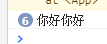
点击div元素后的运行效果如下所示:
Vue3插槽
    <children :num="num" age="30" @test="showHello">
      <h1>南辰,Hello</h1>
    </children>
<template>
<div @click="aboutClick">我是子组件 我的父组件值为:{{ yy }}</div>
<slot></slot>
</template>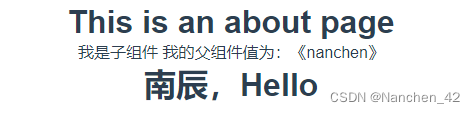
具名插槽的具体写法示例如下:
<slot name="aabb"></slot> <HelloWorld>
<template v-slot:aabb>
<span>NanChen,你好</span>
</template>
<!-- <template #aabb>
<span>NanChen,你好</span>
</template> -->
</HelloWorld>至此,关于Vue3父子组件通信方式及插槽使用方法的详解介绍完毕。如需了解更多相关内容,建议查阅本站历史文章或继续浏览后续内容,感谢大家的支持!
electron-builder打包与发布Electron应用
2026-11-01 05:18:32
Vue结合el-table实现表格行拖拽排序(基于sortablejs)
2026-11-01 01:30:37
详解如何在Vue中进行表单自定义验证
2026-11-01 01:17:28
UniApp 项目中 vue.config.js 配置指南
2026-11-01 00:21:50
uni-app全局变量的四种实现方式总结
2026-11-01 00:15:49