

JavaScript ES6 函数参数扩展与箭头函数详解
本文详细解析JavaScript ES6中的函数特性,包括参数默认值的设置规则与length属性变化、rest参数获取多余实参的方法,以及箭头函数的语法、this指向、简写方式和常见限制,帮助开发者掌握现代JS函数编写规范。
函数参数扩展
ES6 标准允许在定义函数时为参数指定初始值。
带有默认值的形参通常建议放置在参数列表的后部;若使用参数默认值,函数定义中不得存在同名参数。需注意,参数默认值并非在定义时一次性计算,而是每次调用时都会重新评估默认值表达式的结果。
function add(a,b,c=10){
    return a + b + c;
}
let result = add(1,2);
console.log(result); // 13
结合解构赋值使用时,若传入具体数值则使用传入值,否则采用默认值。
function connect({host="127.0.0.1",username,password,port}){
    console.log(host);
    console.log(username);
    console.log(password);
    console.log(port);
}
connect({
    // host:'localhost', //传了值就用这个,如果没有传就用默认值
    username:'root',
    password:'root',
    port:80
})
当函数参数包含默认值时,函数的 length 属性将忽略那些拥有默认值的参数,仅统计未提供默认值的参数数量。
<script>
    function fun(a,b,c){
        console.log(fun.length);
    }
    fun()//3
    function fun(a,b,c=1){
        console.log(fun.length);
    }
    fun()//2
</script>
设置参数默认值会创建一个新的词法作用域,该作用域仅包含在函数内部传递的值。若形参未传值,则向外层作用域查找变量。参考以下示例:
<script>
    var x = 1;
    // 函数形参定义了x的值,就不需要去外面再找x值
    function f(x, y = x) {
        console.log(y);
    }
    f(2) // 2
    var a = 1;
    // 函数形参没有定义a的值,所以需要去外面找a的值,所以打印为1
    function g(b = a){
        let a = 2;
        console.log(b);
    }
    g()//1
</script>
rest参数
ES6 引入了 rest 参数(语法为 ...变量名),用于收集函数多余的实参。这取代了对 arguments 对象的依赖,rest 参数对应的变量是一个数组,所有多余的参数都会被存入该数组中。
<script>
    // ES5 获取实参的方式
    function date(){
        console.log(arguments);
    }
    date(1,2,3,4,5)
    console.log('--------------');
    // rest参数
    function date1(...args){
        console.log(args);
    }
    date1(1,2,3,4,5)
</script>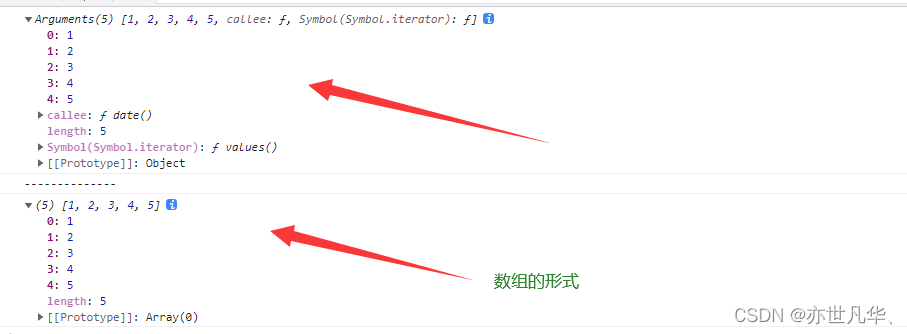
箭头函数
ES6 规范允许使用箭头符号 ( => ) 来定义函数。
//正常写法
let fn = function(){
}
//箭头函数
let fn1 = (a,b) =>{
    return a + b;
}
console.log(fn1(1,2)); //3
箭头函数的使用规范
在箭头函数中,this 是静态绑定的,它始终指向函数定义时所在作用域下的 this 值。
function getName(){
    console.log(this.name);
}
let getName2 = () =>{
    console.log(this.name);
}
// 设置 window 对象的 name 属性
window.name = '张三'
const person = {
    name:'小张'
}
// 直接调用
getName() //张三
getName2() //张三
//call 方法调用
getName.call(person) //小张
getName2.call(person) //张三 箭头函数是静态的,始终指向开始时的第一个值
箭头函数不能作为构造函数使用,尝试对其使用 new 关键字实例化对象会导致报错。
let Person = (name,age) =>{
    this.name = name;
    this.age = age;
}
let p = new Person('张三',18)
console.log(p);
箭头函数内部无法访问 arguments 变量,该对象在函数体内不存在。
let fun = () => {
    console.log(agruments);
}
fun(1,2,3)
箭头函数的简写方式。
1、省略小括号,当形参有且只有一个的时候。
let add = n => {
    return n*n;
}
console.log(add(8));//64
2、 省略花括号,当代码体只有一条语句时,此时 return 必须省略,而且语句的执行结果就是函数的返回值。
let pow = (n) => n+n;
console.log(pow(2)); //4
箭头函数的嵌套
箭头函数内部,还可以使用箭头函数:
<script>
    // ES5 语法的多重嵌套
    function insert(value) {
    return {into: function (array) {
        return {after: function (afterValue) {
        array.splice(array.indexOf(afterValue) + 1, 0, value);
        return array;
        }};
    }};
    }
    console.log(insert(2).into([1, 3]).after(1)); //[1, 2, 3]
    // ES6 箭头函数嵌套
    let insert = (value) => ({into: (array) => ({after: (afterValue) => {
        array.splice(array.indexOf(afterValue) + 1, 0, value);
        return array;
    }})});
    console.log(insert(2).into([1, 3]).after(1)); //[1, 2, 3]
</script>
箭头函数案例
点击 div 2s 之后颜色变成 pink :
<head>
    <title>Document</title>
    <style>
        div {
            width: 200px;
            height: 200px;
            background: #58a;
        }
    </style>
</head>
<body>
    <div id="id"></div>
    <script>
        // 获取元素
        let div = document.querySelector('#id')
        // 绑定事件
        div.addEventListener("click",function(){
            // 如果想用 this 调用,先在外部保存this,否则this会指向window对象
            let _this = this;
            // 点击 2s 之后让盒子颜色改变
            setTimeout(()=>{
                // div.style.background = 'pink'
                _this.style.background = 'pink'
            },2000)
        })
    </script>
</body>
从数组中返回偶数的元素:
<script>
    const arr = [1,6,9,10,100,25];
    /* filter() 方法创建一个新的数组,函数中有return返回值。
     * 若返回值为true,这个元素保存到新数组中;
     * 若返回值为false,则该元素不保存到新数组中;原数组不发生改变。
    */
    const result = arr.filter(function(item){
        if(item%2===0){
            return true;
        }else{
            return false
        }
    })
    console.log(result);
    console.log('-------------------');
    const result1 = arr.filter(item => item % 2 ===0 )
    console.log(result1);
    // 箭头函数适合与 this 无关的回调:定时器。数组方法的回调
    // 箭头函数不适合与 this 有关的回调:事件回调、对象的方法
</script>
使用总结:
箭头函数没有自己的this对象
不可以当做构造函数,即不能对箭头函数使用new命令,否则报错
不可以使用arguments对象,该对象在函数体内不存在,如需使用用rest函数代替
不可以使用yield命令,因此箭头函数不能用作 Generator 函数。
到此这篇关于JavaScript函数扩展与箭头函数超详细讲解的文章就介绍到这了,更多相关JS函数扩展与箭头函数内容请搜索本站以前的文章或继续浏览下面的相关文章希望大家以后多多支持本站!
D3.js 比例尺与坐标轴的配置详解
2026-11-05 16:54:46
JavaScript怎么遍历对象的Symbol键和不可枚举属性
2026-11-05 13:13:39
封装一个健壮的JS字符串判空工具函数
2026-11-05 12:16:14
JavaScript合并数组的三种常用方法:concat、扩展运算符与push
2026-11-05 11:22:29
JavaScript立即执行函数(IIFE)是什么及基本语法
2026-11-05 10:51:19