

JavaScript防抖与节流原理及完整实现指南
本文深入解析JavaScript中防抖与节流的原理,通过代码示例展示如何从零实现这两个核心函数。内容涵盖this指向修正、事件参数传递、立即执行模式、返回值处理及取消功能,并对比时间戳与定时器两种节流实现方式,最后总结其在搜索、滚动等场景下的实际应用。
1 为什么需要防抖和节流
在前端开发中,部分交互事件会被高频触发,这会导致页面渲染性能下降。若频繁调用接口,更会直接造成服务器资源的浪费。
以下代码演示了一个输入框,通过监听键盘弹起(keyup)事件来统计触发次数,以此展示事件被频繁触发的情况。
    <input type="text" id="demo">
    <div>触发了:<span id="count">0</span>次</div>
    <script>
        // 获取input输入框与span标签
        let demo = document.getElementById("demo");
        let count = document.getElementById("count");
        // 为demo输入框注册keyup事件
        let init = 0; // 记录keyup事件被触发的次数
        demo.onkeyup = function () {
            // 将span标签中的文本修改为事件被触发的次数
            count.innerHTML = ++init;
        }
    </script>
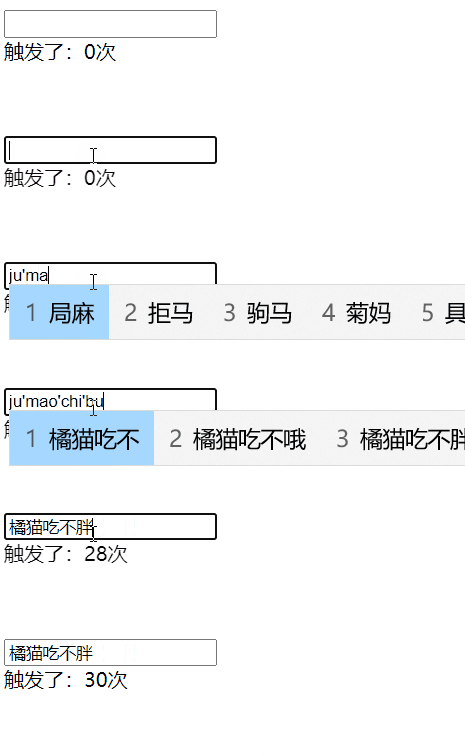
演示结果显示,输入5个字符时,keyup事件触发了30次。若以此高频检测用户名可用性,不仅严重浪费性能,且用户尚未输完即开始检测,体验极差。因此,需等待用户输入完成后触发函数,此优化思路即为防抖与节流。
2 防抖与节流原理
函数防抖:在事件触发后延迟 n 秒执行目标函数。若在此期间事件再次被触发,则重新计时。换言之,若用户在间隔内持续触发,目标函数将永远不会执行。
基于此原理,若为keyup事件添加防抖,只有当该事件在设定时间内不再被触发时,函数才会开始计时并执行。
函数节流:设定一个固定时间单位,规定在此单位内函数仅执行一次。若单位时间内多次触发,仅第一次有效;后续执行需等待下一个周期。
若为keyup事件添加节流,效果表现为:在一段时间内计数一次,随后在下一段时间内再计数一次。
理解原理后,接下来尝试手动实现防抖与节流函数,验证其效果。
3 实现一个防抖函数
3.1 初步实现
根据描述,事件触发一段时间后函数执行一次。因此,防抖函数需接收两个参数:目标函数fun和延迟时间time。
// fun:被执行的函数
// time:间隔的时间
function debounce(fun, time) { }
防抖函数的返回值应为一个函数,因为事件触发时接收的是函数。该内部函数需设计定时器,在time时间后触发fun。
function debounce(fun, time) {
    return function () {
        // time时间后触发函数fun
        setTimeout(fun, time);
    }
}
上述函数存在一个问题:再次触发事件时,会在time时间后再次执行fun,无法实现事件触发完成后time时间再执行的预期效果。这是因为定时器效果累加,导致事件被延时触发而非减少触发。因此,需取消之前的定时器,以新定时器为准。
function debounce(fun, time) {
    let timer;
    return function () {
        // 取消当前的定时器效果
        clearTimeout(timer);
        // time时间后触发函数fun
        timer = setTimeout(fun, time);
    }
}
至此,初步防抖函数完成。使用以下代码改进前述示例:
    <input type="text" id="demo">
    <div>触发了:<span id="count">0</span>次</div>
    <script>
        // 获取input输入框与span标签
        let demo = document.getElementById("demo");
        let count = document.getElementById("count");
        // 防抖函数
        function debounce(fun, time) {
            let timer;
            return function () {
                // 取消当前的定时器效果
                clearTimeout(timer);
                // time时间后触发函数fun
                timer = setTimeout(fun, time);
            }
        }
        // 为demo输入框注册keyup事件
        let init = 0; // 记录keyup事件被触发的次数
        demo.onkeyup = debounce(function () {
            // 将span标签中的文本修改为事件被触发的次数
            count.innerHTML = ++init;
        }, 1000);
    </script>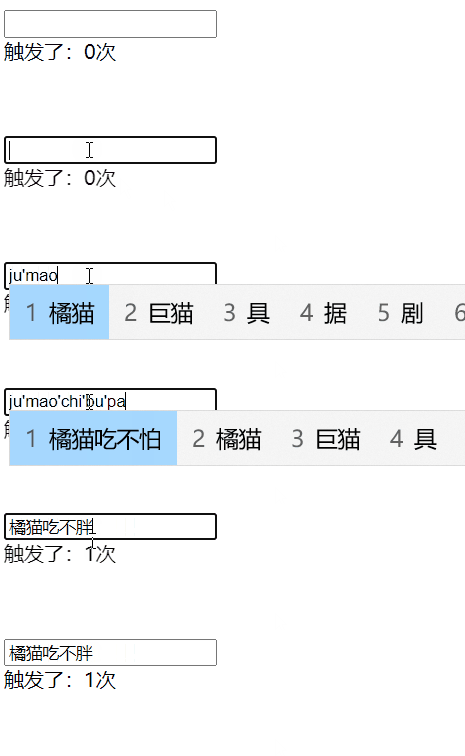
3.2 this问题
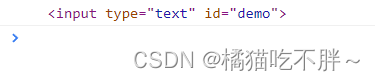
从效果图看,输入5个字后,1秒内keyup事件仅触发1次,相比之前的30次大幅降低频率。但添加防抖后,原函数的this指向发生改变:原指向触发事件的对象,现指向window。
// 添加防抖之前打印 this
demo.onkeyup = function () {
    console.log(this); // <input type="text" id="demo"></input>
}
// 添加防抖之后打印 this
demo.onkeyup = debounce(function () {
    console.log(this);
}, 1000);

因此,需在防抖函数中重新将this指回触发事件的对象。防抖函数返回的函数this指向谁?可通过打印验证:
        function debounce(fun, time) {
            return function () {
                console.log(this);
            }
        }
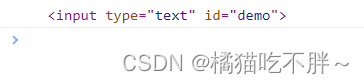
结果显示其this也指向触发事件的对象。接下来,只需让定时器的回调函数this指向触发事件的对象即可,主要使用call函数修改this指向。
function debounce(fun, time) {
    let timer;
    return function () {
        // 将当前的this赋值给that
        let that = this;
        // 取消当前的定时器效果
        clearTimeout(timer);
        // time时间后触发函数fun
        timer = setTimeout(function () {
            fun.call(that); // 使用call改变函数内部的this指向
        }, time);
    }
}
3.3 event问题
解决this指向后,观察事件对象event:添加防抖前,event为键盘事件KeyboardEvent;添加后,event变为undefined。
// 添加防抖之前
demo.onkeyup = function (e) {
    console.log(e);
}

// 添加防抖后
demo.onkeyup = debounce(function (e) {
    console.log(e);
}, 1000);

同理,打印防抖函数返回函数的arguments参数,发现其中包含事件对象。
function debounce(fun, time) {
    console.log(arguments);
}

接下来,将该参数传给函数fun即可,具体通过call函数传递。由于call函数从第二个参数起接受其他参数,因此需使用展开运算符(…)传递参数。
function debounce(fun, time) {
    let timer;
    return function () {
        // 将当前的this赋值给that
        let that = this;
        // 获取函数的参数
        let args = arguments;
        // 取消当前的定时器效果
        clearTimeout(timer);
        // time时间后触发函数fun
        timer = setTimeout(function () {
            // 使用call改变函数内部的this指向,并传递参数
            fun.call(that, ...args);
        }, time);
    }
}
3.4 立即执行
此时防抖函数基本完成,但可添加立即执行功能。设置立即执行后,第一次事件触发时,函数fun会立即执行,但需等待time时间后,函数才可再次触发。
可传递第三个参数immediate以决定是否立即执行,true为是,false为否。代码逻辑通过if…else…判断。原防抖函数非立即执行,故放入else分支。
function debounce(fun, time, immediate) {
    let timer;
    return function () {
        let that = this; // 将当前的this赋值给that
        let args = arguments; // 获取函数的参数
        clearTimeout(timer); // 取消当前的定时器效果
        if (immediate) {
            // 立即执行代码
        } else { // 不立即执行
            // time时间后触发函数fun
            timer = setTimeout(function () {
                // 使用call改变函数内部的this指向,并传递参数
                fun.call(that, ...args);
            }, time);
        }
    }
}if语句中的代码不能简单fun.call(that, ...args);,因为当immediate为true时会一直调用,与不加防抖无异。因此引入新变量callNow记录是否立即执行。
function debounce(fun, time, immediate) {
    let timer;
    return function () {
        // 将当前的this赋值给that
        let that = this;
        // 获取函数的参数
        let args = arguments;
        // 取消当前的定时器效果
        clearTimeout(timer);
        if (immediate) { // 立即执行
            let callNow = !timer;
            timer = setTimeout(function () {
                timer = null;
            }, time);
            if (callNow) fun.call(that, ...args);
        } else { // 不立即执行
            // time时间后触发函数fun
            timer = setTimeout(function () {
                // 使用call改变函数内部的this指向,并传递参数
                fun.call(that, ...args);
            }, time);
        }
    }
}
if语句具体逻辑为:当immediate为true时,若计时器不存在(即第一次触发),则callNow为true,代码立即执行;若计时器存在,则callNow为false,不立即执行。以下在keyup事件中试验:
    <input type="text" id="demo">
    <div>触发了:<span id="count">0</span>次</div>
    <script>
        // 获取input输入框与span标签
        let demo = document.getElementById("demo");
        let count = document.getElementById("count");
        // 防抖函数
        function debounce(fun, time, immediate) {
            let timer;
            return function () {
                // 将当前的this赋值给that
                let that = this;
                // 获取函数的参数
                let args = arguments;
                // 取消当前的定时器效果
                clearTimeout(timer);
                if (immediate) { // 立即执行
                    let callNow = !timer;
                    timer = setTimeout(function () {
                        timer = null;
                    }, time);
                    if (callNow) fun.call(that, ...args);
                } else { // 不立即执行
                    // time时间后触发函数fun
                    timer = setTimeout(function () {
                        // 使用call改变函数内部的this指向,并传递参数
                        fun.call(that, ...args);
                    }, time);
                }
            }
        }
        // 为demo输入框注册keyup事件
        let init = 0; // 记录keyup事件被触发的次数
        demo.onkeyup = debounce(function () {
            // 将span标签中的文本修改为事件被触发的次数
            count.innerHTML = ++init;
        }, 1000, true);
    </script>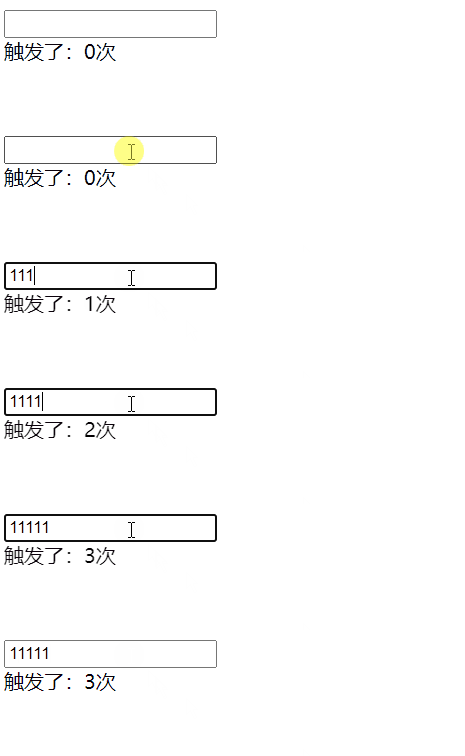
效果显示,输入第一个字符“1”时事件立即触发,随后1秒内不再触发,需等待触发后1秒方可继续触发。
3.5 返回值问题
若目标函数有返回值,使用上述防抖函数无法获取返回值,需进一步改进:
function debounce(fun, time, immediate) {
    // result用来获取返回值
    let timer, result;
    return function () {
        // 将当前的this赋值给that
        let that = this;
        // 获取函数的参数
        let args = arguments;
        // 取消当前的定时器效果
        clearTimeout(timer);
        if (immediate) { // 立即执行
            let callNow = !timer;
            timer = setTimeout(function () {
                timer = null;
            }, time);
            if (callNow) result = fun.call(that, ...args);
        } else { // 不立即执行
            // time时间后触发函数fun
            timer = setTimeout(function () {
                // 使用call改变函数内部的this指向,并传递参数
                fun.call(that, ...args);
            }, time);
        }
        return result;
    }
}
3.6 取消防抖
若防抖等待时间过长且immediate为true,可取消防抖后再触发,以减少等待时间。
代码中将防抖返回的函数保存在变量debounced中,并为其增加cancel方法。通过该方法取消当前定时器,实现取消效果。
function debounce(fun, time, immediate) {
    // result用来获取返回值
    let timer, result;
    let debounced = function () {
        // 将当前的this赋值给that
        let that = this;
        // 获取函数的参数
        let args = arguments;
        // 取消当前的定时器效果
        clearTimeout(timer);
        if (immediate) { // 立即执行
            let callNow = !timer;
            timer = setTimeout(function () {
                timer = null;
            }, time);
            if (callNow) result = fun.call(that, ...args);
        } else { // 不立即执行
            // time时间后触发函数fun
            timer = setTimeout(function () {
                // 使用call改变函数内部的this指向,并传递参数
                fun.call(that, ...args);
            }, time);
        }
        return result;
    }
    debounced.cancel = function () {
        clearTimeout(timer); // 清除定时器
        timer = null; // 闭包会导致内存泄漏,因此需要将定时器制空
    }
    return debounced; // 返回防抖函数
}
使用keyup事件试验,未取消防抖时,需等待一段时间方可再次触发事件:
    <input type="text" id="demo">
    <div>触发了:<span id="count">0</span>次</div>
    <button id="btn">取消防抖</button>
    <script>
        // 获取input输入框、span标签、按钮
        let demo = document.getElementById("demo");
        let count = document.getElementById("count");
        let btn = document.getElementById("btn");
        // 防抖代码函数省略
        // 为demo输入框注册keyup事件
        let init = 0; // 记录keyup事件被触发的次数
        function fun() { // 触发keyup后要执行的函数
            count.innerHTML = ++init;
        }
        let fd = debounce(fun, 3000, true);
        demo.onkeyup = fd; // 为输入框注册keyup事件
        btn.onclick = function () { // 取消防抖的效果
            fd.cancel();
        }
    </script>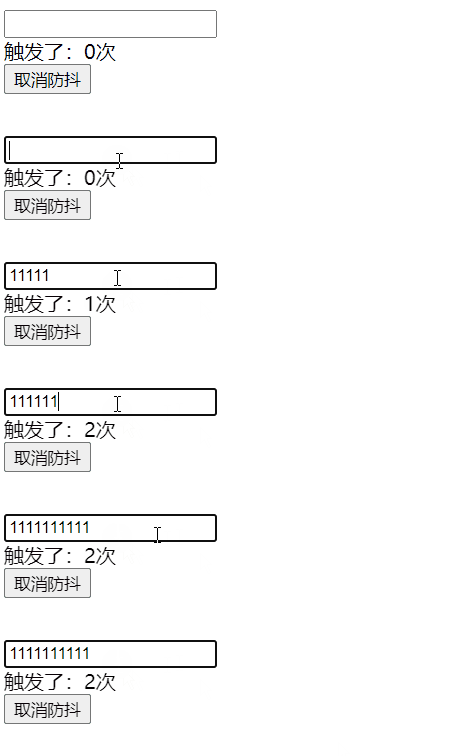
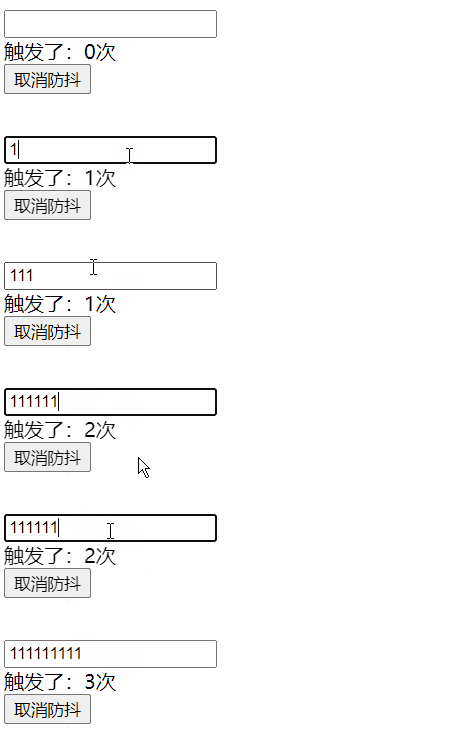
取消防抖函数后,即可立即触发事件:
3.7 总结
初步防抖函数,解决了this指向及event参数问题:
function debounce(fun, time) {
    let timer;
    return function () {
        // 将当前的this赋值给that
        let that = this;
        // 获取函数的参数
        let args = arguments;
        // 取消当前的定时器效果
        clearTimeout(timer);
        // time时间后触发函数fun
        timer = setTimeout(function () {
            // 使用call改变函数内部的this指向,并传递参数
            fun.call(that, ...args);
        }, time);
    }
}
增加立即执行效果的防抖函数:
function debounce(fun, time, immediate) {
    let timer;
    return function () {
        // 将当前的this赋值给that
        let that = this;
        // 获取函数的参数
        let args = arguments;
        // 取消当前的定时器效果
        clearTimeout(timer);
        if (immediate) { // 立即执行
            let callNow = !timer;
            timer = setTimeout(function () {
                timer = null;
            }, time);
            if (callNow) fun.call(that, ...args);
        } else { // 不立即执行
            // time时间后触发函数fun
            timer = setTimeout(function () {
                // 使用call改变函数内部的this指向,并传递参数
                fun.call(that, ...args);
            }, time);
        }
    }
}
解决返回值问题的防抖函数:
function debounce(fun, time, immediate) {
    // result用来获取返回值
    let timer, result;
    return function () {
        // 将当前的this赋值给that
        let that = this;
        // 获取函数的参数
        let args = arguments;
        // 取消当前的定时器效果
        clearTimeout(timer);
        if (immediate) { // 立即执行
            let callNow = !timer;
            timer = setTimeout(function () {
                timer = null;
            }, time);
            if (callNow) result = fun.call(that, ...args);
        } else { // 不立即执行
            // time时间后触发函数fun
            timer = setTimeout(function () {
                // 使用call改变函数内部的this指向,并传递参数
                fun.call(that, ...args);
            }, time);
        }
        return result;
    }
}
增加取消功能的防抖函数:
function debounce(fun, time, immediate) {
    // result用来获取返回值
    let timer, result;
    let debounced = function () {
        // 将当前的this赋值给that
        let that = this;
        // 获取函数的参数
        let args = arguments;
        // 取消当前的定时器效果
        clearTimeout(timer);
        if (immediate) { // 立即执行
            let callNow = !timer;
            timer = setTimeout(function () {
                timer = null;
            }, time);
            if (callNow) result = fun.call(that, ...args);
        } else { // 不立即执行
            // time时间后触发函数fun
            timer = setTimeout(function () {
                // 使用call改变函数内部的this指向,并传递参数
                fun.call(that, ...args);
            }, time);
        }
        return result;
    }
    debounced.cancel = function () {
        clearTimeout(timer); // 清除定时器
        timer = null; // 闭包会导致内存泄漏,因此需要将定时器制空
    }
    return debounced; // 返回防抖函数
}
4 实现节流函数
4.1 通过时间戳实现节流
触发事件时,获取当前时间戳并减去之前的时间戳(初始值为0)。若大于设定时间time,则执行函数fun,并更新时间戳;若小于time,则不执行。
根据描述,节流函数有两个参数:目标函数fun和等待时间time,初始代码如下:
function throttle(fun, time) {
    // 节流代码
}节流函数返回值也是函数。首先设置初始时间戳为0,获取当前时间戳。若间隔时间大于time,则执行函数,否则不执行。
function throttle(fun, time) {
    let old = 0;
    return function () {
        let now = new Date().valueOf(); // 获取当前的时间戳
        if (now - old > time) {
            fun(); // 执行函数
            old = now; // 更新旧时间戳
        }
    }
}
与防抖函数相同,需考虑this指向和event改变的情况,因此引入两个变量,使用call函数更改this指向并重新传入参数。
function throttle(fun, time) {
    let that, args;
    let old = 0;
    return function () {
        let now = new Date().valueOf(); // 获取当前的时间戳
        that = this; // 获取this
        args = arguments; // 获取参数
        if (now - old > time) {
            fun.apply(that, args); // 更改this指向并传入参数
            old = now; // 更新旧时间戳
        }
    }
}
示例代码:节流函数效果
    <input type="text" id="demo">
    <div>触发了:<span id="count">0</span>次</div>
    <script>
        // 获取input输入框、span标签
        let demo = document.getElementById("demo");
        let count = document.getElementById("count");
        // 节流函数
        function throttle(fun, time) {
            let that, args;
            let old = 0;
            return function () {
                let now = new Date().valueOf(); // 获取当前的时间戳
                that = this; // 获取this
                args = arguments; // 获取参数
                if (now - old > time) {
                    fun.apply(that, args); // 更改this指向并传入参数
                    old = now; // 更新旧时间戳
                }
            }
        }
        // 为demo输入框注册keyup事件
        let init = 0; // 记录keyup事件被触发的次数
        demo.onkeyup = throttle(function () {
            count.innerHTML = ++init;
        }, 1000);
    </script>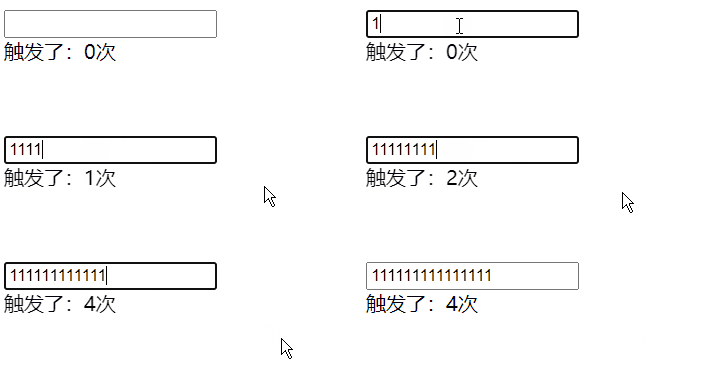
4.2 使用定时器实现节流
节流函数有两个参数,返回值是函数,会修改this指向和event事件对象,其框架如下:
function throttle(fun, time) {
    let that, args;
    return function () {
        that = this;
        args = arguments;
        fun.apply(that, args);
    }
}
函数应在定时器回调中调用,因此需声明定时器变量timer。当定时器不存在时,触发定时器并调用函数。
function throttle(fun, time) {
    // timer是定时器对象
    let that, args, timer;
    return function () {
        that = this;
        args = arguments;
        if (!timer) {
            timer = setTimeout(function () {
                fun.apply(that, args);
            }, time);
        }
    }
}但当定时器timer一旦触发,便永远有值,无法再次触发定时器。因此需在定时器回调中将time置为空。
function throttle(fun, time) {
    // timer是定时器对象
    let that, args, timer;
    return function () {
        that = this;
        args = arguments;
        if (!timer) {
            timer = setTimeout(function () {
                timer = null;
                fun.apply(that, args);
            }, time);
        }
    }
}
示例代码:查看函数效果
    <input type="text" id="demo">
    <div>触发了:<span id="count">0</span>次</div>
    <script>
        // 获取input输入框、span标签、按钮
        let demo = document.getElementById("demo");
        let count = document.getElementById("count");
        // 节流函数
        function throttle(fun, time) {
            // timer是定时器对象
            let that, args, timer;
            return function () {
                that = this;
                args = arguments;
                if (!timer) {
                    timer = setTimeout(function () {
                        timer = null;
                        fun.apply(that, args);
                    }, time);
                }
            }
        }
        // 为demo输入框注册keyup事件
        let init = 0; // 记录keyup事件被触发的次数
        demo.onkeyup = throttle(function () {
            count.innerHTML = ++init;
        }, 1000);
    </script>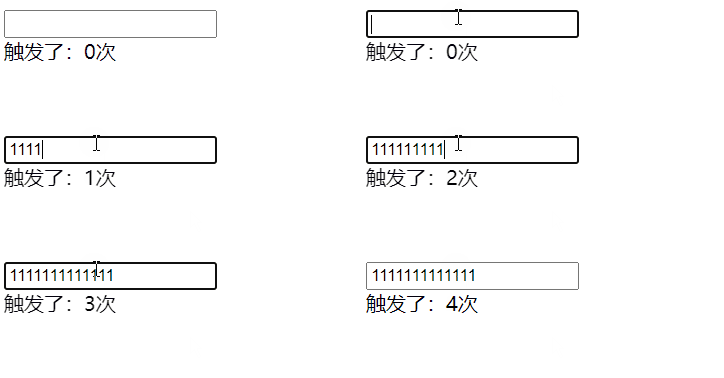
4.3 时间戳和定时器组合实现
从效果看,时间戳节流的函数首次输入文本立即触发,但输入结束后不再触发;定时器实现的节流函数首次输入需等待一段时间,但输入结束后还会再触发一遍。接下来实现一个首次输入立即触发、输入结束后再触发的节流函数。
首先合并两个防抖函数:
function throttle(fun, time) {
    let that, args, timer;
    let old = 0; // 设置初始时间戳
    return function () {
        that = this;
        args = arguments;
        let now = new Date().valueOf(); // 获取初始的时间戳
        if (now - old > time) {
            fun.apply(that, args);
            old = now;
        }
        if (!timer) {
            timer = setTimeout(function () {
                timer = null;
                fun.apply(that, args);
            }, time);
        }
    }
}该防抖函数的时间戳和定时器同时运行。可在定时器回调执行一次后,将old值设为最新时间戳,使时间戳和定时器节流函数时间同步。
function throttle(fun, time) {
    let that, args, timer;
    let old = 0; // 设置初始时间戳
    return function () {
        that = this;
        args = arguments;
        let now = new Date().valueOf(); // 获取初始的时间戳
        if (now - old > time) {
            fun.apply(that, args);
            old = now;
        }
        if (!timer) {
            timer = setTimeout(function () {
                old = new Date().valueOf(); // 将old的值设置为最新的时间戳
                timer = null;
                fun.apply(that, args);
            }, time);
        }
    }
}
但不应让两者同步,接下来执行定时器的防抖函数,在时间戳防抖函数中取消定时器置为空。
function throttle(fun, time) {
    let that, args, timer;
    let old = 0; // 设置初始时间戳
    return function () {
        that = this;
        args = arguments;
        let now = new Date().valueOf(); // 获取初始的时间戳
        if (now - old > time) {
            if (timer) {
                clearTimeout(timer);
                timer = null;
            }
            fun.apply(that, args);
            old = now;
        }
        if (!timer) {
            timer = setTimeout(function () {
                old = new Date().valueOf(); // 将old的值设置为最新的时间戳
                timer = null;
                fun.apply(that, args);
            }, time);
        }
    }
}
示例代码:查看节流函数的效果
    <input type="text" id="demo">
    <div>触发了:<span id="count">0</span>次</div>
    <script>
        // 获取input输入框、span标签
        let demo = document.getElementById("demo");
        let count = document.getElementById("count");
        // 节流函数省略
        // 为demo输入框注册keyup事件
        let init = 0; // 记录keyup事件被触发的次数
        demo.onkeyup = throttle(function () {
            count.innerHTML = ++init;
        }, 1000);
    </script>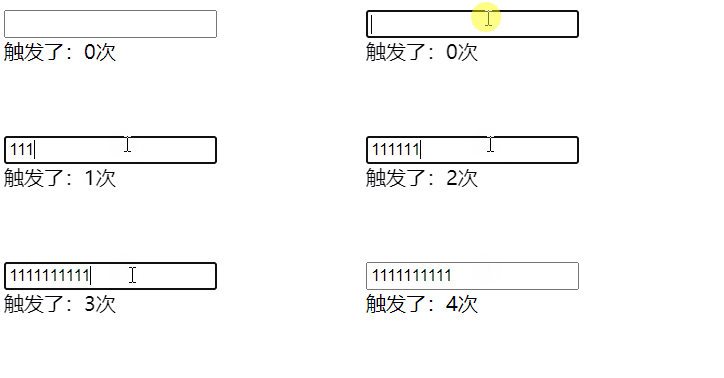
4.4 节流优化
若希望设计一个防抖函数,可根据不同情况选择不同策略,即对上述三种情况进行结合。可设置options为第三个参数,根据传值判断使用哪种防抖函数。options可有两个参数:leading表示是否打开第一次执行;trailing表示是否打开最后一次执行。
function throttle(fun, time, options) { // options决定使用哪种节流效果
    let that, args, timer;
    let old = 0; // 设置初始时间戳
    if (!options) options = {}; // 如果没有该参数,置为空对象
    return function () {
        that = this;
        args = arguments;
        let now = new Date().valueOf(); // 获取初始的时间戳
        // leading为false,表示不打开第一次执行
        if (options.leading === false && !old) {
            old = now; // 这样会将下面的时间戳节流代码跳过
        }
        if (now - old > time) { // 第一次回直接执行
            if (timer) {
                clearTimeout(timer);
                timer = null;
            }
            fun.apply(that, args);
            old = now;
        }
        // trailing为false,表示不打开最后一次执行
        if (!timer && options.trailing !== false) { // 最后一次会被执行
            timer = setTimeout(function () {
                old = new Date().valueOf(); // 将old的值设置为最新的时间戳
                timer = null;
                fun.apply(that, args);
            }, time);
        }
    }
}
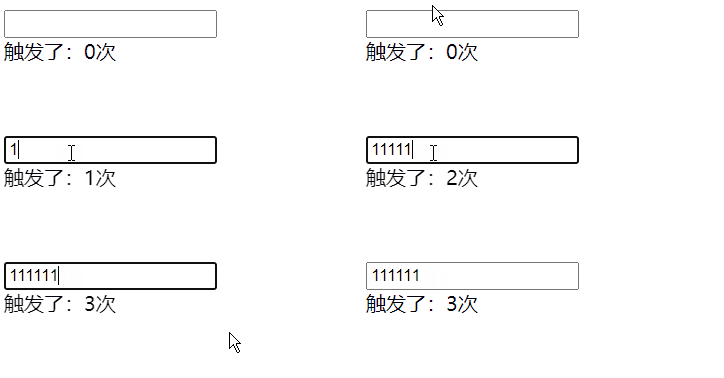
示例代码:节流函数的使用效果,打开第一次执行和最后一次执行
        demo.onkeyup = throttle(function () {
            count.innerHTML = ++init;
        }, 1000, { leading: true, trailing: true }); // 表示打开第一次执行和最后一次执行
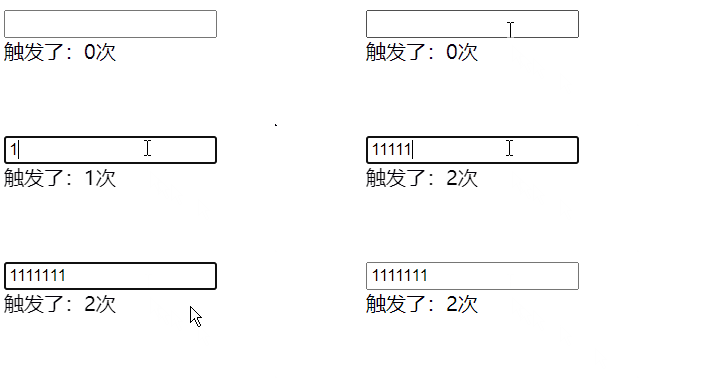
打开第一次执行,关闭最后一次执行:
        demo.onkeyup = throttle(function () {
            count.innerHTML = ++init;
        }, 1000, { leading: true, trailing: false }); // 表示打开第一次执行,关闭最后一次执行
关闭第一次执行,打开最后一次执行:
        demo.onkeyup = throttle(function () {
            count.innerHTML = ++init;
        }, 1000, { leading: false, trailing: true }); // 表示打开第一次执行,关闭最后一次执行
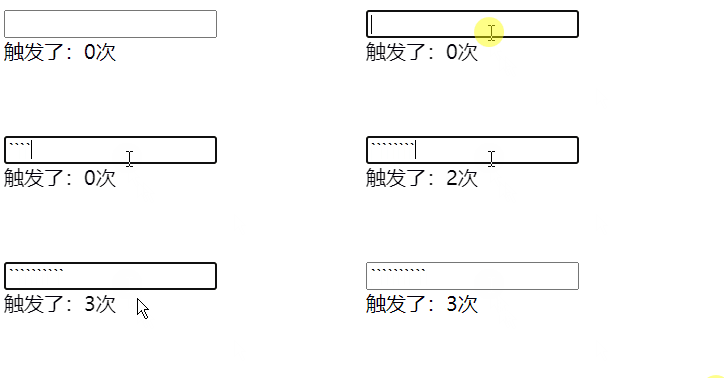
若两个都关闭会出现bug,因此使用时不会将两个都关闭。
5 应用场景
防抖应用场景:
- scroll事件滚动触发
- 搜索框输入查询
- 表单验证
- 按钮提交事件
- 浏览器窗口缩放,resize事件
节流应用场景:
- DOM元素的拖拽功能实现
- 射击游戏
- 计算鼠标的移动距离
- 监听scroll滚动事件
本文学习于视频:手写函数防抖和节流
到此这篇关于JavaScript防抖与节流超详细全面讲解的文章就介绍到这了,更多相关JavaScript防抖与节流内容请搜索本站以前的文章或继续浏览下面的相关文章希望大家以后多多支持本站!
JS中将数组和对象混合组装为JSON字符串
2026-11-05 16:41:42
JS运算符优先级与结合性的区别是什么?
2026-11-05 13:22:02
JS Map怎么只遍历Key或Value
2026-11-05 13:00:36
D3.js 与 ECharts 选型对比:灵活性 vs 开发效率
2026-11-05 09:45:01
为什么JS中typeof []返回object:数组类型检测误区解析
2026-11-04 19:50:47