

JS异步观察目标元素方式完成分页加载
本文介绍利用IntersectionObserver API替代传统滚动条计算来实现分页加载。通过监听目标元素与视口的交叉状态,仅在元素进入指定阈值时触发数据请求。针对反复交叉导致的重复请求问题,提供了基于isLoading开关隐藏监听元素的解决方案,提升现代浏览器中的加载效率与兼容性。
介绍
在处理分页加载功能时,常规做法是监听滚动条位置,判断是否到达容器底部以触发加载任务。这种方式的缺陷在于,无论滚动条是否真正触及底部,计算逻辑都会持续运行,造成不必要的性能消耗。
若能改为监听底部加载区域的出现状态,仅在目标元素可见时执行加载,即可省去繁琐的滚动条计算过程。本文将介绍如何利用异步观察目标元素的新机制来优化分页加载业务。
代码
<div id="app" @vue:mounted="mounted" :class="{'active':active}">
  <ul>
    <li v-for="item in num"><span>{{item}}</span>
      <p></p>
    </li>'
    <div class="loading">
      <div ref="loading" v-show="!isLoading"></div>
      loading..
    </div>
  </ul>
</div>
#app{
  display: none;
  &.active{
    display: block;
  }
}
ul{
  width: 100%;
  li{
    width: 100%;
    height: 10vh;
    display: flex;
    align-items: center;
    justify-content: start;
    box-sizing: border-box;
    padding: 0 3%;
    position: relative;
    border-bottom: 1px solid #efefef;
    font-size: 14px;
    font-family: fantasy, Courier, monospace;
    span{
      display: inline-block;
      min-width: 30px;
      text-align: center;
    }
    p{
      flex: 1;
      height: 4vh;
      background-color: #e2e2e2;
      margin-left: 3%;
    }
  }
}
.loading{
  font-family: fantasy, Courier, monospace;
  display: flex;
  height: 15vh;
  align-items: center;
  justify-content: center;
  animation: loading 1s linear infinite;
}
@keyframes loading{
  0%,100%{
    opacity: 1;
  }
  50%{
    opacity:0;
  }
}
import { createApp } from 'https://unpkg.com/petite-vue?module'
createApp({
  num: 0,
  page:1,
  active:false,
  observer:null,
  isLoading:false,
  mounted() {
      this.active = true;
      this.loading = this.$refs.loading;
      this.observer= new IntersectionObserver(()=>{
         this.addNum();
      },{
        root:window.document,
        rootMargin:"0px 0px 0px 0px",
        threshold:0
      })
      this.observer.observe(this.loading)
      // this.observer.unobserve(this.loading)
  },
  addNum(){
    if(this.isLoading) return;
    this.isLoading = true;
    console.log(`loading,page:${this.page}`)
    setTimeout(()=>{
      this.num += 20;
      this.page ++;
      this.$nextTick(()=>{
          this.isLoading = false;
      })
    },1000)
  }
}).mount()
演示
正文
监听元素
对于许多开发者而言,IntersectionObserver() 可能是一个相对陌生的构造函数。它可以接收监听区域及回调函数作为参数,并返回一个 IntersectionObserver 实例。该实例用于监测目标元素是否与监听区域发生交叉,一旦交叉比例达到设定的检查阈值,便会触发之前注册的回调函数。
// 获取监听目标
this.loading = this.$refs.loading;
// 用构造器创建监听区域对象
this.observer= new IntersectionObserver(()=>{
    this.addNum();
},{
    root:window.document, // 监听区域,默认为整个可视窗体
    rootMargin:"0px 0px 0px 0px", // 类似margin,为边界的偏移量用于判定范围是否满足计算需要,默认0px 0px 0px 0px
    threshold:0  // 阈值(0-1),表示交叉区域的比例值,默认为0
})
//
this.observer.observe(this.loading)
基于上述机制,业务逻辑只需判断元素是否出现在视野中。当满足阈值条件时触发回调,在回调中执行列表加载等操作,从而避免频繁计算滚动条距离带来的性能问题。
反复交叉
在使用异步观察目标元素进行开发时,可能会遇到一个显著问题:原本设计为单次加载的任务却触发了两次请求。造成这一现象的原因需要深入分析。
这主要归因于 threshold 阈值参数,它定义了交叉区域的比例值。当目标元素进入观察区域时触发首次请求;随着页面内容向下填充,监听目标元素被向下推挤,再次达到该阈值时,便会触发第二次请求。
解决该问题的方案较为直接:引入一个 isLoading 状态开关。在发起请求期间,通过该开关将监听目标元素暂时隐藏;待数据加载并渲染完成后,再将其显示出来。具体实现可参考演示案例。
<div class="loading">
    <div ref="loading" v-show="!isLoading"></div>
    loading..
</div>
结语
采用异步观察目标元素的方式处理分页加载、触发动画或阻止特定操作等业务场景,是较为理想的选择。从兼容性角度来看,该方案可在大多数现代浏览器中放心使用。
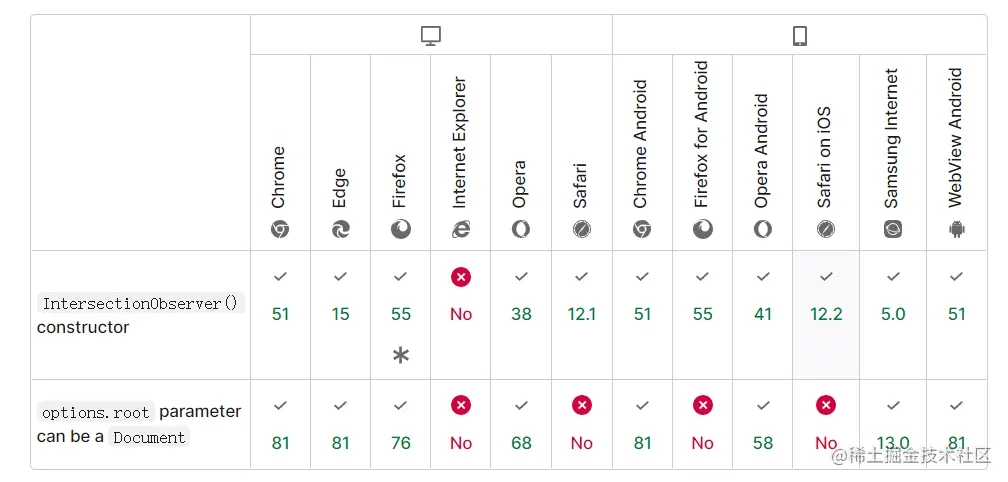
以上就是异步观察目标元素方式完成分页加载的详细内容,更多关于异步观察目标元素分页加载的资料请关注本站其它相关文章!
JavaScript异步发送HTTP请求时怎么优雅地处理错误
2026-11-05 17:10:44
5款主流JS在线运行工具对比:CodePen、JSFiddle与StackBlitz怎么选
2026-11-05 17:04:04
JavaScript入门书籍避坑:这些书不适合初学者
2026-11-05 16:31:15
JS使用Math.round实现保留两位小数的原理与代码
2026-11-05 15:35:55
JavaScript 原生 Date 对象怎么实现日期加减
2026-11-05 14:30:00