

JavaScript实现简易计算器与计时器功能
作者:代码拾荒时间:2026-10-25 16:26:56浏览:139
本文介绍了如何使用JavaScript实现简易计算器和计时器功能。通过具体的HTML与JS代码示例,展示了计算器的界面布局与逻辑处理,以及计时器的开始、停止和复位功能实现,供前端开发者参考学习。
JavaScript实现简易计算器与计时器功能
本文分享了一段使用JavaScript实现计算器和计时器功能的代码示例,供读者参考。
实现简易计算器
首先实现一个简单的计算器功能。
<!DOCTYPE html>
<html>
    <head>
        <meta charset="utf-8">
        <title></title>
        <style type="text/css">
            #box {
                width: 250px;
                height: 200px;
                background-color: #C0C0C0;
            }
            input{
                width: 50px;
                height: 27px;
            }
            #text{
                width: 229px;
            }
        </style>
        <script type="text/javascript">
              var num = 0;
              function str(num) {
                document.getElementById('text').value += document.getElementById(num).value;
              }
              function eva() {
                var res = eval(document.getElementById("text").value);
                document.getElementById("text").value = res;
              }
              function clearNum() {
                document.getElementById("text").value = null;
              }
        </script>
    </head>
    <body>
        <div id="box">
            <table  cellspacing="0" cellpadding="5px">
                <tr>
                    <th colspan="4">
                        <input type="text" id="text" />
                    </th>
                </tr>
                <tr>
                    <th>
                        <input type="button" value="7" id="7" onclick="str(this.id)"/>
                    </th>
                    <th>
                        <input type="button" value="8" id="8" onclick="str(this.id)"/>
                    </th>
                    <th>
                        <input type="button" value="9" id="9" onclick="str(this.id)"/>
                    </th>
                    <th>
                        <input type="button" value="+" id="+" onclick="str(this.id)"/>
                    </th>
                </tr>
                <tr>
                    <th>
                        <input type="button" value="4" id="4" onclick="str(this.id)"/>
                    </th>
                    <th>
                        <input type="button" value="5" id="5" onclick="str(this.id)"/>
                    </th>
                    <th>
                        <input type="button" value="6" id="6" onclick="str(this.id)"/>
                    </th>
                    <th>
                        <input type="button" value="-" id="-" onclick="str(this.id)"/>
                    </th>
                </tr>
                <tr>
                    <th>
                        <input type="button" value="1" id="1" onclick="str(this.id)"/>
                    </th>
                    <th>
                        <input type="button" value="2" id="2" onclick="str(this.id)"/>
                    </th>
                    <th>
                        <input type="button" value="3" id="3" onclick="str(this.id)"/>
                    </th>
                    <th>
                        <input type="button" value="*" id="*" onclick="str(this.id)"/>
                    </th>
                </tr>
                <tr>
                    <th>
                        <input type="button" value="0" id="0" onclick="str(this.id)"/>
                    </th>
                    <th>
                        <input type="button" value="c" id="c" onclick="clearNum()"/>
                    </th>
                    <th>
                        <input type="button" value="=" id="=" onclick="eva()"/>
                    </th>
                    <th>
                        <input type="button" value="/" id="/" onclick="str(this.id)"/>
                    </th>
                </tr>
            </table>
        </div>
    </body>
</html>
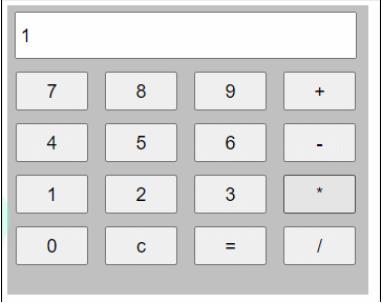
计算器的运行效果如图所示。
制作计时器
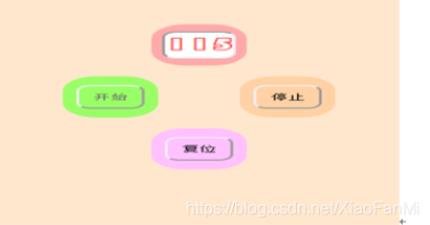
接下来制作一个计时器。如界面所示,点击“开始”按钮后从1开始计数;点击“停止”按钮可暂停计数;点击“复位”按钮则归零并结束当前计数过程。
<!DOCTYPE html>
<html>
    <head>
        <meta charset="utf-8">
        <title></title>
        <script type="text/javascript" src="../js/jquery.1.8.3.min.js" charset="UTF-8">

        </script>
        <script type="text/javascript">
            var second = 0;
            var minutes = 0;
            function star() {
                $("#start").attr("disabled", true);
                $("#stop").attr("disabled", false);
                t = setInterval("sum()", 10);
            }

            function sum() {
                if(second != 100){
                    second++;
                    if(minutes<10){
                        if (second < 10 ) {
                            $("#text").val("0"+minutes+".0" + second);
                        } else if (second < 100) {
                            $("#text").val("0"+minutes+"."+second);
                        }
                    }else{
                        if (second < 10 ) {
                            $("#text").val(minutes+".0" + second);
                        } else if (second < 100) {
                            $("#text").val(minutes+"."+second);
                        }
                    }
                }else{
                    second = 0;
                    minutes++;
                }

            }

            function stop() {
                $("#start").attr("disabled", false);
                $("#stop").attr("disabled", true);
                clearInterval(t);
            }

            function res() {
                second = 0;
                minutes = 0;
                $("#text").val("00.00");
                clearTimeout(t);
                $("#start").attr("disabled", false);
                $("#stop").attr("disabled", false);
            }
        </script>
        <style type="text/css">
            #start,
            #res,
            #stop,
            #text{
                border-radius: 25px;
                margin-right: 20px;
            }
            div{
                background-color: aliceblue;
                width: 120px;
                height: 90px;
                margin: auto;
            }
        </style>
    </head>
    <body>
        <div>
            <table >
                <tr>
                    <th colspan="2"><input type="text"  style="width:50px; text-align: center; " value="00.00" id="text" /></th>
                </tr>
                <tr>
                    <th><input type="button" id="start" style="background-color: #7FFFD4;" value="开始"
                            onclick="star()" />
                    </th>
                    <th><input type="button" id="stop" style="background-color: bisque;" value="停止" onclick="stop()" />
                    </th>
                </tr>
                <tr>
                    <th colspan="2"><input type="button" id="res" style="background-color: #8A2BE2;" value="复位"
                            onclick="res()" />
                    </th>
                </tr>
            </table>

        </div>

    </body>
</html>
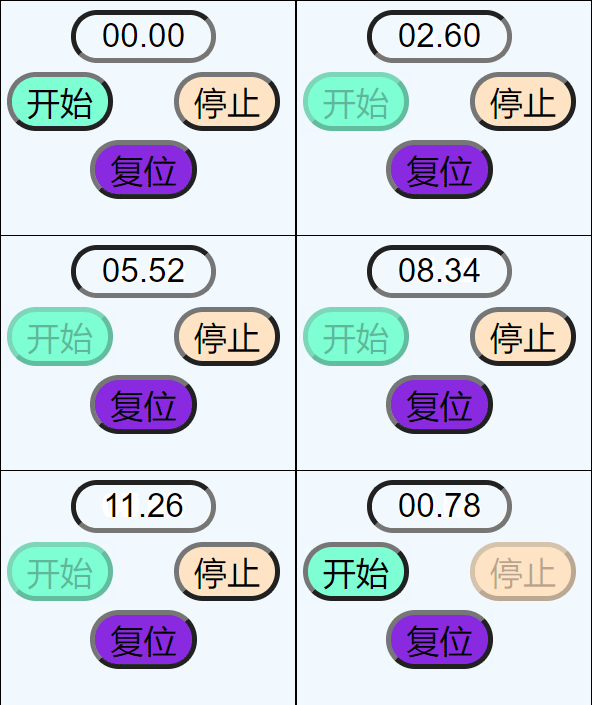
计时器的运行效果如图所示。
以上就是本文的全部内容,希望这些代码能对各位的学习有所帮助,也欢迎大家继续支持本站。
作者最新文章
JavaScript入门书籍避坑:这些书不适合初学者
2026-11-05 16:31:15
JS使用Math.round实现保留两位小数的原理与代码
2026-11-05 15:35:55
JavaScript 原生 Date 对象怎么实现日期加减
2026-11-05 14:30:00
JavaScript函数定义的三种方式:声明、表达式与箭头函数
2026-11-05 13:50:55
JavaScript中escape、encodeURI和encodeURIComponent对空格的处理差异
2026-11-05 12:47:23