

JavaScript实现上下滑动轮播图完整示例
作者:小括号时间:2026-10-25 15:17:09浏览:662
本文介绍使用JavaScript实现上下滑动轮播图的具体方法。通过遍历元素处理点击交互,利用循环计时器与克隆节点实现无缝滚动,并控制鼠标悬停暂停及按钮状态切换,提供完整核心代码供参考。
本文分享了使用JavaScript实现上下滑动轮播图的具体代码,供读者参考。
一、效果图
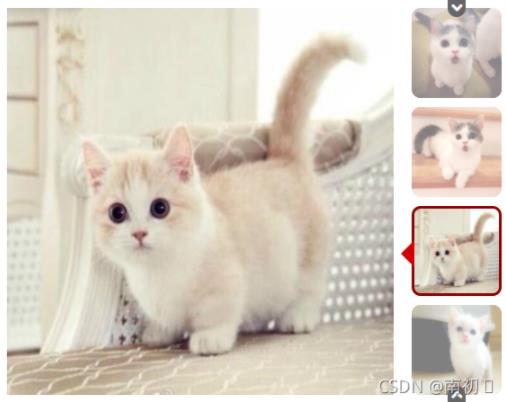
二、设计思路
第一步:遍历所有元素,当鼠标点击右侧小图时,图片高亮并显示红框偏移值,同时左侧展示对应的图片。
第二步:利用循环计时器,克隆ul中的第一个元素,以实现连续循环滑动效果。
第三步:当鼠标移入轮播区域时,停止循环滑动;鼠标离开后,继续自动播放。
第四步:设置上下切换按钮。当第一张图片的offsetTop值为0时,显示下移按钮;到达底部最后一个元素时,上移按钮出现,下移按钮隐藏;在中间状态时,上下按钮均显示。每次点击按钮移动一个格子,左侧图片同步更新。
三、核心代码
//找到right-btn 元素添加事件
var righttBtnList;
var Line;
var transy = 0;
var liHeight = 430;
var ulItem;
var count = 0;
var timer;
var speed = 2000;
var Item;
var ItemMenu;
var offsetTop = 0;
var itemtabinfo, topBtn, bottomBtn;
    window.onload = function () {
        righttBtnList = document.getElementsByClassName("right-btn");
        Line = document.getElementsByClassName("line")[0];
        ulItem = document.getElementsByClassName("item-child-ul")[0];
        Item = document.getElementsByClassName("item-list")[0];
        ItemMenu = document.getElementsByClassName("item-menu")[0];
        itemtabinfo = document.getElementsByClassName("item-tab-info")[0];
        topBtn = document.getElementsByClassName("top-btn")[0];
        bottomBtn = document.getElementsByClassName("bottom-btn")[0];
        //默认复制第一张添加到ulItem之中
        ulItem.appendChild(ulItem.children[0].cloneNode(true));
        //设置itemtabinfo 默认移动值
        itemtabinfo.style.transform = "translateY(" + offsetTop + "px)";
        //直接默认启动计时器
        Animate();
        //遍历所有的li添加事件
        for (var i = 0; i < righttBtnList.length; i++) {
            righttBtnList[i].index = i;
            righttBtnList[i].onclick = function () {
                //点击当前移除top-white
                if (checkClass(this, 'top-white')) {
                    this.classList.remove("top-white");
                    //其余的添加
                    addWhite(this.index);
                }
                //获取偏移值
                Line.style.top = ((this.index * 110 + 10) + offsetTop) + "px";
                //输出当前点击的索引
                ulItem.style.transform = "translateY(" + (-this.index * liHeight) + "px)";
                //用户点击的索引  对应count值
                count = this.index;
            }
        }

        Item.onmouseenter=function(){
            clearTimeout(timer);
        }
        Item.onmouseleave=function(){
            Animate();
        }
        topBtn.onclick = function () {
            offsetTop += 110;
            //获取原来的top
            var oldTop = parseFloat(Line.style.top);
            Line.style.top = (oldTop + 110) + "px";
            itemtabinfo.style.transform = "translateY(" + offsetTop + "px)";
            checkBtnShow();
        }
        bottomBtn.onclick = function () {
            offsetTop -= 110;
            //获取原来的top
            var oldTop = parseFloat(Line.style.top);
            //只能取到行内样式
            Line.style.top = (oldTop - 110) + "px";
            itemtabinfo.style.transform = "translateY(" + offsetTop + "px)";
            checkBtnShow();
        }

        ItemMenu.onmouseenter = function () {
            checkBtnShow();
        }
        function checkBtnShow() {
            if (offsetTop == 0) {
                //下面按钮出现
                bottomBtn.classList.add("showBottom");
                topBtn.classList.remove("showTop");

            }
            else if (offsetTop == -220) {
                //上面按钮出现
                topBtn.classList.add("showTop");
                bottomBtn.classList.remove("showBottom");
            } else {
                //两个按钮同时出现
                bottomBtn.classList.add("showBottom");
                topBtn.classList.add("showTop");
            }
        }

        ItemMenu.onmouseleave = function () {
            bottomBtn.classList.remove("showBottom");
            topBtn.classList.remove("showTop");
        }
        //检测是否具有top-white
        function checkClass(obj,className){
            return obj.classList.contains(className);
        }
        //其余的li添加
        function addWhite(index){
            for(var i=0;i<righttBtnList.length;i++){
                if(i!=index){
                    righttBtnList[i].classList.add("top-white");
                }
            }
        }
        //启动计时器动画
        function Animate(){
            //写执行代码
            timer=setInterval(function(){
                if (timer)
                    clearInterval(timer);
                if(!ulItem.classList.contains("transY")){
                    ulItem.classList.add("transY");
                }
                count++;
                ulItem.style.transform="translateY("+(-count*liHeight)+"px)";
                //找出当前每一张图动画完成时间
                setTimeout(function(){
                    if(count>=ulItem.children.length-1){
                        count=0;
                        //移除过渡类
                        ulItem.classList.remove("transY");
                        ulItem.style.transform="translateY(0px)";
                    }
                    //让右边的元素动画对应
                    //rigthBtnlist[count].click();
                },500)
            },speed)
        }
    }
以上就是本文的全部内容,希望对大家的学习有所帮助,也希望大家多多支持本站。
作者最新文章
JS语法错误会阻止加载吗?区分SyntaxError与资源加载失败
2026-11-05 16:08:46
JavaScript常见SyntaxError语法错误排查与修复方法
2026-11-05 13:58:44
JS中slice、substring和substr截取字符串的区别
2026-11-05 13:43:47
JS 转 TS 手动迁移最佳实践:从配置 tsconfig 到消除 any 类型
2026-11-05 11:53:32
为什么JS数组push后得到的是数字而不是数组?
2026-11-05 09:59:18